Miscellaneous Ramblings
Miscellaneous Ramblings Review
Free mEdit Text Editor Excels at Handling and Combining Multiple Documents
Charles Moore - 2008.07.28 - Tip Jar
Rating: 
Most word processors are designed principally for office and secretarial use, the formatting of documents to be printed, and for letter-writers - not for creative writers. The new mEdit word processor is different. If you're a journalist or author, this one merits a look.
mEdit, which supports both Mac and Windows is a text editor that incorporates custom editable formats, called workbooks, and editing of multiple text documents.
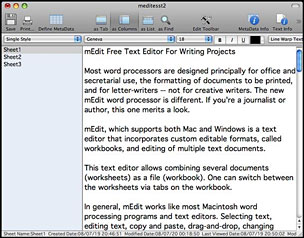
This text editor allows combining several documents (worksheets) as a file (workbook). One can switch between the worksheets via tabs on the workbook.
In general, mEdit works like most Macintosh word processing programs and text editors. Selecting text, editing text, copy and paste, drag-and-drop, and changing style/type characteristics all function the way you expect them to.
However, mEdit's interface window - which is incidentally very clean, attractive, and professionally turned-out - features multiple panes and views, with the default, called Column, being the familiar three-pane window motif with a list of sheet or section names on the left. The right-hand pane is a standard text editing window containing only the text related to whatever sheet you have selected on the left. When you click on another sheet name, the respective text it contains appears on the right for editing, as you'd like. At the top of the window is a toolbar and editing menus.
Alternate views include Tab, List, and Find modes.
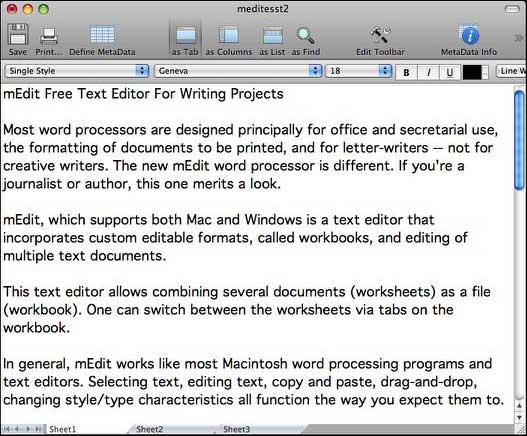
Tab mode.
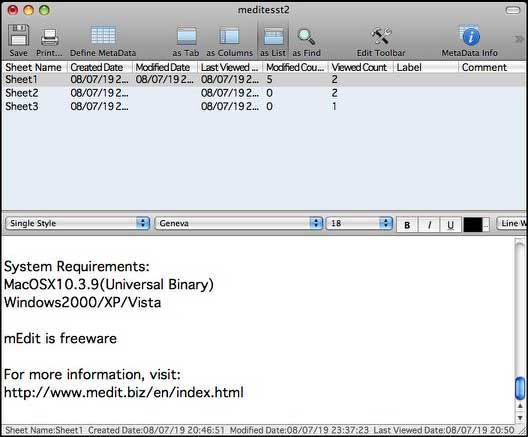
List view.
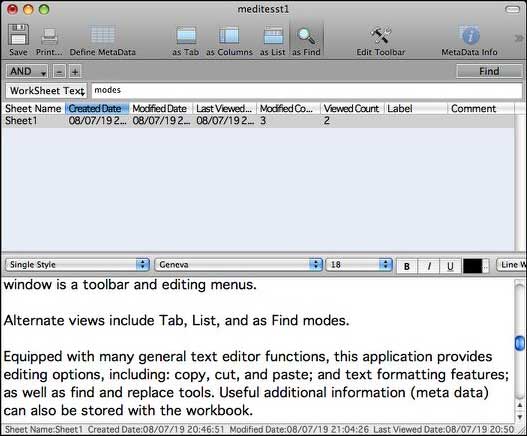
Find view.
Equipped with many general text editor functions, mEdit provides standard editing functions, including copy, cut, and paste; and text formatting features; as well as find and replace tools. Useful additional information (meta data) can also be stored with the workbook.
Meta data - information such as when the worksheet was created, edited or last viewed; how many times the worksheet was edited; and label and comment attributes - can be set for each worksheet. Moreover, this software can create new meta data or delete unnecessary meta data. You can also find worksheets matching specific meta data.
Metadata.
As noted, worksheets can be displayed in tab, column, or list style. In tab style, tabs at the lower part of the window allow switching between worksheets.
In column style, the screen is divided into two, with the names of worksheets on the left-hand side and text editing area on the right.
In list style, a screen is also divided into two, with the names of worksheets and the list of meta data displayed at the top of the page, while the text editing area is located at the bottom. All three styles can be easily selected, as can shifting the order of worksheets on the screen.
The ability to sort various parts or versions of an article or book and research notes and resources respectively into instantly accessible worksheets greatly facilitates the efficient organization and development of a piece of prose.
No more having to scroll back and forth through a long document making edits and revisions. Just keep everything organized into more easily manageable sections and combine the parts you want into one section when you've finished the creative process.
You can view, copy, and paste from one sheet to another, create as many sheets as you need, and organize them in any manner you like. Each worksheet can be as long as you need it to be. This makes the process of sorting, finding, and remembering details a lot easier. You can also use mEdit worksheets as a way to manage multiple versions of some writing.
For example, I will sometimes write a long version of a column for my local newspaper, which allows me relatively generous space each week, and a shortened version of the same piece for syndication to newspapers across Canada, most of which prefer columns of 800 words or less. Before mEdit, I used to make to separate word processor or text editor documents for the respective versions, or store both in tandem in a single document. With mEdit, you can keep both or all versions in separate sections of one document.
So far, so good, but there are some deficiencies. For one thing, there are no Help files, and while there is a link to a mEdit manual online, the Web page comes up blank - a work-in-progress, I infer, so one is dependent upon intuition. There is no spell check function or access to the built-in Mac OS spellchecker that works with, for example, Tex-Edit Plus and Text Edit.
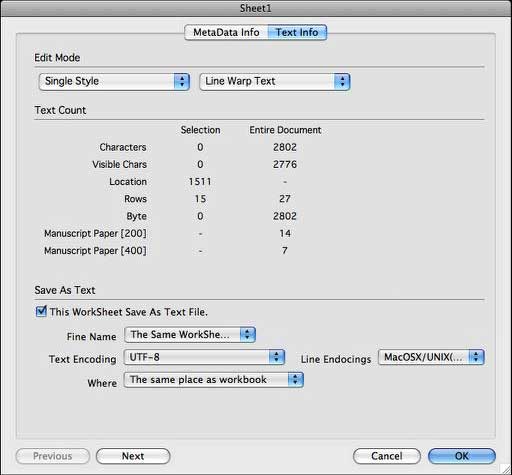
Oddly, the text metadata window gives you character and row counts but no word count.
mEdit saves workbooks in its own proprietary file format, which is understandable given the multi-sheet nature of such documents, and there is no option to save in other formats in the Save As... menu, although there is an Export command in the Worksheet menu that lets you save worksheets as text files. The Text metadata window also has configuration options for saving individual worksheets as text files, but linebreaks and any formatting are lost in either case.
More satisfactory is to export worksheets to Text Edit or another OS X Services-savvy application via the Services command in the application menu - a mode in which linebreaks remain intact. This is helpful because I found I still need to transfer my work to a more full-fledged word processor for proofing and formatting or HTML markup once composition is finished.
However, those shortcomings don't negate mEdit's usefulness for organizing writing projects during the creative and construction stages. I'm giving it a 3 out of 4 rating in that capacity.
System Requirements:
- Mac OS X 10.3.9 (Universal Binary)
- Windows 2000/XP/Vista
mEdit is freeware/donationware.
Join us on Facebook, follow us on Twitter or Google+, or subscribe to our RSS news feed
Charles Moore has been a freelance journalist since 1987 and began writing for Mac websites in May 1998. His The Road Warrior column was a regular feature on MacOpinion, he is news editor at Applelinks.com and a columnist at MacPrices.net. If you find his articles helpful, please consider making a donation to his tip jar.
Links for the Day
- Mac of the Day: PowerBook 2300, introduced 1995.08.28. The only Duo equipped with a PowerPC processsor run at 100 MHz.
- Support Low End Mac
Recent Content
About LEM Support Usage Privacy Contact
Follow Low End Mac on Twitter
Join Low End Mac on Facebook
Favorite Sites
MacSurfer
Cult of Mac
Shrine of Apple
MacInTouch
MyAppleMenu
InfoMac
The Mac Observer
Accelerate Your Mac
RetroMacCast
The Vintage Mac Museum
Deal Brothers
DealMac
Mac2Sell
Mac Driver Museum
JAG's House
System 6 Heaven
System 7 Today
the pickle's Low-End Mac FAQ
Affiliates
Amazon.com
The iTunes Store
PC Connection Express
Macgo Blu-ray Player
Parallels Desktop for Mac
eBay

