
Charles Moore's Mailbag
Skip 867 MHz 12" PowerBook, iBook Sleeps When Touched, Netscape 7.0.2 Keeps Crashing, and More
Charles Moore - 2008.06.11 - Tip Jar
- 12" PowerBooks: Skip the 867 MHz Model
- iBook G4 Keeps Putting Itself to Sleep
- Mac OS and Linux for Power Macintosh ONE/225
- Netscape 7.0.2 Keeps Crashing
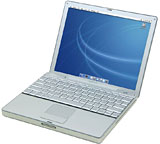
12" PowerBooks: Skip the 867 MHz Model
From Dave:
Mr. Moore,
Hi,
 I
just wanted to write in to let you know how glad I was to see your
article on the
12" PB line. I've been using one of the 867 MHz models since
April of '03, and it's a brilliant little machine. Used it all through
college, lugging to/from class, and still do. I even worked as a
cartoonist for my school paper, and for the most part, managed to make
do with the little screen, though occasionally I'd plug into a big
external monitor. I had some hard drive trouble a few years ago, but
37(!) screws later, I was able to swap it out and put in another,
slightly larger drive. It runs 10.4 beautifully, and Ubuntu works well
too (blasphemy, I know).
I
just wanted to write in to let you know how glad I was to see your
article on the
12" PB line. I've been using one of the 867 MHz models since
April of '03, and it's a brilliant little machine. Used it all through
college, lugging to/from class, and still do. I even worked as a
cartoonist for my school paper, and for the most part, managed to make
do with the little screen, though occasionally I'd plug into a big
external monitor. I had some hard drive trouble a few years ago, but
37(!) screws later, I was able to swap it out and put in another,
slightly larger drive. It runs 10.4 beautifully, and Ubuntu works well
too (blasphemy, I know).
My advice would back yours up, though - go for a model other than the 867. It's not processor speed, but the USB 1.1 that holds it back. Real pain sometimes, especially with the lack of PC Card port.
Anyhow, sorry to ramble, I know you're busy, just wanted to share my story. Thanks for writing your article!
Cheers,
Dave
Hi Dave,
Thanks for your comments, and I'm glad you took my (relative) criticism of the 867 MHz model in the spirit it was offered. As the saying goes, "There's no such thing as bad beer, but some beers are better than others." Same goes for 12" PowerBooks.
I used a 12" iBook for more than three years as my production workhorse and didn't find the display any particular hardship. Of course, I was used to working on a Pismo screen, which is physically larger but has the same 1024 x 768 resolution. The big 1440 x 900 resolution display in my current 17" PowerBook is of course nice to have, but I still use my Pismos a lot and really don't find it that big an adjustment. Just me, I guess. Some folks find 1440 x 900 not enough.
Hard drive failures can happen with any computer, the units themselves being essentially generic, so we can't hold that against the 12-incher.
OS X 10.4 runs great on my 550 MHz G4 Pismos with their poky GPUs, so I don't doubt that it runs nicely on the 867.
Good point about the USB 1.1 issue - same deal with my iBook and Pismos, although the latter can accommodate a USB 2.0 adapter in their PC Card slots.
Charles
iBook G4 Keeps Putting Itself to Sleep
From Matthew:
Hello Mr. Moore,
I'm a regular visitor of Low End Mac. Great site. Been my main reference since 8th grade in 2004. Anyways, I wanted to ask you, as road warrior, about some problems I've had with my brother's iBook G4 12" (2005 model). Being the expert Mac guy in my family, I assumed it was going to be an easy fix, like a corrupted OS X installation.
Apparently I've never had a lot of experience with a 'Book before: It has a hardware issue with the logic board. Whenever I move it or apply any amount of pressure on the trackpad or keyboard, the backlight turns off and it goes to sleep within five seconds. At first this only happened without the battery. Now it happens with battery, without battery, and with battery and the AC charger. And I can't figure out the problem.
I've searched countless places on the Web, but I can't seem to find anyone else's blog who has this problem. The only possible issues I can think of are the broken reed switch, the Sudden Motion Sensor, and a loose graphics chip. But I haven't found out how to open the dang thing. Being a veteran Mac user, this has me furious. I've tried the PRAM reset, NVRAM reset, archive installing OS X Tiger, updating to 10.4.11, pulling out the old battery, running the Apple Hardware Test, creating a Guest User Account, booting into Single User Mode, booting into Open Firmware, and everything. It still has issues.
Do you have any inkling as to what it is? Thanks in advance!
All the Best,
Matt
Hi Matt,
I think I may. There is a known issue with the dual USB iBooks - particularly the 600/700/800 MHz G3s, but also the G4s. My daughter's late 2004 G4 iBook is afflicted, and the symptoms are pretty much as you describe on your brother's computer.
A test laboratory that investigated the iBook for the Danish government in relation to consumer complaints determined that a solder joint between two components on the logic board is prone to breaking after the computer has been turned on and off a sufficient number of times, and that the joint eventually severs completely. Testing indicated that the breakage occurs because the solder joint loosens slightly every time the computer is turned on and off.
The investigation methodology included taking the iBook G4 apart and removing the logic board, which was analyzed and examined by means of visual inspection, stereo microscopy, scanning acoustic microscopy, and X-ray microscopy of suspected components. Individual components under suspicion were cut out of the logic board and embedded in epoxy for subsequent micro-sectioning. A few solder joints were further examined after micro-sectioning, in which the inner structure of these soldering positions becomes visible by microscopy.
Applying pressure to the outside of the computer or picking it up can cause the motherboard to flex slightly, breaking tenuous contact in a broken solder joint.
The sort of use an iBook gets is probably a major determinant of whether this issue will manifest. My old 700 MHz G3 iBook (now my wife's computer) has been in constant service since January, 2003, has a gazillion hours on it, and has never given a lick of serious trouble, but it very rarely gets shut off and has been used mainly in desktop substitute mode, sleeping when not in use either there or when taken on the road. My daughter's iBook, on the other hand, was her university machine, lugged around campus and also around Europe and Japan with lots of startups, shutdowns, and flex loads.
Unfortunately, if the problem is the solder-joint issue, the only cure is to replace the motherboard, and on these aging machines the economics of that are hard to justify. The white iBooks are one of the more swinish Apple laptops to take apart, and while you might find a used mobo for sale, the odds of the same issue cropping up are not encouraging. I've heard of iBook owners having their machines' motherboards replaced as many as four times (that was with AppleCare picking up the tab).
Given that you can find plenty of dual USB iBooks on the market for well under $500, the best alternative might be just to pick up another, similar machine and use the defective one as a parts mule.
Charles
Mac OS and Linux for Power Macintosh ONE/225
From Roy:
Hi Charles,
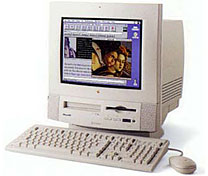 I've been given an old system
marked as Power Macintosh
ONE/225 on the front. I found references on your site like Installing Linux on a PCI Power Mac, Part 1
and Low End Mac's
Compleat Guide to Mac OS 9.
I've been given an old system
marked as Power Macintosh
ONE/225 on the front. I found references on your site like Installing Linux on a PCI Power Mac, Part 1
and Low End Mac's
Compleat Guide to Mac OS 9.
I'm used to Mac OS X on my MacBook and Linux. I don't want to ask you exactly what I need to do to get this box working, but, I want to do the following:
- Currently, I don't seem to have Mac OS version anything on this box. At startup I just get a grey screen with a tiny picture of a smiling Mac in the middle of the screen. I would like to get Mac OS version whatever up and running
- I'd like to get Linux running on the box
Before I try to work on getting this thing running, I want to know if doing the above is just, in general, and in your opinion, feasible, and whether Linux would run well enough for a basic X environment ? Oh, and is there somewhere I can get a boot floppy or a boot CD for this box (it has a floppy drive and CD-ROM on the front)?
Thanks in advance, would be great to get a little basic Linux system out of this device. :)
Cheers,
Roy
Hi Roy,
The Power Macintosh ONE/225 was a variant of the Power Macintosh 5500 that was sold in the UK education market.
The 5500 came with 225 and 250 MHz PPC 603e CPUs, and thus officially supports System 7.5.5 through Mac OS 9.1. You should be able to find an install CD for one of those fairly easily. Here are a couple of potential sources:
As for installing Linux, I'm certainly no authority on that, but some Linux distros do support 603e machines. An overview of what will work with what and links to more information can be found on Pure-Mac.
I will add the caveat that even in its day the Power Mac 5500 wasn't regarded as a scintillating performer. It should run well enough using a supported OS (my pick for this machine would be System 8.6) and contemporary software, and probably Linux would be reasonably lively as well, but don't expect to be excited by the performance.
Charles
Editor's note: Also see our Best Classic Mac OS Deals, updated about twice a month. dk
Netscape 7.0.2 Keeps Crashing
From Ryan:
Hello Gentlemen:
After doing some research, I can't solve the following problem...
I downloaded Netscape 7.0.2 from http://browser.netscape.com/releases English Mac PPC version...
I then installed it on a PowerBook 5300ce running OS 8.6 with a 4 GB SanDisk Ultra II CF flash card/Addonics Adapter hard drive. It installed successfully, and I tried to run the program, but it would not work. It just launched a small, blank window in the middle of the screen, and nothing happened. I waited a few minutes but nothing....
Also, the menu bar was blank. After several restarts and application launches, the problem was reproduced 100% of the time.
Okay, so I then went over to my WallStreet that has a 60 GB partition, OS 9.2 on one partition, Tiger on the other. Downloaded the installer from the same location, installed it, and, bang, same problem.
Restarted, relaunched, same thing. No other programs running, and both installs of 8.6 and 9.2 are fairly clean and fresh.
I do recall a few months ago getting Netscape 7.0.2 working on another WallStreet I have, but why this? Maybe it is the installer?
Of note, I did get Netscape 6.2 and older versions working on both machines, but, strangely, 6.2 just minutes ago elicited the same blank window centre screen (on the WallStreet) as 7.0.2 does.
Any thoughts? Am I missing something?
Thanks,
Ryan
Hi Ryan,
My guess is that this issue must be due to something idiosyncratic in your system setup.
I've never had any trouble with various Netscape 7 versions I've installed under both OS 8.6 on our PowerBook 1400s and OS 9/9.1/9.2.x on a variety of machines including my WallStreet PowerBook.
Since a similar problem has manifested in Netscape 6.2 on your computer, I doubt very much that it's a bad installer. Something in your system doesn't like Netscape. It might take a clean system install plus some experimentation to sleuth out the culprit.
Charles
Join us on Facebook, follow us on Twitter or Google+, or subscribe to our RSS news feed
Charles Moore has been a freelance journalist since 1987 and began writing for Mac websites in May 1998. His The Road Warrior column was a regular feature on MacOpinion, he is news editor at Applelinks.com and a columnist at MacPrices.net. If you find his articles helpful, please consider making a donation to his tip jar.
Links for the Day
- Mac of the Day: PowerBook 5300, introduced 1995.08.25. The first PowerPC PowerBook was known for 'flaming' performance.
- Support Low End Mac
Recent Content
About LEM Support Usage Privacy Contact
Follow Low End Mac on Twitter
Join Low End Mac on Facebook
Favorite Sites
MacSurfer
Cult of Mac
Shrine of Apple
MacInTouch
MyAppleMenu
InfoMac
The Mac Observer
Accelerate Your Mac
RetroMacCast
The Vintage Mac Museum
Deal Brothers
DealMac
Mac2Sell
Mac Driver Museum
JAG's House
System 6 Heaven
System 7 Today
the pickle's Low-End Mac FAQ
Affiliates
Amazon.com
The iTunes Store
PC Connection Express
Macgo Blu-ray Player
Parallels Desktop for Mac
eBay

