
Charles Moore's Mailbag
Picking a Lapdesk, MacBook Air the New Cube?, Pismo Won't Start, and Entourage vs. Mail and Eudora
Charles Moore - 2008.01.28 - Tip Jar
- Picking the Right Lapdesk
- MacBook Air, the Cube's Notebook Cousin
- Pismo Processor Problems
- Is Entourage Any Better than Mail and Eudora?
Picking the Right Lapdesk
From Laurie:
Hi there,
I have always enjoyed reading your reviews but I still cannot figure out which laptop lapdesk/cooler/pad/gizmo to buy. I think I am leaning toward either the Lapinator, Lapworks Futura, or the iLap. I work a lot on my lap on a recliner, but also at the kitchen table and occasionally at a desk. My lap gets really hot, and I hate it; also my posture is awful when I work on my lap, and I have carpal tunnel and tendonitis flare ups. I suppose a 40 hour a week job at a computer is not the best thing for me, but hey, it's a job, and I can do it in my pajamas and stay home all day with my dog, cat, and rat.
Anyway, do you have a chart in which you compare the lapdesks you like? is the iLap worth the extra $20 over the Futura? Is there another dual purpose (lap and tabletop) or single purpose lapdesk you would highly recommend? Do you think the ones with fans (like in the Targus Chillpad) are a great improvement over the fanless ones? I am very sensitive about noise and vibration so have not even considered these.
Okay, gotta go. My legs are burning up. I really need to buy one of these things ASAP.
Thank you,
~ Laurie
Hi Laurie,
Glad you enjoy the reviews, and thanks for reading.
I haven't tested all of the products you mention, so I will restrict my comments to the ones I have tried firsthand.
The Lapworks Futura (see 'Book Mystique Review - Laptop Desk Futura) is a well-designed product, attractively styled and available in a range of colors. It's well-made and has a high standard of finish, as well as being versatile, with both lapdesk and desktop stand modes. I've also tested the Lapworks Lapdesk Ultralight (see New Road Warrior Review Posted - The Laptop Desk UltraLite), and it's good too, with the same basic functionality but a little wider and not quite as slickly styled or finished.
Another lapdesk I like and find quite comfortable is the Xpad Thermal Laptop Pad (see The Road Warrior Review: Xpad Thermal Laptop Pad and Aviator Laptop Stands), a charmingly simple device with no moving parts that both enhances your computer's passive cooling efficiency and also serves as an insulated lapdesk to shield your thighs from excessive heat. It's is surprisingly light in weight despite being a large enough to comfortably support a 17" MacBook Pro or PowerBook, but still be able to gracefully accommodate a 12" PowerBook or iBook as well.
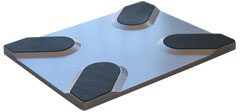 The Xpad is an ABS plastic injection molding
with four raised platforms about 1/4" high configured in the X-pattern
from which the product derives its name. The Xpad's main section is
about 3/8" deep, and filled with three layers of thermal insulation
with trapped air pockets that prevent the user's thighs or other
support service from heat transferred or radiated from the computer.
The underside of the Xpad is coated with a synthetic EVA fabric padding
whose looks, feel, and texture are similar to "wetsuit" material, and
which provides a soft, non-scratching contact footprint, and enough
traction to make the rig feel secure on your lap. It's very comfortable
in use.
The Xpad is an ABS plastic injection molding
with four raised platforms about 1/4" high configured in the X-pattern
from which the product derives its name. The Xpad's main section is
about 3/8" deep, and filled with three layers of thermal insulation
with trapped air pockets that prevent the user's thighs or other
support service from heat transferred or radiated from the computer.
The underside of the Xpad is coated with a synthetic EVA fabric padding
whose looks, feel, and texture are similar to "wetsuit" material, and
which provides a soft, non-scratching contact footprint, and enough
traction to make the rig feel secure on your lap. It's very comfortable
in use.
I have tested the Targus Chillpad and can put your mind to rest about noise and vibration. It's two cooling fans are large diameter and slow-turning, and in most cases it makes less noise than the hard drive of the computer sitting on it, and it really does reduce the machine's temperature. The biggest downside it that it occupies a USB port and eats precious battery charge (although not by a whole lot) when running off the battery.
However, the product I use most myself is the Laptop Laidback, because I prefer to work while reclining when I'm computing away from my desktop workstation. As you observe, body English ergonomics are dreadful when using a laptop on your actual lap, but with the Laptop Laidback, the ergonomics become about as good as it can get without employing a desktop stand and external keyboard and pointing device.
Since you work at home, sometimes in pajamas, the Laidback would be well worth checking out.
The manufacturer's site is here: <http://www.laptop-laidback.com/>
Hope these comments help some in your deliberations.
Charles
MacBook Air, the Cube's Notebook Cousin
From Ian:
Hi Charles,
I'm just writing (okay typing) to give my opinion on Apple's new MacBook Air. It can pretty much be summed up in three words: The next Cube.
That's right, in my opinion, the MacBook Air is just a subnotebook version of Apple's ill-fated Cube, with the same inevitable fate. I say this because it has the exact same drawbacks as the Cube, the biggest one being it's market - or lack thereof. The Cube was pushed as a headless iMac, butit couldn't compare to its counterparts because it didn't fit the needs of the market: an iMac without a monitor at the iMac price. The same holds true to the MacBook Air, cutting size and upgradability to reach a market (executives I heard?) but shooting the price through the roof in the process. The people it's targeting is a group that will easily spend the extra $200 on a 15" (upgradable) MacBook Pro or a more easily upgraded Windows notebook. Or even a regular MacBook, as its features and size are comparable to the Air's, but it can still be upgraded.
For users of 12" PowerBooks, and iBooks for that matter, the MacBook Air is not what we asked for, but once again, Apple pushed for smallest size/most stylish computer, and style won out over function, again.
Ian
PS: Speaking of iBooks, mine is still working (surprisingly) and will have to last until Apple releases something to replace it (and replicate its size in the process). Or until I find $1,000 for a used MacBook.
Hi Ian,
I'm inclined to agree, but then I thought the iPod was an offbeat novelty when Jobs introduced it in '01.
From my perspective, there's no way I would ever pay 1,800 bucks for a crippled machine that can't be upgraded.
For my extended thoughts on the matter see MacBook Air Cool But Too Compromised for Serious Computing and MacBook Air: Notebook Design Philosophy Bellwether Or Cube-esque Overreach?
Charles
Pismo Processor Problems
From Mike:
Hi,
I'm a big fan of your site. I've been using Macs since 1996, and I still use my faithful 8600 daily.
I also have a Pismo, and in the last year I had to change processor twice (if I count this time). In a forum, I could read between the lines from a savvy Pismo tech, and he was asking what the guy did prior to the problem (i.e., I might have caused this). I never shut down my Pismo; I leave it to sleep.
This morning, it did not want to wake up, so I pressed the power button 3 sec. so it shuts down. It didn't want to restart, and it gave me four beeps. I managed to get it to work after leaving the PRAM battery, the main battery, and the power unplugged. When I restarted: nothing! What am I doing to my Pismo? How should I restart it when it freezes?
Thanks,
Mike
Hi Mike,
I never shut my Pismos down either, except for occasional maintenance. I just put them to sleep. Since I've been doing this with my older Pismo for seven years with no problems, I don't think that's what's causing your issues.
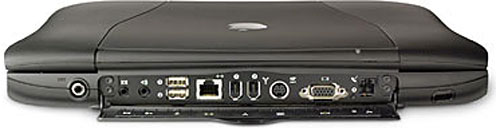
Have you tried pressing the Reset button on the back panel? It's small, between the modem jack and video-out port. De-power the machine, hold the reset button in for a few seconds, wait a few more seconds, and try booting up.
However, I think it's more likely you have a hardware problem, quite possibly a bad processor. I've seen Pismos behave the way you describe and then work fine after the processor card was replaced with a known-good one.
Could also be bad RAM, a bum hard drive, or even motherboard issues. Try substituting the easier things first.
Charles
Is Entourage Any Better than Mail and Eudora?
From Reina:
Eudora ruined me for every other email application I've tried. Mail is driving me nuts; is Entourage any better? I tried it a year ago and ran back to Eudora.
Reina
Hi Reina,
I honestly don't know. I try to avoid any software of Microsoft's and haven't used Outlook since old Outlook Express back in Classic OS days. However, some people (e.g.: the folks at Mac 360) swear by Entourage.
Aside from my anti-Microsoft prejudice, I think Entourage stores message data in a single, big, proprietary file, which would render it a nonstarter for me regardless of its provenance.
Charles
Join us on Facebook, follow us on Twitter or Google+, or subscribe to our RSS news feed
Charles Moore has been a freelance journalist since 1987 and began writing for Mac websites in May 1998. His The Road Warrior column was a regular feature on MacOpinion, he is news editor at Applelinks.com and a columnist at MacPrices.net. If you find his articles helpful, please consider making a donation to his tip jar.
Links for the Day
- Mac of the Day: PowerBook 500 Series, introduced 1994.05.16. 'Blackbird' includes a 25 to 33 MHz 68040 along with smart batteries and grayscale or color displays.
- Support Low End Mac
Recent Content
About LEM Support Usage Privacy Contact
Follow Low End Mac on Twitter
Join Low End Mac on Facebook
Favorite Sites
MacSurfer
Cult of Mac
Shrine of Apple
MacInTouch
MyAppleMenu
InfoMac
The Mac Observer
Accelerate Your Mac
RetroMacCast
The Vintage Mac Museum
Deal Brothers
DealMac
Mac2Sell
Mac Driver Museum
JAG's House
System 6 Heaven
System 7 Today
the pickle's Low-End Mac FAQ
Affiliates
Amazon.com
The iTunes Store
PC Connection Express
Macgo Blu-ray Player
Parallels Desktop for Mac
eBay

