
Miscellaneous Ramblings
Miscellaneous Ramblings Review
At Play in the Garden of OS X Browsers: Firefox 3 Beta 5
Charles Moore - 2008.04.07 - Tip Jar
Because of the number of relatively large images, this article has been split over two pages. Safari, Opera, and iCab are covered page 1, and Firefox 3 Beta 5 is covered here.
Firefox 3 'Gran Paradiso' Beta 5
Then there's Mozilla's Firefox 3 "Gran Paradiso" browser, which has reached Beta 5 status, probably the last beta before the version 3 final is released. Notwithstanding Mozilla's disclaimers that the version 3 betas are for "testing" and developer evaluation only, I haven't encountered any reason with any of the version 3 Firefox betas not to use them for regular, workaday browsing. I've not traditionally been much of a Firefox fan, but Beta 5 is the slickest, most polished Firefox browser ever, not to mention the fastest and prettiest. IMHO it's a lot better vehicle with which to cruise the Information Superhighway than the latest version of Firefox 2 is.
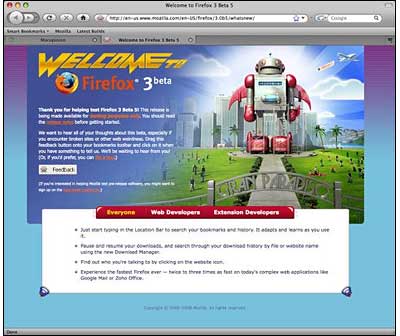
Last Wednesday, Mozilla.org released Firefox 3 beta 5, and Firefox's incremental updates continue to be the most elegant and user-friendly in the business, downloading unobtrusively in the background, then displaying a polite dialog asking if you want to install the updated files. If you give the go-ahead, it only take a minute or two, the program restarts, and it then proceeds to restore whatever pages or tabs you had open - very user-friendly and convenient.
Incidentally, Firefox 3 does a masterful job of restoring your web sessions even after routine close/startups. The program (again politely) asks you if you want to save the current session when you shut it down.
According to Mozilla.org, Firefox 3 Beta 5 includes more than 750 changes from the previous beta, which in turn contained over 900 improvements over the version before that, enhancing stability and compatibility, providing a fresh look and platform and user interface enhancements, and resulting in the fastest Firefox ever. Many of these improvements were based on community feedback from the previous beta. However, I didn't notice as much of a speed improvement, compared with previous version 3 beta releases, and the interface appearance seems to have been pretty much finalized with the Beta 4 release.
Firefox 3 is based on the Gecko 1.9 rendering platform, which has been under development for the past 31 months. Building on the previous release, Gecko 1.9 has more than 12,000 updates, including some major re-architecting to provide improved performance, stability, rendering correctness, and code simplification and sustainability. Firefox 3 has been built on top of this new platform, resulting in a more secure, easier to use, more personal product with a lot more under the hood to offer website and Firefox add-on developers.
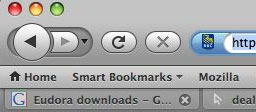 Since the
Firefox 3 beta 3 release, Firefox for Mac has a much-improved and more
attractive user interface with a more native Mac OS X look,
smaller buttons, and more compact tabs. In beta 4, the Mac version of
the browser got the new forward/back buttons (which debuted in the
Windows version of beta 3). With the demise of Netscape Navigator 9,
this new Firefox is to my mind the best-looking Gecko-based
browser.
Since the
Firefox 3 beta 3 release, Firefox for Mac has a much-improved and more
attractive user interface with a more native Mac OS X look,
smaller buttons, and more compact tabs. In beta 4, the Mac version of
the browser got the new forward/back buttons (which debuted in the
Windows version of beta 3). With the demise of Netscape Navigator 9,
this new Firefox is to my mind the best-looking Gecko-based
browser.
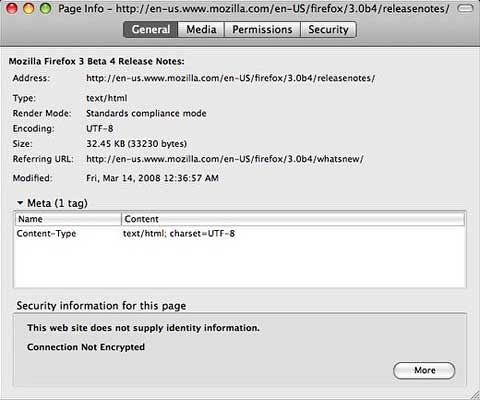
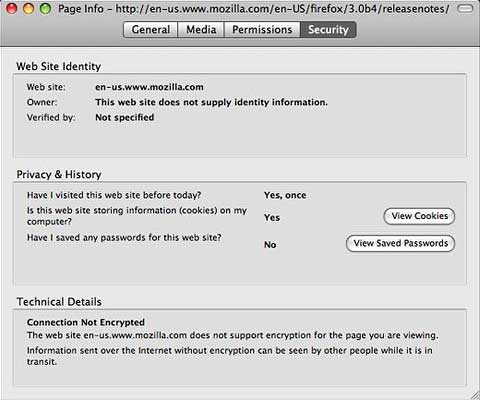
Also new in beta 4 was one-click site info: Just click the site favicon in the location bar, and an information dialog appears.
If that doesn't provide enough info, click the More Information button, and a window appears with 4 tabs containing a whole raft of data pertaining to the page you're on, allowing you to check if your connection is protected from eavesdropping. Identity verification is prominently displayed and easier to understand.
When a site uses Extended Validation (EV) SSL certificates, the site favicon button will turn green and show the name of the company you're connected to.
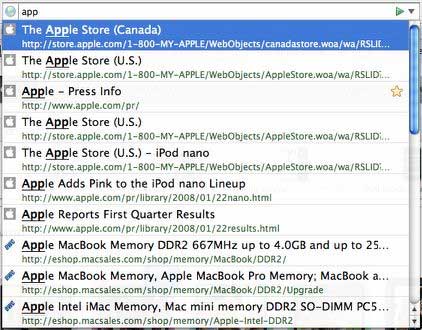
Firefox 3's location bar autocomplete now looks on visited and bookmarked page titles and tags as well as web addresses, and it highlights which parts of the page title and/or URL match the entered text. Results for autocomplete are shown in two lines: one for page title and the other for web address - and in contrasting colors making it easier to isolate one or the other depending on what you're looking for. Also, matched terms are highlighted to direct attention.
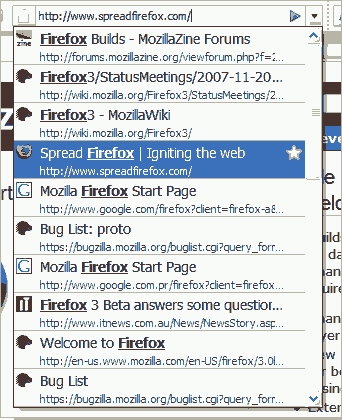
Beta 5's Smart Location feature incorporates an improved search algorithm that "calculates the recency and frequency" of sites visited to help yield search results of highest relevancy. You can also associate keywords with bookmarks to sort them by topic.
The downloads manager has also been improved (although I still think Opera has the best downloads manager in the business), with support for searching through previous downloads, resuming downloads between sessions, and it now displays the domain of the source site next to each completed download.
The Places feature, which organizes bookmarks and browser history, has also been enhanced, offering improved search functionality, and a new Smart Bookmarks folder on the Bookmarks Toolbar.
It's now possible to search History, tags, and bookmarks with a real, configurable search interface, and the Mac OS X version of Firefox 3 now has full support for native widgets in forms.
Probably my favorite new feature in Firefox 3 is that before shutting down, Firefox puts up a dialog asking if you want to save the contents of tabs in your current browsing session. In most instances I definitely do, and the icing on the proverbial cake is that the tabs get reloaded from the cache, which no longer gets dumped on shutdown if you choose the save option with satisfying dispatch upon starting the program again. This is a big enhancement from Firefox 2's ability to remember the contents of tabs after program crashes.
Firefox 3 features:
- Redesigned download manager
- Redesigned add-ons manager
- Download pause and resume
- Visual refresh
- Places
- Redesigned location bar
- Full page zoom
- Offline web apps support
- Security improvements
- Better OS integration
- Web content and protocol handling
- Discontinuous selections
Some new features and fixes in Beta 5:
- Just start typing in the Location Bar to search your bookmarks and history. It adapts and learns as you use it.
- Pause and resume your downloads, and search through your download history by file or website name using the new Download Manager.
- Find out who you're talking to by clicking on the website icon.
- Experience the fastest Firefox ever - twice to three times as fast on today's complex web applications like Google Mail or Zoho Office.
- Places Organizer: view, organize and search through all of your bookmarks, tags, and browsing history with multiple views and smart folders to store your frequent searches. Create and restore full backups whenever you want.
- [Improved in Beta 5!] Integration with Windows: Firefox now has improved Windows icons, and uses native user interface widgets in the browser and in web forms.
- [Improved in Beta 5!] Integration with the Mac: the new Firefox theme makes toolbars, icons, and other user interface elements look like a native OS X application. Firefox also uses OS X widgets and supports Growl for notifications of completed downloads and available updates. A combined back and forward control make it even easier to move between web pages.
- [Improved in Beta 5!] Integration with Linux: Firefox's default icons, buttons, and menu styles now use the native GTK theme.
One minor caveat is that switching to Firefox 3 may break some plugins you're using with Firefox 2, although that issue is improving as plugin developers step up and release Firefox 3 compatible versions.
Firefox 3.0's memory demands were "dramatically improved" with Beta 4, and it does seem like a better citizen on my Desktop than earlier versions.
They're also not kidding about the speed. This is a blazing fast browser.
No release date has been announced for the Firefox 3 final, but in the meantime, beta 5 is a completely acceptable ride, and I would not think of going back to Firefox 2.
Here are some more Firefox 3 improvements:
More Secure
- One-click site info: Click the site favicon in the location bar to see who owns the site and to check if your connection is protected from eavesdropping. Identity verification is prominently displayed and easier to understand. When a site uses Extended Validation (EV) SSL certificates, the site favicon button will turn green and show the name of the company you're connected to.
- Malware Protection: malware protection warns users when they arrive at sites which are known to install viruses, spyware, Trojans or other malware.
- New Web Forgery Protection page: the content of pages suspected as web forgeries is no longer shown.
- New SSL error pages: clearer and stricter error pages are used when Firefox encounters an invalid SSL certificate.
- Add-ons and Plugin version check: Firefox now automatically checks add-on and plugin versions and will disable older, insecure versions.
- Secure add-on updates: to improve add-on update security, add-ons that provide updates in an insecure manner will be disabled.
- Antivirus integration: Firefox will inform antivirus software when downloading executables.
- Vista Parental Controls: Firefox now respects the Vista systemwide parental control setting for disabling file downloads.
- Effective top-level domain (eTLD) service better restricts cookies and other restricted content to a single domain.
- Better protection against cross-site JSON data leaks.
Easier to Use
- Easier password management: an information bar replaces the old password dialog so you can now save passwords after a successful login.<p>
- Simplified add-on installation: the add-ons whitelist has been removed making it possible to install extensions from third-party sites in fewer clicks.
- New Download Manager: the revised download manager makes it much easier to locate downloaded files, and you can see and search on the name of the website where a file came from. Your active downloads and time remaining are always shown in the status bar as your files download.
- Resumable downloading: users can now resume downloads after restarting the browser or resetting your network connection.
- [Improved in Beta 4!] Full page zoom: from the View menu and via keyboard shortcuts, the new zooming feature lets you zoom in and out of entire pages, scaling the layout, text and images, or optionally only the text size. Your settings will be remembered whenever you return to the site.
- Podcasts and Videocasts can be associated with your media playback tools.
- Tab scrolling and quickmenu: tabs are easier to locate with the new tab scrolling and tab quickmenu.
- Save what you were doing: Firefox will prompt users to save tabs on exit.
- Optimized Open in Tabs behavior: opening a folder of bookmarks in tabs now appends the new tabs rather than overwriting.
- Location and Search bar size can now be customized with a simple resizer item.
- Text selection improvements: multiple text selections can be made with Ctrl/Cmd; double-click drag selects in "word-by-word" mode; triple-clicking selects a paragraph.
- Find toolbar: the Find toolbar now opens with the current selection.
- Plugin management: users can disable individual plugins in the Add-on Manager.
- Integration with Vista: Firefox now has Vista-specific icons, and uses native user interface widgets in the browser and in web forms.
- Integration with the Mac: the new Firefox theme makes toolbars, icons, and other user interface elements look like a native OS X application. Firefox also uses OS X widgets and spellchecker in web forms and supports Growl for notifications of completed downloads and available updates. A combined back and forward control make it even easier to move between web pages.
- Integration with Linux: Firefox's default icons, buttons, and menu styles now use the native GTK theme.
More Personal
- Star button: quickly add bookmarks from the location bar with a single click; a second click lets you file and tag them.
- Tags: associate keywords with your bookmarks to sort them by topic.
- Location bar & autocomplete: type in all or part of the title, tag or address of a page to see a list of matches from your history and bookmarks; a new display makes it easier to scan through the matching results and find that page you're looking for. Results are returned according to their frequency (a combination of frequency and recency of visits to that page) ensuring that you're seeing the most relevant matches. An adaptive learning algorithm further tunes the results to your patterns.
- Smart Bookmarks Folder: quickly access your recently bookmarked and tagged pages, as well as your more frequently visited pages with the new smart bookmarks folder on your bookmark toolbar.
- Places Organizer: view, organize and search through all of your bookmarks, tags, and browsing history with multiple views and smart folders to store your frequent searches.
- Web-based protocol handlers: web applications, such as your favorite webmail provider, can now be used instead of desktop applications for handling mailto: links from other sites. Similar support is available for other protocols (Web applications will have to first enable this by registering as handlers with Firefox).
- Download & Install Add-ons: the Add-ons Manager (Tools > Add-ons) can now be used to download and install a Firefox customization from the thousands of Add-ons available from our community add-ons website. When you first open the Add-ons Manager, a list of recommended Add-ons is shown.
- Easy to use Download Actions: a new Applications preferences pane provides a better UI for configuring handlers for various file types and protocol schemes.
- Improved Platform for Developers
- New graphics and font handling: new graphics and text rendering architectures in Gecko 1.9 provides rendering improvements in CSS, SVG as well as improved display of fonts with ligatures and complex scripts.
- Color management: (set gfx.color_management.enabled on in about:config and restart the browser to enable.) Firefox can now adjust images with embedded color profiles.
- Offline support: enables web applications to provide offline functionality (website authors must add support for offline browsing to their site for this feature to be available to users).
- A more complete overview of Firefox 3 for developers is available for website and add-on developers.
Improved Performance
- Speed: improvements to our JavaScript engine as well as profile guided optimizations have resulted in significant improvements in improvements over previous releases. Compared to Firefox 2, web applications like Google Mail and Zoho Office run twice as fast in Firefox 3 Beta 4, and the popular SunSpider test from Apple shows increased performance
- Memory usage: Several new technologies work together to reduce the amount of memory used by Firefox 3 Beta over a web browsing session. Memory cycles are broken and collected by an automated cycle collector, a new memory allocator reduces fragmentation, hundreds of leaks have been fixed, and caching strategies have been tuned.
- Reliability: A user's bookmarks, history, cookies, and preferences are now stored in a transactionally secure database format which will prevent data loss even if their system crashes.
System requirements: Mac OS X 10.4 and later
Minimum Hardware
- Macintosh computer with an Intel x86 or PowerPC G3, G4, or G5 processor
- 128 MB RAM (Recommended: 256 MB RAM or greater)
- 200 MB hard drive space
Go to Page 1 for coverage of Safari 3.1, Opera 9.27, and iCab 4.01.
Join us on Facebook, follow us on Twitter or Google+, or subscribe to our RSS news feed
Charles Moore has been a freelance journalist since 1987 and began writing for Mac websites in May 1998. His The Road Warrior column was a regular feature on MacOpinion, he is news editor at Applelinks.com and a columnist at MacPrices.net. If you find his articles helpful, please consider making a donation to his tip jar.
Links for the Day
- Mac of the Day: 17" MacBook Pro Core Duo, (2006.04.24. The top-end MacBook Pro has a 1680 x 1050, 2.16 GHz Core Duo CPU, and supports Apple's 30" Cinema Display.)
- Support Low End Mac
Recent Content
About LEM Support Usage Privacy Contact
Follow Low End Mac on Twitter
Join Low End Mac on Facebook
Favorite Sites
MacSurfer
Cult of Mac
Shrine of Apple
MacInTouch
MyAppleMenu
InfoMac
The Mac Observer
Accelerate Your Mac
RetroMacCast
The Vintage Mac Museum
Deal Brothers
DealMac
Mac2Sell
Mac Driver Museum
JAG's House
System 6 Heaven
System 7 Today
the pickle's Low-End Mac FAQ
Affiliates
Amazon.com
The iTunes Store
PC Connection Express
Macgo Blu-ray Player
Parallels Desktop for Mac
eBay

