
Miscellaneous Ramblings
Checking Out the Latest Eudora Replacement Betas
Charles Moore - 2008.11.11 - Tip Jar
The two contenders to replace the venerable Classic Eudora email program as queen of the email client applications both released data updates last week. (Eudora is a girl's name of Greek derivation meaning "giving" or "generous" - for trivia fans, in Greek mythology, she was one of the Hyades, a sisterhood of nymphs that bring rain. That said, the email program is named for novelist Eudora Welty, the relevance being her short story "Why I Live at the P.O.")
Eudora, originally developed by developed by Steve Dorner at the University of Illinois at Urbana-Champaign in 1990 and acquired by Qualcomm in 1991, is one of the most refined pieces of software I've ever used. It's also as comfortable as a favorite pair of slippers after all those years of familiarity. It's about as close to perfection as I've encountered in any piece of personal computer software. I say "close", because Eudora isn't perfect, but it's suits my needs and tastes so well that I've continued to use it as my main email application more than two years after Qualcomm terminated development - and despite the fact it's not an entirely happy camper running under Mac OS X 10.5 "Leopard".
However, there is no Intel-native version of classic Eudora, and the likelihood is that incompatibilities with OS X 10.6 "Snow Leopard" will render it completely obsolete as a practical email tool, so the dismal reality for me and a lot of other Eudora aficionados is that we'll have to somehow adapt to something else if we upgrade to Snow Leopard.
The problem for me is that nothing I've tried even comes close to being as satisfactory as Eudora for what I need in an email client.
Entourage? Uh, uh. No way I would ever and trust my crucial in real archives to a proprietary file format accessible only with Microsoft software. Mozilla Thunderbird? Well, the price is right, but the feature set and execution isn't. OS X Mail has never grabbed me, and while I love Opera's browser, I'm much less enthusiastic about its integrated email client.
What to do?
The good news is that happily Qualcomm didn't entirely kill off Eudora when it lost interest in further development and support, but rather handed off the name and development rights, including Steve Dorner as a consultant, to the Mozilla Foundation in 2006. Mozilla's Penelope (another name taken from Greek mythology) project has taken the ball and run with it to develop a new Open Source Eudora email client.
The bad news is that the new Eudora incorporates the Thunderbird architecture and email engine, making it essentially a Thunderbird clone with Eudora-esque appearance and features grafted on,. It thus suffers from many of the things I dislike about Thunderbird, especially its archive management, it's three-pane (or pain) user interface, and it's clumsy handling of multiple email accounts (I have 22 configured and coexisting peacefully in Eudora) for outgoing mail especially.
The other contender for Eudora's crown is actually a much more faithful emulator of classic Eudora features and conventions than the official and eponymous Eudora successor. A brand new email application from Infinity Data Systems called Odysseus (yet another name from Greek mythology), whose developers affirmed objective is to make a modern and up-to-date iteration of the qualities that endeared Eudora to so many fans. Odysseus is commercial software (as was Qualcomm's Eudora), not Open Source, and it sells for $39.95, about the same price as classic Eudora. The program is being developed with support for Mac OS X and Windows, with Linux compatibility being looked at for the future.
Both of these applications have had longer gestation periods than was originally anticipated, and neither is yet ready for final release, but both have been making incremental progress, the most recent milestones being Eudora 8.0b4 and Odysseus 1.0b7, both of which I downloaded and checked out over the weekend.
Eudora 8.0b4
Eudora 8, like its Thunderbird progenitor, is huge - nearly 20 MB for the compressed disk image, and more than 50 MB when expanded.
Eudora, version 8.0.0b4 has a raft of improvements and bug fixes, which you can find listed online.
Of particular note is that a Classic Eudora Redirect feature has been added, which acts like the older program's Send Again, but the Reply-To: header is set to be the sender of the original message so that any replies to the redirected message get sent to the original sender. This allows the user to edit the redirected message before sending, e.g. add additional comments. Also new is that mailboxes receiving new messages in them (e.g. from mail checks) are automatically opened now.
That just scratches the surface of this substantial update, and I found that I liked this build a lot better than the last version I tried.
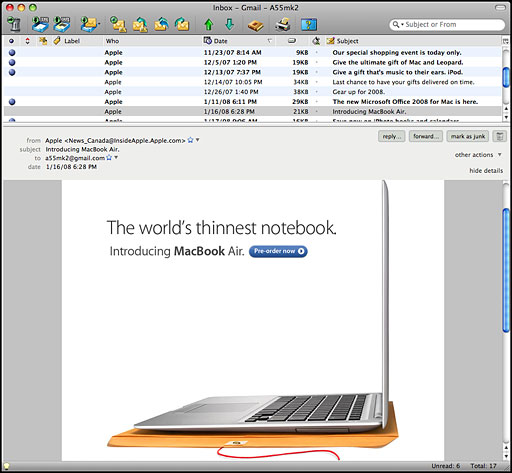
Eudora 8.0 thankfully has an optional 2-pane interface mode that allegedly causes mailboxes to open in a similar manner to Mac Eudora's 2-pane message list and message preview. The list of mailboxes will open in a separate window. "Mac users might find this interface to be more like Mac Eudora." Well, not quite, but it's an improvement on the Thunderbird interface.
Eudora happily allows you to check your email accounts individually as well as all at once, and I appreciate that it disables downloading of embedded images in email messages by default, leaving it to the user's discretion to manually bring them down with a convenient button.
However, one bug that I encountered with version 8 beta 3 still hasn't been squashed it this latest build. With a mail download half-completed, the process stalled, accompanied by a loud and grating buzzing that I could only get rid of by quitting the program and restarting it.
I'm also skeptical that Eudora 8's Search/Find function will be as good classic Eudora's fast, slick, and powerful search engine, but I have to say I found it pretty good searching the sparsely populated archive I have so far accumulated in Eudora 8.
To summarize, Eudora 8 really is making progress, and I wouldn't rule out its winning me over yet, especially if they can restore Eudora's ability to configure a particular SMTP server to each account.
Mac system requirements:
- Mac OS X 10.4.x and later
- Macintosh computer with an Intel x86 or PowerPC G3, G4, or G5 processor - 128 MB RAM (Recommended: 256 MB RAM or greater) - 200 MB hard drive space
Odysseus 1.0b7
Odysseus has been released in a 1.0b7 beta build, with more improvements, but like Eudora 8, it still has a ways to go.
Odysseus is not based on the classic Eudora code base, since, as IDS notes, Qualcomm was not disposed to handing that proprietary code over to anyone else - even Mozilla's Thunderbird/Eudora 8 effort isn't based on the original code base.
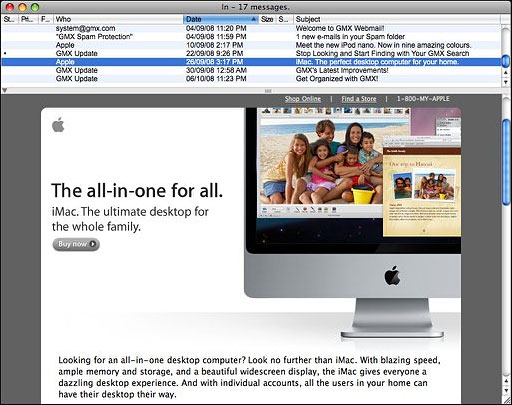
This 1.0b7 build continues to improve on existing features, while adding a couple of critical ones, You can find a full inventory of the latest changes online.
For me, the make-or-break feature that's still missing is the ability to check individual email accounts separately. With all the email accounts I have configured in Eudora 6.2.4, it's simply impractical to do mass checks, especially over my bog-slow dialup connection. The other lingering problem is that Odysseus still can't sent mail through my ISP's (Sympatico Canada) SMTP server. This is partly a Sympatico problem, and it afflicts Eudora as well.
The new progress bar enhancements are welcome, but the bar is still clunky in its readout compared with Eudora's excellent Tasks window, and I haven't found any way in the Odysseus Preferences to make message windows display the data strings at the top.
Join us on Facebook, follow us on Twitter or Google+, or subscribe to our RSS news feed
Charles Moore has been a freelance journalist since 1987 and began writing for Mac websites in May 1998. His The Road Warrior column was a regular feature on MacOpinion, he is news editor at Applelinks.com and a columnist at MacPrices.net. If you find his articles helpful, please consider making a donation to his tip jar.
Links for the Day
- Mac of the Day: 17" MacBook Pro Core Duo, (2006.04.24. The top-end MacBook Pro has a 1680 x 1050, 2.16 GHz Core Duo CPU, and supports Apple's 30" Cinema Display.)
- Support Low End Mac
Recent Content
About LEM Support Usage Privacy Contact
Follow Low End Mac on Twitter
Join Low End Mac on Facebook
Favorite Sites
MacSurfer
Cult of Mac
Shrine of Apple
MacInTouch
MyAppleMenu
InfoMac
The Mac Observer
Accelerate Your Mac
RetroMacCast
The Vintage Mac Museum
Deal Brothers
DealMac
Mac2Sell
Mac Driver Museum
JAG's House
System 6 Heaven
System 7 Today
the pickle's Low-End Mac FAQ
Affiliates
Amazon.com
The iTunes Store
PC Connection Express
Macgo Blu-ray Player
Parallels Desktop for Mac
eBay

