
Miscellaneous Ramblings
Why Eudora Fans Are 'Doggedly Faithful'
Charles Moore - 2008.04.24 - Tip Jar
Longtime reader Rick wrote to comment on Monday's column, Odysseus Cometh: The Real Successor to Eudora, about the forthcoming Odysseus email software application that die-hard Eudora fans like myself fervently hope will fulfill its mission statement as a successor to the discontinued Eudora email client. Rick says:
Charles,
I was intrigued reading your article about the forthcoming Odysseus and the mantle it seems to be receiving from the discontinued Eudora.
When I first came to the Mac in 1998, I used Outlook Express (which was the default email reader in the Classic Mac OS), then moved to Entourage when it was released, and eventually settled into the the OS X Mail.app, which I use now.
But I know that Eudora users rave about that application. I use Mail, Address Book, and iCal over something like Entourage because these apps seem better integrated into OS X and sync very easily to my iPhone.
For the uninitiated such as myself, what does Eudora/Odysseus offer that I am not experiencing now? Or why are Eudora users so doggedly faithful to that product? What's the real difference?
Thanks,
Rick
Why We Love Eudora
Well, Rick, preferences such as taste in email software are of course subjective to a considerable degree. While I'm sure that other veteran Eudora fans might cite a great many reasons why Eudora hits the sweet spot for them, one of the things I love about Eudora, as opposed to "three-pane" email clients like Outlook Express, Mail, Thunderbird, and alas, the new Open Source Eudora 8, is its mailbox-based motif, a minimalist or non-interface, if you will, in which, if you keep the Toolbar disabled (as I do) program windows disappear leaving just the Eudora main menu bar. This allows one to have clear access to the Desktop and/or multiple windows open and windowshaded as opposed to switching views in a three-pane interface.
Another Eudora feature that is IMHO unmatched for slickness, speed, and versatility in any other email client is Eudora's kick-ass search engine, which I hope will be carried over to Odysseus. I only wish OS X Spotlight worked half as well!
I also love the straightforward (i.e.: mostly manual) way you set up email accounts in Eudora - I currently have 22 accounts in my copy of Eudora 6.2.4, each with its own separate and discrete SMTP configured in non-conflict with those of other accounts, an aspect I've found particularly clumsily executed and hair-tearingly frustrating in Thunderbird and its derivatives (including Eudora 8).
But there's much, much more.
Email software is mission critical, especially for someone in my line of work - important not only for the obvious function of sending and receiving email efficiently, but also for organizing and retrieving data stored in my email message archives. Eudora has been my mainstay, workhorse email application since I first drove up the Information Highway onramp, and to my mind it is the most versatile, custom configurable, and manually controllable (I mostly dislike automation other than stuff that just lets you bypass repetitive and boring donkeywork) email client so far with a uniquely rich feature set. Other clients may do particular tasks better than Eudora - for example, Nisus Email's wonderful one-click messaging and OS X Mail's spam filtering - but few other clients (if any) handle all aspects of email management as comprehensively well as Eudora does - or at least did until Leopard partially broke it.
Eudora happily remained true to its original user interface motif to the end, in which messages are stored in virtual "Folders" (as many as you choose to create) in the mbox file format, which uses plain text files that can be opened in a pinch by any text editor or word processor instead of a central proprietary (and all-too-easily corruptible) database as used, for example, by Microsoft Outlook. This makes Eudora archives a snap to back up or transfer between different computers (just drag the Mail Folder or individual mbox files - a tremendous advantage - to the backup medium), has proved extremely robust and trouble-free, and is very data-secure since, unlike with databases, in the mbox format should disk corruption occur, most of your archives are unlikely to be affected. Mbox files are also delightfully compact.
Eudora is powerful, versatile, flexible, and used to be reliable as an anvil. It has never lost data on me in a dozen years of use. Speaking of which, my Eudora mail folder, which contains my entire email archives going back to 1996 - what must be tens of thousands of messages - is still just a minuscule 350 MB, which makes it a snap to back up.
Eudora is also fast, supports very flexible and user-friendly filtering, supports SSL, has inline spell checking and basic word processing features, and handles multiple accounts better than any other email client I've tried (many). Like the Mac OS (perhaps even more so), Eudora lets you do things your way.
Eudora's forward and backward compatibility is nothing short of amazing. Eudora mailboxes I originally created in Eudora Light 1.5.1 on 680x0 Macs running Macintosh System 6 or 7 back in the day still open and work fine in Eudora 6.2.4 running in OS X 10.5.2.
Some Room for Improvement
On the downside, Eudora's address book and contacts management, as well as support for HTML mail rendering, are a bit lame with lots of room for improvement, areas I hope the Odysseus folks will address.
Odysseus will be an entirely new and modern application, since it is not based on Qualcomm's proprietary source code for Eudora. I'm encouraged by the Odysseus mission statement that it promises to be a worthy replacement for Eudora in the Leopard age and beyond while retaining a faithful replication of the best aspects of Eudora's feature set.
Eudora and Leopard
Another reader, Jim, had a question about a Leopard "compatibility patch" I mentioned in the column, noting that he had just upgraded to OS X 10.5 and finds that Eudora now "prefers crashing to displaying messages" and that he's been forced into letting Eudora download mail so he can maintain file continuity with his email archives, but doing his reading in Mail, which he likes "far less than Eudora." He wanted to know where he could find the "patch" I referenced.
Well, my terminology on that point was less precise than it should have been, since what I was referring to is more of a kludge or workaround than a patch.
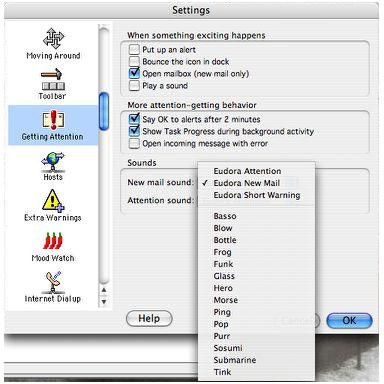
Qualcomm has posted a compatibility note for users of the Eudora email client on OS X 10.5.2 Leopard.
 In
order for Macintosh Eudora to work well under OS X 10.5.x 'Leopard',
you need to turn off the use of specific sounds in Eudora. These are
the sounds Eudora plays when you get new mail or Eudora needs your
attention, or are played by Filters. The sounds that are problematic
are the ones that contain 'Eudora' in their name as they were created
using a sound synthesizer that Leopard does not support. To disable or
change the sounds used in Eudora, do the following:
In
order for Macintosh Eudora to work well under OS X 10.5.x 'Leopard',
you need to turn off the use of specific sounds in Eudora. These are
the sounds Eudora plays when you get new mail or Eudora needs your
attention, or are played by Filters. The sounds that are problematic
are the ones that contain 'Eudora' in their name as they were created
using a sound synthesizer that Leopard does not support. To disable or
change the sounds used in Eudora, do the following:
Turn off or change the 'New Mail' and "Attention" sounds:
- Open Eudora->Preferences and select the 'Getting Attention' panel
- In the 'Sounds' section, for both 'New mail sound' and 'Attention sound', select a sound OTHER than one that has 'Eudora' in its name (i.e.: NOT 'Eudora Attention', 'Eudora New Mail' nor 'Eudora Short Warning')
- Click OK to the close the Preferences
Turn off sounds triggered by filters:
- Open Window->Filters
- Look through all your filters for filters that have a 'Play Sound' action.
- Select a sound that does NOT have 'Eudora' in its name, or disable sounds all together by selecting 'None' from the action popup menu.
I've done this, and it does seem to improve Eudora stability in Leopard somewhat, but I don't want to oversell it. "Work well" is a relative evaluation here, and Eudora is still a lot more crash-prone and buggy in Leopard than the paragon of reliability it was in Tiger and previous version of the Mac OS. On the other hand, it's still so much better than whatever is in second place that I (yes, "doggedly") continue using it while I wait impatiently for the debut of Odysseus, which is projected for May 12.
Jim's Eudora/Mail tandem is one coping strategy. Another workaround I've been using, which may or may not appeal, is using Eudora in conjunction with a Gmail account (any email account with ambidextrous webmail/POP3 support would work), which lets me read and respond to mail without having to deal with Eudora's angularities in Leopard, but I can still download mail to keep my archives up to date in Eudora on my hard drive for access without being online (a feature that looms large when you're stuck with dialup, as I am).
Odysseus can't arrive soon enough.
Join us on Facebook, follow us on Twitter or Google+, or subscribe to our RSS news feed
Charles Moore has been a freelance journalist since 1987 and began writing for Mac websites in May 1998. His The Road Warrior column was a regular feature on MacOpinion, he is news editor at Applelinks.com and a columnist at MacPrices.net. If you find his articles helpful, please consider making a donation to his tip jar.
Links for the Day
- Mac of the Day: Power Mac 8200, introduced 1996.04.22. The minitower version of 7200 was never sold in America.
- Support Low End Mac
Recent Content
About LEM Support Usage Privacy Contact
Follow Low End Mac on Twitter
Join Low End Mac on Facebook
Favorite Sites
MacSurfer
Cult of Mac
Shrine of Apple
MacInTouch
MyAppleMenu
InfoMac
The Mac Observer
Accelerate Your Mac
RetroMacCast
The Vintage Mac Museum
Deal Brothers
DealMac
Mac2Sell
Mac Driver Museum
JAG's House
System 6 Heaven
System 7 Today
the pickle's Low-End Mac FAQ
Affiliates
Amazon.com
The iTunes Store
PC Connection Express
Macgo Blu-ray Player
Parallels Desktop for Mac
eBay

