
Last week fellow Low End Mac columnist Simon Royal posted a feature comparing nine Web browsers in the context of use on G3 and older G4 Macs. That’s a space I inhabit.
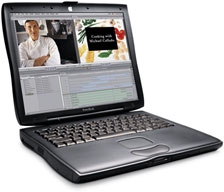
While I no longer have any G3 machines in active service, my wife is still using a 700 MHz iBook G3 running Mac OS X 10.4.11 Tiger, and I have two old Pismo PowerBooks in production and road warrior service, both with 550 MHz G4 processor upgrades and also running 10.4.11.
Even my main production workhorse, a 1.33 GHz 17″ PowerBook G4, is a not exactly spring’s chicken, but it runs Mac OS X 10.5 Leopard.
Being something of a browser-follower, I enjoyed reading Simon’s article, but I was interested at how much his impressions and experiences deviated from my own, given that we’re using somewhat similar hardware and the same OS version.
Opera
Simon looked at Opera 9.5.2 on his 400 MHz Pismo PowerBook G3, which he rated as having come a long way in the past year, but still way behind its competitors. He described Opera as slow to start up, slow to load pages, and the only browser not to render his website home page properly – and subjectively as having “one of the ugliest user interfaces I have seen in a long time; it looks very dated.”
I use a lot of browsers, and Opera is my overall favorite for general surfing. Personally, I find it among the fastest browsers at any given time, both on my Tiger and Leopard machines. It is sluggish to start up, but that’s mitigated somewhat by its having the best, no-hassle session resume support of any Mac browser. It also has far and away the best download manager of any browser I’ve ever used, with a pause and resume feature that works dependably.
I prefer the way Opera renders text, especially if it’s to be copied and pasted into a text editor, to most other browsers. I’m massively impressed with its stability even when downloading a dozen or more pages simultaneously over my dog-slow dialup connection (although stability has slipped a bit with the most recent builds, it’s still impressive)
As for appearance, that’s a subjective judgment. I like Opera’s user interface, although I liked the previous version before Opera’s recent facelift better. I also love little things like buttons to toggle image loading on and off (huge when you’re stuck with dialup access) and page zooming on the main interface without having to root around in menus.
Camino, Firefox, and Netscape
Simon turns out to be a big Camino fan, declaring it “fabulous”. I’m currently using Camino 1.6.4 as my Web-posting workhorse on one of my Pismos, and it’s a good browser, but I would rate it considerably lower than fabulous.
Simon says Camino is incredibly fast even on his old G3 PowerBook. Perhaps it does a better job on broadband. It’s a bit of a slug on my (faster than Simon’s) Pismo on dialup.
A bit of back story is in order here. My favorite of the Mozilla-based browsers, especially for older Macs, is the now-discontinued Netscape Navigator 9, which I find faster, more stable, and a happier camper on these old machines than any of its many cousins and siblings. It’s the one my wife uses on the old G3 iBook. It runs great on my Pismos too, but I prefer to use a current browser, so I tried Firefox 3, which is my number-two (after Opera) browser on my Leopard machine and does a good job there.
However, I found that on the slower, memory-challenged (576 MB) Pismo, Firefox 3 was not a happy camper, driving me nuts with almost constant hard drive access and slowing everything else down. It doesn’t act that way on my 1.33 GHz PowerBook, which has 1.5 GB of RAM.
I started using Camino 1.6.3 and 1.6.4 on the Pismo, but I find it slower than Navigator 9; menus are sluggish in responding, and it’s recalcitrant about popping to the front from the background with a click. It’s especially laggard about accepting text drags and drops from apps running in Classic Mode, which is something I do a lot of on that machine.
As for appearance, Camino is attractive in a bland sort of way. I definitely prefer the Navigator 9 UI for looks, and I think I like Firefox 3’s appearance better than Camino’s as well, although the Aqua buttons in Camino are definitely nice.
iCab
Simon found iCab fast; I do too, at least on some sites. iCab is usually up and running as a third browser on my Macs. He likes the way it renders pages, and I agree, but text copied and pasted from iCab requires a lot more cleanup than text from Opera, and I don’t find iCab any faster than Opera on most sites.
Its download manager isn’t nearly as good. A concrete example is a download the other night that failed four times until I switched it to Opera, which brought the file down without a hitch.
Shiira & Safari
Simon isn’t a fan of WebKit-based Shiira. I’m not a particular fan of any of the WebKit-based browsers, including Safari, although Safari does start up amazingly quickly. I find Shiira’s interface interesting, and Safari’s eye-glazingly boring, so I don’t use either much.
I will be interested to find out how well I like Google’s WebKit-based Chrome browser when the Mac version finally lands.
The Best?
Simon thinks the best all-rounder among these browsers is Camino.
I can’t agree. Camino is a very decent browser, but for older Macs, my pick for best all-rounder currently would be Navigator 9, although it’s no longer being supported or upgraded, so security and compatibility issues will grow over time.
If SeaMonkey (the successor to the old-school Mozilla suite browser) keeps being developed and updated, it may be the better alternative, although its interface really is very dated and uninspiring.
I love Opera and would not want to have to get along without it. I’m addicted to its dependability and feature set, notwithstanding the odd site that it chokes on for one reason or another. In such instances, on a machine that supports it comfortably, it’s hard to beat Firefox for all-round compatibility and solid performance. And if you like plugins (I don’t) it’s the one you want to have.
Safari is a good browser, just an uncompelling one IMHO. iCab is a little wild card. It does most things very well, but other browsers beat it on particulars. However I like having it around.
Short link: http://goo.gl/7y7tzo
searchword: tigerbrowsers
