
Miscellaneous Ramblings
Miscellaneous Ramblings Review
Bean: Free Word Processor Is Fast and Lean and Looks Great
Charles Moore - 2007.05.29 - Tip Jar
A new OS X application that's been creating a bit of a buzz around the Mac Web is Bean, a free, new, lightweight entry in the crowded field of word processors and text editors for the Mac.
Do we need another word processor application?
Bean developer James Hoover thinks we do and explains:
"Various word processors have come and gone over the years. I started to collect old word processors and became interested in how these programs can either help you or work against you.
"One that people still rave about is WriteNow. Mainly they like the fact that it's lean and fast, and that the font and style menus are easy to get at. That old-style menu system doesn't work well when you have a gajillian fonts, however.
"I remember working with WordPerfect for DOS, which was the industry standard at one time. It was nightmarish. People would accidentally stack dozens of invisible codes together which would fight each other for control of the text. You had to 'reveal' them, then root them out like a dentist.
"Microsoft Word took the best from Word Perfect and ditched the rest. For instance, they borrowed the 'white text on blue background' mode, which is brilliant. It's easy on the eyes, and you aren't faced with a serious-looking 'blank sheet' when you start to write....
"So now, people are stuck with Microsoft Word, which is very nice, but can be quite annoying. ('It looks like you're writing a letter, Dave. Would you like me to throw you out the airlock without your space helmet on? I mean . . . would you like me to format it for you?').
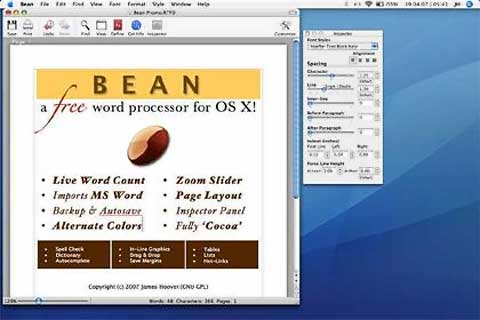
"Text Edit is a great showpiece for Apple's NSText object, but it goes no farther than that (by design). So what I've done with Bean is to make a little word processor that has a live word count and a zoom slider right at the bottom of the window. It does date-stamped backups and has an autosave feature. It has a nice-looking 'Page Layout' mode and the 'white on blue' (or any other combination) alternate color mode for editing. You can set the page margins, which you can't in Text Edit. None of the menus are hidden too deep. It has an easy-to-use Inspector with lots of sliders to adjust the formatting of the text.

"I tried to make the List and Link items easier to use than in the standard Cocoa app. While Bean doesn't save or catalog text styles, you can copy a style, select all text matching another style, then paste the first style in to make it all match. The inspector has a popup menu that gives you immediate access to all font family variations (check out Helvetica Neue, if you have that font)."
"Bean is lean, fast, and uncluttered. If you get depressed at the thought of firing up MS Word or OpenOffice, try Bean.
"If you use Text Edit but have to jump through hoops just to get a word count or change the margins, try Bean.
"If you're pining away for Write Now-esque simplicity or just want a low-pressure writing environment, try Bean."
Okay, Bean sounds promising - great even for a freeware application - but before you chuck Word or Pages or Nisus or Mariner Write, take note of some things Bean doesn't support, such as footnotes, columns, sections, split view, and graphics layering (it does support inline graphics). Headers and footers created by Bean are the Cocoa default ones, like the ones in Text Edit, and can't be modified (but you can turn them on and off in Preferences).
Bean doesn't have a 'Styles Drawer' or anything like that. Also, there is no "above or below the text" (although Bean handles inline graphics).
Hoover says all or at least some of these things could be included in a future version of Bean, but advises that you not hold your breath.
If you would like to tinker with it yourself, Bean is released under the Gnu GPL license; the source code is available and can be used or improved by third parties interested.
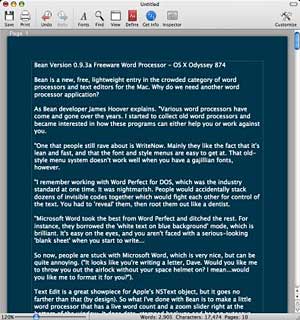
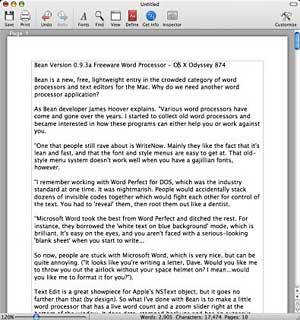
What is Bean like to use? For one thing, it's pretty. I love the clean, attractive interface appearance and am especially smitten with the white-on-blue Alternate Color text option. If you prefer classic black-on-white, Bean will accommodate that too.
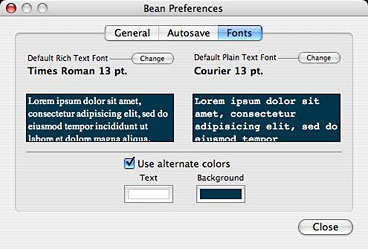
I especially like the Fonts pane in Bean's preferences, which provides a preview of the selected default font for both rich and plain text, in both normal and alternate color.
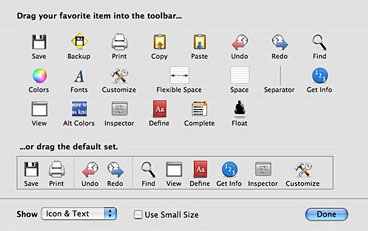
The toolbar is customizable with a wide selection of tools that can be added from a palette if you like toolbar controls.
Bean supports OS X Services, which is handy for exporting content to another Services-savvy application and for adding third-party capabilities. For example, while Bean has few text-cleaning features of its own, if you want the facility to remove unwanted linebreaks from downloaded text, you can download the freeware WordService 2.6.1 utility, which adds a 'Format > Reformat' command to the OS X Services menu and can execute linebreak purges for you, among several other things.
Bean also supports spell-checking, including as-you-type flagging, by piggybacking OS X's built in spell check function, and you get a live, running readout of word, character, and page counts at the bottom margin of the window, which is shared by a handy text zoom slider.
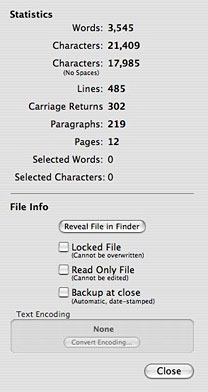 If you need
more document information than the running readouts provide, just
summon the Info panel, which can be accessed from a button in the
toolbar.
If you need
more document information than the running readouts provide, just
summon the Info panel, which can be accessed from a button in the
toolbar.
There is a serviceable and searchable online Help manual.
However, there are precious few text editing features. That may not bother some users, but I absolutely need text editing functions like capitalize and lower case conversion commands, which Bean doesn't have (at least yet).
There is also no AppleScript support, the text color command is cumbersome, and the special Characters palette is slow to open.
As usual, when checking out word processing and text editing applications, my benchmark "gold standard", so to speak, is Tom Bender's superb $15 shareware styled text editor Tex Edit Plus, which thanks to its support of text formatting can also serve admirably as a lightweight word processor. Compared with Bean, TE+ is leaner and quicker, with the best AppleScript support of any application I've ever used and an incredibly deep set of text manipulation tools. It's not as pretty as Bean, but it is the most useful and versatile tool in my suite of production applications.
One Bean text-editing feature that is much appreciated by me is the View menu's Show/Hide Layout command, which facilitates dispensing with WYSIWYG formatting and working with just unformatted text. It can also be toggled with a toolbar button.
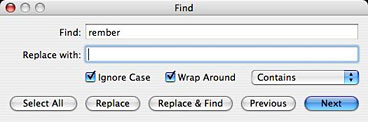
There is a serviceable Find & Replace dialog, albeit not nearly as powerful and configurable as the ones in Tex Edit Plus or the pure text editor, TextWrangler.
However, to be fair, Bean is not pitched as a text editor. It works very well within its limitations for general word processing, and it looks great. It also has plenty of potential to grow. If that sounds like something that would appeal, it's a free 1.7 MB download.
In summary, for the present, Bean is a small, easy-to-use word processor that features:
- a live word count
- a Get Info panel for in-depth statistics
- a zoom-slider to easily change the view scale
- an Inspector panel with lots of sliders
- date-stamped backups
- autosaving
- a page layout mode
- an alternate colors option (e.g., white text on blue)
- an option to show invisible characters (tabs, returns, spaces)
- selection of text by text style, paragraph style, color, etc.
- a floating windows option (like Stickies has)
- easy to use menus
- remembers cursor position (excluding .text, .html, and .webarchive formats)
- all of Cocoa's good stuff (dictionary, word completion, etc.)
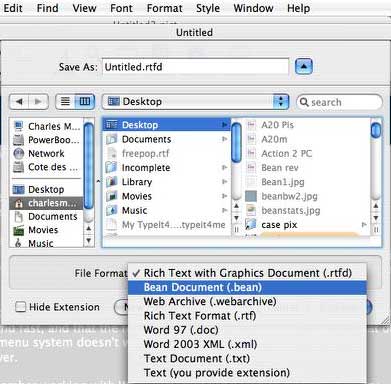
Bean supports several file formats, and determines an existing file's format by looking at the file name's extension. For example, an MS Word document named 'My Great Novel' will not load properly unless you add the '.doc' extension to the name.
File Formats
Bean natively reads and writes these file formats:
- .rtf format (rich text)
- .rtfd format (rich text with graphics)
- .bean format (identical to .rtfd)
- .txt format
- .html format (as source code)
- .webarchive format (Apple's web archive format)
Bean transparently imports and exports these formats:
- .doc format (MS Word '97, minus images, margins, and page size)
- .xml format (MS Word 2003 XML, minus images)
Bean can export all of the above formats to this format:
- .html (web page format, minus images)
More on supported file formats:
RTFD Format
Rich Text With Graphics format allows you to combine formatted text with graphics (or other attachments). This format is accessible to any computer running OS X (through Text Edit), but cannot be opened natively on Windows or Unix machines.
BEAN Format
Bean format is identical to RTFD, except for the extension. A file ending in '.bean' will open up in Bean automatically. Change the extension to '.rtfd' if you wish to share your file with another user of Apple computers.
RTF Format
Rich Text format allows formatted text, but cannot save graphics or attachments (use RTFD format if graphics are necessary). RTF files can be opened by most word processors.
Word 97 Format (.doc)
Bean uses Apple's conversion services to open and save Microsoft Word 97 format files. Note that with this format in Bean, document-level formatting (page size, margins) and graphics are neither read-in nor saved. Bean will warn you about this before overwriting a file originally created in Word.
Word 2003 XML Format (.xml)
Microsoft Word 2003 XML Format (WordML) behaves similarly to Word format, except that document-level formatting is read-in and saved (although graphics are not). Users of versions of Microsoft Word previous to Word 2003 may not be able to open this format.
WebArchive
An archive format for web pages (generally, HTML files) that saves graphics. Safari can save web pages to this format.
Web Format (.html)
Bean reads and saves HTML format as 'source code.' Bean can also export other formats to HTML format (under File > Export to HTML). It will not export images, although it will export HTML references to the images in the HTML code.
Text Format (.txt)
Bean reads in and saves most Unicode text files without any problem. For legacy encodings, you will be asked to specify the encoding. Bean will attempt to read in unknown file formats as text, so you can at least get an idea of what the contents of the file are. Note: page, margin, and paragraph formatting are not saved in TXT files.
New in Version 0.9.3a (16 May 2007)
Enhancements
- added "Text (you provide extension)" file type. Bean will now open and save text files with arbitrary filename extensions (that is, extensions that are not '.txt').
- added keyboard shortcut to Float Window menu item (ctrl + cmd + F). (Note: cmd = 'Apple' key)
- added keyboard shortcut to 'Location of Last Edit' (ctrl + cmd + L)
- added more language options for Smart Quotes (such as inward-pointing brackets for German)
- select File > Send to Mail to open a new message in Mail with your document as an attachment
- Changes
- switched to 'Unified' toolbar look
- revised some alert messages text to be less alarmist and more informative (particularly, when opening and saving plain text documents)
- changed Bean's Unique Creator Code (which is used internally by OS X) to bEAN, because BEAN is not permitted and Bean was already taken. The '.bean' filename extension should still work fine.
- improved Accessibility for most controls in Bean when using Voice Over
- added menu item under Format for preset Line spacings (for convenience, and to improve Accessibility)
- Bean now uses latest version of KBWordCountingTextStorage. Thanks Keith!
- added UTI codes to some filetypes
Bug fixes:
- fixed a problem with Bean's use of centimeters vs. inches in the margin and tabstop sheets; Bean now looks at System Preferences > International > Formats > Measurement Units when a document is loaded to determine whether to use cm's or inches
- Inspector controls are not enabled until at least one character is typed; this fixes a problem where controls could be changed but no change was being applied to text because there was no text!
- Inspector now displays correct information when Inspecting text files
- fixed a display bug: vertical scroller is now placed correctly when horizontal scroller is present
- fixed a bug: Edit > Convert > to Smart Quotes now works even if Smart Quotes is un-enabled in Preferences
- fixed a problem where the Smart Quotes popup button could be un-enabled in Preferences, but it should remain enabled since Edit > Convert > Smart Quotes uses this even when Smart Quotes is un-enabled
- fixed bug where convert to Smart Quotes would not undo when file was .txt
- added menu validation for Edit > Convert > items to indicate all text vs. selected text in menu item
- fixed a problem where saving a rich document to plain text wouldn't discard attributes or images if document was 'Read Only'
- fixed a problem where Bean would hang at launch if 'Arial' font was not found
System requirements: Mac OS X 10.4 or later
System Support: PPC/Intel
Join us on Facebook, follow us on Twitter or Google+, or subscribe to our RSS news feed
Charles Moore has been a freelance journalist since 1987 and began writing for Mac websites in May 1998. His The Road Warrior column was a regular feature on MacOpinion, he is news editor at Applelinks.com and a columnist at MacPrices.net. If you find his articles helpful, please consider making a donation to his tip jar.
Links for the Day
- Mac of the Day: Motorola StarMax 3000, introduced 1999.09.07. This inexpensive clone used lots of off-the-shelf parts.
- Support Low End Mac
Recent Content
About LEM Support Usage Privacy Contact
Follow Low End Mac on Twitter
Join Low End Mac on Facebook
Favorite Sites
MacSurfer
Cult of Mac
Shrine of Apple
MacInTouch
MyAppleMenu
InfoMac
The Mac Observer
Accelerate Your Mac
RetroMacCast
The Vintage Mac Museum
Deal Brothers
DealMac
Mac2Sell
Mac Driver Museum
JAG's House
System 6 Heaven
System 7 Today
the pickle's Low-End Mac FAQ
Affiliates
Amazon.com
The iTunes Store
PC Connection Express
Macgo Blu-ray Player
Parallels Desktop for Mac
eBay

