
Miscellaneous Ramblings
Miscellaneous Ramblings Review
FileMaker Pro 8.5 Well Worth Checking Out
Charles Moore - 2007.04.30 - Tip Jar
FileMaker is to computer desktop database programs on both the Mac OS and Windows platforms what Microsoft Word is to word processors - the de facto industry standard. FileMaker is made by a wholly owned subsidiary of Apple Inc. that was spun out of Apple's old Claris software division back in the mid 90s.
For folks who use their computers for business, in educational institutions, scientific research, software development, or any other endeavor where efficient organization, storage, and retrieval of large volumes of data are required, FileMaker can be one of the most indispensable programs in your suite of production tools. And that just scratches the surface of what FileMaker is capable of.
 The current FileMaker 8.5 comes in a
Pro version (primarily for database users) and a Pro Advanced
version (targeted to developers). The Pro Advanced version is the
one I checked out for this review.
The current FileMaker 8.5 comes in a
Pro version (primarily for database users) and a Pro Advanced
version (targeted to developers). The Pro Advanced version is the
one I checked out for this review.
FileMaker Pro 8.5 Advanced has all the features of FileMaker Pro 8.5 plus a suite of advanced development and customization tools that facilitate the design and development of more powerful, more customized database solutions.
Developer Utilities in FileMaker Pro Advanced consist of a series of tools that enable you to create and deploy standalone database solutions tailored to specific needs (an example of a FileMaker Pro developed application is the Sophie's Cards greeting card creation program, my review of which you can read on Applelinks.
The Advanced version of FileMaker Pro supports menu customization, custom tooltips, custom right-click context menus, reporting enhancements, and has an enhanced script debugger with features like a watch window, stack traces, and the ability to disable individual script steps. You can copy and paste fields, relationships, script steps and whole scripts, or entire tables within the same file or from one file to another. Settings and preferences applied to a runtime solution can be saved and reused over multiple solutions.
With FileMaker Pro's Developer Utilities you can:
- Produce custom runtime solutions within FileMaker Pro Advanced
- Select the databases to be included in your solutions
- Name your runtime solutions to reflect your own branding
- Add your own logo or graphic to the closing splash screen of your solution
The Developer Utilities also enable you to produce solutions for operation on kiosks, rename entire database file sets, and prevent users from modifying the design or structure of your databases.
A database should be designed to facilitate consistent data entry and retrieval, and to reduce the existence of duplicate data among the database tables. Relational database tables work together to ensure that the correct data is available when you need it.
FileMaker Pro is quite flexible, so the decision to store data in a single file or in multiple files is often one of packaging and convenience. Data stored in tables is very easily shared between tables in the same file and tables in external files using relationships.
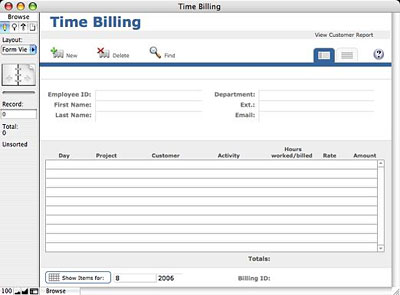
I hadn't actually used FileMaker since an ancient Mac OS Classic version (forget the number) from back in the mid 90s, so I was interested in checking out how much the program had evolved over the past decade. The short answer is "a lot." Indeed, in its OS X Universal Binary version 8.5 iteration, it's essentially a completely different program from the one I used back in the day, so the minimal experience I had with the application back then was pretty much irrelevant, obliging me to climb the learning curve again from scratch.
Consequently, I can't claim either the database expertise or experiential frame of reference to conduct a really comprehensive review of FileMaker Pro 8.5 Advanced. Indeed, a "comprehensive" review of this large and powerful program's capabilities would present a formidable challenge for anyone. What I can offer is some user impressions of what the program is like to use for a FileMaker novice - and what has changed in this version compared with its predecessors.
According to FileMaker Inc., the FileMaker Pro 8.5 family has only a few changes from version 8.0, but they are quite significant. All members of the FileMaker Pro family of applications feature Universal Application support and run on Mac OS X on Intel-based Macs delivering up to 116% faster performance vs. running on PowerPC, based on the company's benchmark testing (for FileMaker Pro 8.5 and FileMaker Server 8.0 v4). The new versions also run on Power PC-based Macs (G3 or better, but G3 upgrade cards are not supported), Windows 2000, and Windows XP.
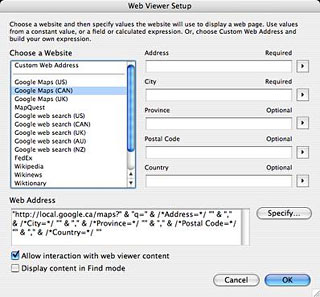
The other big news is FileMaker Pro 8.5's new Web Viewer control, which can incorporate in FileMaker solutions information or applications via the Web on demand, including real-time content based on the information in your database. Data in specified record fields, such as customer's address or product name, will drive the URL in the Web Viewer. Set it up once, and there will be a live link for every record in the database. Possibilities include street maps based on a customer address field, shipping status based on a shipment tracking number, and stock performance charts based on a stock symbol.
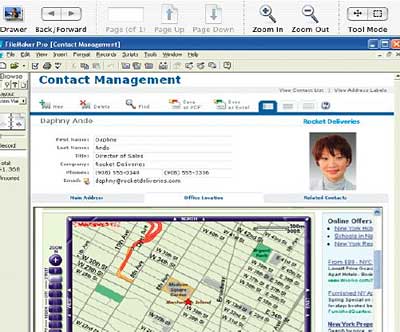
You can view virtually any type of content in the Web Viewer that you can view in a regular Web browser, including HTML, PDF, QuickTime, Java applets, Flash and SVG charts and PHP charting classes, fillable forms, and, on Windows platform, binary files such as Word or Excel as well.
However, Web Viewer can't entirely replace a browser, because it doesn't support features like an address book, history, bookmarks, preferences, menus, and so on, although it is possible to interact with a browser using the new Set Web Viewer script step.
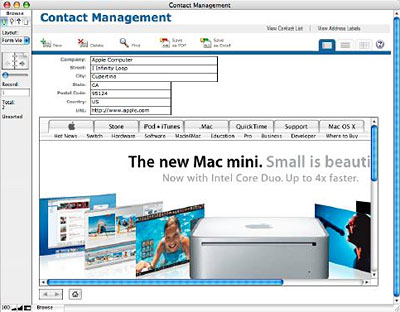
The Web Viewer feature will be of particular interest to developers, because it makes it much easier to integrate databases with the Web.
For lots of ideas on how to benefit from FileMaker Web Viewer, visit the FileMaker Web Viewer Gallery.
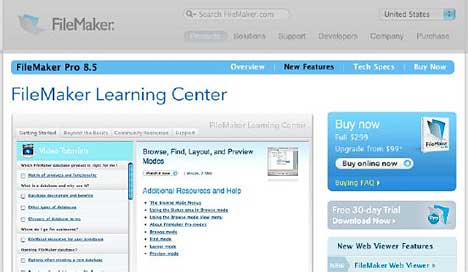
Also new in version 8.5 is the FileMaker Learning Center, which is accessed from the Help Menu. It provides a selection of free online resources to help users improve their FileMaker skills, or, in the case of folks like me, acquire some. At the Learning Center, you will find video tutorials geared to help both new and advanced FileMaker users, as well as how-tos, FileMaker community resources, and the FileMaker Technical Information Center, all from within a FileMaker Pro 8.5 database.
FileMaker Pro 8.5's new Layout Support allows you to assign a unique name to almost any object or layout: Web Viewer objects, field objects, text objects, geometric objects, portals, individual tabbed panels, groups, etc. Since these objects are named, you can use the name and script steps to enhance the power and convenience of your FileMaker solutions. For example, the Go To Object scripts step performs an action on a named object, such as making a particular tab panel active.
The GetLayoutObjectAttribute function finds out the name of the active object and returns to its object type, balance, source, content, state, and more.
The Set Viewer script step lets you provide simple navigational controls for the Web Viewer. Options include reset, reload, go forward, go back, or go to specific URL - the same functions available in Safari and Internet Explorer. The Reload control, for example, would be useful in a FileMaker solution showing a real-time currency exchange rates from the Web, which are updated frequently.
The list function finds out all the values in the database associated with a particular field. One way to use the function is to create a tool that displays the values. To quickly view all company names in the database, for example, a user could simply hover the mouse over the company name field. To see all parts in a shipment, the user could hover the mouse over the Items field.
If you'd like to distribute a database to non-FileMaker users, creating a Runtime application is a great solution. FileMaker Runtime applications make it easy to distribute off-the-shelf, royalty-free FileMaker solutions that allow users to access FileMaker database information but limit their ability to make modifications. Runtime applications can include the FileMaker Web Viewer capabilities.
Runtime applications cannot be shared over a network and do not include the ability to create Adobe PDF files.
Now that we're up to speed on the new features and capabilities in FileMaker Pro 8.5 Advanced, back to bringing me up to speed on using this program.
Installation is pretty straightforward. Insert the CD, type in the registration key when prompted, and let the installer do its stuff. No reboot or log out is required.
The first startup on my 1.33 GHz PowerBook took just short of forever, but subsequent startups thankfully proceed with greater dispatch. Once the program is up and running, a dialog appears asking if you would like to create a new database from one of the program's library of templates, which are selected from a pulldown menu.
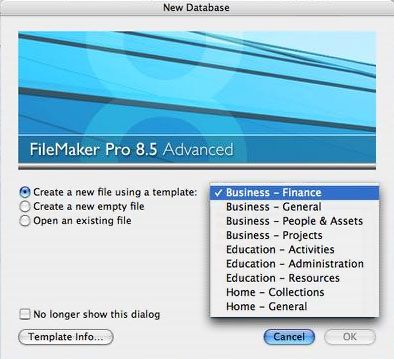
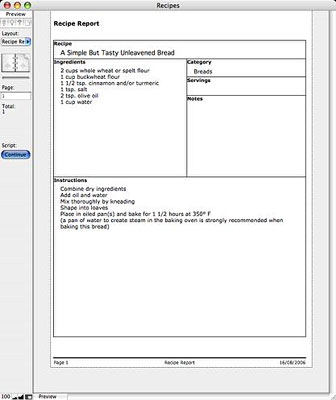
Descriptions are provided, along with helpful complexity and skill level required ratings. I figured it would be best to start with something simple that I could relate to in a real world context, such as the Recipes category, under the heading "Home - General", rated for "Easy/inexperienced", which sounded just about right.
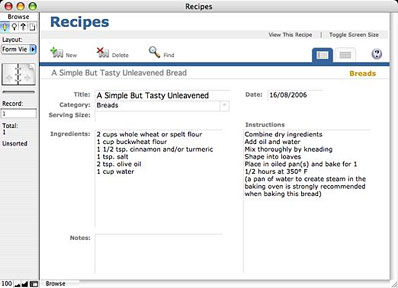
The template opened up, I pasted the data from a bread recipe I like into the fields, and presto! - there was the first entry in my FileMaker Recipes database. It's sort of like using a nine-pound maul hammer to swat mosquitoes, but it does provide a (very) rudimentary example of what can be done with database software.
You can also create a database from scratch, incorporating tables, fields, validation rules, and so forth, using FileMaker Pro's visual relationship builder to define relationships between various tables.
FileMaker Pro 8.5 can also import and export Microsoft Excel's native XLS file format and includes mail-merge capability for sending batches of emails easily (text-only). It supports live spell-checking (with Word-style squiggly underlining of flagged words) and auto-completion of values entered in fields. And much more
FileMaker Pro is touted as the easiest-to-use individual or workgroup database solution available, and while I can only see the proverbial tip of the iceberg, as it were, I can well believe it. I'm no authority on database applications, but based on a couple of weeks trying out this program, if you're thinking about investing in one or upgrading from an earlier version of FileMaker (especially if you can make good use of the Web Viewer feature), either FileMaker Pro 8.5 or FileMaker Pro 8.5 Advanced will be well worth checking out.
Minimum system requirements:
Mac OS
- Intel based Macintosh processors or Power PC (G3 or higher, but not Macs upgraded to G3)
- 256 MB of RAM
- CD-ROM drive and hard drive
- Mac OS X 10.3.9 or Max OS X 10.4
Windows
- Pentium III 500 MHz or higher
- 256 MB of RAM
- CD-ROM drive and hard drive
- SVGA (800 x 600) or higher resolution video adapter and display
- Windows 2000 (Service Pack 4), Windows XP (Service Pack 2)
For All Platforms
- Networking: TCP/IP
*Instant Web Publishing: A host computer with continuous access to the Internet or intranet via TCP/IP; access to the Internet requires an Internet service provider; FileMaker does not provide an Internet account for you; limited to five concurrent web sessions
FileMaker Pro 8.5, $299
FileMaker Pro 8.5 Advanced, $499
Upgrades
- $99 after rebate (from FileMaker Pro 8)
- $179 from FileMaker Pro 7 and FileMaker Pro 6
- Advanced $99, after rebate (from FileMaker Pro 8 Advanced)
- Advanced $299 from FileMaker Developer 7 and FileMaker Developer 6
Join us on Facebook, follow us on Twitter or Google+, or subscribe to our RSS news feed
Charles Moore has been a freelance journalist since 1987 and began writing for Mac websites in May 1998. His The Road Warrior column was a regular feature on MacOpinion, he is news editor at Applelinks.com and a columnist at MacPrices.net. If you find his articles helpful, please consider making a donation to his tip jar.
Links for the Day
- Mac of the Day: Motorola StarMax 3000, introduced 1999.09.07. This inexpensive clone used lots of off-the-shelf parts.
- Support Low End Mac
Recent Content
About LEM Support Usage Privacy Contact
Follow Low End Mac on Twitter
Join Low End Mac on Facebook
Favorite Sites
MacSurfer
Cult of Mac
Shrine of Apple
MacInTouch
MyAppleMenu
InfoMac
The Mac Observer
Accelerate Your Mac
RetroMacCast
The Vintage Mac Museum
Deal Brothers
DealMac
Mac2Sell
Mac Driver Museum
JAG's House
System 6 Heaven
System 7 Today
the pickle's Low-End Mac FAQ
Affiliates
Amazon.com
The iTunes Store
PC Connection Express
Macgo Blu-ray Player
Parallels Desktop for Mac
eBay

