
Miscellaneous Ramblings
What's the Minimum Mac or 'Book for Mac OS X 10.4 Tiger?
Charles Moore - 2007.01.22 - Tip Jar
Every so often, it's interesting to take stock of what the minimum practical Mac is for running the latest versions of Mac OS system software and popular applications. It's always something of a moving target, and individual users have different levels of tolerance for the sluggish and cranky performance you get running too much OS on too little Mac.
Dan Knight, Low End Mac's publisher, posed the question last week: "If you were setting someone up with a low-end Mac on a tight budget, what would you pick? How would you configure it?"
Actually, I'm right now looking to set up my daughter with a low-priced but decent-performing Mac to replace her old 450 MHz iMac, whose power supply failed last week. That iMac had been in intensive use and rarely shut off since it was new, and it deserves to rest in peace, but the fall-back machine so far has been a 233 MHz Bondi iMac, which is not adequate by any stretch of the imagination for the sort of work it's being pressed into.
It wouldn't be quite so challenged if she wasn't insisting on running OS X 10.4 Tiger on it - OS X 10.3.9 is the optimum OS X version for older, slower Macs, but she won't hear of running anything but the latest version of the OS, and for that she really needs a faster computer.
Needs and tastes are all over the map, and it's not really possible to draw a line in the sand as to what the lowest-spec. computer you can tolerate using is. I know what it is for me, but there will be others who will no doubt differ.
Dan suggests budget Macs might fit into four separate categories:
1. Field computer, a complement to a desktop Mac.
By my lights, that could be any dual USB iBook if one is content running OS X 10.3.9, or at least a 700 MHz G3 iBook with the RAM maxed out at 640 MB if you insist on running Tiger.
I have a 700 MHz G3 with 640 MB of RAM, and it runs Tiger quite nicely, although really processor-intensive applications like iListen are sluggish. 700 MHz iBooks with CD-ROM drives have dropped below $300 on the used market, with 800 and 900 MHz models in the $350 - $495 range. I've even seen early G4 iBooks offered at under $400.
An upmarket choice would be a 12" 867 MHz G4 PowerBook, versions of which have dropped below $600 on the used market.
2. Road warrior all-around use notebook.
In this category, I would say a PowerBook G4 or iBook G4 of greater than 1 GHz clock speed. My 550 MHz G4 upgraded Pismo PowerBook is still an awesome machine and offers surprisingly lively performance, but I would no longer want to use it as my primary production workhorse. 12" 1 GHz PowerBook G4 units are going for about $650, and 15" titanium G4 PowerBooks around $100 more.
Actually, G4 iBooks can fill the bill here quite nicely for even less money.
3. Budget desktop system for a Windows switcher who will hold on to existing monitor and peripherals.
What else other than a Mac mini? Any flavor of mini should have no trouble supporting decent performance in Tiger, and they're the no-brainer choice if you already have serviceable or better peripherals - PC or Mac. The recent Core Duo minis will be the most fun, but a G4 model can still acquit itself very satisfactorily. The trouble is that Mac minis seem to hold their value remarkably well, with 1.25 GHz G4 refurbs going for $450 or so, which is only $150 less than you can buy a brand new 1.66 GHz Core Duo model for.
4. Budget desktop system from someone who is just starting with computers or whose old Mac or Windows PC is so outdated that there's no sense bringing over any peripherals.
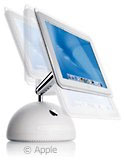 In this
category, I would suggest either a 700
MHz G4 iMac (about $350) or an
867 MHz "Quicksilver" PowerMac G4
tower (around $550, but you'll
have to find a monitor). eMacs are
also a possibility, although I'm not personally a fan.
In this
category, I would suggest either a 700
MHz G4 iMac (about $350) or an
867 MHz "Quicksilver" PowerMac G4
tower (around $550, but you'll
have to find a monitor). eMacs are
also a possibility, although I'm not personally a fan.
The G4 iMac is the real value machine in low-end desktops, with decent power and a lot of elegance that the eMac (IMHO) is lacking.
For all, I'm assuming Tiger will be the OS, although you will get more lively performance on the slower models with OS X 10.3.9 - and if one is content to run OS X 10.3.9 in perpetuity, the minimum hardware requirement can be ratcheted down to (my personal threshold anyway) approximately a 500 MHz G3 with 640 MB of RAM.
These are my arbitrary evaluations, and I'm sure some will disagree.
In practice, I've noted that many folks buying a budget Mac are inclined to go with whatever OS is installed at the time of purchase, perhaps adding any free updates that haven't already been installed. Personally, these days I wouldn't want to use anything less than Panther (OS X 10.3.x). I wasn't really happy with Jaguar (10.2.x) even when it was the current state of the art, and I continued to use Mac OS 9.2.2 for production until Panther was released.
The State of the Classic Mac OS
Speaking of which, I'm still quite happy in OS 9.2.2 for doing a lot of things - but not Web browsing, since there is no Classic browser available that I find satisfactory. However, if you don't mind using clunky, out-of-date browsers and don't have any other support issues for applications you need, Mac OS 9.2.2 will still give you a lot better performance with a slow Mac than any version of OS X. It always blows me away when I boot my iBook or Pismo into OS 9 how fast and smooth and slick the Classic interface and Classic applications are.
Software Suggestions
As for applications on a budget, (back in the OS X world), there are a ton of absolutely great free browsers: Eudora's ad-supported version is my email client fave, or if you prefer, Thunderbird is free. AbiWord makes a good free word processor, although I'm partial to Tom Bender's $15 shareware Tex-Edit Plus for most of my word crunching. Another really great text editor - Bare Bones Software's TextWrangler is freeware (and still being frequently updated).
For image editing, if you can't swing $59.95 for Color It! 4.5 (see Charles Moore Reviews Color It! 4.5 For Mac OS X), try Seashore or ImageJ (see ImageJ: Advanced Image Editing at a Low-end Price (Free)), both of which are powerful and free (Open Source). And don't forget ToyViewer, which I wouldn't want to be without even if it wasn't free (see ToyViewer, a Cool Free Graphics Tool for OS X).
For a desktop database/information manager, Devon Technologies' $20.00 DEVONnote is a great value.
OnyX is a slick and professional system maintenance app that's free, and the free basic ("lite") mode of RBrowser is a good, solid FTP client.
Enjoy!
Join us on Facebook, follow us on Twitter or Google+, or subscribe to our RSS news feed
Charles Moore has been a freelance journalist since 1987 and began writing for Mac websites in May 1998. His The Road Warrior column was a regular feature on MacOpinion, he is news editor at Applelinks.com and a columnist at MacPrices.net. If you find his articles helpful, please consider making a donation to his tip jar.
Links for the Day
- Mac of the Day: PowerBook 500 Series, introduced 1994.05.16. 'Blackbird' includes a 25 to 33 MHz 68040 along with smart batteries and grayscale or color displays.
- Support Low End Mac
Recent Content
About LEM Support Usage Privacy Contact
Follow Low End Mac on Twitter
Join Low End Mac on Facebook
Favorite Sites
MacSurfer
Cult of Mac
Shrine of Apple
MacInTouch
MyAppleMenu
InfoMac
The Mac Observer
Accelerate Your Mac
RetroMacCast
The Vintage Mac Museum
Deal Brothers
DealMac
Mac2Sell
Mac Driver Museum
JAG's House
System 6 Heaven
System 7 Today
the pickle's Low-End Mac FAQ
Affiliates
Amazon.com
The iTunes Store
PC Connection Express
Macgo Blu-ray Player
Parallels Desktop for Mac
eBay

