
Miscellaneous Ramblings
Miscellaneous Ramblings Review
$20 i-Rocks IR-9200 USB 2.0 2.5" Drive Enclosure a Good Value
Charles Moore - 2006.12.04 - Tip Jar
External hard drives are my media of choice for file backups and transfers between machines when a network connection is not available or practical.
CDs and DVDs are fine for backups and sending in the mail or passing on in other ways, so long as you don't have too high expectations about their archival longevity, but burning stuff to optical disks is still a hassle and annoyingly slow, even given the advances that have been made in disk-burning technology (I have an 8x SuperDrive).
I much prefer the fast transfer speeds, easy editability, low-hassle convenience, and relatively good archival stability of a hard drive.
My Previous External FireWire Hard Drive
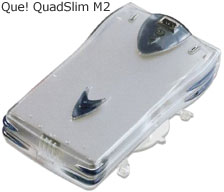
I've had a QPS Que! QuadSlim M2 FireWire hard drive for about five years (you can still find a review in the Miscellaneous Ramblings archives). It's basically a 2.5" ATA hard drive in a sleek little FireWire housing that looks a bit like a Star Trek Tricorder, the M2 (which is no longer available) came in a four capacities: 6 GB, 10 GB, 20 GB, and 30 GB.
Mine was originally a 6 GB unit, but the original Fujitsu 2.5" hard drive failed without warning after only a few months of relatively light use - that was the only hard drive failure I've experienced in 14 years of Mac use. Since then I've swapped in other 2.5" ATA hard drives of varying capacities, and currently the M2 housing holds the original 20 GB Toshiba drive that came in my Pismo PowerBook, which now has a 40 GB Toshiba 5400 RPM drive.
Aside from the hard drive failure (presumably due to a defective drive), the M2 has been a dependable tool that I've used a lot, and it remains one of my main backup media. I also keep a bootable copy of OS X 10.3.9 on the drive, from which I can boot any of my three workhorse computers - a 17" G4 PowerBook, the G4-upgraded Pismo, and my 700 MHz G3 iBook.
Why Choose FireWire?
Booting from a FireWire drive is a very convenient option for troubleshooting and drive maintenance. The drive is hot pluggable and bus-powered, at least on machines that support powered FireWire buses. (Unfortunately, the CardBus FireWire adapter PC card in my WallStreet doesn't support bus power.)
With FireWire, data transfers are pleasantly quick, and I highly recommend FireWire external hard drives to any Mac user with a FireWire compatible computer.
However, all current and recent Macs support USB 2.0, which supports data transfer speeds in the same ballpark as FireWire 400 (see FireWire vs. USB 2.0 for an explanation of why 480 Mbps USB 2.0 drives have lower throughput that 400 Mbps FireWire drives). Hopefully, Apple will continue to support FireWire on Macs indefinitely, although it has been dropped from the iPod line for quite some time now.
USB 2.0 is a viable alternative to FireWire for many Mac users for connecting to external storage media, with a wide selection of USB 2.0 hard drives and drive enclosures available.
While USB 2.0 nominally supports a 480 Mbps data transfer rate, in practice it has no real-world advantage over standard FireWire's 400 Mbps transfer rate.
FireWire still has the advantage of being bootable on pre-Intel Macs with built-in FireWire. (While it is technically possible to make USB 2.0 bootable on these Macs, that involves some tedious geekery, so it's not something the average user should attempt.) Ergo, if you need bootability, it's a no-brainer to go with FireWire.
Why You Might Want USB 2.0 as Well
However, if your your primarily interest is in storage media connectivity, then USB 2.0 will do the job for you, and USB 2.0 drives have one advantage over FireWire that should be of interest to users of older Macs that support USB 1.1 but not FireWire - USB 2.0 drives can be mounted and used to transfer files (albeit at a substantially slower speed).
Actually, the transfer rate is not as glacially slow as you might expect.
The i-Rocks IR-9200 2.5" Hard Drive Enclosure
 After
that long introductory exposition we finally get to the subject of
this review: the i-Rocks IR-9200 2.5" Hard Drive Enclosure, which
supports USB 2.0 with OS X 10.2 or later, as well as USB 1.1
back to Mac OS 8.6 (plus Windows, of course).
After
that long introductory exposition we finally get to the subject of
this review: the i-Rocks IR-9200 2.5" Hard Drive Enclosure, which
supports USB 2.0 with OS X 10.2 or later, as well as USB 1.1
back to Mac OS 8.6 (plus Windows, of course).
I've tested several i-Rocks products and have been favorably impressed by all of them, especially at their modest prices. This drive enclosure is no exception and often retails for about US$20.
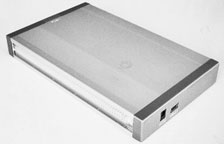
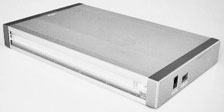
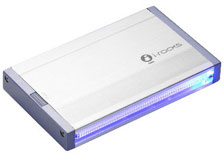
Available in silver or black anodized aluminum with a "hairline" motif, the IR-9200 harmonizes nicely in appearance with any modern Mac, and the silver model I tested looks right at home beside my 17" aluminum PowerBook.
These hard drive enclosures are a great way to make use of hard drives pulled when upgrading to a higher capacity unit in your computer, and I've installed a 4.5 GB Fujitsu drive (which I think originally came in a Lombard PowerBook) in the review unit. The IR-9200 will accommodate any 2.5" IDE/ATA hard drive up to 9.5mm thick.
 The i-Rocks IR-9200 comes bundled with a USB 2.0 cable, a
USB 2.0 to DC jack 5V power cable, a very handy little drawstring
carry pouch, and a software mini-CD (about which more in a
moment).
The i-Rocks IR-9200 comes bundled with a USB 2.0 cable, a
USB 2.0 to DC jack 5V power cable, a very handy little drawstring
carry pouch, and a software mini-CD (about which more in a
moment).
Installing the hard drive in the enclosure was a snap - which is good, because there is no drive installation documentation provided in the product package.
The whole process took less than five minutes, and only a small Phillips screwdriver was required for tightening the four supplied screws that secure the hard drive to the IR-9200 internal chassis.
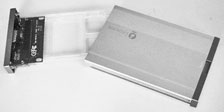
No tools are required to open the case; just press the release button, and the inside chassis slides out.
 Carefully insert the multi-pin plug on the end
of the hard drive into the socket on the IR-9200's circuit board,
to install and tighten the four screws, and slide the assembly back
into the enclosure case.
Carefully insert the multi-pin plug on the end
of the hard drive into the socket on the IR-9200's circuit board,
to install and tighten the four screws, and slide the assembly back
into the enclosure case.
Before using the IR-9200 (for USB 2.0 support) , it's necessary to install supporting driver software on your Mac. A mini-CD containing driver installers for both OS X 10.2 up and several versions of the classic Mac OS comes in the box, but that presents a problem for owners of Macs with slot-loading CD or DVD drives, since these do not support mini-CDs (and attempting to use a mini-CD in a Mac slot-loading drive can cause drive damage, so don't do it). Unfortunately, there is no warning in the IR-9200 documentation about this issue.
My workaround was to use a big old QPS tray-loading FireWire CD-burner that I have, which handled the mini-CD with no hassle.
The driver can also be downloaded from http://www.i-rocksusa.com/support.html, and a somewhat out-of-date but still useful manual on driver installation in PDF format can be downloaded from the same page.
If you don't have a tray-loader available, the best strategy is probably to find someone who does and get them to copy and burn the driver installer files onto a standard CD for you. Driver installation was straightforward, with a standard OS X software installer, and there are instructions in the included user's manual if you need them, but it was pretty intuitive. (This is a hassle that you don't have to deal with using FireWire drives.)
When I connected the IR-9200 to the 17" PowerBook, I found that strangely there was not enough bus power to spin up the drive, so it was necessary to use the supplied USB 2.0 to DC jack 5V power cable plugged into my self-powered USB hub. Once sufficient power had been applied, the Fujitsu drive spun up nicely. The IR-9200 has two activity LED indicators, a cool blue one for power, and a red one for drive access status. I've found that the USB 1 ports in both my Pismo and iBook supply enough juice to spin up the drive without any help.
I didn't do any formally timed comparisons, but file transfer speed seems to be not that different from my external FireWire 400 hard drive.
At just $19.99, the i-Rocks IR-9200 USB 2.0 drive enclosure represents an good value in an external hard drive housing. The hard drive installer installation was simple (aside from the mini-CD issue), it works well, and it looks great.
 In the
negative column, the lack of installation documentation for the
drive installation is the biggest shortcoming, along with the lack
of any warning about the mini-CD and its potentially destructive
incompatibility with slot-loading optical drives. If i-Rocks is
serious about supporting the Mac, they should ship the software
driver installer software on a standard CD.
In the
negative column, the lack of installation documentation for the
drive installation is the biggest shortcoming, along with the lack
of any warning about the mini-CD and its potentially destructive
incompatibility with slot-loading optical drives. If i-Rocks is
serious about supporting the Mac, they should ship the software
driver installer software on a standard CD.
The necessity of using two USB cables with some Macs (so the drive obtains sufficient power) is also a bit of a pain, as open USB ports are usually at a premium for most of us. There is an optional 5V/2.3A power adapter available, and that would be a more convenient way to go.
Link: i-Rock IR-9200 2.5 " HDD Enclosure
External hard drives are my media of choice for file backups and transfers between machines when a network connection is not available or practical.
CDs and DVDs are fine for backups and sending in the mail or passing on in other ways, so long as you don't have too high expectations about their archival longevity, but burning stuff to optical disks is still a hassle and annoyingly slow, even given the advances that have been made in disk-burning technology (I have an 8x SuperDrive).
I much prefer the fast transfer speeds, easy editability, low-hassle convenience, and relatively good archival stability of a hard drive.
My Previous External FireWire Hard Drive
I've had a QPS Que! QuadSlim M2 FireWire hard drive for about five years (you can still find a review in the Miscellaneous Ramblings archives). It's basically a 2.5" ATA hard drive in a sleek little FireWire housing that looks a bit like a Star Trek Tricorder, the M2 (which is no longer available) came in a four capacities: 6 GB, 10 GB, 20 GB, and 30 GB.
 Mine
was originally a 6 GB unit, but the original Fujitsu 2.5" hard
drive failed without warning after only a few months of relatively
light use - that was the only hard drive failure I've experienced
in 14 years of Mac use. Since then I've swapped in other 2.5" ATA
hard drives of varying capacities, and currently the M2 housing
holds the original 20 GB Toshiba drive that came in my Pismo PowerBook, which now has a 40 GB
Toshiba 5400 RPM drive.
Mine
was originally a 6 GB unit, but the original Fujitsu 2.5" hard
drive failed without warning after only a few months of relatively
light use - that was the only hard drive failure I've experienced
in 14 years of Mac use. Since then I've swapped in other 2.5" ATA
hard drives of varying capacities, and currently the M2 housing
holds the original 20 GB Toshiba drive that came in my Pismo PowerBook, which now has a 40 GB
Toshiba 5400 RPM drive.
Aside from the hard drive failure (presumably due to a defective drive), the M2 has been a dependable tool that I've used a lot, and it remains one of my main backup media. I also keep a bootable copy of OS X 10.3.9 on the drive, from which I can boot any of my three workhorse computers - a 17" G4 PowerBook, the G4-upgraded Pismo, and my 700 MHz G3 iBook.
Why Choose FireWire?
Booting from a FireWire drive is a very convenient option for troubleshooting and drive maintenance. The drive is hot pluggable and bus-powered, at least on machines that support powered FireWire buses. (Unfortunately, the CardBus FireWire adapter PC card in my WallStreet doesn't support bus power.)
With FireWire, data transfers are pleasantly quick, and I highly recommend FireWire external hard drives to any Mac user with a FireWire compatible computer.
However, all current and recent Macs support USB 2.0, which supports data transfer speeds in the same ballpark as FireWire 400 (see FireWire vs. USB 2.0 for an explanation of why 480 Mbps USB 2.0 drives have lower throughput that 400 Mbps FireWire drives). Hopefully, Apple will continue to support FireWire on Macs indefinitely, although it has been dropped from the iPod line for quite some time now.
USB 2.0 is a viable alternative to FireWire for many Mac users for connecting to external storage media, with a wide selection of USB 2.0 hard drives and drive enclosures available.
While USB 2.0 nominally supports a 480 Mbps data transfer rate, in practice it has no real-world advantage over standard FireWire's 400 Mbps transfer rate.
FireWire still has the advantage of being bootable on pre-Intel Macs with built-in FireWire. (While it is technically possible to make USB 2.0 bootable on these Macs, that involves some tedious geekery, so it's not something the average user should attempt.) Ergo, if you need bootability, it's a no-brainer to go with FireWire.
Why You Might Want USB 2.0 as Well
However, if your your primarily interest is in storage media connectivity, then USB 2.0 will do the job for you, and USB 2.0 drives have one advantage over FireWire that should be of interest to users of older Macs that support USB 1.1 but not FireWire - USB 2.0 drives can be mounted and used to transfer files (albeit at a substantially slower speed).
Actually, the transfer rate is not as glacially slow as you might expect.
The i-Rocks IR-9200 2.5" Hard Drive Enclosure
After that long introductory exposition we finally get to the subject of this review: the i-Rocks IR-9200 2.5" Hard Drive Enclosure, which supports USB 2.0 with OS X 10.2 or later, as well as USB 1.1 back to Mac OS 8.6 (plus Windows, of course).
I've tested several i-Rocks products and have been favorably impressed by all of them, especially at their modest prices. This drive enclosure is no exception and often retails for about US$20.
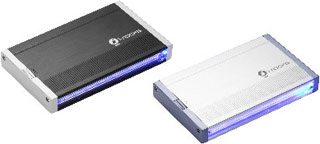 Available in silver or black anodized aluminum with a
"hairline" motif, the IR-9200 harmonizes nicely in appearance with
any modern Mac, and the silver model I tested looks right at home
beside my 17" aluminum PowerBook.
Available in silver or black anodized aluminum with a
"hairline" motif, the IR-9200 harmonizes nicely in appearance with
any modern Mac, and the silver model I tested looks right at home
beside my 17" aluminum PowerBook.
These hard drive enclosures are a great way to make use of hard drives pulled when upgrading to a higher capacity unit in your computer, and I've installed a 4.5 GB Fujitsu drive (which I think originally came in a Lombard PowerBook) in the review unit. The IR-9200 will accommodate any 2.5" IDE/ATA hard drive up to 9.5mm thick.
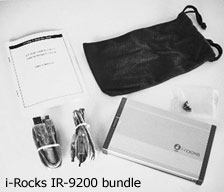
The i-Rocks IR-9200 comes bundled with a USB 2.0 cable, a USB 2.0 to DC jack 5V power cable, a very handy little drawstring carry pouch, and a software mini-CD (about which more in a moment).
Installing the hard drive in the enclosure was a snap - which is good, because there is no drive installation documentation provided in the product package.
 The
whole process took less than five minutes, and only a small
Phillips screwdriver was required for tightening the four supplied
screws that secure the hard drive to the IR-9200 internal
chassis.
The
whole process took less than five minutes, and only a small
Phillips screwdriver was required for tightening the four supplied
screws that secure the hard drive to the IR-9200 internal
chassis.
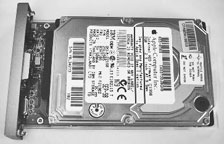
No tools are required to open the case; just press the release button, and the inside chassis slides out.
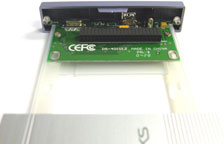
Carefully insert the multi-pin plug on the end of the hard drive into the socket on the IR-9200's circuit board, to install and tighten the four screws, and slide the assembly back into the enclosure case.
 Before
using the IR-9200 (for USB 2.0 support) , it's necessary to install
supporting driver software on your Mac. A mini-CD containing driver
installers for both OS X 10.2 up and several versions of the
classic Mac OS comes in the box, but that presents a problem for
owners of Macs with slot-loading CD or DVD drives, since these do
not support mini-CDs (and attempting to use a mini-CD in a Mac
slot-loading drive can cause drive damage, so don't do it).
Unfortunately, there is no warning in the IR-9200 documentation
about this issue.
Before
using the IR-9200 (for USB 2.0 support) , it's necessary to install
supporting driver software on your Mac. A mini-CD containing driver
installers for both OS X 10.2 up and several versions of the
classic Mac OS comes in the box, but that presents a problem for
owners of Macs with slot-loading CD or DVD drives, since these do
not support mini-CDs (and attempting to use a mini-CD in a Mac
slot-loading drive can cause drive damage, so don't do it).
Unfortunately, there is no warning in the IR-9200 documentation
about this issue.
My workaround was to use a big old QPS tray-loading FireWire CD-burner that I have, which handled the mini-CD with no hassle.
The driver can also be downloaded from http://www.i-rocksusa.com/support.html, and a somewhat out-of-date but still useful manual on driver installation in PDF format can be downloaded from the same page.
If you don't have a tray-loader available, the best strategy is probably to find someone who does and get them to copy and burn the driver installer files onto a standard CD for you. Driver installation was straightforward, with a standard OS X software installer, and there are instructions in the included user's manual if you need them, but it was pretty intuitive. (This is a hassle that you don't have to deal with using FireWire drives.)
 When
I connected the IR-9200 to the 17" PowerBook, I found that
strangely there was not enough bus power to spin up the drive, so
it was necessary to use the supplied USB 2.0 to DC jack 5V power
cable plugged into my self-powered USB hub. Once sufficient power
had been applied, the Fujitsu drive spun up nicely. The IR-9200 has
two activity LED indicators, a cool blue one for power, and a red
one for drive access status. I've found that the USB 1 ports in
both my Pismo and iBook supply enough juice to spin up the drive
without any help.
When
I connected the IR-9200 to the 17" PowerBook, I found that
strangely there was not enough bus power to spin up the drive, so
it was necessary to use the supplied USB 2.0 to DC jack 5V power
cable plugged into my self-powered USB hub. Once sufficient power
had been applied, the Fujitsu drive spun up nicely. The IR-9200 has
two activity LED indicators, a cool blue one for power, and a red
one for drive access status. I've found that the USB 1 ports in
both my Pismo and iBook supply enough juice to spin up the drive
without any help.
I didn't do any formally timed comparisons, but file transfer speed seems to be not that different from my external FireWire 400 hard drive.
At just $19.99, the i-Rocks IR-9200 USB 2.0 drive enclosure represents an good value in an external hard drive housing. The hard drive installer installation was simple (aside from the mini-CD issue), it works well, and it looks great.
In the negative column, the lack of installation documentation for the drive installation is the biggest shortcoming, along with the lack of any warning about the mini-CD and its potentially destructive incompatibility with slot-loading optical drives. If i-Rocks is serious about supporting the Mac, they should ship the software driver installer software on a standard CD.
The necessity of using two USB cables with some Macs (so the drive obtains sufficient power) is also a bit of a pain, as open USB ports are usually at a premium for most of us. There is an optional 5V/2.3A power adapter available, and that would be a more convenient way to go.
Join us on Facebook, follow us on Twitter or Google+, or subscribe to our RSS news feed
Charles Moore has been a freelance journalist since 1987 and began writing for Mac websites in May 1998. His The Road Warrior column was a regular feature on MacOpinion, he is news editor at Applelinks.com and a columnist at MacPrices.net. If you find his articles helpful, please consider making a donation to his tip jar.
Links for the Day
- Mac of the Day: Motorola StarMax 3000, introduced 1999.09.07. This inexpensive clone used lots of off-the-shelf parts.
- Support Low End Mac
Recent Content
About LEM Support Usage Privacy Contact
Follow Low End Mac on Twitter
Join Low End Mac on Facebook
Favorite Sites
MacSurfer
Cult of Mac
Shrine of Apple
MacInTouch
MyAppleMenu
InfoMac
The Mac Observer
Accelerate Your Mac
RetroMacCast
The Vintage Mac Museum
Deal Brothers
DealMac
Mac2Sell
Mac Driver Museum
JAG's House
System 6 Heaven
System 7 Today
the pickle's Low-End Mac FAQ
Affiliates
Amazon.com
The iTunes Store
PC Connection Express
Macgo Blu-ray Player
Parallels Desktop for Mac
eBay

