
Miscellaneous Ramblings
Is Netscape 7 the Best Classic Mac OS Browser? - Tip Jar
Charles Moore - 2006.06.12, corrected
One of the most compelling reasons to upgrade to OS X - even if you're still satisfied with or prefer using the Classic Mac OS - is browsers. Classic has been pretty much abandoned by browser developers, with the lone Classic browser still updated being the iCab 3 beta, which is a very decent browser, but which still lacks some amenities of the latest OS X browsers like FireFox, Opera, and Safari, or indeed iCab for OS X.
I hate resorting to Internet Explorer. Another Classic candidate is Mozilla 1.3 (and its WaMCom derivative), but I've found them a bit rough around the edges and have tended to use iCab whenever it was capable of doing what I needed, which is most of the time. (Download WaMCom here.)
However, last week I noticed an old copy of Netscape version 7.0 from 2002 on my hard drive and started it up to refresh my memory. I was delighted to (re)discover that this version of Netscape is still a pretty decent browser, quite a smooth performer, and in fact quite similar in look and operation to SeaMonkey, which has been my main workaday browser in OS X lately.
I decided to use Netscape 7 for a few days, both in Classic and in Classic mode from OS X, and I've also found that it's stable and speedy - although not as fast as SeaMonkey, Firefox, and other state-of-the-art OS X browsers. Nevertheless, it acquits itself very decently and has so far supported all Web pages and functions I've thrown at it.
Netscape 7.0.2 was the last Netscape browser version that supported Classic, and it had a few minor tweaks (see Appendix below) distinguishing it from version 7.0.1. These browsers are linear descendants of old Netscape Communicator - king of the Web browsers before upstart Internet Explorer usurped the throne in the late 90s.
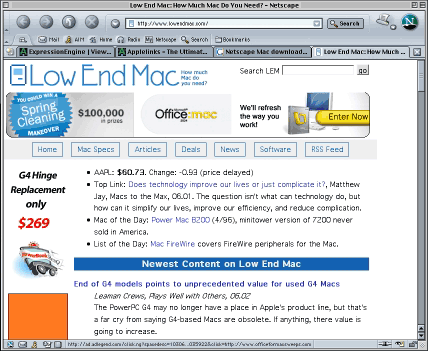
These are suite browsers and include an email client/newsreader, an IRC chat client, and Web authoring modules along with the browser. They also support modern browser features like tabbed browsing, are freeware, and are available for download from Netscape's legacy browser site.
Code from the Mozilla project formed the core of Netscape 7. Netscape contributed the work product of a set of employees to the Mozilla project. That was combined with the contributions of a host of other contributors to create the Mozilla code base.
Netscape then took most (but not all) of the open source Mozilla code base and used it to create Netscape, adding a set of features to the Mozilla core, such as the AOL Instant Messenger, a Java virtual machine, and a set of plug-ins; Netscape logos and other branding items, and may set default URLs, etc.
Netscape 7.0 was pitched as a customization of the Mozilla code base intended for a consumer audience, while Mozilla of that era was described by its developers diplomatically as being targeted at the developer community.
The emphasis for Mozilla, both in terms of functionality and of user interface, was to allow Netscape to create a reliable replacement for the Netscape Communicator 4.x series. However, there were profound changes under the hood that specifically related to the future evolution of the user experience and set Mozilla up for an exciting and rapidly evolving future - this includes the Firefox, SeaMonkey, Camino, and Mozilla 1.7 browsers as well as a number of other derivatives, as well as the Thunderbird email client that was developed out of the old Netscape Communicator Mail module.
In terms of appearance and stability, Netscape comes with a few more bells and whistles than Classic Mozilla, and I prefer the aesthetics of the pretty Netscape animated logo to Mozilla's big lizard. Both browsers include a Messenger email client module and a Composer HTML authoring module.
If you want to keep using the Classic Mac OS but want to avoid using Internet Explorer, Netscape 7.x is well worth checking out.
System Requirements
- Mac OS 8.6 and later; Mac OS 9.1 or later highly recommended; Mac OS X 10.x
- PowerPC 604e 266 MHz or faster processor, G3, or G4
- 64 MB RAM
- 36 MB of free hard disk space
For more information and to download a copy of Netscape 7.0.2, visit:
Appendix
Netscape 7.x is based on the Gecko open source engine and fine-tune of Netscape 6. Netscape 7.0 is based on Mozilla 1.0.1 (7.0.1 is based on Mozilla 1.0.2).
Features
- Tabbed browsing, popup ads blocker (from 7.01), click-to-search, full screen mode, bookmark keywords, print preview, update notification, download manager
- Mail notification, mail labels, return receipts
- Save whole web pages, get map for address book
Support P3P (Privacy Preference Project), New corporate features in Netscape Mail including S/MIME, Shared folders for IMAP, Secure LDAP, and Offline LDAP.
What's New In Netscape 7.02
- Enhanced security
- Improved stability
- New Macromedia® Flash 6 r65 plugin for Windows
- New Java 1.4.0_03 plugin for Windows
New In Netscape 7.01
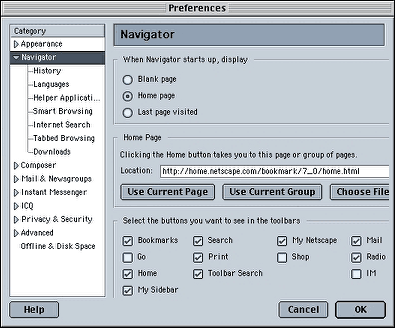
- Popup Window Controls let you suppress popup ads when browsing. In Preferences, double-click the Privacy & Security category and choose Popup Window Controls.
- Home Page Group feature lets you automatically open several of your favorite pages as tabs when starting Netscape. After opening two or more pages, open the Edit menu and choose Preferences. Click "Use Current Group" in the Navigator preference panel.
- New AOL Mail features let you unsend mail, check message status, and keep messages marked as new.
- COPPA Compliance and improved security including greater control of certificates.
New In Netscape 7.0
- Netscape Navigator
- Tabbed Browsing feature lets to visit multiple web pages in a single window: Tabbed Browsing can be launched in one of three ways: from the File menu, choose New, then Navigator Tab; or you can right-mouse click on a hypertext link and open its contents in a new tab; or for those who prefer keystrokes, Ctrl+T opens a new tab.
- GroupMarks (Bookmark Groups) lets you bookmark several web pages in one bookmark: Open two or more Navigator tabs, then open the Bookmarks menu and choose Bookmark This Group of Tabs.
- Radio@Netscape lets you listen to music over the Internet: Click Radio in the Personal Toolbar.
- Click-to-Search lets you search for words you select in a web page: Select any word in a web page, right-click, and select "Web Search ..."
- My Sidebar Search Tooltips display information when you place the mouse over search results in My Sidebar Search.
- Download Manager lets you view and manage all your downloads: Open the Tools menu and select Download Manager.
- Web Site Icon (Favicon) support: Web Site Icons show up next to the URL in the Location bar, in bookmarks, and in Navigator tabs when using Tabbed Browsing.
- Save whole web pages: Save a whole web page along with graphics by choosing "Web Page, Complete" when saving web pages.
- Full Screen Mode gives more space to view web pages: Open the View menu and choose Full Screen, or press F11.
- Drag and drop bookmarks into folders, as well as improved bookmark management such as bookmark sorting.
- Print Preview lets you see a page before you print it: Open the File menu and choose Print Preview.
- Print Setup gives you greater control over how you print: Open the File menu and choose Page Setup.
- P3P (Privacy Preference Project) support give you more control over how web pages can use your personal information.
- Update Notification tells you when a updates to Netscape are available: Open Preferences and choose Advanced > Software Installation.
- Easier to open and close My Sidebar: Click the X in the top right corner of My Sidebar to close it. Click the Open/Close icon on the left side of the Personal Toolbar to open it up again.
- Set as Wallpaper: Right-click on any image in Navigator and choose Set As Wallpaper.
- Netscape Mail
- Mail Notification in Netscape Mail shows how many new emails you have.
- Quick Search in Netscape Mail and Address Book lets you more easily search your messages and contacts: Look for it at the top of your message and contact list.
- Mail labels allow you to prioritize your emails: Right-click on a message in your message list and choose Label.
- Create Filter from Message lets you add filters to Netscape Mail based on information in the message: Click on a message header in an email and choose "Create Filter from Message."
- Return receipts in Netscape Mail allow you to send and request confirmation that an email is received. To request a return receipt while writing an email, open the Option menu and check Return Receipt.
- Improved email importing in Netscape Mail: Netscape now supports importing email from Netscape Communicator, Eudora, Outlook, Outlook Express, and text files (LDIF, .tab, .csv, .txt). Open the Tools menu in Netscape Mail and choose Import.
- New corporate features in Netscape Mail including S/MIME, Shared folders for IMAP, Secure LDAP, and Offline LDAP.
- Address Book
- New support for exporting contacts: In Address Book, open the Tools menu and choose Export.
- Get Map: Click Get Map in a card with an address to automatically see a map using MapQuest.
- AOL Instant Messenger
- Buddy Icons: Choose your own icons that show up while chatting with your buddies.
- Buddy Alerts: Set up sound and window alerts when specific buddies come online.
- File Transfer: Send files to your buddy's PC.
- AIM Today: Keeps you informed about the AIM community, the latest news, and the newest Buddy Icons.
- Server-side Buddy List storage: Lets you access you Buddy List from any computer.
- New integrated ICQ: Chat with your ICQ friend using ICQ within Netscape.
- Sign On at Launch: Sign onto AOL Instant Messenger when you start your computer.
- Netscape Composer
- One-button publishing in Netscape Composer.
- Netscape Help and Support Center (Open the Help menu and choose Help and Support Center)
- New search feature lets you search for help topics. Click the Search tab in the Help window.
- Improved index and glossary: Click the Index or Glossary tab in the Help window.
- New information on Netscape keyboard shortcuts: Click Netscape Keyboard Shortcuts in the Contents tab.
Join us on Facebook, follow us on Twitter or Google+, or subscribe to our RSS news feed
Charles Moore has been a freelance journalist since 1987 and began writing for Mac websites in May 1998. His The Road Warrior column was a regular feature on MacOpinion, he is news editor at Applelinks.com and a columnist at MacPrices.net. If you find his articles helpful, please consider making a donation to his tip jar.
Links for the Day
- Mac of the Day: PowerBook 500 Series, introduced 1994.05.16. 'Blackbird' includes a 25 to 33 MHz 68040 along with smart batteries and grayscale or color displays.
- Support Low End Mac

