
Miscellaneous Ramblings
Best Lombard Replacement, Pismo CPU Upgrades, a Trackball Tip, and More
Charles Moore - 2006.04.17 - Tip Jar
- Best Dead Lombard Replacement?
- Pismo Processor Upgrades
- Frankenpismo?
- Trackball Tip
- Value of Color PowerBook 170
- Pogue Fan
Best Dead Lombard Replacement?
From Lee Shartau
Dear Sir
Lombard 400 MHz DVD - OS X 10.2.8
What are the symptoms of cache going out on these units?
I thought that my hard drive had packed up, but I put in a good 12 GB IBM in, and the installer DVD reports I cannot install (10.3.3) or boot from this drive. On OS X 10.2.8 The monitor was going to black and white on log-in.
An OS/software problem?
I have an old MainStreet, so I am not completely out of luck.
If I cannot resolve this problem, what do you think of the clamshell iBook 466 DVD as a replacement vs. Pismo or another Lombard.
Hi Lee,
The usual symptom of a Lombard cache failure is that things slow down significantly, but the processor remains operable. That doesn't sound like what you're experiencing.
It could be a software issue (clean system reinstall? boot from an external volume?) or a hard drive issue. Are you sure the drive you installed was good?
As for the clamshell iBook as a potential replacement, it has the best reliability record of any Mac laptop according to MacInTouch's user survey. The most desirable models are the late production "Paris" units with FireWire.
Depending on your budget, you might want to also consider a used/refurb white iBook, but the old clamshell is the more rugged. Lombards are getting pretty marginal, but I'm still a big fan of my old Pismo.
Charles
Pismo Processor Upgrades
From Cynthia
I have read your articles about Pismos with great interest, as I, too, love my Pismo. I saw the article regarding the 1 GHz processor upgrade that was, at one time, available from PowerLogix. My question is, can this processor be found anywhere nowadays? I would be interested even in a working used one.
I have a 500 MHz Pismo but need to run Studio 8, which requires a G3/600 according to specs. So I am looking to upgrade. I so do not want to go to a TiBook and have to deal with the hinge issues, even though it will most likely cost me more to keep my Pismo and upgrade. At least I know what I have, and it is in pristine condition. Is my best choice the G4/550? I am willing to throw the max 1 GB RAM in the machine, too, as I know this will help the program.
Thanks for not giving up on these great machines. Any advice you could offer would be very greatly appreciated.
A fellow Pismo lover,
Cynthia
Hi Cynthia,
PowerLogix has discontinued production of the BlueChip 900 MHz and 1 GHz G3 Pismo processor upgrades, so the used market would be your only hope of finding one.
Personally, I would recommend, especially since your Pismo is in good condition, one of the several 550 MHz G4 processor upgrades available for the Pismo. I'm into my third year with the Daystar 550 MHz G4 upgrade in my own Pismo, and I have essentially no complaints. It has been a rock of stability, and a lot better performer than the original 500 MHz G3 CPU was.
I agree with you about the TiBook being a not very auspicious replacement. If you go with a newer machine, I would suggest at least an 867 MHz or 1 GHz 12" aluminum PowerBook, which have a good reliability record, and are getting down into the $600 - $700 bracket.
Charles
Frankenpismo?
From Shane Young
Dear Mr. Moore,
Please accept my apology in advance for a somewhat obscure question. I've read a lot of your articles and asked you a question a long time ago, and I greatly respect your opinion, so I thought rather than scour the Web, you might know offhand.
I'm a photographer, recently went all digital, and have a number of new and old Macs. I have an old Lombard that I was using at home as a 'beater', mostly for email and Web, and it's been fine for that stuff, without having to clutter a work computer. It recently started having 'wake from sleep' problems that it hadn't had in the past. It also started receiving strange error messages and stopped functioning with Yahoo IM. I backed up anything of any value on it, since it seems more and more cranky to wake from sleep - I figure it's on it's last legs.
My question is this:
I also have an old Pismo, which was working until the FireWire ports literally melted through the bottom casing - other than the ports, the machine continued to work, so I suppose the motherboard is still working, as are the other essentials.
The screen and hinges on the Pismo are better than the Lombard, and I was thinking I might try to swap them out, to improve the Lombard or take the drive and memory out of the Lombard, and put them in the Pismo, and use it w/o FireWire (though I don't know if it will work with Tiger if the FireWire ports are burned out). I wouldn't mind doing the monitor-swap just for 'practice', but not if the Lombard is going to die soon.
Anyway, I'm sorry for the long question. And it may be a tough one to answer. Really, I guess I'm wondering if you think any parts between the two machines (i.e. hinges, screen, etc.) are interchangeable?
Thanks very much for your help.
Sincerely,
Shane
Hi Shane,
It does sound like your Lombard is on its last legs. I wouldn't advise spending much time and effort on it until you identify what the problem is.
While the Lombard and Pismo are almost identical in appearance, the motherboard architecture is completely different, the Lombard actually having more in common with the preceding WallStreet G3 Series 'Books, while the Pismo shared a lot of mobo design particulars with the early generation Titanium PowerBooks.
On the other hand, the screen hinges are to the best of my knowledge the same, and I think (but am not sure) that the screens are the same as well. The hard drives are definitely swappable, and the RAM should work as well in either machine.
It would be interesting to see if the burned-out FireWire ports would affect a Tiger install, but IMHO, OS X 10.3.9 is a better choice for running on the Pismo anyway.
Charles
Trackball Tip
From Douglass Scott
I enjoyed your piece on trackballs.
I'm a longtime trackball user and wanted to pass along one bit of advice: Use wrist support. Depending on the setup, trackballs can create their own aches and pains. It's easy to fall into the habit of allowing your wrist to bend and remain stationary for long periods of time, resulting in wrist pain or even carpal tunnel. I use a small padded wrist support with my trackball and haven't had any problems for years.
Cheers, DS
Douglass Scott
Thanks for the tip, Douglass.
Charles
Value of Color PowerBook 170
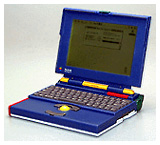 From Jared
Hi,
In your opinion, what would be a fair price to pay for the rare colored version of the PowerBook 170?
Thanks,
-Jared
Hi Jared,
Yikes!
I doubt that there's any standard price for that particular machine. As with any special interest collectable, it's a matter of perceived value on the part of buyer and seller.
My very rough guess for a unit in good condition would be several hundred dollars, but I really can't put a figure on it.
Charles
Pogue Fan
From Peter D. Tillman
Charles:
Just a short note to say "me too" to your rave recos for the Pogue Mac books. I'm on my third (or is it the fourth?) and have always found them to be money well spent.
Poguefans will want to regularly visit his website and should try a subscription to his weekly NY Times "Circuits" column, available by email - signup at his site.
And keep up the good work!
Cheers - Pete Tillman
Hi Pete,
Thanks!
Yes, David Pogue has been a great contributor to the Mac community over the years.
Charles
Join us on Facebook, follow us on Twitter or Google+, or subscribe to our RSS news feed
Charles Moore has been a freelance journalist since 1987 and began writing for Mac websites in May 1998. His The Road Warrior column was a regular feature on MacOpinion, he is news editor at Applelinks.com and a columnist at MacPrices.net. If you find his articles helpful, please consider making a donation to his tip jar.
Links for the Day
- Mac of the Day: Power Mac 8200, introduced 1996.04.22. The minitower version of 7200 was never sold in America.
- Support Low End Mac
Recent Content
About LEM Support Usage Privacy Contact
Follow Low End Mac on Twitter
Join Low End Mac on Facebook
Favorite Sites
MacSurfer
Cult of Mac
Shrine of Apple
MacInTouch
MyAppleMenu
InfoMac
The Mac Observer
Accelerate Your Mac
RetroMacCast
The Vintage Mac Museum
Deal Brothers
DealMac
Mac2Sell
Mac Driver Museum
JAG's House
System 6 Heaven
System 7 Today
the pickle's Low-End Mac FAQ
Affiliates
Amazon.com
The iTunes Store
PC Connection Express
Macgo Blu-ray Player
Parallels Desktop for Mac
eBay

