
Miscellaneous Ramblings
Miscellaneous Ramblings Review
MacSword 1.2: A Solid Free Bible Program Made Even Better
Charles Moore - 2005.12.05 - Tip Jar
Back in Classic Mac days, I used to use a little freeware Bible software application called Bible Browser. It didn't have a lot of bells and whistles, but it was fast and had a decent search engine - and it was free.
These days I'm still using freeware Bible applications, alternating between Bible Reader Free and MacSword, the subject of this review.
MacSword is a free, open source application facilitating research and study of the Holy Scriptures as well as resource, commentary, lexicon, devotional, and book materials, developed specifically for Macs running Mac OS X. It is essentially a Mac front end to the cross-platform open source Sword Project.
MacSword allows you to read and browse many different Bibles translations in different languages from Hebrew to Albanian. As well as reading devotionals, commentaries, dictionaries, and lexicons, it also supports searching and advanced features such as Services so that you can access the Bible in any Services-savvy program.
As noted, MacSword uses modules from the Sword project. This is an open source project whose purpose is to "to create an ever expanding software package for research and study of God and His Word". This provides the backend functionality to handle the Bible texts and provide features such as searching.
The open source model is the basis of development, maximizing the rapid growth and features of this project by leveraging the contributions of many developers. Components of the project include all types of Biblical texts and helps, a portable, platform-agnostic engine to access them, and a variety of front ends to bring this to as many users as possible. The Sword Project is licensed under the GNU General Public License, an open source license approved by the Open Source Initiative.
Sword module Add-ins allow you to expand the functionality and your library of resources for your Sword-based software, including some two dozen different English language Bible or New Testament translations, which is one of the big advantages of MacSword. The program downloads with a King James Version module. One caveat is that most of the recent translations are not in the public domain, so while the modules exist, they are not available for public download.
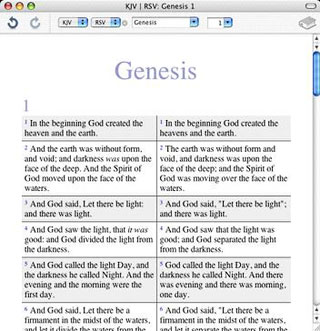 Modules I use
in my copy of MacSword are the King James Version (1611), American
Standard Version (1901), Revised Standard Version (1952 edition - I
detest the politically corrected '90s NRSV), World English Bible
(1997), and the International Standard Version.
Modules I use
in my copy of MacSword are the King James Version (1611), American
Standard Version (1901), Revised Standard Version (1952 edition - I
detest the politically corrected '90s NRSV), World English Bible
(1997), and the International Standard Version.
A very cool new feature in MacSword version 1.2 is that you can now display two or more version texts side-by-side in parallel columns, which makes comparing translation nuances very easy and convenient.
To display another translation (or commentary) in parallel, just click the + icon beside the popup menu displaying the currently active module. Another module popup menu will appear, allowing you select whatever module you want to display. To remove a module, click "Remove" from the menu containing that module's name.
A floater window allows you to select among modules stored in the program's Modules folder.
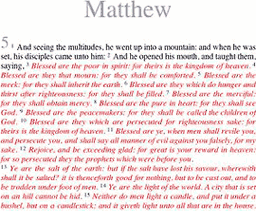
The program includes the ability to display Bible text contiguously with inline verse references or with each verse displayed individually.
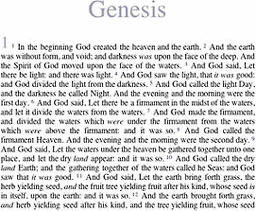
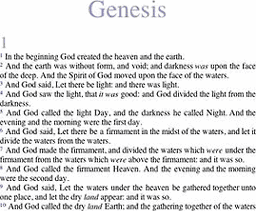
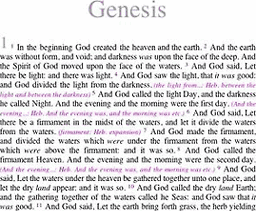
You can also display Scripture with footnotes interpolated, and there is also an option to highlight the words of Jesus in red.
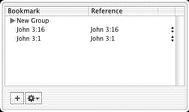 A Cocoa drawer,
toggled from the toolbar, is user-customizable.
A Cocoa drawer,
toggled from the toolbar, is user-customizable.
The "Find" function, which had been a weak point in early versions of MacSword - being relatively slow and without any configuration options (i.e.: limiting searches to just one book or testament) - has been much improved in recent releases with searches refinable using several pulldown menus containing search parameter selections.
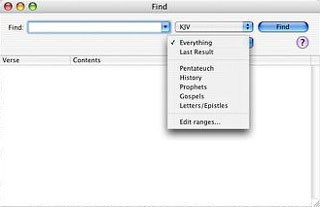 Version 1.2
adds indexed searching, which improves search speed even more.
Searches are now satisfyingly quick, even on my old 700 MHz iBook.
Version 1.2
adds indexed searching, which improves search speed even more.
Searches are now satisfyingly quick, even on my old 700 MHz iBook.
One deficiency I found is that while search results are drag & droppable, they don't copy to the Clipboard for pasting. A bit strange.
Boolean operators are supported, as are standard wildcard symbols, such as the asterisk (*) for multiple characters and the question mark (?) for single characters.
MacSword Rules for Search Requests
- Default: All single words are searched for, jesus wept finds verses containing both words.
- Phrases: Phrases are used to search for an exact phrase, this is useful for phrases like "kingdom of god".
- OR: The OR operator links two terms and finds a verse with either of the terms. For example jesus OR god will find verses with either "jesus" or "god" in them.
- Fuzzy: Fuzzy searches using '~' at the end of a term, search for similar words. For example hezikia~ will find "Hezekiah", useful for those impossible to spell Biblical names.
- Single wildcard: To perform a single character wildcard search use the "?" symbol.
- Multiple wildcard: To perform a multiple character wildcard search use the "*" symbol. king* will find kingdom and kings.
- Proximity: Proximity searches find words that are a within a specific distance away. "jesus love"~4 finds verses where "jesus" and "love" are within 4 words of each other.
- NOT: The NOT operator excludes documents that contain the term after NOT. For example cain NOT abel
- Grouping: You can also group terms with brackets. Such as (jesus OR god) AND love.
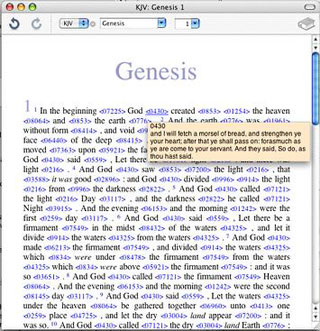 Strong's: Strong's numbers can also be searched
in Bibles that contain them. To search for a particular number
prefix the number with a strong tag, for example
strong:G1234. Strong's numbers are also prefixed by a G or
H, for Greek or Hebrew. This can be combined with normal
terms.
Strong's: Strong's numbers can also be searched
in Bibles that contain them. To search for a particular number
prefix the number with a strong tag, for example
strong:G1234. Strong's numbers are also prefixed by a G or
H, for Greek or Hebrew. This can be combined with normal
terms.
MacSword now also allows you to create your own commentary/user notes modules. Select New Module from the File menu and save a new commentary file to a location on your computer's hard drive, preferably the Modules folder in the MacSword folder.
System requirements:
- MacSword should run on any computer with Mac OS X v10.2 with Safari 1.0 and later or with Mac OS X v10.2.7 and later
- You must also have some text modules installed before it'll do anything.
There are over 200 modules in 50 languages that are all available from the Crosswire Bible Society. Including Bibles, commentaries, lexicons, dictionaries, and devotionals.
MacSword is an excellent and versatile little Bible software program, and if you don't need the advanced features of an application like Oaktree Software's Accordance, it should do the job nicely for you.
MacSword is freeware.
Appendix
Bible text modules that are available for download include:
- The Apostles' Bible
- A Conservative Version
- American King James Version
- Analytical-Literal Translation
- American Standard Version (1901)
- Bible in Basic English (1949/1964)
- Bible in Worldwide English
- The Common Edition: New Testament
- Douay-Rheims American Edition (1899)
- Douay-Rheims Bible, Challoner Revision
- Darby Bible (1889)
- English Majority Text Version
- God's Word Translation
- Hebrew Names Version of the World English Bible
- International Standard Version
- Jewish Publication Society Old Testament
- Green's Literal Translation
- The Living Oracles NT
- Green's Modern King James Version
- Montgomery New Testament
- James Murdock's Translation of the Syriac Peshitta
- Revised King James New Testament
- Restored Name King James Version
- Revised Standard Version
- Revised Webster Version (1833)
- Twentieth Century New Testament
- William Tyndale Bible (1525/1530)
- World English Bible
- Webster Bible
- Weymouth NT (1912)
- Young's Literal Translation (1898)
- Abbott Illustrated New Testament
Downloadable Bible Commentaries include:
- Barnes' New Testament Notes
- Adam Clarke's Commentary on the Bible
- Darby Translation Notes
- Family Bible Notes
- Geneva Bible Translation Notes
- Jamieson Fausset Brown Bible Commentary
- John Lightfoot Commentary
- Luther's Commentary on Galatians
- Matthew Henry's Complete Commentary on the Whole Bible
- Matthew Henry's Concise Commentary on the Whole Bible
- The People's New Testament
- Personal Commentary
- Robertson's Word Pictures
- Scofield Reference Notes, 1917 Edition
- Tischendorf's Spurious Passages of the GNT
- C. H. Spurgeon's Treasury of David
- The Fourfold Gospel and Commentary on Acts of Apostles
- Treasury of Scripture Knowledge
- John Wesley's Notes on the Bible
- Sermons on Gospel Themes by Charles G. Finney (1792-1875)
- Heretics by Gilbert K. Chesterton (1874-1936)
- Calvin's Institutes
- Josephus: The Complete Works
- The Normal Christian Life by Watchman Nee (1903-1972)
- Orthodoxy by Gilbert K. Chesterton (1874-1936)
- The Pilgrim's Progress by John Bunyan (1628-1688)
- The Practice of the Presence of God: The Best Rule of Holy Life by Brother Lawrence (Nicholas Herman, 1605-1691)
SWORD Module Add-ins also include:
- Lexicons / Dictionaries
- Glossaries
- Daily Devotionals
- General Books
- Cult / Unorthodox / Questionable
Join us on Facebook, follow us on Twitter or Google+, or subscribe to our RSS news feed
Charles Moore has been a freelance journalist since 1987 and began writing for Mac websites in May 1998. His The Road Warrior column was a regular feature on MacOpinion, he is news editor at Applelinks.com and a columnist at MacPrices.net. If you find his articles helpful, please consider making a donation to his tip jar.
Links for the Day
- Mac of the Day: Motorola StarMax 3000, introduced 1999.09.07. This inexpensive clone used lots of off-the-shelf parts.
- Support Low End Mac

