
Miscellaneous Ramblings
Captain FTP 4.3 Faster, Easier, Better than Ever
Charles Moore - 2005.09.13 - Tip Jar
Captain FTP is an elegant, user-friendly Mac OS X FTP (File Transfer Protocol) client with what is arguably the most aesthetically attractive user interface of any Mac FTP client. It is also the first Mac FTP client to allow local network users to share files directly.
This requires a new approach, with the Captain FTP Address Book divided into separate parts: the Public Address Book (consisting of local Network users), Private FTP entries, and Public FTP entries that can be used to share files - but only with users authorized and approved by the host.
This is not a Peer to Peer methodology; only authorized local users and specified (authorized) WAN users can connect to you - and you to them.
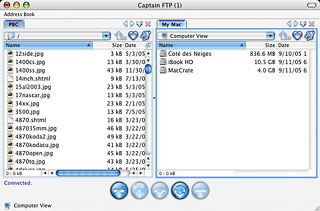 This feature requires a new interface to facilitate FTP
session management, which led to the development of a tabbed
interface supporting multiple FTP connections, allowing users to
open multiple tabs (each tab a separate FTP session) in a single
window or two panes within a window (left and right). It is even
possible to transfer between tabs in the same window by drag and
drop.
This feature requires a new interface to facilitate FTP
session management, which led to the development of a tabbed
interface supporting multiple FTP connections, allowing users to
open multiple tabs (each tab a separate FTP session) in a single
window or two panes within a window (left and right). It is even
possible to transfer between tabs in the same window by drag and
drop.
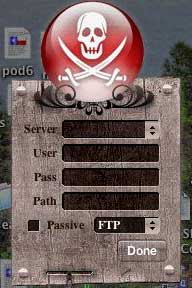 A cool new
Tiger-only feature in Captain FTP 4.3 is a Dashboard widget
that presents the brand new help guide for Captain FTP. It can also
be used to quickly upload files to remote servers by dragging them
from the desktop to the widget. The Captain FTP Widget directly
accesses the Captain FTP Address Book, enabling quick connection to
all remote servers.
A cool new
Tiger-only feature in Captain FTP 4.3 is a Dashboard widget
that presents the brand new help guide for Captain FTP. It can also
be used to quickly upload files to remote servers by dragging them
from the desktop to the widget. The Captain FTP Widget directly
accesses the Captain FTP Address Book, enabling quick connection to
all remote servers.
The widget was a quick download and a breeze to install, although I found the dark colored appearance theme makes the menu selections hard to read until you mouse over them, but it does offer quick and convenient access to the Captain FTP address book.
The Captain FTP Widget is free for all users with Captain FTP 4.2 or higher.
With Captain FTP 4.3, file management has been simplified with the addition of built-in file viewers for movies, sounds, pictures, PDF, and a new browser column to show file attributes. File/folder synchronization has been enhanced with a visual browser.
This powerful and multithreaded FTP/SSL-FTP/SFTP Client, built from scratch for Mac OS X, allows an unlimited number of simultaneous connections. It provides accelerated downloads, resuming downloads, and support for text editors (BBEdit and others), a favorites Address Book, Bonjour (formerly Rendezvous), virtual folders, a transfer manager, scripting, a UNICODE converter supporting national fonts, privileges management (UMASK, CHMOD), plugins, and more.
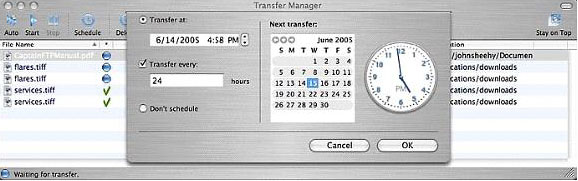
The Transfer Manager
The Transfer Manager, a longtime showpiece feature of Captain FTP, not only controls file transfers and allows users to modify transfers by pausing or halting transfers. It has now been integrated with the accelerated downloads function, which works particularly well for large files (2 GB and bigger), allowing them to be downloaded much more quickly.
Captain FTP's server manager allows creation of user lists containing defined FTP server names along with their connection and account parameters, such as user name, password, passive or active mode, and firewalls. One mouse click is usually enough to connect to any listed FTP server.
Also new is an extra layer of security with Key Authentication for secure FTP transfers.
Captain FTP supports OS X 10.4 Tiger's Bonjour networking technology, as well as plugins for Internet Browsers (Helper), new dynamic "stop/disconnect" option, and the ability to import addresses from Net Finder, Fetch, and Transmit.
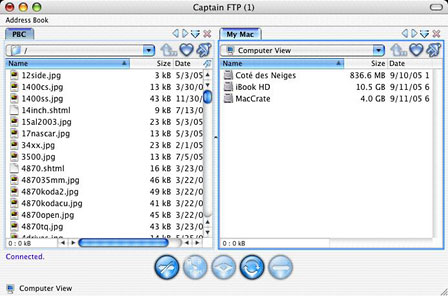
Captain FTP 4.3 includes a revamped interface, which is written in Cocoa and styled to conform with Apple's "brushed metal" motif. Frankly, I have to say that the brushed metal appearance doesn't really grab me, but Captain FTP gives you a choice. Captain FTP's developers listened to those who don't like brushed metal and have provided users with the option of switching to an Aqua theme since version 3.1.1.
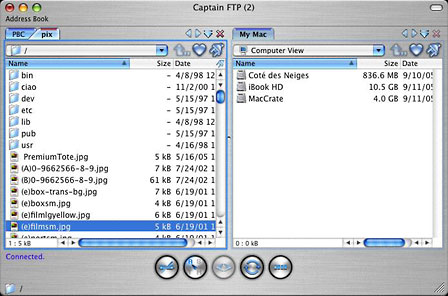
Captain FTP lets you choose brushed metal or
Aqua appearance.
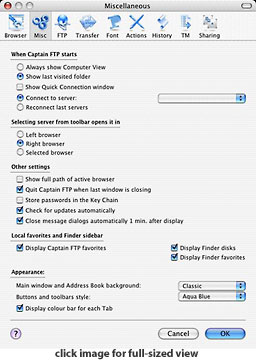 To switch between these appearance, just
open the Captain FTP Preferences, click the "Misc" tab, and at the
bottom of the dialog you will find a couple of pulldown menus to
specify appearance options (right).
To switch between these appearance, just
open the Captain FTP Preferences, click the "Misc" tab, and at the
bottom of the dialog you will find a couple of pulldown menus to
specify appearance options (right).
A big thank you to the developers for providing this option.
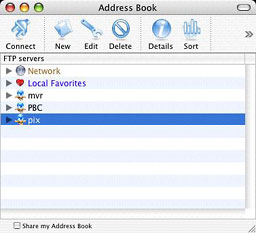
Captain FTP doesn't use Cocoa drawers, but its Address Book (below) puts the "plain Jane" connection menus of the other apps to shame. This application has the attention to detail that typifies German products.
 Captain FTP 4.3 provides "wicked fast"
file transfers, and it makes connections quickly as well.
Captain FTP 4.3 provides "wicked fast"
file transfers, and it makes connections quickly as well.
However, it did stumble when encountering an existing file with the same name as the one of I was trying to upload, which happens when updating an existing Web page. Indeed, stumble is an understatement. The program would stall with the progress bar rolling endlessly and no file upload. This happened on all of several attempts at different times and connected to different FTP servers.
I tried uploading the same replacement files to the same servers using another FTP client and encountered no difficulties at all. Frankly, I am stymied. I never did find a solution or workaround. I don't know whether this issue is a bug in the program or some incompatibility issue with my setup. Since Captain FTP is shareware, you can download it and see whether this problem will be an issue for you without making a cash commitment.
File transfers have become a whole lot easier with Captain FTP's Virtual Folders. Users can create virtual folders on their desktop for their FTP server folders. To transfer files to these folders, simply drag 'n' drop the file onto the folder icon, and Captain FTP automatically completes the transfer.
The preferences allow you specify which application you wish to use to edit files, whether a double-click on a file in the Captain FTP window will initiate a transfer or just open it, and an array of other FTP options.
Captain FTP supports mirror transfers, allowing you to synchronize a folder on your Mac with a directory on your server with one command, transferring only the files that have changed.
Navigation with Captain FTP is easy and closely emulates the standard conventions of the Mac OS's built-in file lists. Moving from one directory to another within Captain FTP merely requires double clicking on a folder icon or use of a popup menu.
The Global Progress Indicator in the Captain FTP interface window displays the estimated time remaining to end of transfer. a Stop button enables the user to stop any operation at any time without breaking the connection with a server.
Captain FTP 4.x features segmented downloads, which Xnet Communications says provide "very fast transfer based on an intelligent downloaded file analysis and connection parameters (amount of parallel FTP sessions) [that] can speed up the entire transfer task dramatically."
This is particularly effective when downloading large files from an FTP server that limits bandwidth per connection. In that case, Captain FTP maximizes bandwidth utilization and increases performance.
This Segmented Download feature allows Captain FTP to split a large file (recommended for files over 1 MB) into multiple parts and use multiple transfer connections to download those parts simultaneously. These parts are recombined into a single file upon receipt.
"Having added this feature, Captain FTP evolves from the class of a standard FTP-client into a feature rich Download-Manager," according to Xnet.
Captain FTP tasks are shared between separate threads (multitasking), therefore all time consuming functions - such as uploading and downloading - don't consume valuable OS resources but leave them available for other user requests.
System requirements:
- Mac OS X 10.3 or higher
- G3 processor or better
- 64 MB RAM
Xnet makes Captain FTP available as a fully enabled 14-day trial version. Captain FTP costs US $25 to register. Version 4.3 is a free upgrade for all registered users of Captain FTP 4.x.
The older, very capable Captain FTP 1.4 remains available as freeware for private, noncommercial use to government employees, home users, students, and staff of educational institutions. The Captain FTP website itself is worth a visit in its own right. Make sure to check out the downloadable Captain FTP wallpaper images.
You can also order Captain FTP stuff like T-shirts, caps, mugs, clocks - even boxer shorts - online.
Appendix: New in Version 4.3
Major Features:
- Resume added for Uploads
- Color bars on the tabs can be turned off
- IBM Mainframe z/VM FTP Server support
- Set file Creator and Type in GetInfo dialog
- Changing destination name is now allowed on the overwrite prompt dialog
Enhancements:
- Automatic transfer. Files are not automatically transferred in MacBinary mode any more (even if contain resource fork)
- New Mac native help with context access
- Clicking on a server icon in the main window toolbar opens the connection with a NEW tab (if active tab is remote)
- Automatic download mode removed from Preferences
- Setting "Default Upload Permissions" forces uploaded files to keep original permission after being uploaded to a server. FTP servers ignore the execute permission of uploaded files even when the files are sent with this permission. Captain FTP sets (if needed) all uploaded file permissions to correct this behavior. Works only for files not for folders.
- "File/Copy URL" option generates URL with password included which makes the URL available for direct usage
- Launching Captain FTP takes less time now
Cosmetic Changes:
- slimmer dividing pane between browser windows
- spacing of line text reduced in browser window
Bug Fixes:
- Double click on unfinished file (resume) sometimes didn't open Captain FTP window properly
- Synchronization process, top folder sometimes omitted from download for local files
Join us on Facebook, follow us on Twitter or Google+, or subscribe to our RSS news feed
Charles Moore has been a freelance journalist since 1987 and began writing for Mac websites in May 1998. His The Road Warrior column was a regular feature on MacOpinion, he is news editor at Applelinks.com and a columnist at MacPrices.net. If you find his articles helpful, please consider making a donation to his tip jar.
Links for the Day
- Mac of the Day: PowerBook 2300, introduced 1995.08.28. The only Duo equipped with a PowerPC processsor run at 100 MHz.
- Support Low End Mac
Recent Content
About LEM Support Usage Privacy Contact
Follow Low End Mac on Twitter
Join Low End Mac on Facebook
Favorite Sites
MacSurfer
Cult of Mac
Shrine of Apple
MacInTouch
MyAppleMenu
InfoMac
The Mac Observer
Accelerate Your Mac
RetroMacCast
The Vintage Mac Museum
Deal Brothers
DealMac
Mac2Sell
Mac Driver Museum
JAG's House
System 6 Heaven
System 7 Today
the pickle's Low-End Mac FAQ
Affiliates
Amazon.com
The iTunes Store
PC Connection Express
Macgo Blu-ray Player
Parallels Desktop for Mac
eBay

