
Miscellaneous Ramblings
Interarchy a Fast, Powerful FTP Client for OS X
Charles Moore - 2005.02.28 - Tip Jar
If you're looking for speed in an FTP client, Interarchy is it; it claims 30 MB per second. I haven't done any formal timed comparisons with other FTP applications, but my gut tells me that it's the fastest that I've ever used - and by a significant margin.
As with Web browsers, there is a gratifying selection of good OS X FTP clients, such as Captain FTP, Transmit, Fetch, RBrowser, and half a dozen or so others. I've tried many of them, but the one I turn to most often is Interarchy.
Interarchy doesn't have as fancy an interface as some of the other OS X FTP clients, but it is highly functional and can display directory contents in icon, list, or column views - just like the OS X Finder. At least in theory. In practise, on the main FTP directory I use, column view does not work very well, although list and icon are fine.
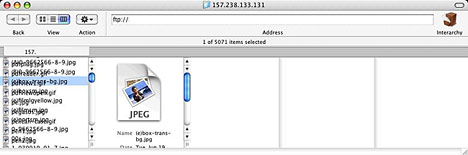
Column view does not work very well
Interarchy (formally known as Anarchie) was one of the very first Macintosh Internet applications with a lineage going back almost a dozen years. Well over 100,000 copies have been sold, and it received the 1999 and 2000 Macworld Editors' Choice Awards. Interarchy currently has an estimated 650,000 users, and the Interarchy User Group has an active user base of over 1,000 members, making it the most popular software in its class.
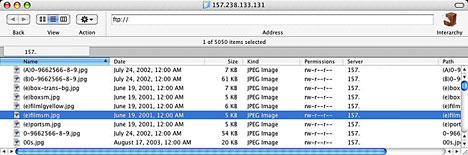
List and icon view work fine
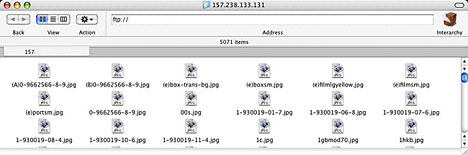
Interarchy can do a vast number of things beyond basic FTP uploads and downloads. It allows you to control every aspect of the file transfer process, provides you with auxiliary testing tools to help diagnose connection problems with your server, and offers a variety of automation features that allow you to cache, group, queue, delay, and repeat transfers all within a familiar Finder-like interface.
Interarchy also integrates tightly with your browser, the Finder, text editors, and other tools to let you get your job done easily.
For maintaining websites, you can build a site locally, mirror it to your remote server, edit files directly from your server, check website links either locally or on your server, download an entire website, or even list the links on a web page - all integrated within Interarchy.
If your FTP requirements are fairly basic, like mine are, then the power of Interarchy is overkill (although no hardship to have available - this is not a complicated or ponderous program to use for simple FTP uploads/downloads, and the speed is delightful). However, if you're a heavy FTP user, you really owe it to yourself to check out Interarchy.
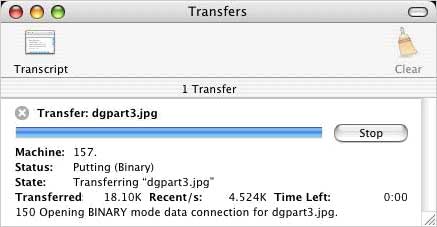
With Interarchy you can fetch, edit, or transmit files to any kind of Internet server using FTP, SFTP, or HTTP. Common uses include setting up websites, long-distance transfer of data, and remote server administration. It can download files or whole sites using HTTP, search the Internet to find files you want, and provide a wealth of information about your Internet connection using common Internet protocols including ping, traceroute, DNS lookup, and packet sniffing. Because Interarchy is standards-compliant, it will work with servers running on any operating system including Windows and Unix.
Last week, Stairways Software released Interarchy 7.3.2, a bugfix and refinement update that includes the following fixes:
- Includes the French translation.
- Local File Listings now display all files and folders.
- Show service numbers when service names are not available.
- Fixed a bunch of drawing/scrolling problems in column view.
- Fixed a problem where column view could reload the wrong column.
- Find Again now behaves correctly.
- Fixed a CR/LF issue for ignored files PCRE pattern editing.
- Fixed a problem with resizing the Network Connections window.
- Fixed a problem with zooming the Mirror Report window.
- Fixed a problem with the split divider in the Check Site Links window.
- Resolved a problem with Network Interfaces in 10.2
- Create Mirror Place Holder will now replace files if requested.
- Fixed a potential crash when canceling DNS lookups.
- Fixed a bug that could cause uploaded files to not appear or appear
- with the wrong name in a listing window.
- Improved list parsing code.
Interarchy 7.3 primarily includes structural changes, completing the long transition to Mac OS X, with the last vestiges of Open Transport finally eliminated. Localized files are all plist or nibs; only the AppleEvent terminology remains in the resource file. Also added is the Kagi Registration Module so you can purchase from within Interarchy. The developers have written their own column view to resolve all the issues with the Data Browser's column view and rewritten the list parser from scratch.
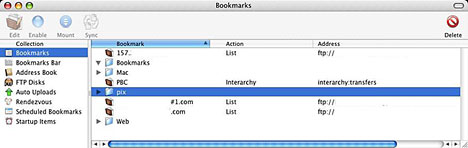
Other Interarchy 7.x features include:
- Fully Mac OS X native (carbon events and native core networking).
- Tabbed browsing
- Bookmark Bar
- Icon view (to complement list view and column view).
- Full bookmark management system, including FTP Disks, Rendezvous services, bookmarks, Address Book entries, scheduled and startup items.
- Full internal file mapping support, with Get Info, Edit With, and more.
- Full support for local files (file listings, checking local websites).
- Full support for dragging between windows (FTP, SFTP, File, HTTP).
- Toolbars everywhere.
- A single combined Transfers window.
Interarchy isn't perfect. There's the column view bug noted above, its account and bookmark management structure could be more intuitive, and it has an annoying habit of quitting on me when closing the cancel or overwrite dialog box that I found is still an issue in version 7.3.2. It also occasionally locks up, requiring a force quit.
However, Interarchy's speed is addictive, especially over my rural dialup Internet connection, where every scintilla of speed one can squeeze out is cherished.
For the most part it works really well.
New customers can purchase Interarchy for US$39.
Interarchy 7 is a paid upgrade from previous versions. 7.3.2 is a free upgrade for all Interarchy 7 owners.
Customers who purchased any previous version of Interarchy (or Anarchie) before October 2003 are able to upgrade to Interarchy 7 for US$19.
A fully functional trial version of Interarchy is available for downloaded from <http://download.interarchy.com/>
Some Other FTP Clients for OS X
Captain FTP
Captain FTP has the ability to split files, download each segment individually, and then reassemble the pieces. Particularly when connecting to servers that limit the bandwidth for each connection, this can greatly improve download speeds. It is US$25 shareware.
Fetch
Fetch">Fetch has a long history and enjoys tremendous popularity in the Mac OS community. Though it was not updated for several years, in version 4 it reemerges as a modern, OS X-native FTP client, supporting server-to-server transfers, resumable downloads, and site mirroring. Developed by Jim Matthews, formerly of Dartmouth, it is available free of charge to users affiliated with academic institutions. For others, Fetch is available as US$25 shareware.
Hefty FTP
Though Hefty FTP does not have a particularly intuitive interface, it does have a few unique features, such as the ability to schedule downloads and play MP3 files. It also has a separate window that you can use to queue file transfers, pause and restart downloads, and adjust the priority of queued items. It is US$20 shareware.
NetFinder
NetFinder offers an interface that looks and behaves more like the Finder than any of the other programs. It is very customizable and has a strong feature set. Perhaps its most useful feature is its ability to move files between directories and servers without using the hard drive as an intermediary. Created by Peter Li and Vincent Tan, NetFinder is US$35 shareware.
osXigen
osXigen is an FTP and SFTP client with several advanced features, including a time zone manager that makes it easier to synchronize with distant sites. It is US$20 shareware.
RBrowser
RBrowser is a Mac OS X-only application that provides a graphical interface for the FTP and SSH programs built into the operating system. It is a commercial product developed by Robert Vasvari. You may download a demo from the RBrowser website.
SimpleFTP
As its name indicates, SimpleFTP is a client that foregoes advanced features for ease of use. Though its interface doesn't attempt to mimic the Finder, it is straightforward and uncluttered. SimpleFTP is US$15 shareware.
Transmit
Transmit combines elements of Fetch and the Finder, resulting in a very easy-to-use program. Transmit offers a compact and attractive interface that lets you view remote and local directories in the same window. Developed by Panic, Transmit is US$30 shareware.
Internet Explorer
Though primarily a browser, Microsoft's Internet Explorer also doubles as an FTP client. It has fewer features than dedicated FTP clients, but its downloading capabilities are better than Netscape's or Mozilla's.
Mozilla
Mozilla is the open source Web browser upon which recent versions of Netscape are based. It is updated more frequently than Netscape, but its feature set is more experimental. It is less functional than dedicated FTP clients but has the advantage of combining several functions in a single application.
Netscape
Netscape, which is Mac OS X-native in version 6 and later, is a freeware Web browser that also functions as an FTP client. It has fewer features than the dedicated FTP clients but has the advantage of providing several services in one application.
Join us on Facebook, follow us on Twitter or Google+, or subscribe to our RSS news feed
Charles Moore has been a freelance journalist since 1987 and began writing for Mac websites in May 1998. His The Road Warrior column was a regular feature on MacOpinion, he is news editor at Applelinks.com and a columnist at MacPrices.net. If you find his articles helpful, please consider making a donation to his tip jar.
Links for the Day
- Mac of the Day: Motorola StarMax 3000, introduced 1999.09.07. This inexpensive clone used lots of off-the-shelf parts.
- Support Low End Mac
Recent Content
About LEM Support Usage Privacy Contact
Follow Low End Mac on Twitter
Join Low End Mac on Facebook
Favorite Sites
MacSurfer
Cult of Mac
Shrine of Apple
MacInTouch
MyAppleMenu
InfoMac
The Mac Observer
Accelerate Your Mac
RetroMacCast
The Vintage Mac Museum
Deal Brothers
DealMac
Mac2Sell
Mac Driver Museum
JAG's House
System 6 Heaven
System 7 Today
the pickle's Low-End Mac FAQ
Affiliates
Amazon.com
The iTunes Store
PC Connection Express
Macgo Blu-ray Player
Parallels Desktop for Mac
eBay

