
Charles Moore's Mailbag
'The Best Mac Keyboard'? I Beg to Differ
Charles Moore - 2005.01.10 - Tip Jar
- Article on Matias Keyboard
- Matias Tactile Pro Keyboard
- Matias Fan
- Original Macintosh 128 Keyboard Apple's Best
- Has 'the Best Keyboard Apple Ever Made' Been Resurrected?
Article on Matias Keyboard
From James Fraser
Warning: perusal of this email may lead to blindness or insanity.
Hello,
I feel compelled to point out an inaccuracy in your article, "Has 'the Best Keyboard Apple Ever Made' Been Resurrected?"
"However, there are many folks who prefer the feel of mechanical key switches and like an IBM-style "click" in their keystrokes.
"For this constituency, there's now a way to have all that...
I'm afraid that this is not the case. I use an IBM keyboard on my Mac, so I have firsthand knowledge of this. Here's what an IBM keyboard sounds like when being typed upon:
http://www.3m3718.com/audio/modelm1.mp3
Here's what an Apple Extended (or any other Alps keyswitch-based keyboard) sounds like:
http://www.3m3718.com/audio/omnikey1.mp3
That widely-known "IBM-style 'click'" you refer to is caused by a "buckling spring" mechanism, not an Alps switch. If you're not familiar with what a buckling spring is (and most sane, rational people are not), take a look here:
http://park16.wakwak.com/~ex4/kb/tech_bucklingspring_e.htm
There's a patent for this mechanism, which IBM owns:
http://makeashorterlink.com/?K55866A2A
For a brief overview of just why some people find buckling springs so damned exciting:
http://www.dansdata.com/ibmkeyboard.htm
....and while the Apple Extended Keyboard may hold the title as the best keyboard that Apple has ever made, the IBM Model M buckling spring-based keyboard is widely held to be the best keyboard that anyone has ever made.
The preference for buckling spring key switches vs. Alps key switches has a basis in longevity as well: While Alps key switches are rated for a minimum life of 10 million cycles, buckling spring key switches are rated for a minimum life of 25 million cycles. It's not difficult to find people who have used the same buckling spring keyboards for nearly 20 years.
To date, neither Apple nor any third party has licensed the buckling spring technology for use in keyboards expressly designed for use with the Macintosh. Why not? Well, the polite answer in Apple's case is that they don't really care about keyboards any more. After all, if they did, there would have been no need for them to ever stop using the Alps key switches.
But their abandonment of decent key switches is entirely understandable because most end users today don't know the difference. Those that do will quite willingly spring $100+ for a keyboard like the Matias Tactile Pro. Or go to pckeyboard.com to order a brand-new new IBM Model M to use on their Mac.
[Note: the pckeyboard page mentions Unicomp, Inc. Unicomp inherited the buckling spring technology from Lexmark, which in turn got it from IBM].
Ergonomically speaking, the buckling spring keyboard may actually be "healthier" to type on, because it offers gradually increasing resistance before the keystroke bottoms out. With the newer membrane-type keyboards, there is no resistance until the end of the keystroke . . . it's like your fingers are suddenly hitting a brick wall.
Anyway, if you want to see what I'm talking about for yourself, eBay always has a ton of Model M buckling spring keyboards at giveaway prices. Thrift stores usually have them, too, for a buck or three apiece. I would strongly recommend picking one up, if only to get a firsthand idea of what the difference in keyswitch feel is like.
If you'd actually care to use one on your Mac, you can pick up a PS/2 to USB adapter . . . and away you go.
Of course, the only drawback to the buckling spring keyboards is that they are not quiet:
Anyways the typing labs were goddamn loud when I was in grade 9 - imagine 35 IBM keyboards all going at full capacity in a room with no soft surfaces what-so-ever to absorb the sound.
Best,
James Fraser
"Hi James,
"I freely concede the point. How could I not after such an eloquent and thoroughly researched argument?
"My comment was merely intended to mean that IBM keyboards are noisy, and so is the Matias Tactile Pro, albeit for different engineering reasons, as I now understand.
"I am now much better educated about keyboard engineering and technology after visiting the links your kindly supplied.
"Charles
Matias Tactile Pro Keyboard
From Mark Wittner
Hello Charles,
I was a huge fan of the Apple Extended II. So when I first heard about the Tactile Pro, I rushed out to get it.
Huge price tag be damned! I wound up using the Tactile Pro for almost 6 months. It is a great looking and feeling keyboard, but I just couldn't type on it anymore. I don't know if I am just getting old or what, but typing on this thing for 8+ hours a day was killing my hands.
I've never encountered this problem on any keyboard I've ever used, but it was routine with the Tactile Pro. I never had that problem with the old Apple Extended II. I'd suggest this keyboard for the nostalgic feel of it, but if you're going to be working on it for hours and hours every day, I would recommend against it.
Not to mention that is most definitely louder then the Apple keyboard it is trying to emulate. It saddens me, because I was so excited when I heard about it and really happy with it when I first got it. Final thought - a great keyboard, but not for me.
--Mark--
"Hi Mark,
"I'm in the same boat. It's a great looking keyboard, but I have fibromyalgia, and I can't type on any keyboard without pain, but I get along best with 'boards with a short key travel, feather-light touch, and soft key landing. The 'board in my Pismo PowerBook is probably the most comfortable that I have.
"With "hard landing" 'boards (including the Apple Keyboard II), my forearms and hands go numb after a few minutes. This does not happen with most membrane 'boards, although any roughness or "over-center" action to the keys will cause problems even with them.
"As I noted in the review, the key switches in the Matias 'board have a rougher action than the Keyboard II switches - likely the issue for you. It doesn't affect all users that way (see Brett's letter below)
"Charles
Re: Matias Tactile Pro
From Mark Wittner
Charles,
Thanks for your reply. It was much appreciated. You're absolutely correct in your assessment of the Tactile Pro. Right now, I am using the Macally iceKey which uses scissor-key switches like those used in the most recent G4 PowerBooks. It is a pleasure to type on, and I have no real complaints with it. Well, except with one seemingly random key placement. Other then that, I'd really recommend it to you. It has the same white look of modern Mac keyboards, and has the built-in USB hub. The travel is good, the key action is still satisfying, but you don't have to press hard at all. On top of that it only costs $49.99. Best of all, it is seriously quiet. :-) Take care!
Regards,
Mark
"Hi Mark,
"I reviewed the Macally iceKey Slim USB Keyboard some time ago and really liked it, with the exception that I still thought the action was a bit stiff. I like key action so light that you could blow on a key to press it (well, almost).
"Unfortunately, I spilled a glass of diluted Grapefruit Seed Extract into the iceKey. My son got it working again temporarily, but it died again. :-(
"Charles
Matias Fan
From Brett Campbell
Thanks for your review, Charles. I'm typing this on a Matias that I've had for a year now, I guess, and it is as great as you say. My office also had (until today - we're finally getting two-year-old G4s to replace the old 6800s that've been there for almost a decade. Sometimes Macs' durability is a drawback, because those were slow) the old Apple extended keyboard you mentioned, and I liked it a bit better because it didn't feel or sound quite as clacky. It had a slightly softer, yet still firm, response. But it was ugly.
Anyway, I love the Matias, not least for its alternate character labeling, and I just wish it came in an ergonomic model, though I've had no wrist or other problems since getting it.
On another note, I hope you'll comment on the new iWorks if it really comes out next week. I was just thinking about buying Mellel (see Kill Bill: Twelve Alternatives to Microsoft Word) to replace Word, which I just can't stand anymore, but, thanks to Services, I actually have been pretty happy with TextEdit and occasionally AppleWorks when I need formatting. But I'd love to see what Apple does.
I tried and thought about getting ZWrite, as you recommended, but then I realized that I could achieve the same functionality (correct me if I'm wrong) by using another product you recommended - DEVONnote (now on sale for $10); I can use individual notes as sections like ZWrite, then merge them all when a long piece is done. Plus it has all the great note-organizing and database functions I need.
Anyway, thanks as always for your good work.
Brett
"Hi Brett,
"Glad you are getting good satisfaction form your Tactile Pro.
"I will definitely be taking a look at iWork if/when it materializes. There are a lot of potential alternatives to Word - both word processors and text editors. I actually use Tex Edit Plus (heavily customized with AppleScripts) for the lion's share of my word crunching.
"DEVONnote and DEVONthink are excellent applications, and indeed can be used as you report.
"Charles
Original Macintosh 128 Keyboard Apple's Best
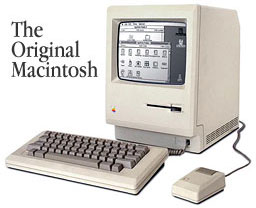 From Enzo Pianelli
Dear Charles:
Nice article on the keyboards.
I just would like to mention that as a trained typist, I really preferred the Apple keyboard that came with the original Macintosh - the Mac 128 or 512 Fat Mac, which keyboard was not mentioned in your article. Yes, I've owned Macs since 1984.
It was perfect, the best keyboard for me. The keystrokes were effortless, and the compactness of the keyboard was the best for typing quickly or for transcription. I don't know if you had any experience with this keyboard, but I thought it was worth mentioning.
Thanks for the article and Happy New Year to you.
Enzo
"Hi Enzo,
"I have a bunch of those old keyboards still kicking around (I still have a working Mac Plus). They were good quality, solid units.
"However, those keyboards also have a hard landing to the keystrokes, and were the first 'boards that caused typing pain for me. Using one for more than a minute or two these days makes my arms go numb and painful.
"Happy New Year!
"Charles
Has 'the Best Keyboard Apple Ever Made' Been Resurrected?
From Herm
Hi Charles:
LEM's a great site and a nice resource for those of us who can't (or won't) suffer the sticker shock for new Apple hardware.
Your article on the Matias is particularly timely, since I just picked up a Sawtooth G4 paired up with the original "iMac" Apple USB keyboard, which IMO is probably the worst Apple keyboard ever made. The mushy feel of the keys and their stiction if struck at any angle except directly on-axis make using it a horrible experience for me.
As the owner of both an Apple Extended I (bought with my SE in 1988 - the best), and an Extended II (2nd best), I've been searching for a decent keyboard to go with my "new" G4. I've tried to audition as many keyboards as I can, from Macally, Kensington, Logitech, MS, etc. The MTP [Matias Tactile Pro] has received many raves, so my expectations for it were high.
After auditioning the Matias TP in a local store, IMO the answer to your question would be "No - close, but no cigar." The action of the MTP is better than most keyboards on the market now, if not all, esp. since it uses mechanical key switches (though I don't mind membrane keyboards), but it's no match for the AE I and II.
It's nice, but not $100 (or $80 street) nice, and for that kind of money I expect consistent quality throughout, which the MTP lacks. One thing I haven't seen any reviewer point out is the finish of the case plastics, which is fair-to-mediocre at best, with rough edges and uneven seams. It makes one appreciate the excellent quality of the clear plastics that Apple uses on their products.
One could argue that the market for a $100 keyboard is scant in today's world and that the money was better spent on the keyboard mechanism and not the case, but I just don't think it's worth the price premium or the hype it has received. Being the best of a mediocre bunch does not make one king.
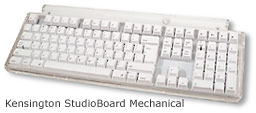 As the for alternatives, they do exist, but I have yet
to be able to track down a Kensington
StudioBoard Mechanical to audition. One informal review has
rated it better than MTP, except for the deviant layout of the
Return key. I'm hoping that the Kensington booth at MWSF has one on
display so that I can get some firsthand experience.
As the for alternatives, they do exist, but I have yet
to be able to track down a Kensington
StudioBoard Mechanical to audition. One informal review has
rated it better than MTP, except for the deviant layout of the
Return key. I'm hoping that the Kensington booth at MWSF has one on
display so that I can get some firsthand experience.
Another alternative is to keep the AE I or II with the Griffin iMate ADB-to-USB adapter.
The current Apple USB keyboard is nice, but the crumb-catching design (esp. around the arrow T-pad) and get-dirty-fast white keys keep it from being ideal. Still, it's well made and not too expensive for such a quality piece.
I appreciate Matias' effort, but their execution doesn't quite match their claim.
my 2¢
Herm
PS. In shopping for a keyboard, it's puzzling to me why none of the manufacturer's websites contain a good, detailed picture of the keyboards they sell. All of them have only small, off-angle pictures of the products, with no way to discern the layout or contents of the keys.
Something to hide, perhaps?
"Hi Herm,
"I mostly agree with your observations, although the test Matias 'board I have is nicely finished with nothing to complain about. As I noted in the article, the key switches are not up to the Apple Extended Keyboard II standard.
"One 'board I have stuck with is the Macally New Wave ADB (although there was a USB variant). It was cheap but comfortable, and I still use it with a Grffin iMate adapter.
"For price/quality/comfort/looks, it's tough to beat the Apple Pro Keyboard.
"Charles
Letters sent may be published at our discretion. Email addresses will not be published unless requested. If you prefer that your message not be published, mark it "not for publication." Letters may be edited for length, context, and to match house style.
Join us on Facebook, follow us on Twitter or Google+, or subscribe to our RSS news feed
Charles Moore has been a freelance journalist since 1987 and began writing for Mac websites in May 1998. His The Road Warrior column was a regular feature on MacOpinion, he is news editor at Applelinks.com and a columnist at MacPrices.net. If you find his articles helpful, please consider making a donation to his tip jar.
Links for the Day
- Mac of the Day: PowerBook 500 Series, introduced 1994.05.16. 'Blackbird' includes a 25 to 33 MHz 68040 along with smart batteries and grayscale or color displays.
- Support Low End Mac

