
Charles Moore's Mailbag
ToyViewer, a Cool Free Graphics Tool for OS X
Charles Moore - 2004.10.04 - Tip Jar
There is some pretty cool freeware available for OS X.Browsers, of course; iTunes; email applications like MozillaThunderbird, GNUMail, Light, and ad-supported versions of Eudora.Another freeware application I like a lot is the system maintenanceand tweaking utility, OnyX,which is amazingly polished and professional for freeware.
Speaking of professionally turned-out freeware, another little appthat blows me away is ToyViewer,which was updated to version 4.60 last week.
ToyViewer is a tricky program to categorize. It's more than agraphics viewer but less than a full-fledged image editingapplication. It incorporates elements of both. I discovered it in myquest for an OS X-native image editor that could serve as a suitablesubstitute for my beloved ColorIt!, thus-far a classic-only application (although I now havea copy of the OS X beta).
There are several OS X-native image editors, but I haven't yetfound one that matches Color It! for speed, simplicity, andversatility.
Photoshopand PhotoshopElements are too big and slow, GIMPis too big and too geeky, and while Thorsten Lemke's GraphicConverteris a nice app that does pretty much everything I need to do, I stilllike Classic Color It! better, mainly because it is lightning fast onthe G3s and G4s (as one might expect of an app that will runtolerably well on a 68020 machine). I love Color It's virtuallyinstant startup (if Classic Mode is already running, which it usuallyisn't these days thanks to the Classic quit bug in Panther on myPismo)
I have Adobe Photoshop Elements 2.0, which is certainly powerful enough, but it's interface is clunky, and it's soooooo slowwww! I'm hoping for some improvement with Photoshop Elements 3.0.
Other OS X-native image editing software I've tried has likewise been either too slow, too bloated, or too feature-challenged for my tastes. I keep coming back to good 'ol Color It!
 However,
ToyViewer has won me over, and it's now one of the applications that
I keep running all the time, even when I'm using Photoshop Elements
or Color It! I find ToyViewer indispensable for quick, slick image
viewing and basic editing, resizing, and file format conversions.
It's also a quick and convenient PDF viewer, with the ability to
display and navigate multipage PDF documents included with Version
4.60.
However,
ToyViewer has won me over, and it's now one of the applications that
I keep running all the time, even when I'm using Photoshop Elements
or Color It! I find ToyViewer indispensable for quick, slick image
viewing and basic editing, resizing, and file format conversions.
It's also a quick and convenient PDF viewer, with the ability to
display and navigate multipage PDF documents included with Version
4.60.
I wasn't expecting a lot when I first tried ToyViewer, which is freeware, and its name doesn't exactly elicit confidence, but it pleasantly surprised me.
 This
program ain't no toy. It's an amazingly capable image converter and
editor, and it's become one of those "can't do without it" general
factotum applications. For resizing and converting images, which are
the two most common tasks I do with graphics, ToyViewer is even
faster and slicker than Color It! Indeed, if just cut-and-paste
editing were added, ToyViewer would serve about 95% of my graphics
utility needs admirably.
This
program ain't no toy. It's an amazingly capable image converter and
editor, and it's become one of those "can't do without it" general
factotum applications. For resizing and converting images, which are
the two most common tasks I do with graphics, ToyViewer is even
faster and slicker than Color It! Indeed, if just cut-and-paste
editing were added, ToyViewer would serve about 95% of my graphics
utility needs admirably.
ToyViewer was originally developed on NeXTstep and then OpenStep. Currently it is for Mac OS X (Cocoa).
ToyViewer has an impressive array of simple image editing functions and also offers filter services to other applications.
New in this version of ToyViewer:
- You can make the size of newly displayed images small if they are large.
- New function "Color Balance" is added. Simple auto fix operation is also available.
- Simple auto fix operation is added to "Brightness/Monochrome" panel. The interface of the panel is updated.
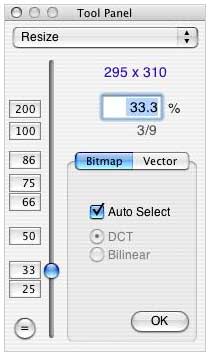
- The interface of "Resize" panel is updated.
- PICT images are dealt with as bitmap images.
- The numbers of the popup menu for resizing on each window are arranged in increasing order.
- Printing routine is updated. Three ways of printing are
provided:
- Shrink automatically,
- Divide into some pages, and
- Print the central part only.
- To save an image, cmd-S displays a sheet on which you can select the format.
- Control panel to show specified page of multipage PDF is added.
- Library libpng (for PNG images) is updated to 1.2.6.
- Utility tool JasPer (for JPEG2000 images) is updated to 1.701.0.
- Bug Fix: On the save panel of JPEG2000, some functions were not selectable.
- Bug Fix: Some parts of German interface did not work well.
ToyViewer features in a nutshell:
- ToyViewer can read and display image files in following formats: TIFF, GIF, BMP, PNG, JPEG, BIE (JBIG), PCX, PCD, PICT, PNM (PPM, PBM, or PGM), XBM, MAG, SUN Rasterfile, JPEG2000 (JP2, JPC, J2K), and other formats supported by Mac OS X.
- Displayed images can be saved in following formats: TIFF, PDF, GIF, BMP, PNG, JPEG, JPEG2000, BIE (JBIG), PNM, or XBM.
Bitmap Images, Vector Images, and PICT Format
In image formats such as JPEG, GIF, or TIFF, an image consists of pixels (colored dots). Such images are called "bitmap images" or "raster images." Most operations of ToyViewer are for bitmap images. PDF or EPS images consist of drawing information such as lines or circles; these are called "vector images." The quality of vector images is independent of the resolution of the printer or display.
ToyViewer provides a function to rasterize, that is, convert a vector image into a bitmap image. You can apply operations such as adjustment of brightness to rasterized images. However, the quality of the images depends on the resolution of the printer or display.
PICT format images can contain both bitmap and vector information. Though ToyViewer basically deals with PICT images as vector images, it can also deal with them as bitmap images. In this case, ToyViewer automatically rasterizes the PICT image. For example, you can clip a part of the image or you can adjust its brightness. In order to turn the function on or off, use the check button of "PICT: Deal with as a bitmap image" in "Formats" of Preferences panel. If you want to deal with a PICT image as a bitmap image, you must rasterize it first.
JPEG format can achieve high compression. However, the quality of the image is diminished. In general, high quality prevents good compression, and good compression spoils quality. This parameter of JPEG can be set by the save panel.
JPEG is recommended for continuous color or monochrome 8-bit images. Applying it to other images, especially 1-bit black-and-white images, will not only worsen image quality but also create larger files.
You can save images in interlaced (progressive) format. When an interlaced image is displayed on a Web page, its outline is displayed quickly even if the speed of the Net is slow, but the compression ratio is slightly worse.
In the JPEG2000 format, like JPEG, high quality prevents good compression, and good compression spoils quality. In JPEG2000, you can save images without loss of the original data (lossless compression). JPEG2000 is recommended for continuous color or monochrome 8-bit images. In lossless compression, JPEG2000 provides better compression ratio than PNG. In lossy compression, even if the compression ratio is relatively high, noise is inconspicuous compared with JPEG.
When you save an image in TIFF, you can select either no compression or LZW compression. As LZW is a lossless compression, the quality of the image is not spoiled. In some TIFF images, color is represented with CMYK instead of RGB. ToyViewer can convert CMYK into RGB using "Operation / CMYK->RGB", but it takes a long time with current implementation.
ToyViewer can attach a custom icon to any file as well as a newly saved image file.
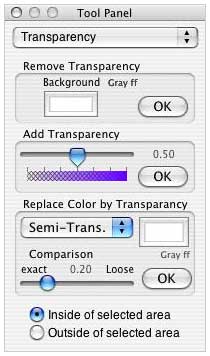 ToyViewer
can read and write CF or PNG files with transparent color, and also
can read and write interlaced (progressive) GIF, PNG, or JPEG
files.
ToyViewer
can read and write CF or PNG files with transparent color, and also
can read and write interlaced (progressive) GIF, PNG, or JPEG
files.
ToyViewer can scan (auto-display) image files in a folder. You can also display images in full-screen size.
Displayed images can be scaled (enlarge/shrink).
You can rotate, flip, or clip images.
ToyViewer has the ability to automatically fix the balance of colors. You can also adjust brightness, contrast, and color tone of images.
If the "Auto Fix" button is clicked, ToyViewer examines the balance of the brightness of the image and sets the brightness, contrast, and gamma sliders. Clicking the "Brightness" button, you can make a new image. However, Auto Fix does not always function appropriately. If newly displayed image does not appear pleasing to the eye, you should adjust the sliders manually.
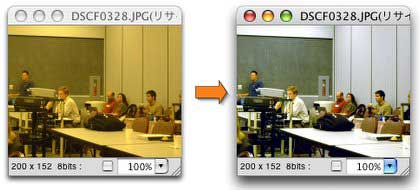
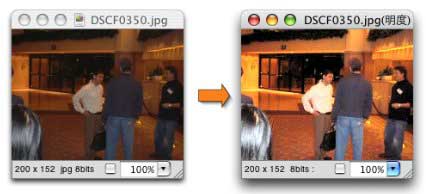
If a part of image is selected, ToyViewer refers to only the inside (or outside) of the selection. Auto fix ignores the brightest part and the darkest part of the image. Slider "Auto Fix Range" specifies the percentage of the part that is not ignored.
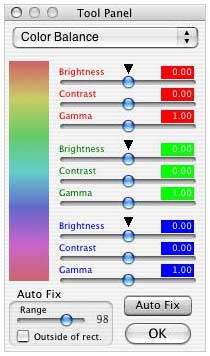 For
each element of RGB, you can adjust brightness (strength), contrast,
and gamma. This operation cannot be applied to vector images (e.g.,
PDF). In order to tune the color balance, using mainly gamma sliders
is recommended. Smaller gamma values make the corresponding color
richer. Moreover, if the original color balance doesn't need
correction, you can use the Auto Fix function instead.
For
each element of RGB, you can adjust brightness (strength), contrast,
and gamma. This operation cannot be applied to vector images (e.g.,
PDF). In order to tune the color balance, using mainly gamma sliders
is recommended. Smaller gamma values make the corresponding color
richer. Moreover, if the original color balance doesn't need
correction, you can use the Auto Fix function instead.
You can also tune color tone (saturation and hue) of images. If you click "Effect / Enhance Color Tone...," a panel is displayed on which you can set the degree of enhancement. Large values of "Saturation" make images brilliant. You can also control the hue of images. This operation can not be applied to vector images (e.g., PDF).
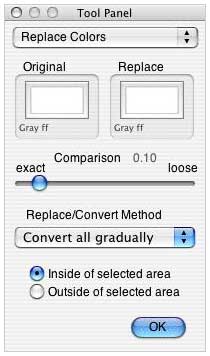 You
can replace a specified color in the image with another color. If you
click "Effect / Replace Colors...," a panel is displayed on which you
can set replaced colors with the color-wells. The degree of exactness
in comparison of colors is set by a slider. If an area is selected by
dragging, this operation will be applied to only inside or outside of
the area. You can replace a specified color with another color or
transparent color.
You
can replace a specified color in the image with another color. If you
click "Effect / Replace Colors...," a panel is displayed on which you
can set replaced colors with the color-wells. The degree of exactness
in comparison of colors is set by a slider. If an area is selected by
dragging, this operation will be applied to only inside or outside of
the area. You can replace a specified color with another color or
transparent color.
ToyViewer supports some typical image operations, such as enhancement, mosaic, embossing, and so on.
Full color images can be reduced into 256, 64, or 8 colors. Also, each color value of images can be cut down to 4, 2, or 1 bit.
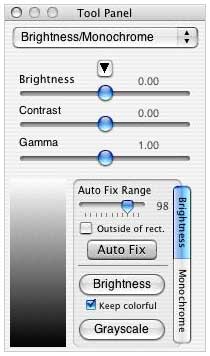 ToyViewer
can make images monochrome (8-bit gray, 2-bit gray, or bilevel).
ToyViewer
can make images monochrome (8-bit gray, 2-bit gray, or bilevel).
Images can be printed. An image is automatically shrunk to be printed on a sheet or divided into multiple pages.
ToyViewer provides image conversion filter services for other applications.
You can add comments to images (comments are written into only GIF, PNG, JPEG, or PNM formats).
You can make Aqua-button-like images.
If you like a displayed image, you can make it the Desktop picture (wallpaper) of your Mac.
ToyViewer has Japanese, English, French, and German Interfaces. (French and German interfaces are incomplete).
Perhaps the developer, Takeshi Ogihara, has no interest in turning ToyViewer into a full-zoot bitmap "paint" program, but what's already there is so good that it's tantalizing to think how cool it would be if a set of MacPaint style editing tools and functions were added. I encourage Mr. Ogihara to give it some serious thought.
System requirements: Mac OS X 10.3 or higher
ToyViewer is freeware.
Join us on Facebook, follow us on Twitter or Google+, or subscribe to our RSS news feed
Charles Moore has been a freelance journalist since 1987 and began writing for Mac websites in May 1998. His The Road Warrior column was a regular feature on MacOpinion, he is news editor at Applelinks.com and a columnist at MacPrices.net. If you find his articles helpful, please consider making a donation to his tip jar.
Links for the Day
- Mac of the Day: 17" MacBook Pro Core Duo, (2006.04.24. The top-end MacBook Pro has a 1680 x 1050, 2.16 GHz Core Duo CPU, and supports Apple's 30" Cinema Display.)
- Support Low End Mac
Recent Content
About LEM Support Usage Privacy Contact
Follow Low End Mac on Twitter
Join Low End Mac on Facebook
Favorite Sites
MacSurfer
Cult of Mac
Shrine of Apple
MacInTouch
MyAppleMenu
InfoMac
The Mac Observer
Accelerate Your Mac
RetroMacCast
The Vintage Mac Museum
Deal Brothers
DealMac
Mac2Sell
Mac Driver Museum
JAG's House
System 6 Heaven
System 7 Today
the pickle's Low-End Mac FAQ
Affiliates
Amazon.com
The iTunes Store
PC Connection Express
Macgo Blu-ray Player
Parallels Desktop for Mac
eBay

