
Charles Moore's Mailbag
Dying FireWire Cables, G3/900 vs. G4/533, and Low-End Cross-Platform Wireless
Charles Moore - 2003.11.06 - Tip Jar
Dying FireWire cables
From B.J. Major
Hi Charles,
Here's a question for your mailbag: Why are my FireWire cables dying??
I have two that now only deliver power to the device they are connected to but do not transfer data to those devices any longer. The item connected will not show up on the desktop, even when rebooting the Mac. One cable came with a FireWire external drive enclosure and the other cable originally came with a VST external hard drive purchased over three years ago when FireWire was making its debut. Both items are out of warranty, so I cannot contact the manufacturers for replacement cables.
I am very afraid this will happen to all my FW cables, and then I'll have no way to update my iPod or back up my data . . . what can be causing this to happen suddenly with these cables?
Thanks in advance for any help you can offer.
bj
The Music Discographies of bjbear71.com
Hi bj,
I can't say with any certainty what the issue is with your cables. I did a couple of articles on FireWire problems last winter; FireWire: Hot Swapping Isn't Always a Good Idea and More on the Dangers of Hot Swapping FireWire Devices might shed some light.
This forum thread says:
"Most of the failure modes of FireWire ports are believed to be caused by low quality or worn out FireWire cables, operator error during device and cable insertion, inadequate PHY port protection, and improper design of external FireWire devices which causes voltage surges to the host port."
James Wiebe of WiebeTech's excellent white paper on FireWire port failures notes:
Certain preventive measures seem obvious:
• Always use high quality FireWire cables.
• If a cable is worn out, replace it immediately. (Cables used at
WiebeTech are used heavily throughout every business day; they are
generally replaced every month, if not more frequently.)
• Never insert a cable backwards into a port. If this happens
before the cable is also attached to the host (or to the peripheral
device), get the port repaired prior to further use of the device (or
host). Discard the cable and use a new one.
• If a device does not mount, attempt mounting it with a new cable
on the same port. Always suspect the cable before suspecting a failure
of the device. Try powering the host down; rebooting; etc. Port
failures on machines tend to follow the cable.
Hope this helps.
Charles
900 MHz G3 vs. 533 MHz G4
From Rick
Hi, I want to buy an old Pismo PowerBook and upgrade the processor.
My conflict is this: I have a 700 MHz eMac and had used my friend's 800 MHz G3 iBook - both with 384 MB of RAM. The iBook ran Warcraft, Windows 98 and XP in Virtual PC, and overall OS X much faster then my eMac.
The iBook just choked (and croaked) on video encoding. If I get a Pismo and reserve my most processor intensive tasks for the eMac, what will make it run faster over all, a 900 MHz G3 or a 533 MHz G4?
Also, would choosing Panther and Jaguar effect this decision?
Thanks you very much for any help you can give me.
Rick
Hi Rick,
Good question. Which would be faster would depend on what you were doing. PowerLogix says their 900 MHz G3 Pismo upgrade is generally faster than a 500 MHz G4 upgrade in their tests (they have results and comparo graphs posted on their website).
On the other hand, if you were doing a lot of stuff with software optimized for AltiVec (video encoding for example), the G4 will almost certainly dust the G3.
Incidentally, even though the games, et al., run fast on your friend's iBook, note that the iBook has a Radeon 7500 video accelerator and 32 MB of VRAM, while the Pismo is stuck with Rage 128 Mobility video and 8 MB of VRAM, so you can't necessarily expect performance parity. OS X Quartz Extreme, which livens things up substantially, requires 16 MB VRAM minimum.
Charles
Low-end wireless
From Patrick O'Grady
Hi, Charles,
I'm looking to take a hodgepodge of elderly laptops wireless, and I
could use your advice. The wife and I currently share a DSL connection
via ethernet, but we'd like the option of wandering about the house or
down to the corner coffee shop when the basement office walls start to
close in on us.
A cookie-cutter approach won't work for us, though. My main machine is a G3/500 Pismo running OS 9.0.4, while hers is a Dell Latitude running Windows 98. Our backups are a G3/250 WallStreet (OS 8.6) and a G3/600 iBook (OS 9.2.1). The Pismo and iBook are AirPort-ready; the WallStreet and Dell are not. I wouldn't mind bringing the WallStreet up to OS 9, but I'm not eager to upgrade all three Macs to OS X.
My question is this: Should I try building an AirPort or AirPort Extreme wireless network, using AirPort cards in the Pismo and iBook and third-party PCMCIA cards in the WallStreet and Dell, or should I use a third-party wireless router as my base station? The DSL modem we're using is an ActionTec Wireless-ready DSL Gateway.
Any advice and/or recommendations you can pass along will be most welcome.
Thanks in advance,
Patrick O'Grady
Hi Patrick,
I'm anything but an expert in wireless networking issues, but a product sold by Wegener Media sounds like it might be an ideal solution to your dilemma.
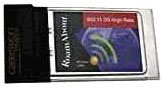 The RoamAbout Wireless
Card offers full 10Base-T networking capabilities, full
compatibility with AirPort base stations and the entire 802.11b network
system!
The RoamAbout Wireless
Card offers full 10Base-T networking capabilities, full
compatibility with AirPort base stations and the entire 802.11b network
system!
11 Mbps transfer rate - cruise the Web wirelessly as fast as your cable or phone line can connect.
Compatible with PowerBooks 5300, 1400, 3400c, 2400, G3 ("Kanga"), G3 WallStreet, G3 Lombard, G3 Pismo, G4 Titanium
Fully compatible with AirPort software and firmware.
Apple, Windows, XP, and Linux drivers included.
Note that AirPort software requires OS 9.0.4 or higher (this is standard no matter which cards you use). Certain machines may require upgrades or software to be compatible with AirPort, but this card will work in any AirPort compatible PowerBook that has a PC card slot.
Price: $27.99
Charles
Letters sent may be published at our discretion. Email addresses will not be published unless requested. If you prefer that your message not be published, mark it "not for publication." Letters may be edited for length, context, and to match house style.
Join us on Facebook, follow us on Twitter or Google+, or subscribe to our RSS news feed
Charles Moore has been a freelance journalist since 1987 and began writing for Mac websites in May 1998. His The Road Warrior column was a regular feature on MacOpinion, he is news editor at Applelinks.com and a columnist at MacPrices.net. If you find his articles helpful, please consider making a donation to his tip jar.
Links for the Day
- Mac of the Day: Motorola StarMax 3000, introduced 1999.09.07. This inexpensive clone used lots of off-the-shelf parts.
- Support Low End Mac
Recent Content
About LEM Support Usage Privacy Contact
Follow Low End Mac on Twitter
Join Low End Mac on Facebook
Favorite Sites
MacSurfer
Cult of Mac
Shrine of Apple
MacInTouch
MyAppleMenu
InfoMac
The Mac Observer
Accelerate Your Mac
RetroMacCast
The Vintage Mac Museum
Deal Brothers
DealMac
Mac2Sell
Mac Driver Museum
JAG's House
System 6 Heaven
System 7 Today
the pickle's Low-End Mac FAQ
Affiliates
Amazon.com
The iTunes Store
PC Connection Express
Macgo Blu-ray Player
Parallels Desktop for Mac
eBay

