
Miscellaneous Ramblings
A 200 MHz 604e for Production Work?
Charles Moore - 2002.08.19 - Tip Jar
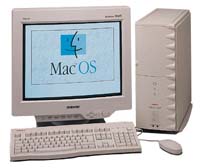
For the past few days, I've been using my Umax SuperMac S900 tower machine for production work. I decided to try to freshly evaluate its potential for workhorse duty if I were to upgrade it with a G3 processor, more RAM, and a bigger hard drive.
I tried this for a week back in May 2001, and I found that both stability and speed left much to be desired, but I was running OS 9.0 and using Netscape 4.7.7 for browsing. This time around, I've got OS 9.1 installed, am using iCab as my principal browser, and stability is a lot better, while the speed is remarkably good for some things - notably Web surfing and email.
In fact, for email especially, and Web surfing with a text
browser, the old 200 MHz 604e Umax with a Global Village Platinum
33.6 bps modem is faster than either the 500 MHz G3 Pismo
or my currently broken 233 MHz WallStreet
PowerBooks with their internal 56k modems (surfing with regular
browsers, especially in OS X, the Pismo still has the edge,
 presumably
because of these programs' processor demands). I can only guess that
this is due to better port throughput to the modem, a particularly
harmonious match between one of Tracy Turner's Mac ara
Modem Magic a modem scripts (Global Village X2), and a faster
hard drive (although still only 5400 RPM) in the Umax.
presumably
because of these programs' processor demands). I can only guess that
this is due to better port throughput to the modem, a particularly
harmonious match between one of Tracy Turner's Mac ara
Modem Magic a modem scripts (Global Village X2), and a faster
hard drive (although still only 5400 RPM) in the Umax.
Whatever, the Pismo, whose 20 GB hard drive is a real plodder, is frustrating to use for these Web-related tasks (the late, lamented WallStreet, which had a livelier hard drive, was better), while the old tower machine, while not exactly zippy, is much more pleasant to use. The 33.6 modem is not a hardship, as I had never seen better than a 26.4 connection with any of these machines here.
Of course, for processor-oriented tasks, the old 604e processor takes a back seat to the G3s, especially the 500 MHz unit in the Pismo, which will transcribe dictation in almost real time. However, that strengthens the case for upgrading the Umax's processor and RAM (currently 120 MB), and getting a bigger hard drive. The S900 has a 50 MHz system bus, which is not all that much slower than the 66 MHz bus in the WallStreet.
My S900 already has USB and FireWire PCI cards installed, and both work great. With built-in ethernet, six PCI slots, eight RAM slots, a bunch of drive bays, and two SCSI buses, the old SuperMac is still a formidable contender.
I would love to be able to stick in Sonnet's new 800 MHz Crescendo PCI processor upgrade, which would no doubt make the old SuperMac fly, even in OS X, but $400 for a processor is a bit rich for my budget these days. I will probably settle on a 400 MHz or 450 MHz G3 upgrade, which can be had for under one under $150.
Adding 256 MB more RAM and a 9.1 GB hard drive from Other World Computing will still come in and under $300. Anyway, that's my current thinking.
In the meantime, I'm amazed at how good the old Umax is for most of the stuff I do, even with the poky 200 MHz 604e. My email programs, Eudora 5.1.1, Nisus Email 1.6.1, and SweetMail 2.2, all work well, although windows open a bit slower than with the G3s, and the little streamed ads with Eudora also cause the program to pause when they're loading - something that isn't noticed nearly as much on the G3 machines. SweetMail is the least affected of the three by moving to the slower processor.
Tex Edit Plus works well, and, aside from slower scrolling, I really don't notice any significant drop in performance from the faster machines. Color It! 4.1, my favorite graphics application, is very responsive on the new Macs, but it gives decent performance even on my ancient 25 MHz 68030 LC 520, so that's not a surprise.
iListen 1.1 works for emergency dictation of short passages, but at the speed of continental drift (it's not supported on this machine, so I'm grateful that it works at all). Vicomsoft FTP Client performs as well as it does on the G3s.
As for Web browsers, iCab works great, and since it's my number one browser most of the time anyway, there is no big adjustment there. The little text-only browser, WannaBe, is, if anything, faster on the Umax than it is on the Pismo - that modem throughput thing again, I suppose, since this program makes very light processor demands.
What I miss most in the browser department are Mozilla and Netscape 7.0, which require a minimum 266 MHz 604e. Netscape 4.7.x works, but for some reason it is not a happy camper on this machine, crashing often and usually causing enough havoc in the process to require a restart. Since I stopped trying to use it, I've had no crashes or lockups in the past few days.
In the interest of research, I tried Internet Explorer 5, and it seems to work okay and even scrolls rather briskly, but it is a lot slower with downloading pages than iCab. I must download a current version of Opera to try.
Bottom line: Someone on a low-budget looking for an inexpensive Mac could do a lot worse than one of these Umax towers, or their Apple-branded Tsunami motherboard siblings - the Power Mac 9500/9600, or, if you can live with three PCI slots, the Power Mac 8600.
And there's always plenty of potential for upgrading - even to a gig of RAM and an 800 MHz G4!
Join us on Facebook, follow us on Twitter or Google+, or subscribe to our RSS news feed
Charles Moore has been a freelance journalist since 1987 and began writing for Mac websites in May 1998. His The Road Warrior column was a regular feature on MacOpinion, he is news editor at Applelinks.com and a columnist at MacPrices.net. If you find his articles helpful, please consider making a donation to his tip jar.
Links for the Day
- Mac of the Day: PowerBook 500 Series, introduced 1994.05.16. 'Blackbird' includes a 25 to 33 MHz 68040 along with smart batteries and grayscale or color displays.
- Support Low End Mac
Recent Content
About LEM Support Usage Privacy Contact
Follow Low End Mac on Twitter
Join Low End Mac on Facebook
Favorite Sites
MacSurfer
Cult of Mac
Shrine of Apple
MacInTouch
MyAppleMenu
InfoMac
The Mac Observer
Accelerate Your Mac
RetroMacCast
The Vintage Mac Museum
Deal Brothers
DealMac
Mac2Sell
Mac Driver Museum
JAG's House
System 6 Heaven
System 7 Today
the pickle's Low-End Mac FAQ
Affiliates
Amazon.com
The iTunes Store
PC Connection Express
Macgo Blu-ray Player
Parallels Desktop for Mac
eBay

