
Miscellaneous Ramblings
Miscellaneous Ramblings Review
Haxial TextEdit 1.000
Charles Moore - 2002.04.29 - Tip Jar
I have a weakness for text-editing applications. There must be at least two dozen text editors available for the Mac, and probably more than that. I've sampled of fair few of them, and they range from mediocre to superb.
In my estimation, the cream of the crop are Tom Bender's shareware Tex-Edit Plus and Bare Bones Software's BBEdit, which comes in both commercial software and a feature-reduced lite freeware version. The Text Edit replacement for SimpleText in OS X is a pretty decent basic text editor as well.
Most text editors are variations on the same basic set of functions, with emphasis on particular features that the developer has chosen to concentrate on. Pepper, for example, is a favorite of programmers. BBEdit has extensive HTML markup capabilities, and even BBEdit Lite has a remarkable surge and replace engine. Tex Edit Plus focuses on text cleaning and manipulation, and has the best AppleScript implementation I've encountered in any program of any sort.
Tex Edit Plus and BBEdit's are so good that I sometimes wonder why anyone else bothers, but it seems that there's a new shareware text editor introduced every couple of weeks. However, the newest kid on the block really is distinctive, both because of its striking looks and also thanks to some genuinely innovative features. Haxial TextEdit is a simple, freeware text editor that edits plain text files in Mac (OS X or classic), DOS/Windows, and Unix formats.
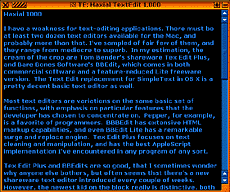
Haxial TextEdit 1.000 looks like no text editor application you've ever seen before, unless, perhaps you have been into hacking the GUI with Kaleidoscope. The default is colored text on a black background, but you can customize Haxial Text Edit using its color settings panel to suit your personal tastes and imagination, or choose from a dozen supplied themes cataloged in a pulldown menu. The color schemes are a bit loud, but I find several of them quite attractive.
You can also download extra Color Scheme files from the Haxial website, or you can make your own Color Scheme using the Color Scheme Editor, which you also download from the Haxial website.
There are also four font choices, all sans serif and rather bland.
A Rename command shows a window that allows you to enter a new name for the open file. There is also a Find/Replace function. Find: Shows a window which allows you to find (and optionally replace) text in the file (explained further ahead in this documentation). Enter 'Find' Text: Puts the selected text into the Find window. Replace & Find Next: After using "Find Next", you might use this command to replace that text with the Replace text that is in the Find window, and then it finds the next occurrence.
One of the innovations I mentioned is how you access the settings. The Haxial window interface, aside from the arresting colors, is actually a model of clean simplicity. There is a title bar, which contains the file name and just four buttons - a close button in the usual place, and a wider button just to its right, which toggles a menu containing all program commands. This is very slick. A Zoom Button expands the window to display all of its contents.
The fourth button toggles another cool feature. When you click it or double-click on a Haxial window's title bar, instead of windowshading, the window collapses to what Haxial calls a dock. If you have more than one Haxial document open an collapsed it will stack in the dock.
When you hold down the control/command key, then hit the
asterisk key (the '*' key) on the numeric keypad, a popup grid
appears 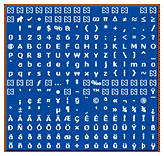 showing you a map of every
character that can be used. Click one to insert it into the text.
You can access special characters and letters with diacritical
marks this way.
showing you a map of every
character that can be used. Click one to insert it into the text.
You can access special characters and letters with diacritical
marks this way.
Unfortunately, Haxial TextEdit also has some shortcomings. It does not support drag-and-drop text (although you can drag text from other applications into it). An even more glaring omission is that command-Z does not work for undo (although it appears in the File menu), and response to other commands was flaky. Some of this may be version 1 (or 1.000 in this case) bugginess, but it limits Haxial TextEdit's usefulness. I also discovered that the Scrollability auto-scrolling utility I use in OS 9 doesn't work with it either. There are no text-cleaning tools and no formatting options. It is a very basic text editor in terms of function.
Rename: Shows a window which allows you to enter a new name for this file. If you proceed, the name of the file on disk and the editor window are changed to the name you entered.
Find: Shows a window which allows you to find (and optionally replace) text in the file (explained further ahead in this documentation).
Find Next: Starting at the insertion point or selection, this finds the next occurrence of the text that is in the Find window.
Enter 'Find' Text: Puts the selected text into the Find window. Replace & Find Next: After using "Find Next", you might use this command to replace that text with the Replace text that is in the Find window, and then it finds the next occurrence.
I tried Haxial Text Edit in both OS 9.2.2 and OS X, and it works the same in both, following neither's appearance conventions, although the "Tropical Water" color scheme is somewhat harmonious with OS X Aqua.
This is a fun little application. It isn't going to wean me away from Tex Edit Plus, but it deserves recognition for the outside-the-box thinking that has gone into it. Still more a curiosity and interface design exercise than a useful application, it's a small download (c. 300K) so there's no reason not to give it a try. Included is a very good PDF manual.
System Requirements
- Mac OS X (10) or better.
- Mac OS 9 with CarbonLib 1.3.1 or better
- MS Windows 95 or better
Join us on Facebook, follow us on Twitter or Google+, or subscribe to our RSS news feed
Charles Moore has been a freelance journalist since 1987 and began writing for Mac websites in May 1998. His The Road Warrior column was a regular feature on MacOpinion, he is news editor at Applelinks.com and a columnist at MacPrices.net. If you find his articles helpful, please consider making a donation to his tip jar.
Links for the Day
- Mac of the Day: PowerBook 500 Series, introduced 1994.05.16. 'Blackbird' includes a 25 to 33 MHz 68040 along with smart batteries and grayscale or color displays.
- Support Low End Mac
Recent Content
About LEM Support Usage Privacy Contact
Follow Low End Mac on Twitter
Join Low End Mac on Facebook
Favorite Sites
MacSurfer
Cult of Mac
Shrine of Apple
MacInTouch
MyAppleMenu
InfoMac
The Mac Observer
Accelerate Your Mac
RetroMacCast
The Vintage Mac Museum
Deal Brothers
DealMac
Mac2Sell
Mac Driver Museum
JAG's House
System 6 Heaven
System 7 Today
the pickle's Low-End Mac FAQ
Affiliates
Amazon.com
The iTunes Store
PC Connection Express
Macgo Blu-ray Player
Parallels Desktop for Mac
eBay

