Miscellaneous Ramblings
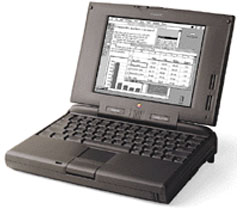
PowerBook 5300: The Real PowerBook
Charles Moore - 2002.04.01 - Tip Jar
The concept of Luddite Mac appeals to me at the gut level because I am temperamentally resistant to change. When I have found something that works well for me, I'm happy to stick with it and reluctant to move along to the next big thing.
This is why I'll probably never find a computer that grabs me emotionally as much as the PowerBook 5300 did and still does. The 5300 wasn't my first Mac, but it was my first portable, and I discovered - in about the first five minutes after taking it out of the box - that I'm a portable computer guy.
For me there was something just right about the 5300. I loved its
size, its styling, and even its fairly hefty
weight.
There's something reassuringly substantial about a diminutive object
that turns out to be heavier than it looks. Ever pick up a
Krugerrand?
Even though my base-specification 5300 had only a passive matrix grayscale monitor screen, I even liked that. Of course, I wouldn't have objected to the bright and jewel-like, 105 dpi, 800 x 600 TFT monitor of the PowerBook 5300ce either, but there is something soothing and comfortable about passive matrix LCD screens that appeals to me.
"But the PowerBook 5300 is a slow as a lame dog," you might object. Okay, by today's standards the 5300 is slow, especially if you try to run any system later than OS 8.1 on it. However, back in 1996 it didn't really seem that bad, and the 5300 was actually quite tolerably lively running System 7.5.5 and using contemporary software like Word 5.1, Eudora Light, and Color It! 4.
I prefer the general feel of the 5300 to that of any other laptop I've ever tried. The light-touch, positive click of the trackpad button is much preferable to the simultaneously stiff and mushy feel of my later, G3 Series PowerBooks trackpad buttons, and the palm rest ergonomics are better, too, although I must concede that the 5300 keyboard is mediocre compared with the lovely keyboards on my WallStreet and Pismo. However, I do like the way that the tops of the key caps on the 5300 keyboard are recessed to the level of the palm rest surfaces.
The dual-USB, 12.1" screen iBook has about the same footprint as the PowerBook 5300, is not radically dissimilar in styling, and offers performance that blows the 5300 far into the weeds. However, the iBook still falls short of the true PowerBook mystique, while the 5300, despite some shortcomings, is a full-fledged PowerBook, complete with a removable module expansion day (we have a Zip drive, a second hard drive, and a floppy drive for ours), two PC Card slots, a full set of classic PowerBook connectivity ports, 16-bit sound in and out, video out including monitor spanning, and an infrared port.
For me, the 5300 is and always will be the real PowerBook
benchmark.
Join us on Facebook. Follow us on Twitter.
Charles Moore has been a freelance journalist since 1987 and began writing for Mac websites in May 1998. His The Road Warrior column was a regular feature on MacOpinion, and he is a news editor and columnist at Applelinks.com. If you find his articles helpful, please consider making a donation to his tip jar.
Recent articles by Charles W. Moore
- Don't Kill Caps Lock, Learning to Love the iOS Keyboard, and an Adaptive iPad Keyboard, Miscellaneous Ramblings, 2012.02.06. The Caps Lock key has a useful function, the iPad's keyboard really is useful, and checking out an adaptive keyboard for the iPad.
- MacBook Air vs. MacBook Pro, Looking for a Vertical MacBook Stand, and SE/30 Internet Tips, Charles Moore's Mailbag, 2012.01.31. Whether a MacBook Air makes as much sense as a MacBook Pro, finding a vertical stand for a MacBook, and tips for getting an SE/30 on the Internet.
- Moving from Pismo to MacBook Air, Pros and Cons of Cheap PC Laptops, and More, Charles Moore's Mailbag, 2012.01.23. Also which upgrades make sense for an older PowerBook or MacBook.
- More in the Miscellaneous Ramblings index.
Links for the Day
- Mac of the Day: Macintosh Portable, introduced 1989.09.20. The nearly 16 lb. behemoth was innovative but not a smashing success.
- February 13 in LEM history: 01: Layoffs may hurt Mac market - 02: Unix for the Mac - Rage against the Macintosh - 03: Options to move data from PCs to Macs - 04: Low cost RAM for older 'Books - 06: Apple, IBM, and Intel - 07: Picking the right cheap computer, new or used - 08: I needed to find an older Mac
- Support Low End Mac
Recent Content on Low End Mac
- Fix Home Button Delay, Tablet the Ultimate Mobile PC, iPad Notebook a Possibility, and More, iOS News Review, 2012.02.10. Also using your iPad at work, two photo editors, a new iPad text editor, Macally's magnetic iPad 2 stand, and more.
- White MacBook Goes End-of-Life, Logitech Touch Mouse Supports Gestures, Firmware Updates, and More, The 'Book Review, 2012.02.10. Also MacBook Air better than any Ultrabook, docks for MacBook Pro models, Intel offers improved SSDs, and more.
- Mac and iOS Browsers: Options Galore, Freeware Forum, 2012.02.10. Safari is adequate on Mac and great on iOS, but the range of good alternatives is stunning. LEM writers share their favorites.
- Apple's Support Lead Shipping, Smartphones Outsell PCs, OS X Ported to ARM by Intern, and More, Mac News Review, 2012.02.10. Also the power of Tex-Edit Plus, Google and Twitter are already censoring the Web, Snow Leopard Security Update, and more.
- LogMeIn: Remote Screen Sharing for the Rest of Us, Alan Zisman, Zis Mac, 2012.02.09. Configuring the Mac's built-in screen sharing to work over the Internet can be difficult or impossible. LogMeIn makes it easy.
- 15 Years Ago Motorola Unveiled the PowerPC G3, Low End Mac Round Table, 2012.02.06. The G3 processor was optimized for real world Mac software and made a big leap forward in efficiency.
- More links in our archive.
Recent Deals
- Best MacBook Air Deals
- Best iBook G4 Deals
- Best iPad Deals
- Best Classic Mac OS Deals
- Best Apple TV Deals
- Best 15" MacBook Pro Deals
- Best Power Mac G4 Deals
- Best Mac OS X 10.6 Deals
- More deals in our archive.
About LEM Support Usage Privacy Contact
Follow
Low End Mac on Twitter
Join Low End Mac
on Facebook
Low End Mac Reader Specials
TypeStyler 11 is now in the Mac App Store!! -- Special Introductory Price of $59.95!! -- To Buy From The Mac App Store Click Here Now!! Or buy direct
from Strider Software.
Don't install Parallels to play poker online! Poker Mac will show you how to download and install a native Mac poker and Mac Casino applications in minutes.
Favorite Sites
MacSurfer
Cult of Mac
Shrine of Apple
MacInTouch
MyAppleMenu
InfoMac
The Mac Observer
Accelerate Your Mac
RetroMacCast
PB Central
MacWindows
The Vintage Mac Museum
DealMac
Deal Brothers
Mac2Sell
Mac Driver Museum
JAG's House
System 6 Heaven
System 7 Today
the pickle's Low-End Mac FAQ
Affiliates
Amazon.com
The Apple Store
The iTunes Store
PC Connection Express
GainSaver
Parallels Desktop for Mac
eBay