Miscellaneous Ramblings
Almost High-End Graphics for a Low-End Price
Charles W. Moore - 2001.02.19
Adobe Photoshop owns the cross platform bitmap graphics category even more convincingly than Microsoft Office dominates the productivity software market.
Photoshop is extremely powerful image creation and editing software, but it is also very large and expensive software that requires state of the art hardware in order to use it efficiently - at least the current version. I have a copy of Photoshop 1.0, that runs happily on my old '030 LC 520, but that's another movie.
If you're a graphics professional or an amateur with serious aspirations, you need Photoshop. The vast majority of Mac users, particularly ones without fast G3 or G4 Macs do not.
Color It! 4
I'm graphics dabbler at best, but I do occasionally like to do some photo retouching and image manipulation. Also, I frequently need to edit images for use as illustrations in articles and convert screenshot PICTs into JPEGs or GIFs for publishing on the Web. My tool of choice for all of these tasks is MicroFrontier's 32-bit image editing program, Color It! 4.0.1, which I think of as "Photoshop for the rest of us."
Color It! will do almost anything I would ever do in Photoshop, and considerably more besides, and it does it at little more than the price of average shareware. Not only that, but Color It! is fast. It launches on my not-exactly-bleeding-edge 233 MHz PowerBook in less than four seconds - great when all I want to do is quickly convert an image to another file format or clean up a downloaded JPEG. And it's a whole lot better than twiddling my thumbs while ponderous Photoshop lumbers to life.
However, the cool thing is that Color It! works a lot like Photoshop, so the skills you develop using one of these programs will, to a considerable degree, transfer to the other. There are distinctions and differences, of course, but not ones so radical that you have to climb a steep learning curve when switching.
Color It! also supports Photoshop plug-ins, which work exactly the same in both programs. For instance, my scanner software is a Photoshop plug-in that works with either program.
Another advantage of Color It! 4.0.1 will be of particular interest to many readers of this website: It supports 68k machines as well as Power PC. It runs fine on my LC 520 under System 7.5.5 and on my PowerBook G3 under Mac OS 9.1. The installer will install your choice of PPC, 68k, or a fat install of both.
Unfortunately, it appears that MicroFrontier has terminated further development of Color It! I was told a couple of years ago by a company spokesman that a version 4.2 or 4.5 was in the works, but nothing came of it. Consequently, I don't have very much hope that we will ever see a Carbonized version of Color It! for OS X, but, as noted, the program works fine for the under systems up to and including Mac OS 9.1
My first acquaintance with Color It! was Version 3.0, which came bundled with a scanner I bought about six years ago. I was impressed that the bundled image editing software was such a complete and comprehensive program, not a "crippleware" come-on to buy something more expensive. Color It! has been my main image editing and scanning program ever since.
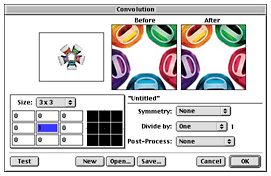
I found that Color It! offered some features that Photoshop didn't at the time, including multiple undos and a convolution editor that applies convolutions (numerical pixel-by-pixel operations) on the fly as you paint. Color It! also has a customizable toolbox, user-friendly color controls with an intuitive slider-bar motif, anti-aliasing and feathering options, an Unsharp Mask function, and selection and masking tools.
Color It! gives you pressure-sensitive control over input (if you have a pressure-sensitive drawing tablet like Wacom's), does color corrections with its Levels and Curves commands, allows you to edit color channels separately using paint tools and special-effects filters, including CMYK separation channels.
Color It! 4.0 supports a wide variety of file formats including GIF, JPEG, PNG, TIFF, PICT, PostScript, Photoshop, PhotoCD, and more. Up to 16 levels of undo makes experimenting or correcting mistakes easy. It can also use Photoshop 3.0- compatible plug-ins, like Alien Skin's Eye Candy and Xenofex.
Color It! 4.0 is only 2.9 MB for the application (3.4 MB for the entire installation) and will run in 2,048 KB of memory (both cited memory partitions are with Virtual Memory on).
With Color It! 4.0 you can:
- Create, view, edit, and save animated GIF files without leaving the program
- Catalog your image files for quicker browsing and retrieval.
- Export documents with clipping paths.
- Remove scratches, dust, redeye effects & more from scanned or digital photographs with the program's built-in filters.
- Use Photoshop 3.0-compatible plug-ins
- Open and save PNG and progressive JPEG files.
- Quickly create client- and server-side image maps for the Web by simply defining shapes around parts of an image.
- Apply linear or radial effects to gradient fills.
- Minimize color tables to create smaller GIF files for your Web pages.
- Mix paint and pasted images together with different effects using Color It! 4.0's new paint transfer modes.
Tools include:
- 24 different brush shapes, with variable size, opacity, spacing, and fade controls
- Stamp tool with several cloning options
- Gradient tool with customizable linear or radial gradients containing up to 16 blends
- Air Brush tool with adjustable flow and repeat rates
- Flexible Magic Wand and Lasso tools to vary selections
- Bezier tool for selections or pen/brush outlines with smooth curves
- Kernel tool applies convolution filters with brush settings
- Sharpen and Blur tools
- Magnify with variable magnification views (up to 32x enlarged or reduced)
- Eye Dropper to select colors at the cursor position
- Eleven standard Shape Selections plus Custom Shape Selection Scissors and Zap tools to remove unwanted portions of selections
- Crop tool
- Smudge tool
- Lighten and Darken tools
- Text tool with anti-aliasing works with text from the Clipboard
- Eraser & Pencil tools
- Pointer, Mover, Line, and Paint Bucket tools
You can edit and save customized Tools Palettes (arrange and duplicate tools as you wish!). The Colors Palette combines color wheel, sliders, customizable color set grids, scratch pad and pattern fills in one palette to save screen space. The Animation Palette makes creating and editing animated GIF images for the Web easy and intuitive. Control looping, duration and other characteristics overall or by frame Patterns can be created, edited, saved and used as fills or paint for any brush.
The Web Image Map Palette controls creating and modifying client- or server-side Web image maps. Specialized tools create regions, control relative positions and assign URLs.
Catalog Palettes are thumbnail of images you choose. Images may be opened directly by double-clicking.
The Paint Controls Palette controls paint, paste and filter operations and permits variable blending with the original image. With 8 different effects modes and selection by color ranges, the Mouse Coordinates Palette permits precise measurements and positioning, including color readouts in decimal, percent, or hexadecimal form
Other controls:
- Levels adjustment with histogram for composite and individual RGB channels Curves adjustment for brightness, contrast, gamma and posterize on composite and individual RGB/CMYK channels
- Auto enhance adjust contrast and exposure up to six É-stops in one-third stop increments
- Auto contrast for one-step image improvement
- Adjust HSL modifies hue, saturation, and lightness of an image
- Brightness/Contrast
- Lighten/Darken
- Image effects such as flip, rotate, stretch/shrink, skew, perspective, and distort
- Invert
Filters:
- Support for Photoshop-type plug-ins: supports third party filters such as Alien Skin Eye Candy, Andromeda, and others live filter preview option
- Unsharp masking
- Create and edit custom convolution filters
- Variable intensity blur
- Variable add noise and despeckle
- Equalize
- Posterize
- Threshold
- Quick dust-off and remove scratches
- Remove redeye
- Solarize
- Mosaic
- De-Interlace and NTSC video safe
- Minimum and Maximum
System Requirements are happily modest, making Color It! 4.0 an excellent choice for older 680x0 Macs:
- 68020 processor or greater, or a PowerPC chip
- Mac System 7.0 or later
- At least 2 MB of RAM (3 MB of RAM for the PowerPC version)
- A hard drive with at least 5 MB of available space.
The full price for new users of Color It! 4.0 is $49.95. If you have registered a previous version of Color It!, you can upgrade to Color It! 4.0 for just $29.95.
If you don't want to commit even that much cash before trying out Color It!, you can download a demo version for free. The Color It! 4.0 demo is fully functional, except that save, print, export, publish, and copy functions are disabled. Color It! has also released the older 24 bit Color It! 2.3 as freeware in CD-ROM bundles like the one included with David Pogue and Joseph Schorr's popular Macworld Macintosh Secrets.
Manuals for Color It! are downloadable from the MicroFrontier Website in either PDF or text only versions.
Education users can obtain Color It! 4.0 from Genesis Technologies for $33 for a single copy, or even less in multiple packs.
Currently, you get all seven Pattern Libraries (a $69.65 value) free with the CD-ROM version of Color It! 4.0 (over 1,100 patterns).
The Color It! 4.0.1 update with minor bug fixes is available as a free download to registered users of Version 4.0.
Changes in Version 4.0.1 from Version 4.0:
- Information is now displayed correctly when the "Get Info" command in the "Image" menu is used to report on image files created with Color It! 3.2.
- Printing: Fixed page orientation problems and a major Color PostScript bug in which all Color PostScript printing would not work.
- Animated GIFs will now loop only once in Web browsers when the loop count is set to one. Previously, animations would run twice if you set the loop count in Color It! to one.
- Tool Palette Color Pick area: Hold down the option key while clicking the mouse in the Color Pick area to bring up the System's Color Picker dialog. (The "sticky mouse" feature prevents MacOS 8.x users from accessing the Color Picker by double-clicking in the Color Pick area.)
Miscellaneous Ramblings Rating: Color It! 4.X
- Price Dependent: •••••
- Price Independent: ••••
- Hooray: Incredible value; multiple undos; small, economical of memory, fast; many high-end features that put more expensive programs to shame; user-friendly; stable, highly polished program
- Boo: Some functions not as powerful or precise as they would be in Photoshop, but given the vast price difference between the two programs, this is hardly a serious complaint. Color It!'s eraser tool is a bit poky, and the text function leaves much to be desired.
For more information, visit <http://www.microfrontier.com/products/colorit40/>