
The original Mac mini was introduced in January 2005 at 1.25 GHz and 1.42 GHz. In July, Apple bumped base RAM from 256 MB to 512 MB. The Late 2005 model boosts CPU speeds to 1.33 GHz and 1.5 GHz. The SuperDrive is bumped from 4x to 8x, can now burn dual-layer discs, and also works with DVD-RAM media.
The Late 2005 Mac mini has 64 MB of VRAM in the 1.5 GHz model, twice as much as other Minis. It uses the same Radeon 9200 graphics processor. 5400 rpm hard drives are now standard, replacing 4400 rpm drives found in earlier Minis.
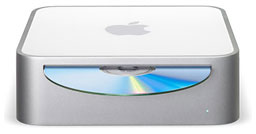 Apple didn’t initially acknowledge the existence of these faster models, even though many people had received them instead of the older, slightly slower models they had ordered. When you bought a Mac mini, Apple only promised you’d get “at least” 1.25 GHz or 1.42 GHz. There is no difference in packaging, so the only way to know which version you had was to plug it in and turn it on.
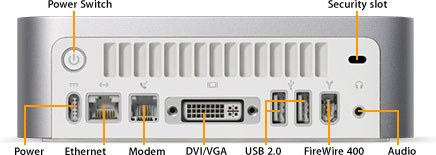 The tiny Mac mini (6.5″ square, 2″ high, 2.9 lb.) has a minimalist design. On the front, there’s just a slot-loading optical drive and a power light. On the rear, almost enough ports to do everything important. (More than two USB ports would have been nice.)
The Mac mini is Apple’s only desktop model that doesn’t include a keyboard or mouse. Apple says buyers can plug in their favorite USB keyboard and mouse – or buy Apple’s offerings. Mac OS X 10.4 and later include support for remapping the Windows alt and option keys to option and cmd.
The Mac mini is expandable. Memory can be expanded to 1 GB (there’s only one memory slot, so if you upgrade, you have to remove what’s installed), and Apple doesn’t recommend that users upgrade RAM (although this will not void your warranty). There’s room inside for Bluetooth and AirPort Extreme (to be installed by Apple or an authorized dealer, not by the user).
With USB 2.0 and FireWire, it’s easy to add all sorts of peripherals.
Apple cut costs by including just one memory slot and by leaving out the keyboard and mouse, but some choices actually raise the cost of the Mac mini, particularly the slot-loading optical drive and the use of 2.5″ laptop hard drives that are smaller, more energy efficient, and more expensive than the 3.5″ drives found in most desktop computers.
Due to poor cooling, the ATI Radeon 9200 graphics processor can overheat during intensive gaming, producing what one reader calls “swirling flying triangles”. Letting the mini cool solves the problem. To minimize overheating, be sure to allow plenty of air flow around the Mac mini, don’t stack it with a hot hard drive, and consider running it vertically or with a set of feet to raise it above your work surface, which allows air to reach the bottom, the mini’s primary heat radiating surface.
Apple offered several Build To Order options, such as an 80 GB hard drive (add $50), a 4x SuperDrive ($100), Bluetooth ($50), AirPort Extreme ($79) – or both Bluetooth and AirPort Extreme for $99 – Mighty Mouse and a keyboard ($78), or a wireless mouse and keyboard ($99, requires Bluetooth). And with a $19 DVI to Video Adapter, you can connect the Mac mini to most modern TVs using S-video or composite video.
If you have a lot of peripherals, you might want to look into a FireWire/USB 2.0 hub. Prices range from $29-49.
At the time, Apple’s least costly display was the 20″ Cinema Display ($799), although the Apple Store also offers flat screen CRT monitor for a lot less. The big question is which flat-panel monitors look and work best with the Mac mini. For best results, look for one with digital DVI input instead of or in addition to analog VGA.
Details
- introduced 2005.09.28 at US$499 (1.33 GHz Combo), US$599 (1.5 GHz Combo), and US$699 (1.5 GHz SuperDrive). 1.5 GHz models include AirPort Extreme and Bluetooth 2.0. Replaced by Core Duo Mac mini on 2006.02.28
- Part no.: M9687LL/A (1.33 GHz), M9687LL/A (1.5 GHz)
- Model Identifier: PowerMac10,2
Mac OS
- requires Mac OS X 10.4.2 Tiger through 10.5.8 Leopard
Core System
- CPU: 1.33/1.5 GHz G4 (7457B)
- L2 cache: 512 KB on CPU
- Bus: 167 MHz
- RAM: 512 MB, expandable to 1 GB using PC2700 (333 MHz) DDR SDRAM.
- Performance:
- Geekbench 2 (Leopard): 782 (1.5 GHz), 720 (1.33 GHz)
- Geekbench 2 (Tiger): 806 (1.5 GHz)
Video
- GPU: ATI Radeon 9200 with AGP 4x support
- VRAM: 32/64 MB DDR SDRAM
- Video out: DVI, VGA with included adapter, S-video with optional adapter
Drives
- drive bus: ATA/100
- Hard drive: 2.5″ 40/80 GB 5400 rpm ATA/100
- Combo Drive: reads DVDs at up to 8x speed, writes CD-R discs at up to 32x, writes CD-RW discs at up to 16x, reads CDs at up to 32x
- SuperDrive: writes DVD±R discs at up to 8x speed; DVD±RW at 4x; DVD-RAM at 5x; reads DVDs at up to 8x; writes CD-R discs at up to 24x, writes CD-RW discs at up to 8x, reads CDs at up to 24x
Expansion
- USB: 2 USB 2.0 ports
- FireWire 400: 1 port
- FireWire 400: none
- Ethernet: 10/100Base-T
- WiFi: 802.11g AirPort Extreme optional on 1.33 GHz model; standard on 1.5 GHz model
- Bluetooth: optional on 1.33 GHz model; standard on 1.5 GHz model
- integrated 56 kbps modem supports v.92 standard, optional on 1.5 GHz models
- Microphone: none
Physical
- size: 2.0 x 6.5 x 6.5 in/5.1 x 16.5 x 16.5 cm
- Weight: 2.9 lb./1.3 kg
- Power supply: 85W external power supply
- PRAM battery: 3V CR2032 lithium
Upgrades
- none at present
searchword: macminig4
Online Resources




