
2001: About two months ago, I received a DayStar Digital Genesis MP 600 with a 200 MHz quad 604 CPU module and a 132 MHz quad 604 CPU module as a gift from some friends of mine. If you have never seen one in person, this is big, heavy, and loud. Its metal case could stop a bullet. Originally selling for $12,000, it was definitely made to take a beating.

For the first few days, I wasn’t quite sure what to do with it, but like all systems I have laying around my apartment, I decided to make a server out of it. In my head, it would make a nice all-purpose server, and I could compress what I have spread across multiple servers into this one system.
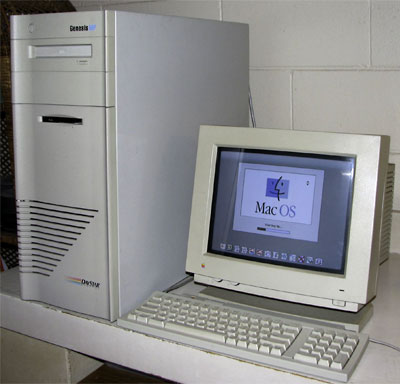 The first thing I needed to decide on was what operating system to run. I could use the Mac OS, but it doesn’t make a very good server – especially when it comes to using four processors. If I were using Photoshop, that would be one thing, but I am not a graphics guy.
BeOS crossed my mind for a minute, because of it’s excellent scaling on four processors, but the problem with BeOS is that it is not a server OS. It can’t do NFS, DNS, email, file sharing, and so on.
LinuxPPC
I finally settled on LinuxPPC, which I didn’t want to use at first because I had never had built my own kernel before. The reason for having to build your own kernel is that stock kernels that ship with the LinuxPPC distribution (and others) are compiled for only one processor.
You can go two routes when getting a new kernel: Download a precompiled kernel or download the source code and compile it on your own. I prefer to build my own because I have more control over what is and what is not going to be supported on my system.
Either way, you decide to go, the place to get it is at kernel.org. One thing I did need to learn about was kernel version numbers and what they mean. Even numbered kernels are official, and odd numbered ones are development kernels. So 2.2 and 2.4 are official, with 2.1 and 2.3 under development.
The latest kernel right now is 2.4.0, which at this time does not compile properly on Macs and results in some sort of MMU error while compiling. There are some precompiled 2.4 kernels over at Linuxppc.org, but I cannot testify as to how stable they are.
Compiling Your Own Kernel
In the meantime, the latest kernel (that works) for Macintosh’s is 2.2.18, which compiles just fine. Ftp to kernel.org, grab the 2.2.18 kernel source (ftp://ftp.kernel.org/pub/linux/kernel/v2.2/linux-2.2.18.tar.gz), and while in Linux perform the following commands.
gzip -d linux-2.2.18.tar.gz
tar -xf linux-2.2.18.tar
mv linux /usr/src/linux-2.2.18
rm linux
ln -s linux-2.2.18 linux
In a nutshell, what you have just done is decompress the source code and move it to the /usr/src directory, which is where it needs to be. You have also created a symbolic link from the linux-2.2.18 directory to point to /usr/src/linux, which is good to do because if you get in the habit now you won’t shoot yourself in the foot later if you ever deal with Linux systems on other platforms.
Once all that is done, go into the /usr/src/linux directory and type “make menuconfig”. (You did remember to select your development packages during the Linux install right?) You will be presented with a menu of options ranging from “Platform Support” to “Block Devices”. From there just select what you want and what you don’t want your kernel to support with the space bar. In my case, I want “Multiprocessing Support” under the Platform support section. I will also be removing IDE support because my DayStar doesn’t use IDE and I have no intentions on adding IDE to it right now.
You may notice that certain options are marked with an M, which stands for module. Think of modules as Mac OS system extensions that can be turned off and on without rebooting. If something is marked with an M and you think you want it to always be on, just hit spacebar until it has an asterisk like everything else you selected.
When you exit, you will be asked to save your new kernel configuration and will be brought back to the command line. Now it’s time to compile your custom kernel with the options you selected by typing the following commands
make dep
make zImage (takes awhile)
make modules
make modules modules_install
After everything is said and done, you will have two new files called vmlinux and System.map. Rename your current vmlinux and System.map files to vmlinux.old and System.map.old. Then move your new kernel and System.map file to where the old ones were and reboot.
You now are using the latest kernel.
Multiple Processors: Not Quite
If you enabled multiprocessing support and have multiple processors, you will see two penguins when you boot instead of one (the number of penguins equals the number of processors it sees). You can also find out additional processor information in the file /proc/cpuinfo.
Sadly, I have been unable to get quad processors working under LinuxPPC. With the 132 MHz and 200 MHz CPU modules, Linux sees only one processor. I have emailed LinuxPPC, Yellow Dog, SuSE, and Debian asking if at any time they had a kernel that booted with quad processor support. None of them have yet replied to my emails.
After searching multiple message boards, I have learned a few things. There was a website called quad.macdiscussion.com running a test 2.4 kernel with quad processor support. That site is currently down, and they never had any contact information when the page was up, but it at least let me know that quad support is out there.
There was also a reply to a request for information on quad processor support from Benjamin Herrenschmidt, who writes a good majority of the Macintosh related kernel code and wrote the LinuxPPC AirPort driver. Ben said that support was coming and that it had not been merged into the 2.4 source tree yet. It may be in there now, but with 2.4 not being able to compile on Macs at the moment, I have no way to confirm if it’s in there or not.
Either way, at least I learned how to build my own kernels, which I needed to learn at some point.
If you’re interested in running Linux or BSD on PowerPC Macs, consider joining our Linux on PowerPC Macs group on Facebook.
keywords: #linuxppc #ppclinux
