
My previous article, A Stinky Old iBook that Smells Like Sweat, prompted a fair bit of email. Low End Mac’s publisher, Dan Knight, had requested that owners of stinky iBooks contact him with the specifics of their ‘Books so he could provide some meaningful consumer data. Six readers checked in, and he compiled what data he could from the Apple forum on the subject. This totaled over 20 reports, a good sample.
 He says, “12” and 14″ G3 iBooks were reported as stinky regardless of speed (500 MHz to 900 MHz), and the smell is random, according to Barb McMillan, who has 100 iBooks at her school.”
Most of my mail contained recommendations for various solvents. Readers had favorites that they felt would remove the stinky adhesive that’s left behind after removing the label from the underside of the affected G3 iBook keyboards.
Why Is the Label There?
First, let’s consider why the label might be there before we rush to get rid of it.
The mounting plate for the key switches consists of two parts. An aluminum layer is perforated both as a measure to lighten it and to allow mounting lugs for the keys to be bent upward. Under this is a steel stiffening plate, also perforated for lightness. The two plates appear to be glued together. The glue used here may or may not be another source of the smell.
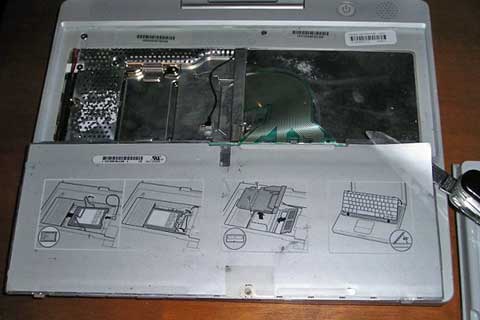
The offending stinky label sits beneath the iBook’s keyboard.
The label under the keyboard serves as a dust shield by sealing these holes. To a lesser extent, it can also prevent liquid from minor spills from getting inside the iBook. It appears to have antistatic qualities that would be defeated if you replaced it with something nonconductive. I doubt, however, that there would be any serious consequences to losing these antistatic qualities in this particular case.
Solvents
Let me say that I’m not fond of solvents. Many are potent carcinogens when absorbed through the skin, and most are likely to cause brain, nerve, and liver damage if inhaled or absorbed. With the exception of very few (like rubbing alcohol and water), you shouldn’t use them unless you are wearing a chemical respirator, rubber gloves, and have an exhaust fan running.
If you try to use a solvent to remove the adhesive leftover after removing the label, you’re faced with the very real possibility of getting the resultant gunky residue in the holes in the metal plate. These holes are directly under the key switches. Some solvents may remove the lettering on the keys or dissolve the plastic they’re made of. The dissolved gunk may get into the switch contacts, where it would likely cause real problems.
Because of this and the health hazards involved, I feel that using solvents to get the adhesive off should be your last resort.
Masking the Odor
If you don’t have it already, do a search on the designation of your iBook plus the words “repair manual” (i.e., “ibook dual usb repair manual”) and download the official Apple repair PDF for your model or use the online iFixIt guide for your iBook. This article doesn’t cover disassembly procedures.
Our first and easiest solution to the odor will be to leave the label in place but modify the smell so that it’s not as offensive. (If you have chemical sensitivities, this quick fix may not work for you.)
Before we jump in, I will mention that you can find replacement iBook keyboards online, both new and used, for US$30-50. You know what question to ask the sellers.
I mentioned before that some people have placed dryer sheets under the keyboard to hide the odor. Leaman Crews, a Low End Mac columnist, tells me that he has personally used this method, and it does work. However, you must place the sheet on the keyboard before closing the iBook’s lid and replace it every couple of days. Since the adhesive is exposed to the air just under the keys and not under the keyboard, this makes sense (or is it scents?).
As I also mentioned, I’ve been experimenting with car air fresheners. Yankee Candle produces card-type fresheners in a wide variety of fragrances, and I’ve tried several in my iBook. The worst of these was Midsummer’s Night. It’s an extremely potent, perfumy product that, when combined with the artificial sweat smell of the adhesive, produces an entirely new, even more repulsive odor that is guaranteed to initiate the gag reflex.
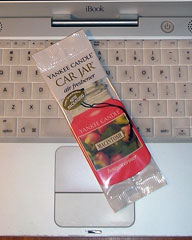 Interestingly enough, the best one that I tried was an apple scented freshener called Macintosh – not McIntosh like the apple, but Macintosh like the Apple. Yankee Candle tells me that the naming was not influenced by computers in any way. Perhaps it wasn’t on a conscious level. (There’s also one called Granny Smith, but I didn’t try it.)
It only takes about a quarter of one of these freshener cards, cut into strips and positioned evenly in the low spots under the keyboard, to do the job. Before doing this, I used a pin to make several holes in the label on the underside of the keyboard. If you remove the keyboard and hold it up to a light with the label side toward you, you will see where to make the pin holes. Don’t push the pin too far. These small holes will let the air freshener get through but won’t let any measurable amount of dust pass the opposite way.
The result will be a long-lasting chemical scent that is neither sweaty nor appley-sweet but something tolerable in between the two.
Removing the Label
Remove the label only if you can’t tolerate the first method and would rather spend some time and effort on a partial solution rather than buy an odor-free keyboard.
Before attempting label removal, I tried yet another option – a halfhearted attempt to artificially age and harden the adhesive.
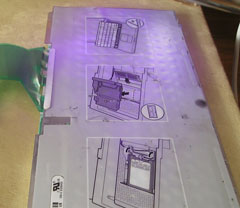 I left the keyboard in direct sunlight with the label up for two days, hoping that the ultraviolet light might begin to dry the adhesive. This works on things like duct tape adhesive, but it usually takes months to dry it to a powdery consistency.
I soon abandoned the sunlight idea for a UV or “black” incandescent light bulb that I have used in the past to help dry varnish. This bulb also generates considerable heat. After half an hour of exposing the keyboard label to the UV light positioned a few inches away, I noticed the label was softening and bulging in the areas over the holes in the plate.
In the past, I’ve spent countless hours using a heat gun to soften paint before scraping it off building parts. Using heat would have occurred to me much sooner if I hadn’t blocked that tedious chore from my memory.
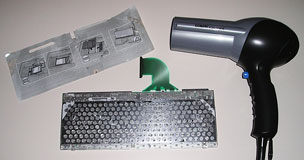 Armed with a hair dryer set on high heat, I started in on the label, heating a small area at a time and pulling the label up in stages. This worked much better than peeling it cold. When I originally lifted a corner that way, the aluminum colored layer containing the graphic instructions stayed behind. With heat, all that was left was the colorless (but odorful) adhesive itself.
I tried applying duct tape to the adhesive and then lifting it off, but the tacky goo clung tenaciously to the metal. The duct tape did pull the small amounts of remaining loose adhesive out of the holes. Since those areas are the main source of the smell, this was progress.
The only option left to get the sticky residue off now was to use a solvent and risk damage to both the keys and me. Instead, I chose to cover the adhesive with packing tape, hoping to seal it in as much as possible. After doing this, I replaced the one small foam strip and two plastic/metallic spacer strips that had been removed with the label.
This has not totally gotten rid of the sweat smell, but it is much better.
A Third and Possibly Complete Cure
If you’re overly compulsive and willing to completely disassemble the board and soak the mounting plates in a solvent bath until they are both separate and clean, you might get rid of the smell entirely. You will then have to stick the plates back together with some kind of odorless adhesive and make sure you get all of the keys back in the right places.
I once pulled all of the keys off an old Apple Extended ADB keyboard circuit board and put it in the dishwasher in an attempt to clean two switches that weren’t functioning. I washed the plastic keys separately in the sink. When the board was dry, all of the key switches worked, but I never did find the “L” key.
Keywords: #stinkyibook #smellyibook #sweatyibook
Short link: http://goo.gl/l0Wx7L
searchword: stinkyibook
