
Say good-bye to hard drives with the 2010 models of the MacBook Air (MBA). Solid-state drives (SSD) are standard across the board – and they’re built onto the motherboard. Apple claims this makes its SSDs twice as fast as conventional ones. Battery life is rated at “up to” 7 hours.
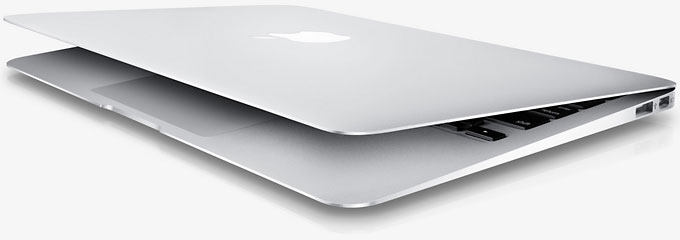
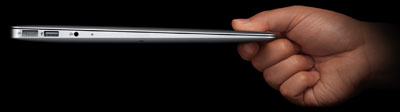
Peripheral users will rejoice over this news: The 2010 revision has two USB 2.0 ports (one on each side), a huge improvement over the single USB port in previous editions. The 13″ MBA also gains an SD Card slot, a feature not included in its smaller 11.6″ sibling. This not only makes it easy to import photos and videos, it also makes it easy to add more data storage if the SSD isn’t large enough or removable data storage if security or portability is a concern.
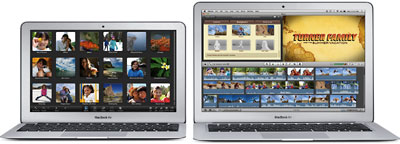
Apple has increased screen resolution to 1440 x 900 on the 13″ MBA, the same resolution that’s been standard on 15″ MacBook Pro models.
In light of FaceTime coming to the Mac, Apple has renamed the built-in webcam, formerly called iSight, as a FaceTime camera.
For the first time ever, you can expand RAM from the stock 2 GB, with 4 GB as the 2010 MBA’s new maximum (a $100 build-to-order option).
The Late 2010 MacBook Air models are the oldest to officially support macOS Sierra.
For those who need or want a faster CPU, 2.13 GHz is a build-to-order option when you buy the 256 GB SSD model.
Best of all, Apple has trimmed prices, so you can now get a 13″ MacBook Air for as little as $1,299. The MBA has no built-in optical drive, but you can add an external USB 2.0 SuperDrive (only compatible with the MacBook Air) for a new low price of US$79. Rather than include an install DVD, Apple now ships the MBA with a USB software reinstall drive.
A few things are missing. There is no FireWire port. There’s no built-in ethernet port; if you need ethernet, Apple sells a USB 2.0 ethernet adapter for $29. And the MBA no longer has a backlit keyboard.
The MacBook Air is available only with an 18-bit glossy display (not the 24 bits you might expect). Like the iPod and iPhone, it does not have an easily replaceable battery. Cost to have Apple replace the 37 Watt-hour battery out of warranty is $129.
Closed Lid Mode: All Intel ‘Books support “lid closed” (or clamshell) mode, which leaves the built-in display off and dedicates all video RAM to an external display. To used closed lid mode, your ‘Book must be plugged into the AC adapter and connected to an external display and a USB or Bluetooth mouse and keyboard (you might also want to consider external speakers). Power up your ‘Book until the desktop appears on the external display and then close the lid. Your ‘Book will go to sleep, but you can wake it by moving the mouse or using the keyboard. The built-in display will remain off, and the external monitor will become your only display. Since all video RAM is now dedicated to the external monitor, you may have more colors available at higher resolutions. The MacBook Air is designed to run safely in closed lid mode, but if yours runs hot (perhaps due to overclocking or high ambient temperatures), you may want to open the lid when in closed lid mode: The screen will remain off and the computer will more readily vent heat from the CPU.
To resume use of the internal display, you need to disconnect the external display, put the computer to sleep, and then open the lid. This will wake up your ‘Book and restore use of the built-in display.
Details
- introduced 2010.10.20 at US$1,299 (128 GB SSD) and US$1,599 (256 GB); replaced by Thunderbolt model 2011.07.20
- Part no.: MB543 (1.6 GHz), MB940 (1.86 GHz)
Mac OS
- requires Mac OS X 10.6.5 Snow Leopard or later. macOS 10.14 Mojave and later are not supported.
- Mac OS X 10.6 Snow Leopard compatibility
- Grand Central Dispatch is supported.
- 64-bit operation is supported.
- OpenCL is supported.
- Mac OS X 10.8 Mountain Lion compatibility
- AirPlay Mirroring is not supported.
- AirDrop is supported.
- Power Nap is supported.
Core System
- CPU: 1.86/2.13 GHz Intel Core 2 Duo
- Level 2 cache: 6 MB shared cache
- Bus: 1066 MHz
- RAM: 2 GB, expandable to 4 GB
- Performance (1.86/2.0 GHz)
- 64-bit Geekbench: 2692/3008
- Speedmark 6.5: 108/119
Video
- Graphics: Nvidia GeForce 320M with Mini DisplayPort, supports extended desktop.
- VRAM: uses 256 MB of system memory
- Video out: Mini DisplayPort (to 2560 x 1600 resolution)
- display: 13.3″ glossy 1440 x 900 128 ppi color active matrix
- supports 1440 x 900, 1280 x 800, 1152 x 720, 1024 x 640, and 800 x 500 pixels at 16:10 aspect ratio; 1024 x 768, 800 x 600, and 640 x 480 pixels at 4:3 aspect ratio; 720 x 480 at 3:2 aspect ratio
- allows mirroring to external display and extended desktop mode
Drives
- Hard drive: 128 GB solid state drive standard, 256 GB optional
- SuperDrive: optional external USB 2.0 drive, requires high power USB port (only compatible with MacBook Air)
- floppy drive: external USB only
- expansions bays: none
Expansion
- USB: 3 USB 2.0 ports
- FireWire: none
- IR port: none
- Ethernet: optional USB-to-ethernet adapter
- Modem: No longer offered by Apple
- WiFi: 802.11n AirPort Extreme built in
- Bluetooth: BT 2.1 built in
- ExpressCard/34 slots: none
- SD Card slot: yes
Physical
- size: 8.94 x 12.8 x 0.11-0.66″ (227 x 325 x 3.0-17 mm)
- Weight: 2.9 pounds (1.32 kg)
Online Resources
Keywords: #13inchmacbookair #macbookair
Short link: http://goo.gl/llXzFF
searchword: late2010macbookair




