
The Low End Mac Mailbag
iBook 'Road Apple' Debate, New iMac Look Horrible, Apple's New Keyboards, and More
Dan Knight - 2007.08.08
- The iBook G3 Is a 'Road Apple'
- Why the G3 iBooks Should Not Be Considered a Road Apple
- New iMac 'Looks Horrible'
- Apple's New Keyboards
- How I Almost Lost (but Saved) a SCSI Drive
- Troubleshooting an LC 575
- USB and the Beige G3
The iBook G3 Is a 'Road Apple'
Matt says:
Dan,
First off, thanks for the wonderful website and resources!
I would like to weigh in on the recent mailbag topic about the iBook G3s being considered a Road Apple. I will not bore you with the details of my fights over these machines, but I will sum up my story this way:
I bought a brand new iBook 700 with my scare money to take with me to college. After suffering three hardware failures (bad motherboards), Apple finally replaced it with an iBook 900. That iBook G3 also met with identical troubles and was eventually replaced by another (non-iBook G3) that served me reliably for years. To this day I am amazed that I did not give up on Apple despite the many hours of frustration and days without a working computer.
I have owned (second hand) other machines that were considered Road Apples, including the Power Mac 52xx. Although I am very familiar with the problems of the 52xx series, I have to say that at the very least I never once wondered whether it would boot up or not. Yes, it was slow and it behaved in odd ways, but I came to expect that, it happens. It still "showed up for work" every day without fail and performed.
If there was any Apple I would "leave by the side of the road", it would be an iBook G3, because no matter how slow the others might have been at least they worked.
Thanks
Matt
In a follow-up email, Matt said:
I looked at the segment again and better understand your "Road Apple" designation now. I also find it interesting that the unnamed reader had (and knew people who had ) so much luck with the iBook G3s. I have personally known others who had their iBooks fail, and the local Apple Store said they would receive at least one one failed iBook per day. I also disagree with his comments about them being "more rugged", but that is another matter.
Thanks again.
Matt
Why the G3 iBooks Should Not Be Considered a Road Apple
Dan,
Been reading in the Mailbag the past couple of days about the G3 iBook and whether it should be considered a "Road Apple." To join the supposed throngs of G3 iBook owners who disagree, I'll offer a pro-con analysis.
The prevailing opinion regarding G3 iBook owners in the community is that you either get a good one or you get a bad one. Either your keyboard stinks like wet dog or it doesn't. Either your video chip tries to pull off its own version of "The Great Escape" or it doesn't.
I purchased my G3/900 iBook as an open box model from the Apple Store, and it has had a rough life. It has had its memory retention clips broken. It has had its LCD screen smashed. It has been in for AppleCare twice due to the notorious video board problem.
But to imply that it is a Road Apple is to discredit this wonderful, capable little computer that does everything it was designed to do well, and more. It runs Tiger flawlessly. It is comfortable to use. It doesn't put out nearly as much heat as my PC laptop. The screen is crisp and bright. It sips battery power, and it's quiet. Even with the unexpected repairs and downtime, I think I've got a great computer and that it was money well spent. Reliability is only one part of the value equation.
I would argue that a Mac is only a "Road Apple" when it represents, over the course of its useful life, less value for the customer than another option, and when that was a direct result of a deliberate decision made by Apple to hamper the system. The iceBook is an elegant but flawed design, but it's not a Road Apple. No one at Apple's financial office would have deliberately traded cheap solder for the cost of replacing thousands of motherboards down the road.
Call it what you wish, but just make sure you call it a Mac, because that's what makes it special.
- Josh R.
Josh,
Thanks for sharing your experiences and your continued appreciation of the iceBook despite the number of times it's had to go in for service.
For most of us, reliability is a big part of the value equation. When my PowerBook G4 had to have a screen transplant, I had to buy another computer so I could continue to publish Low End Mac for the week it would be gone. Sure, it only went in for service twice in over five years of use, but for the first three years I had it, it was my only production computer.
Some Macs are compromised by accident, not deliberately. Consider how the titanium in the early G4 PowerBooks severly restricted AirPort range. Or the second memory socket problems seen in 15" aluminum PowerBooks. Or the stinky keyboard and video/motherboard problems of the iceBooks.
I appreciate your distinction between deliberately hampering a system and design flaws that are a result of the production process. Rather than call the G3 iBooks Road Apples, it makes more sense to include a note about their track record with each iceBook profile.
Dan
New iMac 'Looks Horrible'
Bob Forsberg muses:
Dan
Does the face of the new iMac remind you of the original purple, orange, pea soup green or black spotted G3 iMacs?

A welcome and well thought out update on the inside, but that black display halo makes Apple's newest iMac offering reminiscent of something out of India or China design schools.
I understand the black ribbon enhances a display's appearance when viewing video or photos, but it looks horrible. (Did I just say that about an Apple product?) Anyone looking to join the third party Apple add-on market, a black plastic case overlay or black replacement case cover will be the next best seller for iMacs.
 After the last multicolored & spotted G3 iMacs
invasion, I thought Apple fired that designer. He has resurfaced
with the new iMac third world retro face design. I never thought I
would live to see the day when I would compliment Apple for what
they did on the inside but hesitate from buying it because of how
it appeared on the outside.
After the last multicolored & spotted G3 iMacs
invasion, I thought Apple fired that designer. He has resurfaced
with the new iMac third world retro face design. I never thought I
would live to see the day when I would compliment Apple for what
they did on the inside but hesitate from buying it because of how
it appeared on the outside.
Two tone paint and white wall tires went out in the 50s. Not our best face to present to the PC crowd. A definite Apple design misstep, easily corrected. Loose the halo or do it all in black.
Bob Forsberg
Bob,
At this point, I've only seen photos of the new iMacs. It looks like an attempt to make the display appear larger, as the screen is the same shiny black as the surround. It may also make the new iMacs look a bit smaller, makes the "chin" less pronounced, and hides the iSight webcam.
I like the look, and I think it will appear more professional (and less toy-like or plasticky) to potential buyers than any previous iMac design.
Dan
Apple's New Keyboards
Isaac Smith writes:
Hey Dan,
I was just looking on Apple's website (which is currently experiencing downtime), and it appears that Apple's new keyboard looks just like the leak. However, I was expecting the wired keyboard (which was the one leaked) to look like the wireless one. As they've done before. But I never would've believed what they actually did:
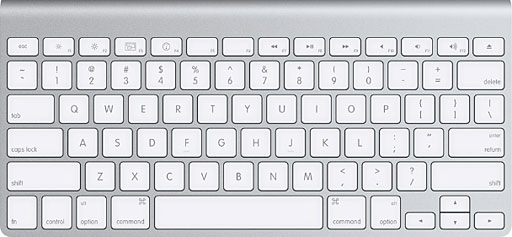
Apple's new wireless keyboard (above) and USB 2.0 keybord (below) -
not to scale.

Doesn't that look a little bit too similar to the keyboard from the iMac G3, which you guys called a Road Apple? There is an oddity - it's got a power button on the side. The wired one doesn't. They've now essentially got two different keyboards. Personally, I'd prefer a mix of the two.
A nice thing they've done is put USB 2.0 ports on the keyboard, but only the wired one. (I've never owned or even seen an Apple wireless keyboard before - have they always been without USB ports?)
- Isaac Smith
Isaac,
The wireless keyboard seems to exactly match the layout of the MacBook keyboard, which must have saved a bundle in design costs. Unlike Apple's previous wireless keyboards, it's not an extended keyboard - no numeric keypad, no cluster of navigation keys, half-sized arrow keys. Compact is nice, but why isn't there also a wireless extended keyboard?
The new USB 2.0 keyboard looks to have the same layout we've known for years, but it's only 1/3" thick. I'm glad to see USB 2.0 in an Apple keyboard.
To my knowledge, no wireless keyboard has never had a USB hub. Until this past month, wireless USB hadn't been implemented on any computer, and Apple's Bluetooth keyboards aren't USB devices, so they couldn't pass along USB information. Maybe we'll see a wireless USB keyboard with USB ports in the future - but it kind of defeats the point of a wireless keyboard to plug wires into it.
As for the original iMac keyboard, I still don't like it. It had decent key action, but the layout was different enough that I still can't use it comfortably. The new wireless keyboard should be better than that, because it's designed using the familiar notebook layout.
Dan
Note: Bluetooth is also considerably slower than USB - even USB 1.1. Bluetooth 2.0 has a data rate of 3 Mbps, USB 1.1 of 12 Mbps, and USB 2.0 of 480 Mbps. Even if a Bluetooth keyboard were designed with a USB hub, it would run any connected USB device at a fraction of USB 1.1 speed.
How I Almost Lost (but Saved) a SCSI Drive
Guilherme Maranhão writes:
Dan,
I was amazed with the answers the "Why Does a Mac Die" email got. I learned a lot!
This is what happened here last week, I almost lost a SCSI drive.
It is a 9 GB I had inside a Power Mac 8500. I had three partitions: one with OS 9, second one with OS X 10.2.8 (XPostFacto), the third one was for files. As I was trying to install a ATI video card in one of the slots, the ATI universal installer froze and I had to reboot. The computer didn't boot and gave me the question mark.
I popped in the OS 9 CD to try to rebuild the desktop file or anything like that, no such luck. I got a boot, loaded all the system, and when it was time to mount the drives it would stall again and again. Couldn't get past mounting the drives. The sound of the 9 GB drive would go repetitive, and the mouse pointer would freeze. I installed the drive into two other machines, and the same thing happened, booting but never past the drive mounting stage.
I placed the drive again into the original machine and tried an OS 8 CD this time. A perfect boot, since it doesn't recognize the disk formatting (maybe?). The drive displayed the "Where did all my files go?" message. With Drive Setup, I initialized the drive.
I lost hours and hours of refinement of a very nice system, but I didn't loose the drive.
Take care,
Gui
Gui,
Thanks for sharing your story. Good thought, going back to OS 8. Also one more reason everyone should back up everything on their hard drives now and again.
Dan
Troubleshooting an LC 575
Alvin writes:
Hi. I'm trying to revive my LC 575 to be part of a sale. It's display turned on before, but after deciding to clean all contacts from its insides (dismantling everything) to the power cord, it now only turns on, boots, chimes, and seems to load okay - but there is no video, no display, which it used to prior to cleaning.
Is there a website that has very technical ways of reviving this LC 575 besides the troubleshooting guide from Apple? Could this be caused by a weak battery? Its battery is a homemade one of three 1.5v AA batteries (not Alkaline or Energizer).
Thx. Gbu.
Alvin,
I've never had to work inside an LC 575, but I don't think this is the kind of problem that would be caused by a weak battery. The two best resources I can point you to would be our Vintage Macs List on Google Groups and the 68k Mac Liberation Army.
Dan
Alvin writes:
Hi. In your troubleshooting vintage Macs have you tried putting a Color Classic's board to an LC 575? I have to test if the logic board of my 575 is at fault or if it is the analog board (the only caveat to this Mac is it has no video). Thanks for bearing with me. Gbu.
Alvin,
No, I haven't, as I've never worked on an LC 575. However, the Color Classic and LC 575 motherboards can be swapped, so that's a good suggestion.
Dan
USB and the Beige G3
Robert Krautheim says:
Hi, I have milked a beige G3 for ages now & it has always done exactly what I wanted/needed/wished it to do - a real trooper, of the R2 variety, if you will. Could say the same of a Commodore 64 previously, but I digress.
Turns out via your site I learned that I have the ROM revision 1 and, while x-referencing other articles on your site, it looks like only rev 2 & 3 can support USB via PCI card. If not true, do you know offhand any that are compatible? Simple (1.1) is fine.
Thanks for your time,
Robert
Robert,
I don't know all the ins and outs of the beige G3s. I wasn't aware that Revision 1 motherboards can't support USB cards.
My research indicates that in general USB PCI cards with chipsets that support OHCI (Open Host Controller Interface) tend to work, while OTPI cards tend not to work (although Keyspan seems to be an exception). One person suggests USB cards may work more reliably in the center PCI slot. Yet another factor is whether the card has Mac drivers.
You might want to join G-List, our email group for Power Mac G3 users, and see if you can find better information there from someone with more Rev. 1 beige G3 experience.
Dan
Join us on Facebook, follow us on Twitter or Google+, or subscribe to our RSS news feed
Dan Knight has been publishing Low End Mac since April 1997. Mailbag columns come from email responses to his Mac Musings, Mac Daniel, Online Tech Journal, and other columns on the site.
Today's Links
- Mac of the Day: PowerBook 5300, introduced 1995.08.25. The first PowerPC PowerBook was known for 'flaming' performance.
- Support Low End Mac
Recent Content
back to the Low End Mac Mailbag index
About LEM Support Usage Privacy Contact
Follow Low End Mac on Twitter
Join Low End Mac on Facebook
Favorite Sites
MacSurfer
Cult of Mac
Shrine of Apple
MacInTouch
MyAppleMenu
InfoMac
The Mac Observer
Accelerate Your Mac
RetroMacCast
The Vintage Mac Museum
Deal Brothers
DealMac
Mac2Sell
Mac Driver Museum
JAG's House
System 6 Heaven
System 7 Today
the pickle's Low-End Mac FAQ
Affiliates
Amazon.com
The iTunes Store
PC Connection Express
Macgo Blu-ray Player
Parallels Desktop for Mac
eBay

