
The Low End Mac Mailbag
Apple's First Phone a Fake, Build Your Own Macintel, Internet Options for G3 Macs, and More
Dan Knight - 2007.07.23
- Apple's First Phone: No Way in 1983
- AirPort Power Supply, OS 9 System Folder
- Cube Won't Boot Completely
- How to Build Your Own Macintel?
- Motherboard/BIOS on 'Fill Apple's Gaping Hole Yourself'
- Moving Data from an Old PowerBook to New Mac: CD Advice
- Internet Options for a G3 Mac
- Cheaper Alternative to miniXpress
- Great Resource for PowerBook 1400 Owners
- Reformatting a Quadra 610's Hard Drive
Apple's First Phone: No Way in 1983
Carl Bachellier writes in regards to 24 Years Ago: Apple's First Phone Never Made It to Market:
Hi,
I keep seeing this story with the white phone with the Newton interface.
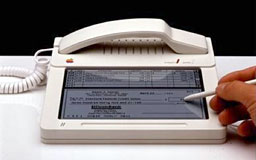
Apple's first phone (mock up)
You realize that the technology did not exist in 1983 to make this device. The Macintosh 128 came out a year later, and, yes, a Lisa cost $10K and weighed a ton. Even the Lisa would have problems churning out a checkbook program like this. To put it in a slim box would have been a miracle from some time traveller.
There were no touch sensitive LCD screens, no stylus, and CompuServe was still $40 an hour. BBS's weren't really that popular until 1985, and no bank let a customer connect to it.
The technology of the day would not fit this form factor, and Apple did not make anything in white plastic. White would have been a stupid colour for the 80s.
Remember, we were using primitive mice using DB-9 connectors. When I worked at the Ontario Science Centre in Toronto back then, we saw some experimental computer equipment and "cutting edge" flight simulators. Touch screens didn't exist, and everyone thought TV laserdiscs were the future. [Sony's] Beta was considered a favourite, and CDs were this cool new technology used for some classical music. There was no use for a phone like this, no use for this kind of software. I don't think checkbook software even showed up until late 1984.
This "old iPhone" is nonsense. I cannot believe that Mac sites are perpetuating this stupid picture that is dated wrong by at least 10 years.
Carl Bachellier
Freelton, Ontario
Carl,
I agree with you that such a product wasn't feasible in 1983 - but that never stopped Frog Design from dreaming up futuristic concepts.
As for white hardware, the Apple IIc and ImageWriter II were white until 1987, the year the Mac went from true beige to platinum, and both were also designed by Frog Design using their "Snow White" design language.
LCDs first came to calculators in 1971, and displays with addressable pixels were available in the late 1970s, and Apple sold an LCD monitor for the Apple IIc in 1984, although maybe only 10,000 were ever produced.
Touch screens were invented in 1971, and the HP-150 (1983) was the world's first commercial computer with a touch screen, so it's quite likely that Apple and Frog Design were playing with the concept of an LCD touch screen.
The concept of online banking also goes back to the early 1980s, and checkbook programs were quite popular on early personal computers.
That said, the mockup probably didn't work, and the screen was probably a piece of Kodalith with a gray background and a thin piece of glass covering it. Conceptualizing such a product was possible in 1983; producing it wasn't.
Dan
Dan,
Yeah, I saw an HP-150 touch screen in the early 80s, but it's logic took up lots of room. You are right about the "concept" of online banking, but no one could do it because back then you there was almost no security or security standards, not to mention no one could afford the cost.
I have seen this mockup going around lately and people are reporting that it was built. I still doubt the date of the design though. Pre-Macintosh? Pre-ImageWriter?
Hard to imagine.
Thanks for the info.
Carl
AirPort Power Supply, OS 9 System Folder
From Steven Hunter in regards to Networking Power Mac 9.1 and 9.2 Machines:
Ken Freeman wrote:
Also, where can I find a power cord for the Apple AirPort Base Station (circular base with power, USB, ethernet ports)?
The AirPort should have the power requirements listed on the bottom. I have a "Snow" (aka Dual Ethernet) airport, and it requires a 5mm, .7A @12v DC, with Positive tip adapter. You should be able to pick one up at any Radio Shack or similar store; probably most discount retails stores too. Radio Shack is nice because the employees generally know what the hell you're talking about and will let you test fit the plug to make sure you have the right size and polarity. Just bring the airport with you when you go.
Dan Knight wrote:
I would recommend against removing your System Folder completely, as there are probably some preferences, fonts, and other things you'll want to keep. Instead, open the System Folder and delete Finder and System, then run the installer. You only want to completely delete the System Folder if it doesn't work after that.
Or you could hold down the spacebar at Startup to invoke the Extensions Manager. Then enable/disable extensions until the problem goes away. (Or if its Classic running in OS X, use the Classic System Preference to launch the Extensions Manager.)
Plus you can always do a "Clean" install of OS 9 and then move Preferences, Fonts, etc. from the Previous System Folder into the new one.
- Steven Hunter
"If you're not part of the solution, you're part of the precipitate."
Cube Won't Boot Completely
After reading 4 Steps for Resurrecting Old Macs, Greg O'Dillon says:
Dan,
I read the article today regarding how to get an old Mac up and running.
If your up for offering some thoughts, please read on.
I just brought my belongings out of two year storage. My Cube was packed away nicely, yet after taking it out of it's packing, it will not boot. It was working fine when I put it into storage.
The system will boot into safe boot. However, for a regular startup, it seems to hang at the point where the Mac OS X rectangular box comes on to say loading and the blue bar goes zipping across just prior to the different accounts being listed on the screen.
I've erased the drive and reloaded system software with no luck. After not doing trouble shooting for about two years, I've forgotten what steps that I might could take to find what is hanging the system. Previously, I would have turned off extensions. Last night, I thought that I might could remove any items in the startup folder. I have run Tech Tool and Disk Warrior with no luck. Hardware tests say the system is fine.
I would like to get the system running again, as I used it as a music server. I was able to back up the drive so the music that was on it is currently safe.
Any thoughts that you might have on my steps are appreciated.
Thank you,
Greg
Greg,
It sounds like something is damaged in the System itself. I'd suggest a clean install of Mac OS X.
Dan
Greg write back to indicate that this solved his problem.
How to Build Your Own Macintel?
Bill Rose writes in response to Fill Apple's Gaping Hole Yourself:
Dan:
I wrote Installing OS X on a SuperMac S900 a few years ago and was intrigued to see Adams article today. I've wanted to build my own OS X Intel box for some time as well. Is there any way you could get Adam to be more specific on how he did this? Which motherboard did he use? What BIOS changes did he have to make? Etc...
Thanks,
Bill Rose
Bill,
That goes beyond the scope of Low End Mac, but there is a dedicated community of people hacking OS X for Intel to run on home built and commercial Wintel hardware. I've forwarded your email to Adam.
Dan
Motherboard/BIOS on 'Fill Apple's Gaping Hole Yourself'
Lewis Anderson writes:
Hi, I was reading your post "Fill Apple's Gaping Hole Yourself", and it sounds like something I want to do myself. What I am wondering is what motherboard you used, and how you fooled the BIOS/EIF into working with OS X or where can I find a suitable (fast enough, compatible) motherboard?
Thank you for your time
Lewis
Lewis,
I'm forwarding your email to Adam. You might also want to look into the OSx86 Project.
Dan
Moving Data from an Old PowerBook to New Mac: CD Advice
Brian Bettenhausen says:
Another solution that the reader could use is getting his hands on a SCSI Zip Drive. Most people on craigslist and freecycle.org will let you borrow one if you explain that it's to get data off of an old machine that doesn't have USB. Once you've gotten it onto the Zip drive, turn back to freecycle or even eBay and look for a USB version to borrow. All new Zip drives will read all old 750, 250 & 100 disks, but won't write to any except the 750. Hope that helps the user who wrote in.
Another solution is to email them to himself or even upload them onto something like Yahoo Briefcase. Gmail supports POP, access so he could use the very old Mac email programs that would only run on the 170.
I hope those additional suggestions help the user.
Brian Bettenhausen
Brian,
Thanks for sharing these tips. I've forwarded them to Chris Eastland.
The problem with things like email, Yahoo Briefcase (30 MB of free online storage), and Gmail are that they assume an Internet connection, which would have to be dialup. I'm not completely sure on this, but I believe that was the era of 2400 bps modems, so even if he has a dialup account, it would be a long, slow process.
Dan
Internet Options for a G3 Mac
Evelyn Benoit writes:
Hi
I am looking at buying a used Mac G3 as a simple way to get email and Internet access for my mother in North Carolina.
Can you tell me where to get information about what type of internet access will be cost effective and reliable? Are there any issues I should be aware of in using an older computer such as the G3?
Any help you can give would be greatly appreciated.
Thank you
E Benoit
Hi Evelyn,
If all your mother needs is email, she might be able to get by with dialup service. Drawback would be how long it would take to download big attachments, such as photos. All G3 iMacs come with a built-in modem, so that might be a good choice. You can generally find a local ISP with a $10 per month or lower package.
For broadband, AT&T/SBC/Yahoo offers DSL over regular phone lines for as little at $14.99 per month. No word on speed on their website, but a lot faster than dialup. Probably the best choice if she has AT&T/SBC phone service.
For speed, it's hard to beat a cable modem - but it's not cheap at $40-50 per month in most areas. For value, AT&T's Basic DSL is probably the winner.
Dan
Cheaper Alternative to miniXpress
Kris Finkenbinder says:
Hi Dan,
I found a site, http://oyendigital.com, that seems to be selling a drive enclosure identical to the miniXpress that was recently listed in one of the Mac News Review articles on your site. It has that same nifty space-saving combined eSATA/USB connector, and they also use the word DuoLink to describe it, which is how I found their site. Their prices are substantially more reasonable than the prices for the miniXpress. Perhaps more importantly, it looks like other drive makers may soon be using that DuoLink connector on new external drive enclosures, since it doesn't appear to belong solely to TransIntl.com.
OyenDigital are also listing the latest 250 GB 5400-rpm notebook drive by itself for $179, which is by far the lowest price I have seen anywhere for that size drive. Oddly, while they are selling the enclosure above with a preinstalled 250 GB 5400-rpm drive for $285, you could buy the bare enclosure ($79) and drive separately from them and assemble it yourself for a mere $258. That's a fantastic deal compared to the few other places I've found that are currently selling that drive, like MCE Tech, who for some reason will only sell the 250 GB drive bundled with a useless USB/eSATA (no FireWire!) drive enclosure.
Kris Finkenbinder
Kris,
In a lot of cases, several different vendors are buying the same OEM enclosure. Differences in price have more to do with the size of the support staff, ad budget, etc. than the enclosure itself.
Dan
Great Resource for PowerBook 1400 Owners
Bruce Colquhoun writes:
I was researching stuff for a PowerBook 1400, saw discussion on your site concerning problem of loading OS without a CD drive. I found this great site that finally explained to me how to network a PowerBook to another Mac (my other computer being a 180 MHz Power Computing brand Power Mac type), and it worked. Used a serial cable, and you must specify name of PowerBook as "powerbook1400" no spaces between and on the Power Mac computer name was the hard drive name and I took out a space in the name (not sure if that helped).
First I formatted the 1400's drive with two partitions using an IDE adapter physically installing it in the Power Mac, which then was started up on a OS CD. Installed 8.0 on one of the partitions while still connected that way. Moved the drive back to the 1400. Started 8.0 and setup network as described in this link. When using Chooser in establishing the network, the CD-ROM of the Power Mac was available and chose that. Put the OS 9 CD in the CD drive, double click installer, which proceeded to load OS 9 onto the second partition of the 1400 hard drive. Took 3-1/2 hours but install is true to the machine it runs on.
This was the link: http://www.vision.net.au/~apaterson/computer/mac_networking.htm
Thanks for helping many people like me.
Bruce
Thanks for the info, Bruce. I'll add a link to our PowerBook 1400 profile.
Dan
Reformatting a Quadra 610's Hard Drive
Carol D'Agostino asks:
Hello. I am trying to find a new home for my Quadra 610, and I'd like to reformat my hard drive. Where can I find directions to do that? Please advise.
Thanks,
Carol D'Agostino
Carol,
All you need is a Disk Tools floppy from System 7.1 or later. Insert the floppy, start up the Quadra, double-click HD SC Setup, and wipe your hard drive.
If your Quadra has a CD-ROM drive, you can boot System 7.1 through 8.1 from a system install CD and do the same thing.
Either procedure will wipe everything from your hard drive.
Dan
Join us on Facebook, follow us on Twitter or Google+, or subscribe to our RSS news feed
Dan Knight has been publishing Low End Mac since April 1997. Mailbag columns come from email responses to his Mac Musings, Mac Daniel, Online Tech Journal, and other columns on the site.
Today's Links
- Mac of the Day: PowerBook 2300, introduced 1995.08.28. The only Duo equipped with a PowerPC processsor run at 100 MHz.
- Support Low End Mac
Recent Content
back to the Low End Mac Mailbag index
About LEM Support Usage Privacy Contact
Follow Low End Mac on Twitter
Join Low End Mac on Facebook
Favorite Sites
MacSurfer
Cult of Mac
Shrine of Apple
MacInTouch
MyAppleMenu
InfoMac
The Mac Observer
Accelerate Your Mac
RetroMacCast
The Vintage Mac Museum
Deal Brothers
DealMac
Mac2Sell
Mac Driver Museum
JAG's House
System 6 Heaven
System 7 Today
the pickle's Low-End Mac FAQ
Affiliates
Amazon.com
The iTunes Store
PC Connection Express
Macgo Blu-ray Player
Parallels Desktop for Mac
eBay

