
The Low End Mac Mailbag
Intel mini vs. Power Mac, Best Keyboard Ever, Uses for Old Macs, and More
Dan Knight - 2008.04.10 - Tip Jar
- Intel Mac mini vs. Power Mac G4
- Intel Mac mini vs. Dual 867 Power Mac
- The Utility of Older Macs
- Uses for Older PowerBooks
- IBM Model M the Best Keyboard Ever
- Claris Home Page and Intel Macs
- A Better Solution with Leopard
- Problems with TruBlueEnvironment
- Collective Nouns
Intel Mac mini vs. Power Mac G4
From Ralph Kuschke in response to Used Intel Mac mini vs. 867 MHz Power Mac G4 Dual:
Hi, Mark!
Thanks for this nice vintage vs. already low-end Mac shootout ;-)
I just wanted to add a minor twinkle:
The Mac mini is limited, therefore so close to the MDD, because of its optical and hard disk speeds regarding ripping DVDs/CDs and running applications. The Power Mac MDD has the big advantage of faster spinning 5.25" optical drives (more robust mechanics vs. laptop grade slim drives) as much as the 7200 rpm hard disk drive compared to the Mac mini's 5400 rpm one.
This alone explains why both those machines perform face-to-face in those I/O related benchmarks.
You should upgrade your mini at least with a 7200 rpm hard disk drive to regain some performance in this regards.
 By the way: I personally liked the Quicksilver casing much more
in terms of its simple, classic smooth grey matte finish. The MDD case
is also too stuffed with cooling devices and cages, which cause severe
heating problems when you try to max out the innards.
By the way: I personally liked the Quicksilver casing much more
in terms of its simple, classic smooth grey matte finish. The MDD case
is also too stuffed with cooling devices and cages, which cause severe
heating problems when you try to max out the innards.
Nevertheless - in terms of cooling and build quality, nothing beats the Sawtooth. The best vintage Mac, in my opinion, price- and performance-wise; I use it for severe file server purposes (with its Gigabit LAN and via PCI SATA RAID), but otherwise stock configuration.
Thanks again and keep up "Macing"!
Ralph
Intel Mac mini vs. Dual 867 Power Mac
From Russell:
It is pretty sad to me to see the end of the PowerPC. I have always felt it was the better architecture from when it was first released, it still is very efficient at its core, just way overpriced compared to the Intel architecture.
Over the last couple of decades, Intel and AMD have spent billions on making faster, more efficient processors. In this they have succeeded very well. You can now buy an AMD processor for about $25 that beats most single PowerPC processors costing twenty times the price.
I really think Motorola, Freescale, and IBM are to blame, but the PC processor market is a place where only the Big Guys survive; there is barely room for number two, as AMD continues to struggle to make a profit.
The worse thing though is all those millions of PowerPC Macs (and a few Amigas and others) that will be left behind. We don't know what version of OS X will cut support for PowerPC Macs, but it will happen.
I finally got a Mac that will run OS X in January 2008 (I still have to get X installed, I am using OS 9.2.2) and my 400 MHz G3 Pismo could use some upgrading. At this point I am questioning spending $500+ over the next couple of years to do this (like I did to my PowerBook 3400 in 2002) when by the time it is maxed out I will no longer be able to use the latest OS, which will eventually be required to use the latest software.
Interesting article, keep it up.
Russell
Russell,
Thanks for writing. While it is true that sooner or later every Mac will be left behind by some version of the Mac OS, the reality is that most of them have been through a couple newer versions before they lose support, and by the time support is phased out, that version of the Mac OS would tend to overwhelm the computer. I've run System 7 on a Mac Plus and OS X 10.4 on a 400 MHz G3 iMac, and you can tell that while these combos work, they are straining.
Dan
The Utility of Older Macs
Hi Dan
I have been an avid reader of your site and the various contributors for many years now. A great resource for anyone using 'older' Mac hardware. I started reading with an Apple PowerBook 180. Now I use an 'old' 17" 1.5 GHz PPC PowerBook. How things change. I am using my daughter's Core 2 Duo MacBook to type this as all the other Macs in the house - all 4 of them - are in use.
In the last 6 years, I have progressed through a Beige 266 MHz G3 desktop through a 300 MHz B&W tower (wonderful machine still going in a student's home) via a 450 MHz DP G4 (even better and in another student's house) to my current 1.25 GHz DP G4 which is truly maxed out and an awesome machine. This last machine was being thrown out by a government department!!!
I have 4 hard drives (320 GB 10.5 boot drive partitioned into boot and data, 2 60 GB drives in a RAID config. on separate IDE buses as a scratch disk for video editing, and another 80 GB drive as a 10.4 boot disk). 2 GB RAM and a 17" Apple Studio Display monitor, which was given too me unused.
Having used Intel Macs and several G5s at work and doing the customary drool, this Power Mac G4 doesn't seem to lack anything. I can't use LiveType but that is a video card issue (only 64 MB video RAM - sigh) but everything else, including modified iMovie 08 just works.
I have arranged the purchase by six others of new Mac hardware based on their experience of our Macs.
Thanks for your continued dedication to the Mac.
Cheers
Greg Lane
Greg,
Glad to be of service, and glad you're getting so many years out of so many Macs. I personally think it's criminal when anyone throws out a perfectly good Mac just because it's "outdated" - like the dual 1.25 GHz G4 you obtained. There's a good market for used Macs, and simply pulling the old hard drives will make them secure before sale.
I love my dual 1 GHz Power Mac G4 - only video and some Flash websites make it feel slow. Still, I have to admit the the speed of the Intel Macs is mighty tempting.
Thanks for writing!
Dan
Uses for Older PowerBooks
From Ryan:
Hi Dan:
I have a PowerBook 5300ce in excellent shape (been through the recondition program), and a PowerBook 1400c 133 MHz that is also in very nice shape. I have installed the Addonics CF Card adapter complete with a CF memory card in each, and they are both silent and snappy. The 5300 is running OS 7.5 with Office 1993, and the 1400c is running 8.5. I have a few diskettes floating around and have started using them to write a book. I go back and forth between the two, using the diskette to move files. I was using my MacBook Pro and thought, all the jazz of Leopard, and the widescreen, not really something I want to put on my lap and write a book on. The little PowerBooks are so much more fun to write with, and much better on the lap too. I also enjoy using the older versions of Word and AppleWorks. The speed is lighting fast on those old machines as well.
I tried to bid on a PowerBook 550c but was outbid. That would have been a nice, black beauty to write on. Those styles of yesteryear have become much more attractive to me in the face of these wide, large, soulless, industrial looking alumitubs that are the MacBook Pros. Sure, good for some purposes, but I would much rather carry my little 5300ce to the coffee shop and write on it, or even surf the Web!
Regards,
Ryan
Ryan,
The Classic Mac OS was so much more efficient than Mac OS X that it was hard for a lot of us to make the switch. For basic writing, System 6 or 7 with Word 5.1a on a 16 MHz or faster Mac is really all you need.
BTW, you can turn a PowerBook 540c into a 550c by swapping the 68LC040 CPU for a 68040.
Dan
IBM Model M the Best Keyboard Ever
From Michael Czajka in response to IBM Model M: The Best Computer Keyboard Ever:
Hi Low End Mac,
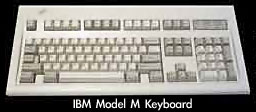 I'm
typing on an IBM model M keyboard . . . when it was new it
cost over $500 . . . and your explanation of why it is so
good is brilliant . . . thanks.
I'm
typing on an IBM model M keyboard . . . when it was new it
cost over $500 . . . and your explanation of why it is so
good is brilliant . . . thanks.
I concur . . . it's probably the best keyboard I've ever used . . . and allows me to type faster than any other keyboard.
It has one or two weak points . . . the covers that cover each key (allowing letters to be moved around) often come off and keep coming off if you take them off even once. I've managed to lose 2 on this keyboard . . . the kids are probably at least partly responsible.
However you can pull the entire key off to clean under them . . . and when you put them back on they don't stick. The keys on most new keyboards stick once you remove them and put them back on. This is really annoying . . . as there's nothing much you can do about it. This is a good test to establish if a keyboard is good quality or not.
I agree it's noisy . . . but that doesn't bother me . . . and nobody at my place ever complains.
I'm probably somewhere between 60 and 100 WPM . . . although it's been a while since I tested myself.
It's heavy . . . you could defend yourself with it if a burglar broke in!!!
It's robust: if you drop it, it keeps on working!!! A cheap keyboard often stops working or jams at this point. Mind you, when you drop it the cap covers are prone to come off, and that's how you can end up losing them.
On a good typists keyboard, the space bar is long and the shift and enter keys are large and thus easy to hit. Contrast that with the reduced size of the shift bar and the smaller keys found on many modern keyboards.
This board has great feel!!! Only a fast typist is likely to notice!!!
BTW: My board looks like crap . . . I've got to give it a clean . . . but it's still working great. I've probably been using it for over 10 years (I think it was on my sisters computer too). I think I might have one more spare somewhere . . . I used to have a huge stack (a friend did me a favour and brought in boxes of keyboards) and slowly used them up to put new computers together.
I often find people feel gypped if I give them an old keyboard on a new computer :-( . . . and most people get put off by the weight. However, once they use it or I explain why it's better, I rarely hear any more about it :-)
I did give one guy the choice . . . and he chose the shitty $10 new keyboard (with warnings) . . . heard back from him a while later . . . he said he had to replace the new keyboard because it stuffed up :-)
I originally started using old keyboards because I killed so many of the new ones and got tired of replacing them.
I wonder if good feel translates to less RSI?
Michael,
What a wonderful story. I remember the old IBM PS/2 computers, which came with these tank keyboards, and they are among the best ever - along with the old Apple Extended and Extended II, and the rightly famous Northgate Omnikeys.
As someone who works at a keyboard, I love a good keyboard and detest some of the crap Apple has put out over the years. The Apple Design Keyboard was cheap, but the white version of the USB keyboard has the worst action I've ever run across from Apple. I've been using Logitech's Cordless Duo, a wireless mouse and keyboard combo that sold for over $100 8-10 years ago, and I love the good feel - so does my wife.
Dan
Claris Home Page and Intel Macs
From Matt Ziebell:
Hi Dan,
I've been a long time Mac user, long time reader, and even subscribed to your noncommercial version of Low End Mac years ago. Love the site.
While it seems unlikely that Apple would release the source code for Claris Home Page (thus allowing the open source community to compile a Universal Binary version), what about running (gasp) the Windows version of Claris Home Page? You could run this in VM, in full screen, and simply copy and paste (or file share) the output with Mac OS X.
If you are already planning on running Parallels or VMware or Boot Camp on your Intel Mac, perhaps that buying a copy of CHP 3.0 for Windows would be not too challenging on eBay or the Craigslist? (I actually recall a LEM reader donating his copy of CHP for Mac to me a few years ago. Perhaps a LEM reader would donate the Windows version? I assume it would run on XP.)
Then again . . . maybe Apple will release that source code (and while they are at it, the code for the classic Mac OS. Why not include HyperCard, too?)
One can always dream.
Regards,
Matt
Matt,
That has occurred to me, and much as I loathe using Windows, it's definitely a possibility.
Yes, it would be wonderful if Apple would decide to open source all of those wonderful apps they've abandoned over the years: AppleWorks, Home Page, HyperCard, and the Classic Mac OS among them.
Dan
A Better Solution with Leopard
From Daniel Decker:
Dan,
The Better Solution: any new Mac will have Leopard and it's wonderful screen sharing built-in. And it works with Macs running Tiger.
Tuck your PPC workhorse away in a corner, Screen Share from Leopard on the new Mac and keep Classic and Claris Home Page for just a bit longer.
Apple supported and free! How much better can it get?!
God bless,
Daniel Decker
Daniel,
Good suggestion. But I'm beginning to wonder if it might not make more sense to buy Dreamweaver than a new desk so I have room for two displays. :-)
Dan
Problems with TruBlueEnvironment
From Helmut Fuchs:
Hello Dan,
for a while now I'm a regular visitor of Low End Mac. It's fun to read, and there's still a lot to learn. Thanks a lot for this!
In your "Low End Mac Mailbag" from today you wrote:
Something called TrueBlueEnvironement is using about 100% of CPU cycles (remember, this is a dual CPU Mac); I'm guessing that's part of Classic Mode, which was called the Blue Box when Rhapsody was being developed. (I just verified that by quitting Classic, and after restarting, it's using up a lot less resources. Interesting....)
That bug is around since at least 10.3 - letting my Alu PowerBook go to sleep and then waking it up often triggers this. I haven't figured out yet, what exactly is going on. But from what I gathered from the Apple support forums, I am not alone with this problem.
When my PowerBook G4 feels sluggish after waking up, then nearly always the TruBlueEnvironment process is using up most cycles. Sometimes the TruBlueEnvironment is doing this even when the icon in the menu bar is showing the classic environment as inactive - and I could swear that I didn't use a classic app since starting up the machine.
When this is the case I can't even launch any Classic apps and I have to kill the TruBlueEnvironment process from the shell. This is kind of annoying, but it's good to know that it's not my Mac that is slow, but some software issue that is easily remedied.
Kind regards,
Helmut
Collective Nouns
From John Muir:
Hi Dan,
As the instigator of the recent little controversy, I suppose I'd better point this out. I'm from Edinburgh in Scotland, and as far as I'm aware, the plural collective noun issue may well have to do with that. Plural and singular are both used pretty extensively around here. It may even be that Scotland is more fond of the plural form than England is, yet alone America. To my ears they both sound entirely natural.
That's dialect for you!
John
Join us on Facebook, follow us on Twitter or Google+, or subscribe to our RSS news feed
Dan Knight has been publishing Low End Mac since April 1997. Mailbag columns come from email responses to his Mac Musings, Mac Daniel, Online Tech Journal, and other columns on the site.
Today's Links
- Mac of the Day: Motorola StarMax 3000, introduced 1999.09.07. This inexpensive clone used lots of off-the-shelf parts.
- Support Low End Mac
Recent Content
About LEM Support Usage Privacy Contact
Follow Low End Mac on Twitter
Join Low End Mac on Facebook
Favorite Sites
MacSurfer
Cult of Mac
Shrine of Apple
MacInTouch
MyAppleMenu
InfoMac
The Mac Observer
Accelerate Your Mac
RetroMacCast
The Vintage Mac Museum
Deal Brothers
DealMac
Mac2Sell
Mac Driver Museum
JAG's House
System 6 Heaven
System 7 Today
the pickle's Low-End Mac FAQ
Affiliates
Amazon.com
The iTunes Store
PC Connection Express
Macgo Blu-ray Player
Parallels Desktop for Mac
eBay

