
The Low End Mac Mailbag
Lean Word Processing, PowerBook 150 Drawbacks, Mac Ethernet Issues, and More
Dan Knight - 2008.03.27 - Tip Jar
- Lean Word Processing
- PowerBook 150 Drawbacks
- WordPerfect, Word, AppleWorks, and Pages
- Mac Ethernet Problems
- FireWire for Modern iPods?
Lean Word Processing
From Mario S. De Pillis:
Dear Mr. van de Kraats,
I found a reference to your trenchant essay on Lean Word Processor Specifics on the home page of the new Bean word processor.
I just wanted to say that you did a great service in advising that any lean processor should study WriteNow as the best program ever written. I agree, and I tried to get the original designer/programmers to port it to modern Macs, but that would have been impossibly difficult because it was written in assembly language.
Even with footnotes, and even under OS 9.2.2 it could handle a 500-page document faster and more conveniently than any existing word processor!
Thanks again.
Prof. (Emer.) Mario S. De Pillis
University of Massachusetts at Amherst
Mario,
Thanks for writing. I never really took the time to get to know WriteNow in the old days, but I recall some of the guys at ComputerLand (where I worked at the time) were big fans. I actually found a page with a download link for WriteNow 4.0 plus the 4.0.2 update. I discovered that you can't run the installer if you're booted into Mac OS X, but you can if you're booted into the Classic Mac OS. It installed with just one error message in Mac OS 9.2.2, and it seems to work just fine.
Those looking for a lean OS X word processor should take a look at Bean. See Charles Moore's review, Bean: Free Word Processor Is Fast and Lean and Looks Great, for one user's take on the free writing tool.
Dan
PowerBook 150 Drawbacks
From Ruffin Bailey:
Look, I love the 150 more than the next guy, bought one when they were released and have purchased another recently from nostalgia, but today's endorsement from Mr. Nygren might have a few people eBaying a machine they don't really want. The best part about the 150 to me is that you can throw in a relatively recent laptop hard drive, unlike the 150's contemporary PowerBooks [which used SCSI drives - ed]. The fun stops there, though, for most.
The only way to get ethernet is to buy a SCSI-to-ethernet dongle, which is huge and, depending on which you find, may even require an external power adapter. That's no good, as you've lost the ability to portably pipe in data quickly for your newly updated, giant hard drive. There's no ADB port, so no external mouse or keyboard, so even its word processing capabilities are compromised. Nor are there headphone ports, which is a shame, as MpegDec runs on the 150.
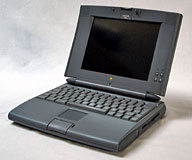 It's a decent machine, but if you're looking to go 68k, grab a
PowerBook 5xx model. In
addition to all the bonuses Mr. Nygren cites for the 150, these have
ethernet built-in (with a small adapter),
the ability to load up on two batteries or add a PCMCIA card adapter,
stereo speakers, sleep on close, and, if you're lucky, an excellent
color screen. These machines are actually still viable today, if just
barely.
It's a decent machine, but if you're looking to go 68k, grab a
PowerBook 5xx model. In
addition to all the bonuses Mr. Nygren cites for the 150, these have
ethernet built-in (with a small adapter),
the ability to load up on two batteries or add a PCMCIA card adapter,
stereo speakers, sleep on close, and, if you're lucky, an excellent
color screen. These machines are actually still viable today, if just
barely.
The 150 is okay in a pinch, or a neat challenge if you're into especially odd old hardware, but there's no getting around the fact that it's closed design is finally a bit too long in the tooth to be a good, everyday, low end Mac.
Ruffin
Ruffin,
Thanks for writing. The beauty of Low End Mac is that everyone has a different definition of what's an acceptable Mac for specific tasks or everyday use. For basic writing in the field, I'm partial to the absolutely ancient Macintosh Portable with its incredible keyboard and 8-10 hour battery life. But I'm not a fan of the nearly 16 lb. weight or the s-l-o-w hard drive. The PowerBook 100 is another winner, as it's very light and compact, but batteries are an issue.
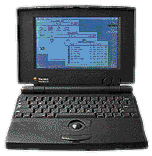 I don't
consider the lack of ADB a drawback for the PowerBook 150 as a field
machine. Believe me, I'm not going to take an external keyboard into
the field when I just want to do some writing. Also, with older Macs,
which all have LocalTalk ports, not having ethernet isn't a drawback.
No, it isn't fast, but it's more than adequate for moving word
processing files between machines and sharing a printer.
I don't
consider the lack of ADB a drawback for the PowerBook 150 as a field
machine. Believe me, I'm not going to take an external keyboard into
the field when I just want to do some writing. Also, with older Macs,
which all have LocalTalk ports, not having ethernet isn't a drawback.
No, it isn't fast, but it's more than adequate for moving word
processing files between machines and sharing a printer.
Yes, the Blackbird models are much nicer - 68040 processors, a very nice keyboard, PCMCIA slots, two battery bays. It definitely set the pattern followed by PowerBooks through the Pismo. I'd recommend a 500 series or PowerBook 190 over any of the earlier ones, but some people really do find happiness with very old PowerBooks.
Dan
WordPerfect, Word, AppleWorks, and Pages
From Bill Doty:
Hi,
I just wanted to jump in on the WordPerfect stuff.
At first, our school ran WordPerfect 5.1 DOS on Windows 3.1 computers. I didn't like it very much. Then we switched to WordPerfect 6.1 for Windows 98. At home, I had WordPerfect 3.x for Macintosh. I had a Windows laptop with ClarisWorks 4 for Windows. My Mac ran ClarisWorks 4. All four were actually good programs.
When I got my MacBook Pro, I took a chance on the iWork programs. I like Pages a lot. It opens (and saves) all the MS Word files I've tried. The interface is much simpler than Word. My current students made PowerPoint presentations a couple weeks ago. (PC windows XP Office). In Keynote, the student's PowerPoint projects open and play perfectly. Keynote also played a PowerPoint made with MS Office 98 for PowerPC software.
I am not sure I will get Office 2008. I can get a discount, but I'm not sure I will need the software.
Bill Doty
West Branch Iowa
Bill,
I was impressed with both Pages and Numbers during my 30 day trial. I have been impressed with AppleWorks since ClarisWorks 1.0 came out. I have not been impressed with Word since version 5.1a, which made even a Mac Plus a lean, mean, word processing machine.
Since I don't need compatibility with anyone, I see no reason to spend the money for Office 2008. If I ever need more power than I have in AppleWorks, I'll ante up for iWork. It's a much better deal than Microsoft Office.
Dan
Mac Ethernet Problems
From John Black:
Dan,
Concerning the "Mac Ethernet Problem" and your reply, I haven't experienced ever the ethernet slowness that you and Geoff talk about. I'm typing this on a 400 MHz PowerBook Pismo that I bring from home and plug into our all-Windows-otherwise office network. It recognizes the network right away, as I'm immediately able to download mail, access servers, and go to the internet.
Same at home on our upgraded Digital Audio G4. The built-in ethernet is active right away, though we don't have a network there, but just a DSL modem connected via ethernet. I will note, however, that the modem takes a minute or so from a cold start to display all green lights. But the delay is nothing like five minutes.
We had a B&W G3 prior to the G4, and it had no ethernet problems either.
On a different subject, take some time to meditate on or even memorize Psalm 19 when you have a chance. I've been doing that for the past few days and have found it to be a profound experience.
Thanks as always for your very informative site.
John Black
Nashville, Tennessee
P.S. Would you ask John Muir to quit referring to Apple in the plural, as "Apple were" and so forth? Apple is an entity as a company, and thus is singular when referred to in normal usage. I know we commonly in conversation will refer to a company sometimes as "they," but that, when written, only makes sense when we say "Apple said they were" or something similar. To use a plural verb directly with a singular noun makes no sense, except in special recognized cases, such as, "I wish I were going."
John,
Where I worked, we had dozens of Macs with ethernet on our network, eventually topping 60 units. Over time, as the network grew, we ran into more and more network problems that were resolved by installing Farallon 10/100 ethernet cards and using them instead of Apple's built-in ports. There was definitely something flaky about Apple's drivers, and it was worst when we had a mix of 10Base-T and 100Base-T Macs. It's not a problem you're likely to run into on a home or small office network, but it points to a problem.
Psalm 19 is one of my favorites - but I have a lot of favorites. The entire Book of Psalms is full of heartfelt praise and pain.
As for referring to Apple "in the plural", that's the norm outside of US English. His usage is correct, albeit different from what we Americans are used to.
Dan
FireWire for Modern iPods?
From Scott Cook:
Hey Dan,
I just saw this $6 FireWire iPod adapter on Deal Mac's site.
Do you think this device would allow low end Macs with FireWire, but
not USB 2, a fast connection to sync with today's video iPods? If so, this removes one of my reasons for not buying an iPod . . . hmmm . . . (gears in head turning slowly)
Scott Cook
Scott,
Thanks for writing. I read over the description, and it doesn't say a thing about bridging FireWire to USB 2.0. It does say a lot about the adapter being compact and letting any iPod with a dock connector charge using FireWire or USB. I'm pretty sure that the adapter only supports FireWire for data with iPods that support FireWire - ditto for USB.
Dan
Join us on Facebook, follow us on Twitter or Google+, or subscribe to our RSS news feed
Dan Knight has been publishing Low End Mac since April 1997. Mailbag columns come from email responses to his Mac Musings, Mac Daniel, Online Tech Journal, and other columns on the site.
Today's Links
- Mac of the Day: Motorola StarMax 3000, introduced 1999.09.07. This inexpensive clone used lots of off-the-shelf parts.
- Support Low End Mac
Recent Content
About LEM Support Usage Privacy Contact
Follow Low End Mac on Twitter
Join Low End Mac on Facebook
Favorite Sites
MacSurfer
Cult of Mac
Shrine of Apple
MacInTouch
MyAppleMenu
InfoMac
The Mac Observer
Accelerate Your Mac
RetroMacCast
The Vintage Mac Museum
Deal Brothers
DealMac
Mac2Sell
Mac Driver Museum
JAG's House
System 6 Heaven
System 7 Today
the pickle's Low-End Mac FAQ
Affiliates
Amazon.com
The iTunes Store
PC Connection Express
Macgo Blu-ray Player
Parallels Desktop for Mac
eBay

