
The Low End Mac Mailbag
Installing Leopard from an Intel Mac, Keyboard Layout, and DSLR Advice
Dan Knight - 2008.03.12 - Tip Jar
- Installing Leopard onto a G4 from an Intel Mac
- Apple vs. Windows Keyboard Layout
- Time to Buy a DSLR
- Helpful DSLR Advice
- One More Nikon D60 Feature
- Limitations of Olympus Mount Adapter
Installing Leopard onto a G4 from an Intel Mac
From Meghan Lewis following up on G4 Quicksilver and Big Hard Drives:
Dan,
Thanks for the reply. I tried using my G4 as a target disk to install Leopard, but I got an error saying the partition scheme needed to be GUID and not APM. I think the disks were model-only/Intel Mac only so I might just have to fork over a bit more to get Leopard on this machine as well as my MacBook Pro. I could make a disk image though, not sure if that would work.
Do you have any more suggestions? I do appreciate your help here. My Google searches haven't really turned up anything...
Thanks!
Meghan
Meghan,
I'm not a Leopard user yet, but it's my understanding that the Leopard installer creates a universal installation that will boot PowerPC and Intel Macs. Problem is, Intel Macs only want to install Leopard on GUID partitions, not the older APM format that PowerPC Macs require.
If I were in your situation, I'd create a disk image on your MacBook Pro, install Leopard to it, and then copy that disk image to your G4 Power Mac. I'd also have at least two bootable partitions or drives on each of my Macs, which would let you run Tiger and use Disk Utility, Carbon Copy Cloner, or SuperDuper to clone the Leopard installation from the disk image to a partition you didn't boot Tiger from. (Alternative: Boot into Tiger from the installer or an external hard drive.)
I'd then boot from the Leopard partition and use Migration Assistant to copy over all of my applications and files.
Dan
Dan,
Thank you so much for all your help. I was successful in getting my Quickie upgraded to Leopard. It's a tad bit sluggish, but not much more than on Tiger. I think in some instances it might actually be faster. However, to upgrade I did end up buying a Leopard install disc and using Leopard assist. I know, it's silly when I have a copy with my new MacBook; it was just not working in that way. At least now I have a backup just in case.
Now to convince the powers that be that it would be worth it to upgrade at work . . . I'm on Panther at work!
Thanks again for the help!
Meghan
Meghan,
Well, if you have a Tiger install disc and don't currently have it installed on another Mac, the license terms allow you to install it on another Mac. Of course, you'll need permission from the IT department....
Dan
Apple vs. Windows Keyboard Layout
From Tim Larson:
Paul Gronke wrote, "Apple's keyboard setup has the least used keys on the outside, where they are most accessible to your pinkie, and the most used keys on the inside."
I don't know about him, but I think the pinkie is the least dexterous and thus least useful finger to type with. It's bad enough that it has so much work to do on the right side of the keyboard. In my experience, Apple keyboards and the Mac OS are much easier to use because I can so easily hit Command - and even chord Command+Option - with a thumb! For most Mac OS operations, this suffices.
Whether I use Mac OS or Windows, I always end up taking a hand off the keyboard to use the Ctrl key because it is a clumsy reach. Real Unix machine keyboards, which, like Windows, use Ctrl as the primary modifier key, often place Ctrl where Caps Lock usually is. This makes Ctrl less of a difficulty to use.
All around I think it's hard to deny that use of Ctrl in Windows was a bad UI decision.
Thanks,
Tim
Tim,
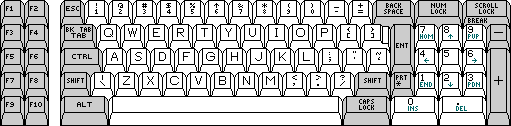
The original IBM PC keyboard layout.
Thanks for writing. At least we can't blame Microsoft for this one: The Control key on the original IBM PC (above) and the later IBM AT (below) keyboards had the Control key to the left of A, where Caps Lock appears today. Alt was to the left of the space bar, Caps Lock to the right. Improvements included a larger Enter key and space between the space bar and the Alt and Caps Lock keys.
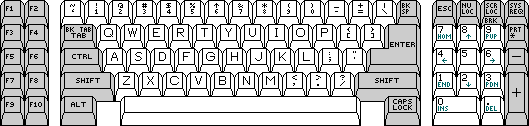
The IBM AT keyboard layout.
A lot of things changed when IBM introduced the 101-key keyboard (below) with the PS/2 series of computers in 1987. The keyboard was the same one IBM had used with its RT PC, a Unix machine, and very little has changed since then. As I look at the Logitech keyboard I use, the only changes have been adding an Option key between Ctrl and Alt and a Windows key between Option and Ctrl on the right. (This was the same year Apple introduced the Apple Extended Keyboard, which is very similar at first glance.)
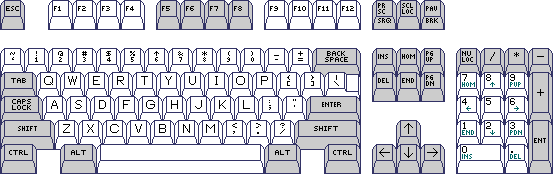
IBM's 101-key keyboard layout.
The worst thing about this layout is that it's too easy to hit Caps Lock by mistake and end up typing in ALL CAPS. That key should be moved to a less accident prone location. It also explains why keys like Home and End on PC keyboards do Unix-y things, since IBM originally developed this keyboard for Unix.
I suppose we really can't blame Microsoft for picking Ctrl and Alt as its primary modifier keys, as earlier PCs didn't have an Option key. Using the key next to the space bar as the primary modifier would have made more sense. That's what Apple chose to do.
Dan
For more on IBM keyboard layout, see Comments on the Keyboard of the IBM PC.
Time to Buy a DSLR
From Mark Sartor after reading Digital SLRs Are Affordable Enough to Replace 35mm SLRs:
Dan,
That was one of the best articles I've read in a long time . . . summarizing what's out there in DSLR and comparing it to SLRs of long ago....
I was a photog in the Navy (69-72) and haven't bought DSLR due to excessive costs. I may pop for the Evolt now! Thanks!
- Mark
Mark,
Thanks for the kind words. I had to do the research yesterday, since I really haven't paid attention to the DSLR scene since Canon upgraded the Digital Rebel the first time. I had one of those for a year or two, purchased used, and sold it because it was too bulky for everyday use - and too expensive to sit on the shelf.
The only real drawback to the 4/3 System is the image proportions: a 4:3 ratio, which doesn't scale to a 4x6, 5x7, or 8x10 enlargement without some cropping. 11x14 is about the only standard enlargement size that will use most of the frame. With 4x6 the standard snapshot size and both TVs and computer monitors going widescreen, it's a shame they abandoned the 3:2 ratio used by 35mm cameras and DSLRs for so many years.
In terms of price and size, I find the Evolt 400 series very attractive.
Dan
Helpful DSLR Advice
From Steve Lubliner:
The big drawback - and the reason I sold my DSLR a couple years ago - is size. DLSRs from Nikon, Canon, Pentax, and Sony tend to be as big as 35mm SLR camera. Cameras in the 4/3 System tend to be smaller, and Olympus bills the E-410 and E-420 as the world's thinnest and smallest DSLRs.
In the end, we have several competing systems, each with a range of lenses and camera bodies, all of them capable of producing top notch photos with the responsiveness we've long expected from SLR cameras. Read the online reviews. Put your hands on them in the local photo shop. Only you can decide what meets your needs.
Hi Dan,
To me the size of the DSLR is an advantage. I agree that the size of a DSLR system can be a drawback for portability. I was uncomfortable using my daughter's Canon A560 point and shoot. I find the larger bodies more comfortable and steadier to hold. Also, the size of the body tends to be less significant when you throw a powerful flash unit on top and a long zoom on the front.
Your advice to put "hands on" is well founded. Most of the major systems are of high quality. I find the handling to be more critical, things like control placement, eye relief, function displays, and hand grips. Unfortunately the local photo shop is a dying breed. Here in Tucson the local independent photo store did not have any of the major prosumer bodies on the shelf (nor much of anything else). Best Buy had the best selection, but they were shy on prosumer models and the help was no better than "point and shoot". Only Kits camera had a reasonable selection and knowledge of the products but did not carry Olympus last time I shopped there.
Steve Lubliner
Steve,
Some things you can buy sight unseen - hard drives, memory sticks, printer ink, books, CDs, and the like. But for things like cameras, handling it yourself should be a big part of the selection process.
I'm leaning toward a 3 model camera strategy: a pocketable snapshot camera, something larger and more flexible that won't weigh you down, and someday a DSLR. For serious work, I don't mind the weight, but for everyday use, I prefer a smaller camera.
Dan
One More Nikon D60 Feature
From Bryan Lepine:
Hi,
Nice article, but there is one small correction.
The D60 comes with a VR lens. The D40 on Amazon does not.
Regards,
Bryan
Bryan,
Thanks for the correction. Vibration reduction is a very nice feature. I'm updating the article to note its presence on the D60's standard zoom.
Dan
Limitations of Olympus Mount Adapter
From John Hatchett:
Dan -
As a long time analog photographer as well as a retail store manager, I thought I could just share a few tidbits with you. The new Olympus 4/3 System has an adapter for old analog Olympus mount lenses. There are lots of caveats, however. Not every f-stop is usable, and auto exposure functions are compromised. What this does mean is that my last excuse for not switching to digital is gone. Still, it's hard to give up my Olympus OM-4, with its multi-spot metering.
John
John,
Yeah, the OM-4 was a gem. I owned an OM-1 for a while, but I found it uncomfortably small for my hands and returned to the Minolta fold with an X-700, one of the finest consumer SLRs ever in the pre-autofocus era.
Dan
Join us on Facebook, follow us on Twitter or Google+, or subscribe to our RSS news feed
Dan Knight has been publishing Low End Mac since April 1997. Mailbag columns come from email responses to his Mac Musings, Mac Daniel, Online Tech Journal, and other columns on the site.
Today's Links
- Mac of the Day: Motorola StarMax 3000, introduced 1999.09.07. This inexpensive clone used lots of off-the-shelf parts.
- Support Low End Mac
Recent Content
About LEM Support Usage Privacy Contact
Follow Low End Mac on Twitter
Join Low End Mac on Facebook
Favorite Sites
MacSurfer
Cult of Mac
Shrine of Apple
MacInTouch
MyAppleMenu
InfoMac
The Mac Observer
Accelerate Your Mac
RetroMacCast
The Vintage Mac Museum
Deal Brothers
DealMac
Mac2Sell
Mac Driver Museum
JAG's House
System 6 Heaven
System 7 Today
the pickle's Low-End Mac FAQ
Affiliates
Amazon.com
The iTunes Store
PC Connection Express
Macgo Blu-ray Player
Parallels Desktop for Mac
eBay

