
The Low End Mac Mailbag
iSub Issues with Intel Macs, No Apple Store in Philly, Gainsaver Problem, and More
Dan Knight - 2008.02.12 - Tip Jar
- Once You Go Mac...
- Complaint about Gainsaver
- iSub Works with Intel Macs
- My Sonnet Encore Upgrade Hates Tiger
- Why No Apple Store in Philly?
- Unsupported Leopard on an 800 MHz Quicksilver
Once You Go Mac...
From Ronald Lanham:
Nice article Dan...
From my own long time experience with computers (decades) and approximately a decade with Macs...
When PC users say their PCs are 'better' than Macs . . . what they're really saying is that their PCs are faster at playing games than Macs.
For a long time this was very true, but as I understand it, now not even that is always true.
I'm not a gamer (nor are most Mac users that I know), but it would seem it would make much more sense to just buy a console than to spend so much on upgrading graphic cards, etc.
Anyone that uses a Mac long enough to feel comfortable (perhaps a month after installing various third-party helper apps - e.g. DefaultFolder, DragThing, MaxMenus, etc.) would never think about going back to using a PC.
I haven't ran a virus app in probably five years and only need DiskUtility, DiskWarrior, Leopard Cache Cleaner, and MainMenu for maintenance.
Many people that I talk to that use PCs at work say that when they get home the last thing they want to do is get on their home PC unless it's necessary. Gee . . . I wonder why? <g>
G5; OS X 10.5.1; 2 GB RAM; 3 monitors
Regards,
Ronald
Ronald,
Like they say, "Once you go Mac, you never go back." Not strictly true, as some Linux and Windows users are so caught up in the paradigms that they've grown used to that it becomes impossible for them to change operating systems, but a good rule of thumb.
I'm not a gamer, but I know how addictive games can be. You never hear of someone dying after a 72 hour marathon word processing session without bathroom breaks, but when an intense new game comes out, you'll often reach such a story.
I hope I'm not addicted to Macs, but I can tell you that I feel completely out of my element working with Windows or Linux.
Dan
Complaint about Gainsaver
From Tony Morris:
I've got a beef. Gainsaver, who is listed on Low End Mac's Best Power Mac G5 Deal page, is misleading your readers with false pricing and availability of Mac computers.
My son is currently trying to get a refund from Gainsaver for a G5 1.6 that he ordered and has never received. Gainsaver had and still have the G5 1.6 listed as available on their website and on Low End Mac's deal page. My son paid for the order with a cashier's check from his bank in good faith. Gainsaver can not or will not ship the unit to my son. In a classic "bait and switch" maneuver, Gainsaver has offered to sell my son a G5 1.8 for just a few dollars more. But Gainsaver refuses to refund him his money. Gainsaver insist upon him accepting their store credit instead.
Would this acceptable to you?
This is atrocious business behavior that should not be tolerated. I have searched the Web for information about Gainsaver. I found this very revealing notice from the Better Business Bureau: Gainsaver has a company rating of D.
Unfortunately for my son, he did not discover the truth about Gainsaver before he placed his order. You can see the cost of the G5 1.6 on Low End Mac's Deals page, we are not talking about a trivial amount. He has been trying to get a refund from them for weeks now. Gainsaver continues to deny his request to return his money. Gainsaver is still insisting that he accept a store credit. Take a store credit for a product that they have mislead you and your readership by advertising Gainsaver had it in stock. This is outrageous offer and will not be accepted!
What am I asking of you? At the very least you should look closely at the BBB rating. Low End Mac has always been about information for the Mac community. Inform your readers of Gainsaver's standing with the BBB. If you feel that this is deplorable business practice I urge you to contact Gainsaver yourself. For Gainsaver to falsely advertise price and availability of product on Low End Mac is disgraceful.
I have been a reader of Low End Mac for many years. You are on my short list of sites that I go to on a daily basis for information and insight on the Mac. Please, discover why Gainsaver would operate in such a fashion. Low End Mac is too good of a website to be tarnished by this. I thank you for reading this email.
Tony,
Thanks for writing. I'm sorry that a link on Low End Mac brought you and your son so much trouble. We list dealers because of good prices and have to assume they provide good service.
I've had good reports about Gainsaver's pricing, which is what prompted us to list them in our daily price trackers. Gainsaver has not paid to have its deals listed. (For that matter, none of the listed dealers have. Some have affiliate programs that reward us when a sale is made, but Gainsaver is not among them.) We track down and post these prices as a service to our customers.
Because your son ordered with a cashier's check, he's covered both by the Postal Service and the FTC. As it says on the BBB page you provided the link to:
The Federal Trade Commission's Mail Order Rule protects consumers who shop by mail. According to this regulation, the company must ship your order when promised. If the company doesn't specify a shipping time, it must send the merchandise within 30 days. If there will be a delay, the company must give you the option to either agree to the delay or cancel the order.
If you decide to cancel your pre-paid order, the seller must mail your refund within seven business days of receiving your notice of cancellation.
Based on multiple negative emails received about Gainsaver (poor business practices, poor quality merchandise, and misleading pricing), we have removed all links from our site. Thanks for bringing this to my attention.
Dan
iSub Works with Intel Macs
From Grant Davis:
Hi Dan,
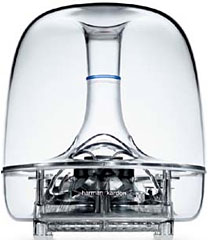 Just
finished reading the latest articles on the site today and noticed a
mention of iSub support in Leopard being broken. That is unfortunate
for many like myself who own or get to use one.
Just
finished reading the latest articles on the site today and noticed a
mention of iSub support in Leopard being broken. That is unfortunate
for many like myself who own or get to use one.
You incorrectly state that iSub support has been unavailable for some time, I in fact have my iSub working with my Intel-based Mac mini still running Tiger. This may have changed with some of the newer versions, and I would be interested to know if that is the case from others who have more current machines.
Regards,
Grant Davis
Grant,
I don't have an iSub, so I have to rely on what I can learn from others. Here are some of the articles I read:
- Topic : iSub problems, Apple Support. First user complains that his Quad-core Power Mac G5 doesn't work consistently with iSub since upgrading to Leopard.
- iSub Problems with Intel-based Macs (and workaround) in OS X Tiger, Accelerate Your Mac. According to one posting, Apple dropped all iSub support for Intel Macs in or before March 2007. This person notes that the iSub will only work with Intel Macs that have other USB audio hardware (speakers, headset, etc.) attached.
Based on my reading, the iSub will not work reliably on an Intel-based Mac unless you have another USB audio device attached, nor is there any iSub support in Leopard.
Dan
My Sonnet Encore Upgrade Hates Tiger
From Dean:
Hey LEM,
I've only recently discovered Low End Mac within the past year, but I've been a Mac addict since . . . well, since MacAddict was around really. I had/have the original G3 iMac 333, still owner of a Beige 300 MHz G3 (upgraded FireWire and USB card kept that thing alive for the longest time), a G3 Pismo 400 MHz, a G4 Sawtooth 450 MHz, and finally a 12" G4 1.33 GHz. I can't seem to part ways with these old machines (go figure, Mac junkies out there).
Now I was actually wondering if you can help me with a technical problem, or if you know of this issue already (and maybe I haven't found it): I've been gearing up, ready to tackle Leopard with my G4 Sawtooth -
- G4 450 MHz (to be 1.2 GHz, Sonnet Encore)
- 2.0 GB RAM
- OS X Tiger 10.4.11
- 40 GB internal (750 GB external)
- Rage 16 MB (to be 256 MB, GeForce 6200 flashed for Quartz/Core - I'm prepared to remove the temp. sensor thanks to LEM!)
Anyway: (I also posted this dilemma on DealNews in search of someone who's already gone through this) my Sonnet 1.2 GHz g4 upgrade is being difficult and will not boot under OS X 10.4.11. I've programed my AGP 450 MHz Sawtooth, installed the firmware for the Sonnet processor 3.1 as well as SonnetCache 1.4 successfully (all OS X), then the installer wants to restart - okay, so I restart, and the computer monitor just hangs in a deep sleep (same dilemma as previous posts).
Okay . . . so I shut down and slap the original CPU back in, rebooted Tiger, then changed startup disc to OS 9.2.2, and proceeded to install the drivers/firmware for classic 9.2.2 now and it wants to reboot - voilà, classic 9.2.2 boots as normal!!! Except there's a dialogue box that says there's a cache memory failure or something, but then I hit OK, and it continues to load classic 9.2.2! Then I look at the system profile, and it reads machine speed: 1200 MHz (so far, so good).
So I thought - okay good - now let's switch start up disc back to Tiger 10.4.11, then I hit restart - Monitor wakes up, and Tiger boots up without a problem!! (And there's not cache error this time in Tiger, like there was in Classic). Double checked, and system profile also reads 1.2 GHz in Tiger.
Now for the real problem - the Sonnet CPU will refuse to reboot again once Tiger shuts down!! The monitor will show no signal again . . . the computer only responds after I plug in the original CPU, boot up Tiger, change startup disc to Classic, shutdown Tiger, plug in the Sonnet CPU, boot up Classic (which Sonnet seems to like), then switch startup disc back to Tiger, and reboot in Tiger. (It's the same cycle - rinse and repeat :/ ).
My conclusion so far: Sonnet likes Classic, and only boots OS X Tiger right after Classic - it will not respond if I hadn't loaded classic prior. Why is it doing this??
FYI: This was the long route that I took to realize that my Sonnet CPU was the culprit, and that when I unplug the power cord and reinserting the battery seems to have 'cured' it without dealing with Classic, but I have to do it every time after shutdown for it to respond . . . and the 6200 GFX card, oh my god . . . that's another story in Tiger . . . but I'll try and troubleshoot the Sonnet first!
Thanks in advance!!!
Dean
Dean,
I haven't worked with any Sonnet upgrades in a long, long time - like prior to 2001. That said, we used a lot of Sonnet upgrades to give every Mac IIci the heart of a Quadra, and they all worked perfectly.
First of all, I hope you've taken this to Sonnet tech support. The fact that it works in Classic and can work in Tiger after Classic and a restart (but I'm guessing not a shutdown) could be a firmware issue, as some settings survive a restart but not a shutdown. Check with Sonnet if you can try an older version or perhaps a beta if they're working on a new version.
That's all I can come up with, since your computer otherwise works flawlessly. Keep us posted!
Dan
Why No Apple Store in Philly?
Dear Dan Knight,
I have been reading and enjoying LEM for a while, and its wealth of information has proved invaluable to me in turning a G4 Power Mac I purchased from Wegener into a truly road worthy production box. With the processor upgrade I just got, an AGP video card I am looking at, and parts I scavenged from a dear departed Beige G3 and an eMac, my "new" computer will be perfectly suitable for graphic design and a great fall back machine to my main box. A thousand thanks!
However, I am kicking around the possibility of biting the bullet and getting a Mac Pro. My main computer now is a 1.66 GHz Mac mini, which has been wonderful until I got the Adobe CS3 suite. I love CS3, but the apps are memory and processor pigs. I have 2 GB of RAM in the mini, but I suffer the spinning Beach Ball of Death quite a bit. I don't want to buy an all-in-one, so my option seems to be to finance the King's Ransom for a box that will last me a decade.
Which brings me to my real question that maybe you or your readers may be able to answer: Why are there no Apple stores in the City of Philadelphia? There are some in the suburbs surrounding Philly, tons of them in Jersey, and New York has as many as they do Starbuck's, but Philadelphia has none. There are a couple of dealers who sell Macs in town, but there's no Apple Store within the city limits. How come? I was born here and am wondering why "we don't get no respect?"
...and no, I don't want to argue over the merits or demerits of the City of Brotherly Love. I know Philly's got problems, but I love it warts and all.
-Joe from Philly
Joe,
I have no clue how a city like Grand Rapids, Michigan (where I live) merits an Apple Store while Philadelphia doesn't, let alone why some cities have several Apple Stores. I'm sure the marketing department at Apple does a lot of work studying demographics, income levels, growth patterns, and the like in determining where to put the next round of Apple Stores, but they don't explain their reasoning.
Be grateful you don't live in Alaska, Idaho, Montana, Wyoming, North Dakota, South Dakota, Kansas, Arkansas, Louisiana, South Carolina, West Virginia, Delaware, Vermont, or Maine. None of those states have any Apple Stores at all at present.
Dan
Unsupported Leopard on an 800 MHz Quicksilver
From Josh Righter:
Hi Dan,
Great site you have here. I'm a recent "convert" to OS X, having been gifted a G4 Power Mac in excellent condition. It's an 800 MHz model, so Leopard is not officially supported, but I decided to give it a go anyway. For the benefit of others, I present to you my findings:
1. What unsupported Mac(s) have you installed it on? Quicksilver 2002 Power Mac G4 with a few upgrades, including a Pioneer DVD-R upgraded drive (original SuperDrive did not support DVD writing), a Sonnet USB 2.0 card, a 120 GB Seagate hard drive, and an AirPort card.
1. How much RAM? 1.5 GB
2. How fast a CPU, and what brand, if it's an upgrade? Original 800 MHz PowerPC 7455 CPU
3. What video card does your Mac have? Installed with original 32 MB ATI Radeon 7000; upgraded to 128 MB ATI Radeon 9800 after install.
2. Which installation method did you use, a modified installer or installing from a supported Mac? Installed from supported G5 Power Mac using FireWire Target Disk Mode. At first, I opted to clone my existing user account from the G5 Power Mac, but for some reason this left normally hidden UNIX system folders on the hard drive of the G4 (var, init, etc.), so I redid the process as a fresh installation and everything went smoothly. Installation time (for the second installation) was no more than an hour and a half or so.
3. What doesn't work? Especially check out Time Machine (which requires a second hard drive at least as big as your main one), DVD Player, Front Row, and VLC. Initially, I could not connect to a wireless network with the AirPort (note: original, not AirPort Extreme) card; the card was being listed as being turned off with no way to turn it on. I found the solution to this online involving simply deleting and re-adding the AirPort listing in my Network preferences, and it now works perfectly. DVD Player works well at its default settings, as does VLC (note: these two were tested using the Radeon 9800, which I installed shortly after the Leopard install). I unfortunately have not been able to try Time Machine or Front Row as of this writing.
4. How does performance compare with Tiger subjectively and objectively? I do not have any experience with Tiger on this particular G4, so unfortunately I can't answer this. However, I will say that overall, I'm pretty pleased with the performance of a new OS running on a system that was made in 2002 (albeit modified somewhat since then). A few things do seem a bit sluggish (for example, if I run my mouse along the Dock with magnification turned on, I get a bit of lag with the magnification animation), but that's probably due to my low speed, unsupported CPU. I am planning on upgrading the CPU to a 1.5 GHz version in the near future (theoretically placing the system in "supported" territory), which I hope will clear up any remaining sluggishness on the system.
What really puts this into perspective for me is the fact that the PC laptop I migrated from was also made in 2002, and in fact has a bit of an edge over the G4 in terms of technical specifications. However, if I were to try and install Windows Vista on the laptop - analogous to installing 10.5 on the G4 - the result would be a complete disaster. The fact that Leopard even runs on the G4 (never mind actually running well enough for me to use the machine for SD video and light Photoshop and Dreamweaver work) is a testament to the longevity of Apple machines. When I have the funds, I'll happily take the plunge with a brand-new powerful Mac, but for now, this old G4 is doing the job better than any PC from the same time period likely would.
Thanks,
Josh
Josh,
Thanks for sharing your experience. I'm looking forward to trying Leopard myself someday.
Dan
Join us on Facebook, follow us on Twitter or Google+, or subscribe to our RSS news feed
Dan Knight has been publishing Low End Mac since April 1997. Mailbag columns come from email responses to his Mac Musings, Mac Daniel, Online Tech Journal, and other columns on the site.
Today's Links
- Mac of the Day: Motorola StarMax 3000, introduced 1999.09.07. This inexpensive clone used lots of off-the-shelf parts.
- Support Low End Mac
Recent Content
About LEM Support Usage Privacy Contact
Follow Low End Mac on Twitter
Join Low End Mac on Facebook
Favorite Sites
MacSurfer
Cult of Mac
Shrine of Apple
MacInTouch
MyAppleMenu
InfoMac
The Mac Observer
Accelerate Your Mac
RetroMacCast
The Vintage Mac Museum
Deal Brothers
DealMac
Mac2Sell
Mac Driver Museum
JAG's House
System 6 Heaven
System 7 Today
the pickle's Low-End Mac FAQ
Affiliates
Amazon.com
The iTunes Store
PC Connection Express
Macgo Blu-ray Player
Parallels Desktop for Mac
eBay

