
The Low End Mac Mailbag
Lawsuits Getting Out of Hand, G3 iMac Upgrade Resources, Leopard on a 400 MHz TiBook, and More
Dan Knight - 2008.01.08 - Tip Jar
- Lawsuits Getting Out of Hand
- iMac Slot Load Upgrade Resources
- Success Report: Leopard on 400 MHz TiBook
- Why Won't Leopard Install or Boot on the Yikes! Power Mac G4?
- How Do I Know if AltiVec Is Enabled?
Lawsuits Getting Out of Hand
From Alvin:
Hi. Happy new year and belated Merry Christmas.
It's sad how people sue each other left and right in the US. Most notably nowadays is people suing Apple. Suing is sometimes necessary, but for the longest time, it's gotten out of hand in the US. I hope one of these days Apple and other companies doing great with their innovations wouldn't be faced with so much lawsuit that they become bankrupted. Even in the Philippines, Microsoft is being sued for a manual which was based on Microsoft's own documents, anyway - and Microsoft gave them help in the first place too. Not to mention nonprofit orgs like the OLPC being sued when it's only doing something good.
Some people should just let some things go even if it's violating something they did. They should look on who they're suing, it's not like it should be based solely on technicalities. What's your take on lawsuits and patents nowadays?
God bless,
Alvin
Alvin,
I agree: It's sad the silly and sometimes stupid things file lawsuits over. It's an unfortunate byproduct of American culture, which is largely driven by greed. Why sue over iTunes DRM when you can buy the CD? Because you can make your lawyer rich with a class action suit and get your piece of the $15 billion Apple has in the bank!
As for the OLPC keyboard lawsuit in Nigeria, I applaud Lancor for their clever introduction of a secondary shift key next to the regular one, which lets them make keyboards for many different markets (Nigeria, North America, South America, and Europe) that need many special characters. They have every right to protect such an innovation with a patent.
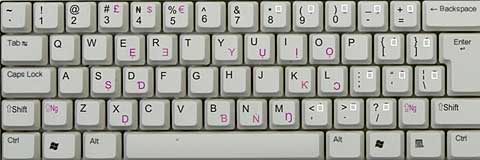
The Lancor Konyin keyboard (above) and
the OLPC keyboard (below).
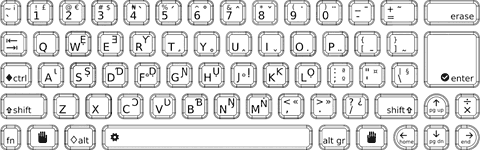
In comparing the OLPC keyboard layout with the Lancor one, there is no secondary shift key next to the regular one. I will grant that the layouts of the two keyboards are similar, particularly the special characters - but even here the OLPC keyboard has it's own layout. It doesn't copy the Lancor layout.
I'm not the least bit familiar with Nigerian law, but
there is a huge list of precedents. Two that come immediately to mind
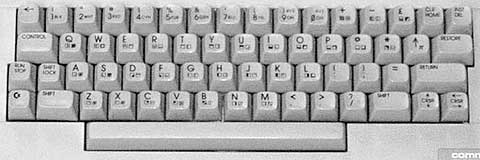
are the old 8-bit Commodore computers with their character graphics and
Macintosh keyboards. The old Commodores had a special Commodore key
that let you access special characters, 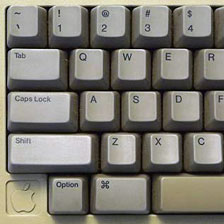 and ever since the first Macintosh
shipped, Apple has used the Option key to let you directly enter
special characters (e.g., Opt-G yields the © symbol).
and ever since the first Macintosh
shipped, Apple has used the Option key to let you directly enter
special characters (e.g., Opt-G yields the © symbol).
As typewriter makers discovered starting in the 1870s, it helps if everyone uses the same keyboard layout. The same goes for computers. It would have been a nightmare if the QWERTY keyboard had been patented - and it probably would have lead to another layout becoming the standard. The same goes for other countries with other characters in their alphabets: You have to have consistency across brands or you just drive the typist nuts.
I think it's like the iTunes lawsuit: Someone saw an opportunity to make money, hired a lawyer, and wants to get rich at the expense of others. In this case, it's at the expense of Nigerian school children who had hoped to use the OLCP computer.
Greed. It's not good, and it's everywhere.
Dan
iMac Slot Load Upgrade Resources
From Fritz Lang:
Hi Dan,
Thanks for keeping the informative site.
I'm upgrading my bro's iMac slot. I have Panther running from an external FireWire [drive] just fine. I'm going to install new RAM to 1 GB. I also want to swap out the original hard drive for a newer WD Caviar 120 GB 7200 rpm. I seem to remember a QT or Flash movie that someone had posted for removing and installing a new drive in the iMac, but I can't find it. Have a pointer for same? Any idea how this rig would fare with Tiger installed? Same speed, slower, a lot slower? Could Tiger be installed from an ext. FireWire DVD drive?
Thanks,
Fritz
glory or insanity awaits
Fritz,
I can't find a video, but I have found some online articles. Macworld has an article with instructions (and some photos) for upgrading the G3 iMacs, both tray-loading and slot-loading varieties. Another page you may want to check is the Visual Installation Guide - 2nd Generation iMac Hard Drive.
As for performance, most users have found the Tiger is every bit as responsive as Panther, and you can speed that up by turning off the Dashboard and not letting Spotlight index while you work.
Dan
Thanks Dan.
I stumbled on those and the operation was a success up to 10.3.9. I'll do the Tiger update and follow that caveat.
Fritz
Success Report: Leopard on 400 MHz TiBook
From David W. Rankin, Jr.:
I have a work 400 MHz PowerBook G4, 1 GB of RAM, and things seem to be acceptable, with some exceptions below:
- The Dock was very slow to redraw in 3D mode and seemed to slow everything else down too. I used the 2D hack, and the system is much happier.
- This machine doesn't like Spotlight. Either disable it completely or drag all of your disks into the Privacy sections of the System Preferences panel and reboot. There are several applications that have gone from "slow enough to annoy" to "barely fast enough to use" with this fix.
- DVD Player says "a valid video device could not be found for playback [-70017]." Since I don't watch DVDs on this box, I hadn't even tested this before now. I'm also getting the Front Row "black screen" problem.
- I'm not seeing the long boot time delays others do, but system boot time is definitely up from Tiger.
- Spaces seems to work well on the TiBook.
I wouldn't want to run anything that's 3D intensive on this box. The 3D dock and Spotlight seem to really have taken a lot out of this old girl. I haven't attempted any video driver hacks yet, since I don't care about 3D performance. I may try this after I get done upgrading my main work machine.
Installation occurred using FireWire target mode to a 1G iMac G4.
Thanks,
David
David,
Thanks for the report. It's not surprising that things are a bit sluggish on a 2001 PowerBook. We should probably be happy the Leopard runs as well as it does on a 400 MHz computer - and for the hacks that let you disable the 3D Dock, turn off Spotlight, etc.
Dan
Why Won't Leopard Install or Boot on the Yikes! Power Mac G4?
From Rowan Conrad:
I have long appreciated you site. A Mac user since the beginning . . . I have one of almost every Mac. Thank you for this fine site.
Has anyone found the reason Yikes won't install Leopard? I have a 1 GB upgrade in my old Yikes, enough memory, an upgrade video board, but it won't install. And when I install in the Digital Audio, it kernel panics in the middle of boot.
Thank you,
Rowan Conrad
Rowan,
I have a few reports that Leopard refuses to install in a Yikes! G4 and in a Blue & White G3 with a G4 upgrade (making it essentially the same machine), but no explanation for the failure. Digital Audio G4s should be able to install Leopard using a hack (as they fall below the 867 MHz mark), but make sure firmware is fully up-to-date.
Dan
I have an upgrade on the Digital Audio, and it installs fine. If you find out why it won't install on a Yikes or how to make it work, please publish.
I was unclear. I installed on the Yikes hard drive on the Digital Audio, and when I reinstalled it into the Yikes it kernel panics halfway through the boot process.
Thanks for the reply.
Rowan
Rowan,
Thanks for the clarification. If we ever learn why, we'll publish the info.
Dan
How Do I Know if AltiVec Is Enabled?
From Guilherme Maranhão:
Dan,
Hello! I did everything there is to do and got myself a working B&W with a G4 ZIF. It's a G4/350 running at 400. Everything is fine. But how to tell if AltiVec is really working/enabled? Should I just believe so? Is there a utility like Metronome for OS 10.2.8?
I went through pure-mac.com, searched other websites, nothing. Everything is either for OS 9 or Panther and up.
regards,
Gui
Gui,
AltiVec is part of the G4 CPU. You don't have to do anything to enable it. If the software can use AltiVec, it will recognize it and take advantage of it.
Dan
Join us on Facebook, follow us on Twitter or Google+, or subscribe to our RSS news feed
Dan Knight has been publishing Low End Mac since April 1997. Mailbag columns come from email responses to his Mac Musings, Mac Daniel, Online Tech Journal, and other columns on the site.
Today's Links
- Mac of the Day: Motorola StarMax 3000, introduced 1999.09.07. This inexpensive clone used lots of off-the-shelf parts.
- Support Low End Mac
Recent Content
About LEM Support Usage Privacy Contact
Follow Low End Mac on Twitter
Join Low End Mac on Facebook
Favorite Sites
MacSurfer
Cult of Mac
Shrine of Apple
MacInTouch
MyAppleMenu
InfoMac
The Mac Observer
Accelerate Your Mac
RetroMacCast
The Vintage Mac Museum
Deal Brothers
DealMac
Mac2Sell
Mac Driver Museum
JAG's House
System 6 Heaven
System 7 Today
the pickle's Low-End Mac FAQ
Affiliates
Amazon.com
The iTunes Store
PC Connection Express
Macgo Blu-ray Player
Parallels Desktop for Mac
eBay

