
The Low End Mac Mailbag
Pismo the Best PowerBook, Capacitor Problems in Macs, XPostFacto for Leopard, and More
Dan Knight - 2007.06.28
- Pismo the Best PowerBook Ever
- Aging Capacitors and Tin Whiskers
- eMacs Plagued with Bad Capacitors
- XPostFacto for Leopard
- Another OS X Install Tip
Pismo the Best PowerBook Ever
Adam Goff writes in response to What 'Book Should I Get?:
You mentioned that the G4 upgrades for the Pismo were in the $300-400 range. Leo can pick up a 550 MHz G4 card from Wegener Media for $199. Going from a 400 MHz G3 will result in a very noticeable difference in speed especially if he throws in a 512 MB stick of RAM, all of which can be done for under $300. If he wanted to go all out, he can even pick up a wireless-g PC Card and an expansion bay DVD/CD burner.
Even going from a stock 500 MHz G3 to the 550 MHz G4 in my Pismo resulted in an overall sense of "snappiness" to the Finder as well as any AltiVec-enabled applications. Your colleague Mr. Moore and I have oft-lamented the venerable Pismo in correspondence to each other. It's expandability and general ruggedness have made it, IMO, the best designed Apple portable ever. Of which my seven years of uninterrupted use is a testament to.
Adam M. Goff, IT Director
Ranch Hope, Inc.
Adam,
Thanks for writing. I checked Wegener Media's Pismo page before replying to Leo LeBron, and I didn't see a listing for the G4 card separate from a used Pismo. Going to the home page today, I see the Pismo upgrade listed. I'll forward this info.
As someone who lived with a first generation TiBook for over five years, I wish it had been as rugged as Pismo. A lot of people had hinge problems and screws would work their way loose from the bottom cover. It was thin, light, fast, and had a widescreen display, but the Pismo was much more rugged and far more expandable with its drive bay.
I think you'd get an argument from any WallStreet owner about which is the best PowerBook design ever, since WallStreet had two expansion bays, but the WallStreet, Lombard, Pismo trio was a high point of versatility. Modern 'Books are more powerful but not nearly as flexible.
Dan
Aging Capacitors and Tin Whiskers
Steve Lubliner writes:
Dan,
Electrolytic capacitors have been the bane of many electronic systems for many years. Disciplines as varied as aerospace products and antique radio restoration are affected. Yes, dried out electrolytics are a cause of capacitor failures. Dried out electrolytics are probably a lesser problem on modern design parts.
A more significant problem deals with the basic physics of the aluminum electrolytic capacitor's construction. The aluminum capacitor relies on an aluminum oxide layer on the aluminum to avoid conduction (shorting). The layer is extremely thin and not 100% perfect, due to minute imperfections (e.g., cracking). The imperfections in the layer will allow conduction. The oxide layer is "reformed" when a capacitor is charged by localized heating at the conduction sites that recreates (reforms) the oxide.
A problem is an electronic system that has not been used for many years, be it a "wooden round" missile (a missile designed to be stored for long periods, say 7 years or more, without maintenance), first turn on of an antique radio, or first use of a rescued Mac after sitting in a closet for many years. The dielectric film in the capacitors may have many conduction sites, making the capacitor electrically look more like a resistor than an open circuit. The heat from the many conduction sites causes the capacitor to fail (or even explode) before the capacitor may reform itself.
A technique used with antique radios is to initially power the radio with a reduced current/voltage source (e.g., through a low wattage light bulb) to allow the capacitors to reform without generating excessive heat. I'm not recommending that for old Macs, because the reduced power operation may damage other components (e.g., the hard drives). The best preventative is a periodic turn on; only once every 5 to 7 years will suffice. The attached article has some information on reforming capacitors.
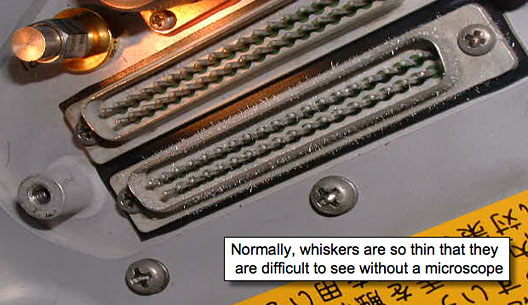
I've added some information on tin whiskers from a presentation that made the rounds at work.
Steve Lubliner
Steve,
Thanks for the info - and the attachments. I can see where tin whiskers are going to become a bigger problem as manufacturers are being forced to create lead-free electronics, but pure tin or tin with less than 3% lead may form whiskers, while tin with at least 3% lead never does.
I was unaware of the use of aluminum oxide as an insullator inside capacitors. Then again, I've never really wondered what was used inside them. I recall from a paper I wrote in high school that aluminum oxidizes very quickly in the presence of oxygen, which gives aluminum a hard, weather resistant surface if it's not coated.
I'm wondering what would be the feasibility of disconnecting the hard drive (and probably the CRT as well, in Macs with built-in displays) and creating a current reduction system that could be used to restore old Macs before applying full power.
Also, would it be possible to obtain permission to include the image a the port with whiskers in a mailbag column?
Dan
Dan,
The images in the powerpoint presentation are "stock" photos from NASA and other sources. There's no problem with them. In fact, if you do a brief "Google" search on tin whiskers you will probably find more information than you care to know. NASA, for one, has excellent information on the phenomena (seems that the space shuttle has issues).
Relative to reforming the capacitors in our Macs: I'm one who will probably accept the risk of smoke, smell, and possible loss of the machine versus special efforts to reform the capacitors. Probably the most common use for electrolytic capacitors in our Macs is for power supply filtering. If the capacitor (in a filter application) goes open, then you've lost the filtering. I'd take the chance that operation would be restored (if the loss of power filtering was critical) by replacing the capacitor, and no permanent damage would be done.
If the capacitor (in a filter application) shorts, then you've created a short across the power supply. I'm hoping, perhaps wrongly, that the power supply will protect itself by blowing its fuse. Of course, the "fuse" in this case may be another component or a ciruit board trace. Like I said, I'm willing to take the risk. (At least right now while the machines are relatively plentiful and inexpensive. 25 years from now, when my LC is a "Collector's Item", I might have a different opinion.)
Steve
eMacs Plagued with Bad Capacitors
A K-12 technician writes in response to Why Some Mac Die: Bad Capacitors:
The problem goes much further than the G5 iMac - much of the product line of eMacs is plagued by the problem - to the point that often replacement parts from Apple have been long delayed and occasionally result in the them shipping a replacement machine. (We once got two intel iMacs to replace two dead G4 eMacs!)
If eMacs had been sold in number to the general public, we would be facing a recall I'm sure.
Please do not use my name - just refer to me as a k12 technician from the field.
K12,
Thanks for sharing your experience. We used to be big proponents of eMacs here at Low End Mac, and we still have a couple of them. Each one has been in for service at least once, so I have to say they are not the most reliable things Apple has ever built.
Dan
Worse if you have to lug the 75 lb. machines around. Only the AIO Power Mac G3 was of comparable weight and prettier on the outside perhaps....
We've combed through hundreds and reported dozens or more of popped capcitors. They tend to run fine until the do something intensive like iPhoto and then they go into never never land....
XPostFacto for Leopard
Will Schoumaker says:
Dan,
You and several others have mentioned XPFacto as providing Leopard support for some older Macs. Do you have some inside info, or are you just hoping and or guessing? Ryan R[empel], the developer of XPFacto, has been missing from the XPFacto forums since Dec 2005! He also hasn't been present at the Darwin lists, where most of the work was done/reported on.
I used to be in contact with Ryan but he has disappeared. Larry, the owner of OWC, would likely be the person to contact, but I've not yet tried. My point is XPostFacto development seems to be dead.
Sincerely,
Will Schoumaker
Thanks for writing, Will,
Ryan Rempel has been good enough to make XPostFacto an open source project, so even in his absence it should be possible for the project to continue moving forward.
I suspect there hasn't been much development work necessary once XPF 4.0 was working with Tiger, which was released over two years ago. Once Leopard is available, I'm sure someone will carry the torch and development of XPostFacto 5.0 will proceed apace.
I've emailed Rempel about this. If I receive a response, I'll post it in the mailbag.
Dan
Another OS X Install Tip
Charles Broderick says:
Hi Dan,
I thought this was well known, but apparently not.
The Lombard was designed to only recognize 384 MB of RAM max. Therefore, problems appear to ensue if you try to install OS's with more than this.
I regularly run 512 MB RAM in my Lombard. If I have to reinstall Tiger or Panther, I would have to take out one of the RAM sticks, otherwise it won't boot.
HTH,
Charles
Charles,
Thanks for the info. I'll update the Lombard profile on Low End Mac to reflect this.
Dan
Join us on Facebook, follow us on Twitter or Google+, or subscribe to our RSS news feed
Dan Knight has been publishing Low End Mac since April 1997. Mailbag columns come from email responses to his Mac Musings, Mac Daniel, Online Tech Journal, and other columns on the site.
Today's Links
- Mac of the Day: PowerBook 5300, introduced 1995.08.25. The first PowerPC PowerBook was known for 'flaming' performance.
- Support Low End Mac
Recent Content
back to the Low End Mac Mailbag index
About LEM Support Usage Privacy Contact
Follow Low End Mac on Twitter
Join Low End Mac on Facebook
Favorite Sites
MacSurfer
Cult of Mac
Shrine of Apple
MacInTouch
MyAppleMenu
InfoMac
The Mac Observer
Accelerate Your Mac
RetroMacCast
The Vintage Mac Museum
Deal Brothers
DealMac
Mac2Sell
Mac Driver Museum
JAG's House
System 6 Heaven
System 7 Today
the pickle's Low-End Mac FAQ
Affiliates
Amazon.com
The iTunes Store
PC Connection Express
Macgo Blu-ray Player
Parallels Desktop for Mac
eBay

