
The Low End Mac Mailbag
Suggestions for Converting AIFF to MP3 in iTunes, Taken on eBay?, G4 Upgrades, and Low End Mac Sadness
Dan Knight - 2006.07.19
Half of today's letters were written in response to problems Jim Brunswick has been having converting AIFF files to MP3 format in iTunes. I've forwarded the suggestions to Jim, and he'll get back to me once he's had a chance to try them.
In other email, one eBay buyer wonders if he's been had after receiving what appears to be a single processor G4/533 when the auction listed a dual processor unit, another writer wonders how expandable a Power Mac G4/500 dual is, and our last letter comes from someone disappointed that so few understand the utility of older Macs.
- iTunes Does Convert AIFF to MP3
- iTunes and MP3s
- Converting AIFF to MP3 Format with iTunes
- Have I Been Taken on eBay?
- Upgrading a G4/500 Dual Processor
- Low End Mac Sadness
iTunes Does Convert AIFF to MP3
Upon reading iTunes Won't Convert AIFF to MP3 and doing some testing, Alan Roberts writes:
Dan,
I haven't any idea exactly what would be preventing people from converting AIFF or WAV into MP3. After reading through the discussion, I had to go try it myself, since I hadn't converted anything to MP3 for a while now (I much prefer Apple Lossless or AAC). I successfully converted both AIFF and WAV files to MP3, and they played fine, so iTunes apparently supports the formats as it claims, but something causes it to break in certain cases.
I currently have OS X 10.3.9 with iTunes 6.0.4 and QuickTime 6.5.2 installed on a Power Tower Pro using XPostFacto 4. The earliest version I have used was iTunes 3.0.1 under OS X 10.2, and it worked fine for me personally back then as well.
- Alan
Thanks for testing and providing your data, Alan. I wonder if perhaps the AIFF files Jim Brunswick is trying to convert lack some metadata or the correct file extension that iTunes needs to properly identify the files.
iTunes and MP3s
Aaron Moser writes:
Hello Mr. Knight,
I was reading your column and thought I might be able to help. My brother-in-law once called me asking for help to burn an MP3 CD with iTunes. He figured he should be able to, but he couldn't figure out how. His problem was in his preferences. He needed to change his burn settings to burn MP3. I have discovered that under the advanced settings where the burn preferences are, are also the settings for importing and some general settings.
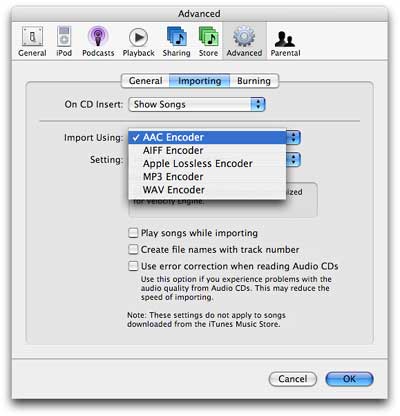 It
seems that whatever format is chosen for importing also appears under
the advanced menu at the top of the main screen. For instance, if you
leave the preferences as they came from Apple with importing done in
AAC format, you will see an option under advanced to convert selection
to AAC. If you change the importing format to MP3, the option becomes
convert selection to MP3. I hope this information is useful. I know I
have used iTunes to convert sound clips and songs to MP3 on multiple
occasions. I can't see that it would be a regional difference.
It
seems that whatever format is chosen for importing also appears under
the advanced menu at the top of the main screen. For instance, if you
leave the preferences as they came from Apple with importing done in
AAC format, you will see an option under advanced to convert selection
to AAC. If you change the importing format to MP3, the option becomes
convert selection to MP3. I hope this information is useful. I know I
have used iTunes to convert sound clips and songs to MP3 on multiple
occasions. I can't see that it would be a regional difference.
Aaron
Thanks for the information, Aaron. I'll forward it to Jim Brunswick.
Converting AIFF to MP3 Format with iTunes
Chris Gleeson writes:
Hi Dan.
I've been doing this ever since I got my little Mac mini a year ago. What I do is go to the iTunes menu, and select Preferences. Then select the Advanced menu, and click on the Importing button. Select the encoding you want in the "Import Using" drop down. This will cause all CDs you import to be formatted as MP3.
Now, if you already have a bunch of songs formatted as AIFF and want to convert them to MP3, make sure you do the above, then select an AIFF track (or tracks) and click on the Advanced drop down menu. You will see an option to "convert selection to MP3". Select this, and the conversion process will commence. It is very important to set the Import Preferences, though, or the Advanced menu won't show the conversion option.
I just bought myself a 3G iPod, and I've installed and converted a bunch of AIFFs as well as MP3s and AAC formatted songs with nary a problem. Of course, I did have the benefit of a tutorial from my 15 year old daughter!
Hope this helps.
Chris Gleeson
Thanks for the tip, Chris. I'm sharing it with Jim.
Have I Been Taken on eBay?
 John Paul
Kindig writes:
John Paul
Kindig writes:
First off just want to say I love your site! It has been in the past and remains a wonderful resource in my day to day life with Macs! Keep up the great work....
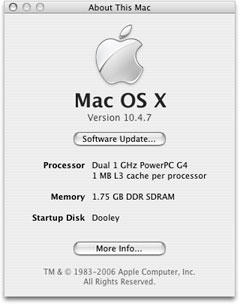
To the question: I recently purchased what was supposed to be a dual 533 MHz Digital Audio G4 off of eBay. However under "about this Mac" in the system specs it just says G4 533 MHz. Is there a way to distinguish between the dual 533 and the single processor model of this machine?
Thank you for your time.
Sincerely,
John Paul
Thanks for writing, John Paul, but I don't think I have good news for you.
I launched About This Mac from the Apple menu on my dual 1 GHz Power Mac G4, and it very clearly states that it has dual processors. If your G4/533 doesn't indicated dual processors, it doesn't have them.
I'd say it's time to go back to the eBay listing, verify that it was a dual processor Mac listed, and take things up with the seller.
Dan
Update 2007.06.26: This appears to be a problem with 'About This Mac', as the System Profiler will always see two CPUs if they are present. See About This Mac May Misreport Dual Processors for more.
Upgrading a G4/500 Dual Processor
Peter Catizone writes:
Hi Dan,
I have Power Mac G4/500 dual processor. I have 512 RAM and thinking of upgrading it to the max 1.5 gig. I am also interested in upgrading the processor to a larger single or dual.
Do you have any thoughts on it or where to buy quality upgrades at a fair price.
Thank you,
Peter
Peter, the beauty of the Power Mac G4 is its expandability. You can go to 1.5 GB of RAM, drop in 120 GB hard drives without need for an updated controller, upgrade to a better AGP video card, and drop on dual G4 processors approaching the 2 GHz mark.
I've used and had good luck with Sonnet, XLR8, and Daystar upgrades over the years. If you're using OS X, I recommend dual processors over a single one, because it will balance the load of all your tasks so nicely. The only limitations come from your budget, as 1.8 GHz dual CPU upgrades are available.
As for memory, stick with the well known brands and vendors - Crucial Memory, 1800Memory, and so on.
Low End Mac Sadness
Brian writes:
Dan,
Once upon a time my dad brought home a sparkling new Macintosh IIsi, which I became enamored with and took to playing with regularly in every way I can imagine (especially when it came to that old flight sim Hellcats over the Pacific). A few years later, as Apple was beginning to move on to 603 and 604 processors, he upgraded to a Power Mac 7100/66, which served as the front line computer for several years, until I decided to enlist in the Army and was no longer around to take care of his computer. From there, though, was the beginning of my Low end Mac obsession.
Since then, I have abandoned the Windows world that I was forced to endure during my stint in the military and slowly moved back to a nearly all Mac environment. In the process, I managed to get my hands on a PowerBook 1400c/166, a 1999 iMac DV SE, and a Power Mac 7500/100 to be used simply as a toy in the spring of 2003. The 1400 managed to serve me in most areas, whereas the iMac was meant to be a more stable platform than my then-aging Compaq Presario.
The reasoning then was pretty simple: I was sick of hardware failures, blue screens, program crashes, etc., etc., and I had been fairly pleased with the performance of an identical iMac to mine that I had bought for my father (who could no longer bear to deal with the wonderful world of Windows himself), and I needed a laptop for the job I was working at the time.
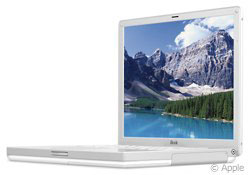 Fast forward
to today: My front line system is the last model of 14" iBook, which I am very
very pleased with, while I use an old B&W 400 MHz Power Mac as a
server, and a Dell Inspiron 9300 that the VA so graciously bought me
because they didn't count my iBook (which is used for virtually
everything from personal finance to email to college assignments to
whatever else) as a computer.
Fast forward
to today: My front line system is the last model of 14" iBook, which I am very
very pleased with, while I use an old B&W 400 MHz Power Mac as a
server, and a Dell Inspiron 9300 that the VA so graciously bought me
because they didn't count my iBook (which is used for virtually
everything from personal finance to email to college assignments to
whatever else) as a computer.
The iMac sits, for the time being, as I have been using it recently to led to friends who otherwise would not have a computer. It comes in handy, as I have OS X 10.4 installed, as well as Office 2004, but no one seems to want it around anymore - it's considered too old and incapable. I figure I will use it as a tool in the kitchen when I move in a couple months to house recipes, play music and movies while I cook, while the B&W and iBook continue to do what they already do best.
It really bothers me, though to see this happen. The old iMac may not be cutting edge, but it does fine for email, Web surfing, music, writing documents and spreadsheets, photos - and yet it is shunned. The 1400 sits in a little bag, as I have little use for it, though I do like to power it on once in a while to mess with, and my 7500 is still just a toy to play with and upgrade once in a while anyways.
Back on the home front, my mother, who complained about never having her computer, has not once powered on the Power Mac 7500 (now with OS 9.1, 144 megs of RAM, and a 200 MHz 604e processor). I bought it to do her upholstery business on. Again, not cutting edge, but it has Office 2001 and Quicken on it, so she can print whatever documents she likes, make spreadsheets, calculate costs, make invoices, etc.
The old 7100/66 (which is maxed on RAM, running OS 9, and houses a 233 MHz G3) is only powered on when I feel like going through the trouble of hooking it up, though my dad is content using it for a place to set his monitor that is hooked up to his iMac, which he only uses because I have it running the most current OS and have installed a 120 GB hard drive in it for him. What was once his pride and joy, his PowerBook 5300, which is in pristine condition, sits collecting dust and is literally used as a paperweight.
What really breaks my heart, though, was hearing the other week that my parents had thrown the old IIsi and Apple ][c in a garbage dumpster, without even taking the time to clear out the old personal files with emails, personal data, and you name it away, nor did they share this with me in time for me to swoop in to save them myself. Apparently my dad was so upset that I was only able to get a handful of dollars for his old PowerBook 170 and a portable 8088 system that he felt it was better to just throw this stuff away. And through it all, my mother and sister complain that there are no computers that can be shared with them for basic tasks.
I'll never understand why equipment I can find innumerable uses for is considered less than trash to those around me.
Brian
The Internet has redefined personal computing. For most people, a computer that doesn't support a "modern" browser such as Firefox, Safari, or the abominable Internet Explorer 6 just isn't terribly useful. While it's possible to use the Web with Mac OS 8 and 9 (and even 7.x), the best browsers require OS X. And that writes the IIsi, PowerBook 170, Power Mac 7100, and PowerBook 1400 out of the picture for most users - no matter how capable we know them to be.
The picture is a bit better for email, where there are some very nice clients for the Classic Mac OS, but again most people want to do email, Web, and often instant messaging as well. OS X has it all over OS 7-9 there.
Where the Classic Mac OS is great is for writing,
spreadsheets, basic 2D graphics, FileMaker Pro, and some wonderful old games.
Still, it's a shame when any old computer goes into the trash instead of being reused or, if that's not possible, recycled.
Join us on Facebook, follow us on Twitter or Google+, or subscribe to our RSS news feed
Dan Knight has been publishing Low End Mac since April 1997. Mailbag columns come from email responses to his Mac Musings, Mac Daniel, Online Tech Journal, and other columns on the site.
Today's Links
- Mac of the Day: Power Mac 8200, introduced 1996.04.22. The minitower version of 7200 was never sold in America.
- Support Low End Mac
Recent Content
back to the Low End Mac Mailbag index
About LEM Support Usage Privacy Contact
Follow Low End Mac on Twitter
Join Low End Mac on Facebook
Favorite Sites
MacSurfer
Cult of Mac
Shrine of Apple
MacInTouch
MyAppleMenu
InfoMac
The Mac Observer
Accelerate Your Mac
RetroMacCast
The Vintage Mac Museum
Deal Brothers
DealMac
Mac2Sell
Mac Driver Museum
JAG's House
System 6 Heaven
System 7 Today
the pickle's Low-End Mac FAQ
Affiliates
Amazon.com
The iTunes Store
PC Connection Express
Macgo Blu-ray Player
Parallels Desktop for Mac
eBay

