
The Low End Mac Mailbag
Getting IE 4.5 to Work with Low End Mac, 7200 rpm Drive Heat in an iMac, Upgrading OS X on a White iBook, and More
Dan Knight - 2006.06.29
- Re: Low End Mac Broken with IE 4.5
- Making IE 4.5 Work with Low End Mac
- 7200 rpm Drive Heat in Slot-loading iMac
- Upgrading OS X on a Dual USB iBook
- Problem Using SD Memory in PB 1400
Re: Low End Mac Broken with IE 4.5
Afte4r reading Low End Mac Broken with IE 4.5, Christopher M. Laspa writes:
Hi Dan,
I just finished reading the above article and couldn't agree more with your assessment of IE 4.5. Just the thought of it brings back migraines from the past!
As you already know, IE 5.17 works very well with your site, and I'm not sure why "Apathy" couldn't use it instead, as the install is just drag a folder to a surreptitious part of your hard drive, not visible to anyone but him. I know that MS has hauled 5.17 off their download area, but I happen to have a new '.smi' version handy - just in case - as this browser is still used as our first check (of many) of our web builds.
Regards,
Christopher M. Laspa
Creative Director, Principal
999 Art Direction
Toronto, ON
Thanks for writing. I'll share your offer with "Apathy".
Making IE 4.5 Work with Low End Mac
Christoph Trusch writes:
Hello Dan Knight,
I just wanted to mention that "apathy" will be able to scroll down the pages of LEM with IE 4.5 when (s)he unchecks "Show Style Sheets" in Preferences > Web Browser > Web Content. LEM will look weird (see attached screenshot), but at least the scrollbar appears and contents of the website are available for reading - although I'd also recommend to get rid of IE 4.5 altogether and use a better browser. IE 3 is no real option - it does let you scroll down with Style Sheets enabled, but the results look interesting, to say it kindly.
Best wishes,
Christoph Trusch
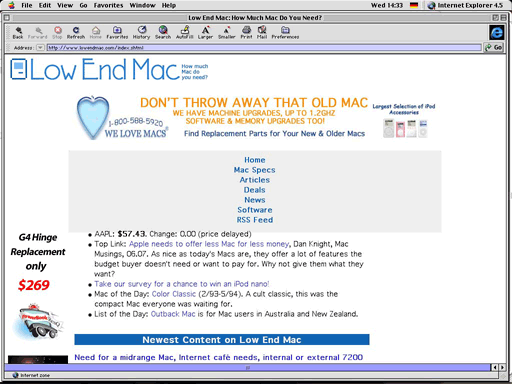
Low End Mac in IE 4.5 with Show Style Sheets checked
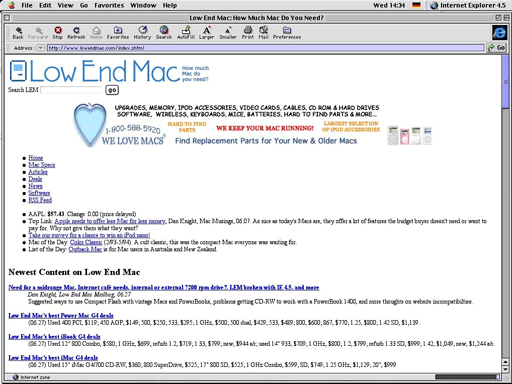
Low End Mac in IE 4.5 with Show Style Sheets unchecked
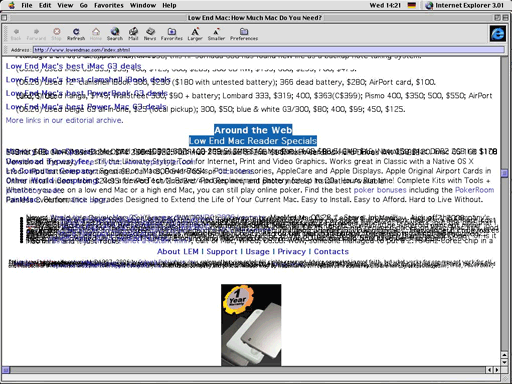
Low End Mac in IE 3.0.1
Thanks for not only sharing the solution but also taking the time to create the screen shots.
Dan
7200 rpm Drive Heat in Slot-loading iMac
Responding to Internal or External 7200 rpm Drive for Slot-loading iMac?, Tom Gabriel says:
Hi Dan,
I wanted to weigh in on this question with my experience.
I got a beaut of an iMac slot-load 400 MHz DV SE awhile back with a Seagate 7200 RPM drive installed I don't know how long ago.
I installed Sonnet's Metronome and Gauge Pro software CPU temp gauges a few months ago to check for CPU temps, which is where the trouble revealed itself.
After maybe an hour's use, depending on room temperature, the iMac CPU began drifting in temperature to 55 and even 58 degrees Celsius, at which point I'd put the computer to sleep for awhile to let it cool. So far there have been no problems with operation when it gets that high, but I don't like it. Top temp for the G3 is supposed to be 60 degrees C, as I understand it, and that's a bit too close for comfort.
The Seagate 7200 RPM drive is probably a couple of years old, and supposedly the newer 7200s run cooler, but I'm not secure about taking the chance.
I have a brand-new Maxtor 5400 RPM drive (40 gig) that I am going to install in the iMac when I get the nerve to open it up :-)
Convection-cooled CRT iMacs and 7200 RPM drives, at this point, from my experience, don't seem to cut it.
Best regards and keep up the good work!
Tom Gabriel
Thanks for sharing your discoveries, Tom. I have a Power Mac G4/1 GHz dual that sits behind a door in my computer desk. No, it's not a great desk design, and someday I'll have to add some vent holes to improve airflow, since there is no venting for the top half of this enclosure. When I run the G4 with the door closed, it will pass 58°C, but if I leave the door cracked an inch or so, it quickly drops by 2°C.
I've been running this way for months on end with no problems. The fact that you've seen no problems with heat in your iMac seems to indicate that everything should be fine as long as the CPU remains below 60°C.
Dan
Upgrading OS X on a Dual USB iBook
Responding to Upgrading iBook from OS X 10.0.4 to 10.1, Jim Strickland says:
I'm not clear on what the author of that question is trying to do. I have a G3/500 dual USB iBook and went from classic (9.mumble) to 10.4 in one leap with no problems. You will need more memory than the poor beast shipped with, and at least for 10.4, you may need an external firewire DVD drive, but other than those limitations, I found no problems at all.
-Jim Strickland
"So this is how liberty ends: with thunderous applause." - Padmé Amidala-Skywalker
Thanks for your feedback, Jim. You're right - Mac OS X has never liked running with 128 MB, although it can do so. For best performance with older versions, 256-384 MB should be adequate, but for 10.3 and later, 512 MB is a realistic minimum for decent performance. And more is always better.
Dan
Problem Using SD Memory in PB 1400
Jay writes:
Dear Dan:
I'm glad to see the topic of Compact Flash return to the mailbag. When I tried to add some memory to a PowerBook 1400, I got nowhere. What I did was put an SD (Secure Digital) memory card into an adapter in the PCMCIA slot. Do you think my problem was with the storage medium? (For example, are there differences between forms of flash memory that I should know about?) Or do you think my problem was with the adapter I used? (For example, are there different types of adapters?)
Thanks. Jay
P.S. Thank you again for the feedback you gave me earlier, explaining my iMac's inability to recognize its CD drive as possibly caused by a clash between the OS and the firmware. That was an explanation it would have taken me a while to figure out on my own, if I ever did.
Glad I could help with your iMac problem, Jay.
As for your PB !400 issue, it could be an incompatible adapter. There are two types of PC Cards that fit in the PCMCIA slot, and the 1400 doesn't support the newer CardBus standard. If your adapter is a CardBus device, that's your problem. You'll need to find a PC Card that works with SD but doesn't support CardBus if you want to use it with your 1400.
Dan
Join us on Facebook, follow us on Twitter or Google+, or subscribe to our RSS news feed
Dan Knight has been publishing Low End Mac since April 1997. Mailbag columns come from email responses to his Mac Musings, Mac Daniel, Online Tech Journal, and other columns on the site.
Today's Links
- Mac of the Day: 17" MacBook Pro Core Duo, (2006.04.24. The top-end MacBook Pro has a 1680 x 1050, 2.16 GHz Core Duo CPU, and supports Apple's 30" Cinema Display.)
- Support Low End Mac
Recent Content
back to the Low End Mac Mailbag index
About LEM Support Usage Privacy Contact
Follow Low End Mac on Twitter
Join Low End Mac on Facebook
Favorite Sites
MacSurfer
Cult of Mac
Shrine of Apple
MacInTouch
MyAppleMenu
InfoMac
The Mac Observer
Accelerate Your Mac
RetroMacCast
The Vintage Mac Museum
Deal Brothers
DealMac
Mac2Sell
Mac Driver Museum
JAG's House
System 6 Heaven
System 7 Today
the pickle's Low-End Mac FAQ
Affiliates
Amazon.com
The iTunes Store
PC Connection Express
Macgo Blu-ray Player
Parallels Desktop for Mac
eBay

