
The Low End Mac Mailbag
Avoid Rev 1 Mac Pro, Flak on Myth Busting, and Mad at Low End Mac
Dan Knight - 2006.05.31
One More Reason to Avoid Mac Pro
Andrew Main writes:
Dan,
Re: Power Mac G5 Today or Intel Mac Tomorrow?
Another "intangible" that should be kept in mind is that the initial version of a whole new hardware architecture is likely to come with problems, for which early adopters will volunteer as "gamma testers." This is especially true for the max performance models at the high end of the product range; compare, for instance, forum posts on the experiences of first purchasers of the MacBook and MacBook Pro.
The forthcoming "Mac Pro" will be Apple's highest performance model; it will benefit from experience so far with the other Intel Macs, but if, as speculated, Apple uses a different model chip (Core 2 Duo), I wouldn't be surprised if those who purchase the first versions spend a significant amount of time and energy providing Apple with real- world user feedback.
Fortunately, some Mac users enjoy (or seem to, anyway) this adventure; I prefer to wait for the "perfected" third or fourth version of a model generation - such as the "Pismo" PowerBook I recently replaced with a 1.5 GHz (i.e. third generation) 17" PowerBook G4.
You raise a good point, Andrew. New models are more likely to have "teething problems" than updated ones.
That said, Apple has done it right the first time several times in its 30 year history. I received one of the first G4 PowerBooks, and after 5+ years the hinges have never been a problem (and this 'Book has been greatly abused).
Also, Apple has had problems that persisted through multiple product revisions, such as the Dual USB iBook motherboard problem, so waiting for a third or later revision doesn't mean all the bugs will be worked out.
I think Apple has learned enough from the Intel-based iMac, MacBook Pro, Mac mini, MacBook, and Power Mac G5 (massive cooling!) that they'll pretty much get everything right on the Mac Pro.
As this is their most expensive and most profitable line and will be sold to their most dedicated customers, they really have no choice but to get it right. This may be one factor in saving the Power Mac replacement for last - not just waiting for more powerful CPUs, but learning all they can about designing around Intel CPUs before putting Core 2 Duo in Apple's flagship.
Time will tell.
Flak/Flack
In response to my misuse of the term "flak" in Myth Busting: Microsoft PlaysForSure Is Not 'Hardware Neutral' (since corrected), Raleigh sent this from Word for the day: Flack:
A flak-catcher is someone who catches flak. Flak - the incoming fire - is what the person catches. And a flak jacket is what you wear to protect yourself from shrapnel.
So call me a flak catcher, call me a flak jacket, call me a flapjack, call me a flack.
But don't call me an anti-aircraft gun or shell. That's a flak.
(I'm sure Sykes will find a source that says you can use flack and flak interchangeably. But there is a difference. Someone who relies on language for a living ought to know it.)
Maybe we should ask Bill Safire to referee. When he retired from the New York Times, he said: "...I was looked at [by some Times staffers] as a Nixon flack when I came to the paper...."
Thanks for the correction, Raleigh. I checked usage with Google, and "flak" is an "attempt to influence media content" as well as the anti-aircraft shells, although it is often (mis)used for a PR person. A "flack" is defined as "a public relations person", and I have updated my article to reflect this.
Thanks again for bringing this to my attention.
Kudos on Myth Busting
In response to the same article, Jim Bryson writes:
Greetings,
I would like to compliment Dan Knight on his excellent myth busting article. He characterized it perfectly as PR doublespeak when PlaysForSure tries to present itself as player neutral. He could easily repackage this essay and change the term to "open" and "standards compliant" when dealing with most things in the computer industry. It's funny (and sad really) when the bar is set with something like MP3 and developers don't raise the bar - or even meet the bar - but instead try to move the bar to a different space.
Speaking of bars, set one up at the bar for Dan for his excellent article.
Thanks for your kind words. I find few things more distasteful than PR masquerading as journalism or even news (there's been some real controversy recently over TV "news reports" that are actually produced by company PR departments).
Mad at Low End Mac
Dear Dan,
About 5 or 6 years ago, when you were about to go under, I sent you a donation to help you out. I did it because I truly liked LEM and found it an immense source of Information for my older Macs.
Now, after some time without visiting the site, I find it so commercial, especially when I do a search for something within LEM, and find myself with overwritten articles and advertisements, in such a way I can't even read what I want.
Moreover, though I place a very specific item I'm looking to get information about, I end up on Google with dozens of unrelated advertisements, making my search both irritating and fruitless.
Shame on you! I don't like you, anymore.
Clarisse Leite Motter
Thanks for writing.
If you are having problems with the ads overwriting the text, please let me know which pages you see this on. We've made many changes to our design and the way we include ads over the years, and some older pages may be broken.
For the record, Low End Mac is running less ads than we used to. We have eliminated the third column that used to appear on the right and its ad with our current design, as well as the banner ad that used to appear at the bottom of our articles.
Dan
 Dear Dan,
Thank you for your timely reply. I admire that!
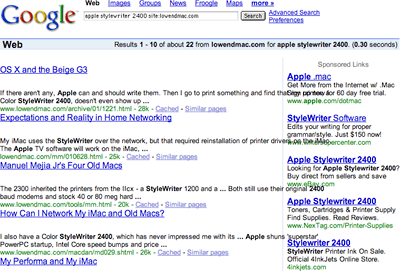
The problem occurred when I used the LEM Search feature for an Apple StyleWriter 2400 (any info on it), and once I clicked Search, I ended up on Google, and many sponsored (most of them) ads, on the right side.
All of the sponsored ads overwrote the LEM results, keeping me from being able to receive my info (or read it, for that matter).
I'm using a Beige G3 AOI running OS 9.2.2 and iCab 2.9.9 (an excellent browser version, by the way, better than 3.0, which completely eliminates the "Back" Shortcuts of Comm. "-" and Comm. "+").
But my issue here is that I've been donated the Color SW 2400, and when I tried to get it installed in my G3, I've found that, even though it has the 2400 Driver, it does not have the Extension and Printer Description in the Extensions Folder.
I look and searched everywhere for it, within my computer, but have found nothing.
That's when I went to LEM, in hopes of being led to an article, w/perhaps a link to obtain what I need.
Instead, I found a mess.
Dispirited, I tried www.ask.com, and actually found the following site: www.driverguide.com, which though supposedly free requires membership, and personal information.
Since I was running out of options (including not finding anything on Apple's site (I know they have such things, but they're very good at hiding Classic items and flood you with current items to tempt you). No luck there, either.
All I need is a link where I may obtain the driver and installation for the Color SW 2400. (I did find some Info that I may be able to use the SW2500 Software, to run the 2400. I may have to try that.)
Lastly, can you direct me to where I may be able to find the location of the lithium batteries, for the Beige G3 All-In-One (AIO) Macs? I know they've a tray on their back which slides out, but I've no idea where their lithium batteries are at. The only two places discussing the G3 AIO did not mention where the batteries go.
Can you help me?
I'd appreciate it very, very much.
Cordially,
Clarisse Leite Motter
Clarisse, thanks for clarifying your problem. I had to launch iCab to see the problem you mention; Google's search results look fine with all the other browsers I use (although iCab 3.0.x does have some problems with LEM itself). Your best bet for using Google is probably with Internet Explorer 5.1.x, which renders the page properly.
Since the page renders well on all the other browsers, I think we have to chalk it up as one of those things iCab 2.9.x just doesn't display properly. I'm glad to hear it's not any of our pages causing the problem, as I have done my best to make sure LEM displays well in all the major browsers.
As for the StyleWriter 2400, we made a decision a long time ago to focus primarily on computers, not peripherals. We don't have any coverage for ImageWriters, LaserWriters, or StyleWriters - or Apple monitors, for that matter. Nothing against printers, it's just that they're not an interest of mine, and nobody else has stepped forward to cover them.
You might try asking for help on one of our email lists, such a G-List.
As for the lithium battery in your G3 All-in-One, I believe it uses essentially the same motherboard as the other beige G3s. I just opened up my extremely dusty beige G3, and on its motherboard the battery is located at the front end of the board in line with the 4th expansion slot (the one that isn't PCI).
I hope that helps.
Join us on Facebook, follow us on Twitter or Google+, or subscribe to our RSS news feed
Dan Knight has been publishing Low End Mac since April 1997. Mailbag columns come from email responses to his Mac Musings, Mac Daniel, Online Tech Journal, and other columns on the site.
Today's Links
- Mac of the Day: Motorola StarMax 3000, introduced 1999.09.07. This inexpensive clone used lots of off-the-shelf parts.
- Support Low End Mac
Recent Content
back to the Low End Mac Mailbag index
About LEM Support Usage Privacy Contact
Follow Low End Mac on Twitter
Join Low End Mac on Facebook
Favorite Sites
MacSurfer
Cult of Mac
Shrine of Apple
MacInTouch
MyAppleMenu
InfoMac
The Mac Observer
Accelerate Your Mac
RetroMacCast
The Vintage Mac Museum
Deal Brothers
DealMac
Mac2Sell
Mac Driver Museum
JAG's House
System 6 Heaven
System 7 Today
the pickle's Low-End Mac FAQ
Affiliates
Amazon.com
The iTunes Store
PC Connection Express
Macgo Blu-ray Player
Parallels Desktop for Mac
eBay

