
The Low End Mac Mailbag
Powerline Networking, Quartz Extreme and Maximum Memory on a Beige G3, All About AGP, and More
Dan Knight - 2003.03.17 - Tip Jar
- eMac Feedback
- Wireless or Powerline Networking
- Radeon 7000 with beige G3 and OS X
- More on the AGP "Extra Tooth"
- Mac OS X and a Beige G3
- Memory Upgrades: Your Mileage May Vary
- Wired USB-to-Ethernet Adapters
- Still More on AGP Slots
- Finding Older Apple Manuals
- PowerBook 500 Series Boots from Compact Flash
eMac Feedback
Heather Anne Hurd asked my advice on a modem for her CD-ROM eMac, which ships from Apple without a modem. I told her I wasn't at all familiar with USB modems and suggested she ask on our iMac list. After doing so, she writes:
Thanks for the reply and the tip. After trying several ways to get my brand new eMac to recognize a serial modem via a serial-to-USB adapter, I gave up and bought a Zoom V90 56K USB modem. I installed it, and viola, here I am online on my eMac at this very moment! The eMac is a really nice Mac - and my most current Mac. I also have a slew of 68k and early Power Macs (the next most recent being my G3-upgraded PowerBook 1400c [wonderful PB!]).
This eMac is like a deluxe original form-factor iMac. The 17" flat CRT display is really great, and the whole computer is a class act. You may recall I wrote in an article for LEM back in 2000 that I wanted a ruby iMac. Well, my new eMac may be white, but it's everything I wanted in that iMac and then some. Great computer!
I'm posting this because I don't have all the answers. I didn't realize that Apple doesn't sell the eMac modem separately for installation in the CD-ROM model. I'm not at all familiar with USB modems, since the 'Books we use for dialup access have internal modems.
That said, we run about 30 mailing lists covering everything from pre-Mac technology (Apple II, Lisa) through the latest 'Books, Power Macs, iMacs, and eMacs. These lists are populated by those who are learning about Macs and those who have become experts in them. They are a fantastic resource.
Wireless or Powerline Networking
Responding to USB and Wireless Networking, Ed Hurtley writes:
Yes, unfortunately, none of my Macs are new enough to be true-blue AirPort equipped. They are all using third-party 802.11b equipment, so I have never gotten to play with any of Apple's AirPort-branded software. (I did have a first generation base station, but it died, and I replaced it with a combo 4-port switch/wireless AP/router. The Lucent WaveLAN Silver card that runs the first-gen base stations is still in use, however, in my PowerBook 1400cs.)
I hadn't thought about software base station. Another option is power line networking. I saw an ad today for Fry's Electronics selling both a USB adapter, and an ethernet bridge for $60 each - with $60 mail-in rebates. I doubt the USB model works with the Mac, but I may pick up a couple of the ethernet bridge models to see how well they work.
I have no experience with power line networking, but it seems a much more sensible idea than piggybacking networking on the phone lines in your home, since power lines tend to reach a lot more places than phone lines.
If anyone has powerline networking up and running with Macs, I'd love to hear about it.
Radeon 7000 with beige G3 and OS X
Steve Tedder reports from the field:
My [Radeon] 7000 arrived today and is working smoothly. Works well with Quartz Extreme enabled so far. Using 400 MHz G4. Best regards....
Thanks for the positive feedback. Those interested in trying Quartz Extreme (QE) on a PCI Power Mac (whether beige, blue & white, or graphite) should try out PCI Extreme!, a free utility that enables QE on most PCI Radeon cards later than the Rage 128 Pro.
Because QE can saturate the PCI bus and slow other tasks, PCI Extreme also include a utility to remove the hack if you don't like the results.
More on the AGP "Extra Tooth"
Adding to the ongoing discussion of the "extra tooth" on some AGP
video cards, Alykhan Halani writes: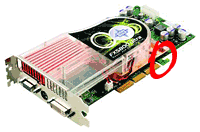
I believe I may be able to shed some light on the AGP card's "extra tooth". Newer AGP cards (AGP 2.0 and higher) can use a retention mechanism to prevent them from becoming loose and slipping out of the AGP slot. The "extra tooth" (the one shaped like a hook) is actually a retention tab which sits outside the AGP slot and is locked onto by a peg in the retention mechanism. As far as I know, it has nothing to do with power.
Video cards with the "extra tooth" work fine in AGP slots without the retention mechanism, as long as the card and the AGP slot are the same version of AGP. Using an AGP 4x card in an AGP 2x slot can cause damage, because they use different voltages (1.5V for 4x, 3.3V for 2x). Some cards and slots are compatible with more than one version of AGP (these are usually labeled AGP 2x/4x). I'm not sure exactly how this applies to Macs (I'm more of a PC guy, but only because I haven't had many opportunities to work with Macs), but I assume it's the same, since AGP is a "cross-platform" standard.
The following is copied from an Intel FAQ page: <http://program.intel.com/shared/products/boards/d845pt/d845pt_faq.htm#6>
Q: Can I use the AGP card retention mechanism with any AGP card?
A: The AGP retention mechanism is designed for use with AGP cards that meet the AGP 2.0 specification. These cards have a special notch at the back that interlocks with a small plastic stud on the retention mechanism. Cards that do not meet the AGP 2.0 specification should not be used with the retention mechanism, because the small plastic stud may interfere with correct installation and retention of the card.
Here is another Intel page with more information: <http://www.intel.com/design/chipsets/agprm/>
I hope this information helps.
I also wanted to let you know that, even though I'm a PC guy, I really enjoy your site. In fact, Low End Mac is one of the two sites that I visit regularly (the other one is Tom's Hardware).
Once a geek, always a geek, I guess. I cut my teeth on the Apple II+, where I learned how to program in BASIC and create disk-based databases. From there I moved into Commodores at home, followed by a Zenith Z-151 that I eventually tricked out with an 8 MHz upgrade, hard drive, combo card (clock/calendar, EEMS memory, extra ports), enhanced EGA video card, and even a 3.5" floppy, which we pretty radical back in the late 1980s.
About 1990 I got a job at the local ComputerLand, where I was the DOS geek - the other used Macs. You can guess what happened next. I ended up with a Mac Plus, sold the Zenith, and the rest is Low End Mac history. I haven't had much to do with PCs since the 386 era. I did keep up on the PC side fairly well until BYTE magazine (1976-1998) was purchased by CMP Media and killed as a print magazine.
So I pretty much missed the evolution of AGP. Thanks for sharing this information. I'll have to update the profiles of the various AGP Power Mac G4 models to reflect this information.
Mac OS X and a Beige G3
After reading Mac OS X and a Beige G3, Vaughn Corden wonders:
I read with interest tonight on Low End Mac your experiences upgrading your beige G3. Thanks for telling us about them!
I've had Jaguar running on my beige G3 for some time without any problems. I have 356 MB of RAM and, other than being a little sluggish, I have no complaints.
Until I decided to add a Western Digital 80 GB 7200 RPM drive. I believe this is an ATA/100 drive, so my first question is can it replace my original Quantum Fireball ATA/66 drive? I haven't been able to get the darn thing to boot up, and after reading about your problems with Carbon Copy Cloner, which I used, that might be the reason.
Before I go to all the trouble of installing Jaguar from scratch, can this ATA/100 drive replace my original ATA/66 drive as a bootable drive?
Yes, it should work without a hitch. The only significant difference between ATA/66 and ATA/100 is throughput. Since few drives are fast enough to need more than 66 MBps throughput, you'll probably see no difference at all if you're using an ATA/66 controller in your beige G3.
If you're still using the 16.67 MBps onboard IDE bus, the 80 GB drive should still work, but it's going to be remarkably hobbled by the bus. Most of today's drives have real world throughput somewhere between 33 MBps and 66 MBps. I'd suggest the Acard Ahard, available from OWC (and probably other sources as well) for under $60, since it makes your Mac see the ATA/100 drive as a SCSI drive and thereby eliminates the need to create an 8 MB bootable partition for Mac OS X.
Although I haven't tried it, I've recently heard that the latest version of Carbon Copy Cloner includes improved support for older Macs, which may solve the problem. I'll have to try it on our beige G3 soon.
There's also a new commercial program, Clone'X, that may work as well. You can download a demo of the $49 program from the website.
Beige G3 Maximum Memory
After reading Maximum RAM in a beige G3, Simon Slaytor comments:
Great site, an absolute must for any Mac user.
Re: Max memory in a G3.
The Beige G3 will support 768 MB RAM (i.e. 3 x 256 MB DIMMs). However, the memory controller on the motherboard only supports DIMMs using chip densities of 128 Mbits or less.
How can I tell the chip density of my DIMM, I hear you ask, Easy - count the chips.
If your 256 MB DIMM has 8 chips (i.e. single sided) the chips are 256 Mbit units. The memory controller on the motherboard will read the first 128 Mbits of the chips and stop, therefore the DIMM will be identified as a 128 MB DIMM.
If your 256 MB DIMM has 16 chips (i.e. double sided), then the chips are 128 Mbit chips, and the DIMM will be recognised as a 256 MB DIMM.
In theory at least, the onboard controller could access 1.5 GB of RAM (i.e. using 3 x 512 MB DIMMs using 32 x 128 Mb chips per DIMM). However, these DIMMs would be so large that they could not physically fit inside the closed machine.
Hope this clears up the questions over beige G3 memory.
Thanks for the kind words about Low End Mac. I'm very pleased with the way we've grown and evolved over the years, now serving up about a million page views per month to Mac users, Windows users supporting Macs, and potential switchers.
I've seen this kind of thing reported before, as in 64 MB SIMMs on 68K Macs by Chris Lawson. Whether a particular model worked with 64 MB SIMMs depended on the computer's memory controller and the configuration of memory on the SIMM more than on the total capacity of the SIMM. The same seems to be happening here.
I wonder if anyone makes the kind of 512 MB DIMMs you theorize might allows the beige G3 to reach 1.5 MB total RAM. If so, the minitower version might have enough room.
Time to update the beige G3 profiles with this new information.
Wired USB-to-Ethernet Adapters
Larry Effler wonders:
Thanks for all the information I've gleaned from your writings over the years. Your efforts are greatly appreciated. I have a question I haven't seen addressed on LEM:
Do you (or any of your readers) know of a wired USB/ethernet adaptor that works with Macs (OS 9 or X, I'm not picky)?
I know it sounds like an odd question because all Macs with USB also have built-in ethernet. But I have a 600 MHz iBook that took a lightning strike. Everything was on a surge protector except the network. Now the ethernet port is dead. A new motherboard will cost hundreds. I see these little plug-in dongles that do this for Windows computers for about $30. For thirty bucks I can live with a slower connection.
P.S. Let this be a warning to everyone. Anything that connects your computer to the outside world is a path for lightning!
Thanks for the warning. I have no experience at all with USB-to-Etherenet adapters, so I'm going to ask the readers for feedback on this one.
Still More on AGP Slots
Another email from Ed Hurtley, this time on the issue of AGP cards and slots:
Here are some explanations of the various AGP card/slot differences. My lovely ASCII art is showing the connector on an AGP card, not the slot. The view is as if you were looking at the 'component' side of the card, with the exterior bracket on the left, and the AGP connector on the bottom.
First, there are three main keying specifications from the main AGP spec:
3.3V: The 'old' specification, good up to AGP 2x. It's slot is keyed as
|____|-|_________|
which can be seen in this picture.
1.5V: The 'new' specification, which is for AGP 4x and above. I have yet to see any 1.5V-only cards, which would have keying as
|_________|-|____|
Universal: A card that is keyed for both 1.5 and 3.3V. Most AGP 4x or above cards use this keying. It has both gaps.
|____|-|___|-|____|
which can be seen in this picture . (A Universal slot has no breaks in it; it's one long slot.)
The extras: There are a few extra 'tabs' that can be seen on various cards. The first is AGP Pro. AGP Pro is a subset of the AGP 4x specification. (So all AGP Pro cards are AGP 4x or above.) AGP Pro is just extra power. It adds two small areas on either end of the main card slot. As
|_|-|____|-|___|-|____|-|_|
(An AGP Pro is one long slot in the middle with the two extra power slots on the ends, as seen in this picture.
The second is the 'retention' tab. It is usually seen as an 'L' shaped extension on the 'back' of the slot (see the 'Universal' example above.) This retention tab fits into the rear slot of an AGP Pro slot or into a special retention clip on a non-Pro slot.
|____|-|___|-|____|-L
Then we have Apple's extra tab. It is the tab that provides power for the ADC. It is on the 'front' of the card, in front of where the AGP Pro tab would be (why they didn't just use AGP Pro, I have no idea, it can provide up to an extra 100 Watts.) This is the only picture I could find of an Apple AGP card. On this picture, you can also see the retention tab 'L' on the end.
|_|---|____|-|___|-|____|-L
Note: I found a good picture comparing all AGP slots after typing the above. It, of course, doesn't include Apple's slot.
I'm getting quite an education on AGP today. Thanks to your information, a lot of us will be much better informed.
Finding Older Apple Manuals
Paul Petrozzi writes:
I have been quite a fan of Low End Mac for about two years, but I've never had the need to write until now.
My question is: Do you have any way of obtaining a Manual/User Guide for a Quadra 840av? I recently purchased one of these machines here in Sydney, Australia, and I cannot locate a manual.
Apple, in their infinite wisdom, only keep manuals for the Power Mac 8100 onwards on their website. I have searched eBay without luck. The market in Australia is quite small, so I haven't had much luck locating one here through contacts, etc. I would assume (hope) that in your circle of Mac buddies someone would have a manual that they wouldn't mind photocopying and sending over. I would be happy to pay costs as required.
I've googled the Web and been unable to find what you're looking for in downloadable format. I've found several sites with service manuals and a few with a limited selection of user guides, but none for the 840av.
You can learn a lot about this classic from our profile, the links we provide, and a wealth of useful article in Apple's K-Base Archive, but sometimes having your own copy of the owner's manual really is best.
I'll post this in the Mailbag and suggest you join Quadlist and ask if anyone there can help out. If you do find an online source, let me know. I have an 840av with no manual, too.
PowerBook 500 Series Boots from Compact Flash
In response to Flash Memory Improves PowerBook, Boris Herman writes:
I read on LEM web site an article about booting a PowerBook from a CompactFlash card with great interest. Although it specifically states that on a PowerBook 500 series it shouldn't work (it says: "PowerBook 520/540/550 does not appear to work"). I went ahead and tried it on my PPC upgraded 540c with success. Here's how I did it:
- turn off PC exchange, reboot
- on prompt I reformatted as Mac OS
- turned PC exchange back on, reboot (now if I choose Special/Erase disk it offers me either PC DOS or Mac OS format, unlike before)
- copy System folder to CF, choose it as Startup device, reboot
- voilà!
Of course, the CF can be used as virtual memory, too.
Configuration used:
- PowerBook 540c PPC upgraded to 167 MHz 603e
- 40 MB RAM
- 340 MB hard drive
- Rev. C PC card cage
- 128 MB CompactFlash card
- PCMCIA CF adapter
- Mac OS 8.1
It would be great if someone updated the information to reflect the true possibility of the Blackbird.
No, the article never stated that the PB 500 series couldn't be booted from Compact Flash, only that at that point nobody had provided evidence that it could work. We've since received other field reports indicating that this is possible.
We don't usually go back and rewrite articles, but I have posted an update indicating that the Blackbird series can be booted from CF - and we'll compile all the information into a new Mac Daniel article that specifically addresses the details of this setup, since it's more complex than the other 'Books.
Join us on Facebook, follow us on Twitter or Google+, or subscribe to our RSS news feed
Dan Knight has been publishing Low End Mac since April 1997. Mailbag columns come from email responses to his Mac Musings, Mac Daniel, Online Tech Journal, and other columns on the site.
Today's Links
- Mac of the Day: PowerBook 2300, introduced 1995.08.28. The only Duo equipped with a PowerPC processsor run at 100 MHz.
- Support Low End Mac
Recent Content
About LEM Support Usage Privacy Contact
Follow Low End Mac on Twitter
Join Low End Mac on Facebook
Favorite Sites
MacSurfer
Cult of Mac
Shrine of Apple
MacInTouch
MyAppleMenu
InfoMac
The Mac Observer
Accelerate Your Mac
RetroMacCast
The Vintage Mac Museum
Deal Brothers
DealMac
Mac2Sell
Mac Driver Museum
JAG's House
System 6 Heaven
System 7 Today
the pickle's Low-End Mac FAQ
Affiliates
Amazon.com
The iTunes Store
PC Connection Express
Macgo Blu-ray Player
Parallels Desktop for Mac
eBay




