
It’s been 14 months since Apple introduced the 2008 Mac Pro, and the 2009 Mac Pro is a big step forward: every configuration uses quad-core Intel Xeon Nehalem CPUs for even more power. Each core has its own 256 KB Level 2 (L2) cache, and each quad-core CPU shares an 8 GB Level 3 (L3) cache.
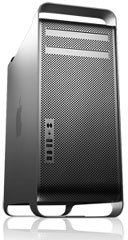
Nehalem supports hyperthreading, which means each quad-core CPU can work like an 8-core CPU, and Turbo Boost technology allows CPUs to dynamically overclock themselves when circumstances permit – such as letting the 2.93 GHz Mac Pro go as high as 3.33 GHz.
All that power doesn’t come cheap. For the first time, the least expensive Mac Pro configuration sells for $2,499 – $300 more than the previous entry-level model – which only makes the gap between the $599 base price 2.0 GHz dual-core Mac miniand the 2.66 GHz quad-core Mac Pro that much larger.
There are two base models, a single-CPU Mac Pro that ships with 3 GB of RAM and supports up to 8 GB, and a dual-CPU Mac Pro that ships with 6 GB of RAM and supports up to 32 GB. For best performance, you should install memory in sets of three matching modules, as the Nehalem CPU can access up to 3 channels of memory at once. With two or four modules installed, it falls back to 2 channel mode, which is less efficient. The single-CPU model is available at 2.66 and 2.93 GHz, while the dual-CPU can be obtained at 2.26, 2.66, or 2.93 GHz.
Nvidia GeForce GT 120 with 512 MB of video memory is the default graphics card, and you can add up to three more video cards. ATI Radeon HD 4870 is available as a build-to-order option.
Oddly, no “cheese grater” Mac Pro used anything faster than 3.0 Gbps SATA Rev. 2, even though the Early 2011 MacBook Pro models and the Mid 2011 iMac and Mac mini all supported 6.0 Gbps SATA Rev. 3 – and the SATA Rev. 3.0 specification had been ratified in August 2008 (but not finalized until May 2009)!
If one 18x SuperDrive (the fastest yet in a Mac) isn’t enough, put in a second one for US$100 more. And you can upgrade from Apple’s regular wired keyboard and Mighty Mouse to the wireless (Bluetooth) version.
Bluetooth 2.1+EDR is standard, but 802.11n AirPort Extreme remains optional.
A headphone jack, two USB 2.0 ports, and two FireWire 800 ports are located on the front of the Mac Pro for easy access, and there are more ports on the back. There are no FireWire 400 ports; FireWire 400 devices are supported using a FireWire 800-to-400 cable or adapter.
Uninterruptible Power Supplies
The AC power coming into your home or office is a sine wave, but some UPSes generate a square wave when you are operating from battery power. This is not good for the Mac Pro. Be sure you only use a UPS with sine wave output to avoid reducing the life of your Mac Pro.
Unsupported macOS
Although it is not officially supported, the Early 2009 Mac Pro can run the latest intel build of macOS via OCLP. Although OCLP contains patches which can allow even the original GPU to work with the latest macOS, hardware acceleration is unlikely/not guaranteed, and it’s recommended to upgrade your graphics card (see below) as well as other parts. The Xeons in this Mac Pro are Nehalem based, Ventura dropped anything before Kaby Lake, since it requires AVX 2.0. Some GPU drivers may need to be patched with OCLP beyond macOS Monterey despite being currently supported, due to this missing CPU instruction set.
The Early 2009 Mac Pro can also run macOS Sierra thru Catalina using Colin Mistr’s Sierra Patch Tool. See our macOS Sierra page for more details and a link. (If you have done the firmware patch to make this model identify as MacPro5,1, you can run the standard Sierra installer.)
Intel-based Macs use a partitioning scheme known as GPT. Only Macintel models can boot from GPT hard drives. Both PowerPC and Intel Macs can boot from APM (Apple’s old partitioning scheme) hard drives, which is the format you must use to create a universal boot drive in Leopard. Power PC Macs running any version of the Mac OS prior to 10.4.2 cannot mount GPT volumes. PowerPC Macs won’t let you install OS X to a USB drive or choose it as your startup volume, although there is a work around for that.
Details
- introduced 2009.03.03 at $2,499 with one 2.66 GHz 4-core CPU, $2,999 with one 2.93 GHz CPU, $3,299 with two 2.26 GHz CPUs, $4,699 with two 2.66 GHz CPUs, $5,899 with two 2.93 GHz CPUs (all CPUs are quad-core); one 3.33 GHz CPU BTO option added 2009.12 at $3,699. Replaced by 2010 Mac Pro.
Mac OS
- requires Mac OS X 10.5.6 Leopard through 10.11 El Capitan, macOS Sierra via patch tool – see macOS Sierra on Low End Macs. macOS 10.14 Mojave and later are not supported.
- Mac OS X 10.6 Snow Leopard compatibility
- Grand Central Dispatch is supported.
- 64-bit operation is supported.
- OpenCL is supported.
- OS X 10.8 Mountain Lion compatibility
- AirPlay Mirroring is not supported.
- AirDrop is supported with AirPort Extreme card.
- Power Nap is not supported.
Core System
- CPUs: single CPU models use Intel Nehalem Xeon 3500, dual CPU models use Xeon 5500
- Bus: 1.6 GHz
- Performance, Geekbench 4:
- single core: 1993 (2.3 GHz 8 cores), 2329 (2.7 GHz 8 cores), 2396 (2.7 GHz 4 cores), 2466 (2.93 GHz 8 cores), 2578 (2.93 GHz 4 cores), 2854 (3.3 GHz 4 cores)
- multi-core: 7690 (2.7 GHZ 4 cores), 8233 (2.9 GHz 4 cores), 9238 (3.3 GHz 4 cores), 11645 (2.3 GHz 8 cores), 13496 (2.7 GHz 8 cores), 14026 (2.9 GHz 8 cores)
- RAM, single CPU: 3 GB, expandable to 8 GB using 1066 MHz DDR32 ECC SDRAM in 4 slots
- RAM, dual CPU: 6 GB, expandable to 32 GB using 1066 MHz DDR32 ECC SDRAM in 8 slots
- L2 cache: 256 KB per core
- L3 cache: 8 MB per CPU
Video
- Graphics: Nvidia GeForce GT 120 with 512 MB RAM (ATI Radeon HD 4870 optional)
- Beyond OS X El Capitan: Depending on the OS you plan to install, you may need to change your GPU to support graphical hardware acceleration. OCLP has patches for the original GPUs, but this does not guarantee performance or hardware acceleration.
- Kepler based Nvidia GPUs are supported up to macOS Big Sur (See website for Monterey Kepler Patcher). Ex: GTX 6xx, 7xx (not the Maxwell 750 Ti), GTX TITAN BLACK, etc;
- AMD Polaris GPUs work from macOS Mojave and beyond.
- Beyond macOS Monterey: Some GPU drivers may need to be patched with OCLP beyond macOS Monterey despite being currently supported. This is because macOS Ventura dropped support for CPUs preceding Kaby Lake, requiring the AVX 2.0 instruction set. As a result, certain AMD GPUs which work between macOS Mojave through Monterey (and are even still supported on newer Macs with the same OS), will stop working properly on Macs if the CPU does not have AVX 2.0 and is unpatched.
Drives
- Hard drive bus: 3 Gbps SATA Rev. 2
- Hard drive: 640 GB Serial ATA 7200 rpm standard; 1 TB optional
- Optical drive bus: SATA
- 18x dual-layer SuperDrive writes DVD-R at up to 18x, DVD+R DL at 8x, reads DVDs at 18x; writes CD-R and CD-RW at up to 32x, reads at 32x
Expansion
- PCI Express: 3 open full-length slots – one x16 slot, two x4 slots
- SATA: 4 independent buses
- optional external 56k v.92 USB modem
- Microphone: standard 3.5mm minijack, compatible with line-level input, not compatible with Apple’s PlainTalk microphone
- FireWire 400: none
- FireWire 800: 4 ports (2 on front, 2 on rear)
- USB: 5 USB 2.0 ports (2 on front, 3 on rear)
- Ethernet: 2 independent 10/100/gigabit ports
- WiFi: optional 802.11n AirPort Extreme
- Bluetooth: 2.0 with Enhanced Data Rate
- size (HxWxD): 20.1″ x 8.1″ x 18.7″ (51.1 x 20.6 x 47.5 cm)
- weight, single CPU: 39.9 lb. (18.1 kg)
- weight, dual CPU: 41.2 lb. (18.7 kg)
- Gestalt ID: n/a
- PRAM battery: 3.6V half-AA
- Part no.: MB871 (single CPU), MB535 (dual CPU)
Accelerators & Upgrades
- CPU upgrades are an option.
Keywords: #2009macpro #early2009macpro #macpro2009 #unsupportedsierra
Short link: https://goo.gl/UeVmSl
searchword: macpro2009
Online Resources




