
 2000 – No, Annie and I have definitely not adopted a child. We haven’t given one of our many up for adoption either, although, on any given day, we might rent any one of them out cheap. 🙂 This is the short tale of an abandoned Macintosh SE/30 that I found sitting on the floor of an empty classroom two years ago that has found a new life in a fifth grade classroom.
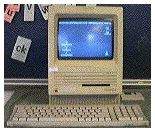 If you’re unfamiliar with the Mac SE series, they were introduced by Apple in March 1987 and continued in production in various forms until October 1990. Originally sold without a hard drive for pre-System 7 use, they later shipped with 20, 40, or 80 MB hard drives. The original SE came with the 8 MHz Motorola 68000 processor, with the SE/30 featuring the blazingly fast 16 MHz 68030.
 This SE/30 appeared to have been “rode hard and put away wet.” Its keyboard, mouse, and power cord were missing, but since it was of the noble SE lineage, I took it in. When I equipped it with the missing items, it purred to life.
Later, when opened up, it had what only could be described as dried mud in it! Was it a flood survivor, or had it previously lived in a filthy and humid environment? I removed at least two or three tablespoons of dirt from the case! By all rights, the thing should have shorted out, overheated, or refused to run. But run it did. Amazing!
I originally had high hopes of using it as a print server as described in MacAddict, but I never seemed to get around to doing it. Instead, the SE/30 was given the old 160 MB hard drive that originally came in our LC III and served as another classroom computer. It ran System 7.0.1 with 4 MB of RAM and served up daily doses of SpellTutor practice tests, PhrazeCrazePlus puzzles, and occasionally was used for GradebookPlus. It also ran ClarisWorks 3.0 without a hitch!
When we went Hollywood last year with the addition of the “wicked fast” Mac IIfx, a Mac IIsi, and a Power Mac 7500 added to the holdover Power Mac 7200 and LC III, the SEs and SE/30s fell into disuse. Over the summer, I took them home to cannibalize them and put together as many working machines as possible. I really wanted to set up the SE/30 for Internet access, but it didn’t get much further than upgrading the RAM to 16 MB and installing System 7.5.3.
Our kids at home avoided it and its sibling SE that sat running most of the summer in the sun room. They occasionally asked why I kept the things running. I’m not sure whether I was too lazy to go up and turn them off, or if I wanted to see if the monitors would last. At some point over the summer, I got sidetracked for a week just after starting both machines and just left them running, again. When I returned to the machines, for some reason the SE appeared to have hung during startup . . . for a week. When I touched the mouse, it completed the startup cycle!
A few weeks ago, a new student started working with us in spelling. We quickly introduced him to the glories of fingertrace and erase drills, various association tricks, and of course, computer spelling practice. The kid took to the computer drills like a champ. He aced his first test after starting with us, making my assistant and I look like real hotshots. (He did have an extra week, however, because we started on his new list Thanksgiving week when his class wasn’t taking a test.)
I asked his homeroom teacher if he’d like a spelling practice machine. I promised only that it would have practice spelling tests for the grade level for the rest of the year. I also sweetened the offer by saying I’d try to add a few games for indoor recesses. I made sure the new student was fluent with the spelling program, as he would be the resident expert for his classmates.
Sometimes you just get lucky. The kids loved the darling little SE/30 with its 9″ black and white screen. The student gained stature with his peers and a bit of needed self-image for himself. He has strung together 4 A’s and B’s in spelling. And the SE/30 got a new lease on life.
I have no illusions about the long-term future of this little SE/30. It’s display is just a touch distorted and occasionally shows the horizontal lines that precede eternal CRT darkness. If it lasts long enough, it may lose out to students enamored with Athlon-equipped whizbang Windows boxes that seem inevitable in our school’s near computing future. But this little engine that could, did.
And if it survives but is eclipsed, I’ve got a nook and an extra modem for it.
Odds and Ends on SE’s
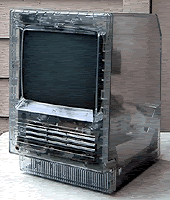
Charlie Springer is the owner of the darndest and coolest SE I’ve ever seen pictured. It’s a transparent SE/20! Never heard of it? Neither had I until Dan Knight ran an item that linked to Charlie’s page a year or so ago. The SE/20 is an unreleased prototype that Charlie got ahold of somewhere. He was kind enough to allow me to use one of the pictures. It’s definitely worth a click to go and see his page.
I seem to come back to writing about the Mac SE series over and over. Here are some links to my other columns on the little gems.
- SE Saga
- SE Fever: The Lure (and Reward) of Vintage Computing, MacTimes, 11/24/98
- More SE Fever, MacTimes, 12/8/98
Places to go and things to do (for Mac SE’s):
- SE and SE/30 pages on Low End Mac
- MacAquarium Links on Low-End Mac
- MacAddict’s This Old Mac Sources
- Obsolete Computer Museum: Apple Macintosh SE
- SE and SE/30 pages from http://www.apple-history.com
- Peter Cameron’s Mac SE page
- Mac Speed Zone SE Upgrades
- Miles Durrie’s This Old Mac article
- Mac Museum Profile: Mac SE & SE/30
- Compact Mac mailing list
- Classic Macs mailing list [defunct]
- Vintage Macintosh Software Links
Some helpful items for reference and configuration:
- The Apple Memory Guide (1673K PDF document) lists memory specs and drawings of motherboards for most Macs. Adobe’s Acrobat Reader is a free download.
- Apple Spec is the Apple Specifications Database. It lists system, memory, video, and other specifications for all Macs. It requires FileMaker Pro, but you can download a trial version of FileMaker. The current version is from August 1998.
- Newer Tech‘s Guru (449K) is a Guide to RAM Upgrades. It’s an excellent source when upgrading various Macs and Mac clones. If for no other reason, “The GURU FAQ…or… Mrs. Marciniak wins a Saw Horse,” makes for some interesting and entertaining reading.
Here’s a table of some of the software I find works well on a Mac SE and/or SE/30:
| ClarisWorks 2.1 or 3.0 | |
| PhrazeCrazePlus (117K) | |
Keywords: #macse30 #macse
Short link: http://goo.gl/4Tgzl7
