
Low End Mac reader David M. was unsuccessful in his attempt to install OS X 10.2.8 Jaguar on his Beige Power Mac G3. The attempt caused the computer to boot into Open Firmware, and he found several similar results on the Web.
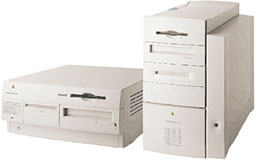 In a nutshell, the computer boots to a white screen with a strange error message – $d, unknown word – and will not respond to standard remedies such as booting from the OS CD or responding to most keyboard commands.
The Symptoms
Error message: $d, unknown word or $d, unknown word DEFAULT CATCH!, code=FF808000 at %SRR0: DEFAULT CATCH! code=FFF00700 at %SRR0 or something similar.
Apple’s support forums indicate that this may be due to a dead or failing PRAM battery, and it can sometimes be resolved by zapping the PRAM (holding down the Cmd-Opt-p-r keys simultaneously during startup) and letting it chime three times.
It could also be due to having outdated firmware. If the Apple Ultra Wide SCSI PCI card is installed, you must to have Mac OS X 10.0 SCSI Card Update installed, and it can only be installed when booted into Mac OS 9 – not from any version of OS X.
The Fix
- Boot into Open Firmware: Hold down Cmd-Opt-o-f and then press the power key.
- At the prompt on the white screen, type: init-nvram
Once you have it running, replace the PRAM battery, press the CUDA switch on the logic board, and then reset the date and time.
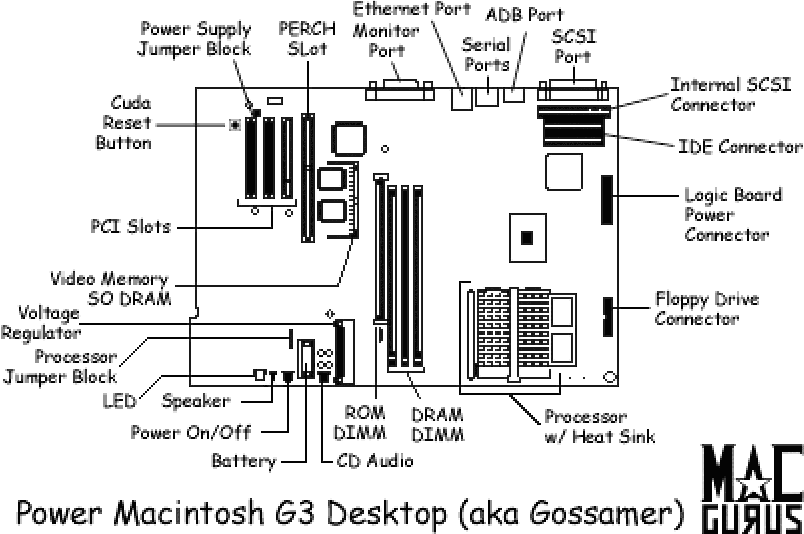
The CUDA reset switch is next to the PCI expansion slots.
Based on his experiences, David warns: “Never try to install OS X on a Power Macintosh Beige G3, despite the tech data indicating the OS will install.”
I wouldn’t make such a blanket pronouncement. I have run OS X 10.2.8 on a Beige G3 successfully, and it does require that you follow all instructions carefully:
- Be sure you have a fresh PRAM battery. A used one that tests good may not have enough power.
- Although you can run it with less, you should have at least 128 MB of RAM installed. More is better, and you can go as high as 768 MB.
- Remove any third-party PCI cards before installing OS X 10.2. You can put them back afterwards, and many will be recognized automatically.
- Your boot drive must be 8 GB or smaller. If not, you must partition the drive so the first partition is less than 8 GB in size (we suggest 7 GB to play it safe), and that is the only partition you can boot OS X from.
- Install Mac OS 9 and all updates before you even think about installing OS X.
- If you have Apple’s SCSI card installed, be sure to install Mac OS X 10.0 SCSI Card Update while booted into OS 9.
- Install Mac OS X 10.2 and all updates.
- Reinstall any pulled PCI cards and find drivers for any that are not already supported by OS X.
I’m certainly not suggesting that you install Jaguar and plan to use it as your everyday operating system, but it you want to run OS X on a Beige G3, this is the last supported version. It’s very outdated and there’s very little software available for it, but it can be done.
Further Reading
- When Is Your PowerPC Mac Too Old?, Dan Knight, Low End Mac, 2011. “If I had a Mac that could only run OS X through 10.2.8, I would probably stick with the Classic Mac OS.”
- OS X Notes for Beige G3 Systems, Operator Headgap, 2009. “…stay on Jaguar (10.2.8) if you are on a Beige System.”
- Power Mac G3 Desktop (Gossamer), Mac Gurus. Good hardware overview.
- Installing Mac OS X on Beige G3, Richard Akerman, 2003. Recommends avoiding versions 10.2.3 through 10.2.6 due to problems mounting disk images and with graphics drivers. No comments on 10.2.7 or 10.2.8.
- The Beige G3 Question, MacCetera, circa 2007. Lots of information. Recommends installing an ATI Rage 128 pulled from a Blue & White Power Mac G3 for improved graphics.
- Installing OS X on Beige G3, Mac OS X Hints, 2001. Deals with the 8 GB limit on the boot partition.
Keywords: #beigeg3 #osxjaguar #startuperror
Short link: http://goo.gl/G4yN9c
searchword: beigeg3startuperror
