
This review has taken a lot longer than planned, but I finally determined that the problem with my Mystic Power Mac G4 was a sporadically bad memory module, as determined by using Rember. Slimmed back from 1.25 GB of RAM to 1.0 GB, it’s been running more reliably, but still not without problems.
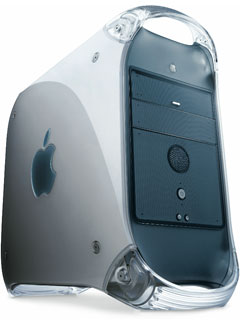 The worst of these is a tendency to corrupt any hard drive running when it locks up. This computer is 11 years old and may need a little TLC. I’m thinking that replacing the thermal paste between the CPU and the heat sink might help. If not, we’re probably looking at permanent retirement for a machine that served as my network server for several years.
I’ve already tested the 40 GB OWC Mercury Extreme Pro SSD Legacy Edition in a dual 1 GHz Mirrored Drive Doors Power Mac G4 and a 350 MHz Blue & White Power Mac G3. Today I’m reporting my results with a dual 500 MHz Gigabit Ethernet (a.k.a. Mystic) Power Mac G4. This machine was my server (running OS X 10.5 Leopard with file sharing enabled) until earlier this year, when I picked up a secondhand 2007 Mac mini and turned my dual 1.6 GHz (upgraded) Digital Audio Power Mac G4 into my server.
Setting Things Up
The OWC Mercury Extreme Pro SSD Legacy Edition is the SATA OWC Mercury Extreme Pro SSD plus a mounting bracket to fit a 3.5″ drive bay and an Addonics IDE-to-ATA adapter. Because this drive is smaller than the Mac OS X 10.4 Tiger boot partition that I normally use, I did a basic Tiger 10.4.11 install (fully updated) on the SSD. I’ve also cloned Leopard 10.5.8 to the SSD, something I didn’t do in my earlier testing.
I also have some additional hardware to help me evaluate things this time: a Sonnet Tempo Serial ATA card, an SBA FireWire 800 card, and a NewerTech Voyager drive dock (with USB 2.0 and 3.0, FireWire 400 and 800, and eSATA) on loan from Other World Computing, and a refurbished 500 GB 7200 rpm Samsung hard drive with a 16 GB cache that I bought for testing purposes. This drive tends to run hot, often overheating when installed in the Power Mac. Based on my research on drive heat, power consumption, and performance, I’m leaning toward the Seagate Barracuda 7200.12 as the best option, probably a huge drive that I can use for Time Capsule backup of my Mac mini, the dual 1.6 GHz upgraded Digital Audio Power Mac G4, and my wife’s ‘Book.
Testing with OS X 10.4
Because this in not a production machine, I’ve been able to run more tests than before. I have tested a 60 GB Maxtor hard drive, a Samsung SATA hard drive, and the Mercury Extreme Pro SSD Legacy Edition with various versions of the Mac OS and also some different memory configurations.
In all cases, I booted the computer from the drive to be tested and then shut down the Mac and rebooted.
60 GB Maxtor Hard Drive
This 60 GB Maxtor Diamond Max 6Y060P0 (133 MBps ATA-7, 7200 rpm, 8 MB buffer) had been sitting in my Beige G3 for years, and I most recently benchmarked it in a 350 MHz Blue & White G3. The first partition is 7 GB with Tiger and OS 9.2.2, and the second partition has Leopard installed. This 7200 rpm hard drive with an 8 MB buffer is as close to SSD performance as any IDE drive I have.
Xbench gives it a disk score of 60.37 with 256 MB of memory, 60.58 with 512 MB, and 49.61 with 1 GB. Startup time is 32 seconds regardless of the memory configuration.
SSD with ATA-5
With the OWC Legacy SSD connected to the primary 66 MBps drive bus, Xbench returned a disk score of 113.59 with 256 MB of RAM, 113.60 with 512 MB, and 113.09 with 1 GB. That’s about 87% faster than the 7200 rpm hard drive! Startup time was 30 seconds, just a tiny bit faster than the hard drive.
Interestingly, Xbench reported a slightly higher CPU score with the SSD – 5.4, 7.1, and 8.1% higher respectively when running with 256, 512, and 1024 MB of RAM. Other than that, Xbench scores were almost identical.
SSD with SATA
Because this is a SATA SSD with an IDE adapter, I removed the IDE adapter and connected the SSD directly to the SATA card. Xbench turned in a slightly better disk score of 123.41, a bit more than 9% higher than with the IDE adapter on the ATA-5 bus. Startup time increased to 43 seconds, possibly in part due to the additional PCI card.
As a real world test, I installed TextWrangler 2.3 and copied Low End Mac archive files from mid-May to the SSD. Doing a search of all those files for a specific word or phrase is something I do regularly. I chose to use the phrase Tweet this article in my search, and TextWrangler completed the task in 242 seconds. (My dual 1 GHz Power Mac performed the same task in 140 seconds, about 42% faster than this dual 500 MHz Mac.)
Hard Drive with SATA
The 500 GB Samsung drive was then connected to the SATA controller and put through its paces with 1 GB of memory in the Power Mac. It’s Xbench disk score was 41.50, which lags well behind the old 60 GB Maxtor Diamond Max drive on the built-in 66 MBps ATA-5 bus. Very unexpected!
SATA Hard Drive with FireWire 400
Curiously, when I put the same 500 GB Samsung drive in the Voyager drive dock and booted the Mystic Power Mac from it via FireWire 400, the drive turned in a far better Xbench disk score of 59.53 – almost 50% better than with the PCI SATA controller but less than half the speed of the Legacy SSD on SATA.
Testing with OS 9.2.2
I was able to test four of the five above configuration with the Classic Mac OS. I was not able to boot using the FireWire 800 card.
60 GB Maxtor Hard Drive
MacBench 5 turned in disk scores of 6162 (256 MB RAM) and 6141 (512 MB). SpeedRun gives it disk scores of 936 (256 MB) and 932 (512 MB). Startup took 38 to 39 seconds.
SSD with ATA-5
On the Power Mac’s internal ATA-5 bus, the SSD achieved MacBench drive scores of 6111 and 6253 (with 256 and 512 MB of RAM respectively). SpeedRun turned in scores of 895 and 938 with the same memory configurations. Startup time improved to 31 seconds.
SSD with SATA
I was unable to cold boot into Mac OS 9 with the SATA card, but I could do a restart and run OS 9.2.2 that way.
MacBench turned in a disk score of 6114, about 2.2% below its ATA-5 score but still well ahead of the hard drive. SpeedRun rated the drive at 946, the best score yet.
Testing with OS X 10.5
This was the first time I used Leopard with the OWC Legacy SSD. As with Tiger, I booted the computer from the drive to be tested and then shut down the Mac and rebooted. All tests were performed with 1 GB of memory.
60 GB Maxtor Hard Drive
This 60 GB Maxtor Diamond Max achieved an Xbench disk score of 46.73, and startup time was 55 seconds regardless of the memory configuration.
Doing my TextWrangler 2.3 search for the phrase Tweet this article took 296 seconds.
SSD with ATA-5
With the OWC Legacy SSD connected to the primary drive bus, Xbench returned a disk score of 101.60, about 10% slower than my results with OS X 10.4 Tiger. That’s still a whopping 117% faster than the 7200 rpm hard drive!
SSD with SATA
Using the bare SSD with the SATA card, Xbench turned in a slightly better disk score of 111.48, about 10% faster than with the IDE adapter on the ATA-5 bus yet still about 10% behind Tiger results for the same configuration. Startup time was 55 seconds, and the TextWrangler search took 274 seconds, just 8% faster than the hard drive.
Hard Drive with SATA
When the 500 GB Samsung drive was connected to the SATA controller, it attained an Xbench disk score of 41.43 – again behind the old 60 GB Maxtor Diamond Max drive on the built-in ATA/66 bus. Curious.
SATA Hard Drive with FireWire 400
When I put the 500 GB Samsung drive in the Voyager drive dock and booted the Mystic Power Mac from it via FireWire 400, the drive turned in an even worse Xbench disk score of 28.49. The TextWrangler test took 282 seconds, placing it between the old 60 GB Maxtor drive and the OWC Legacy SSD.
Other Discoveries
As with the Mirrored Drive Doors tests, I had some sporadic problems with deep sleep. If you decide to go with a legacy SSD, I recommend you use it as an IDE device connected to your Mac’s built-in drive bus or in an external enclosure that doesn’t draw its power from a PCI card, as Macs put these cards to sleep when the computer sleeps. If you want to use it with a SATA card, disable sleep.
Kudos to the folks at Other World Computing for addressing the relatively small market for “legacy” SSDs – there are a lot of old Macs and PCs with IDE out there. If you can get by with 40 GB, the $130 cost could make this very attractive. (OWC also offers 60, 115, 240, and 480 GB legacy SSDs.) There is also a line of legacy SSDs for notebooks, and I’ll be testing one of those as well.
Keep in mind that the ATA bus in these older Power Macs only supports drives up to 120 GB capacity (see How Big a Hard Drive Can I Put in My iMac, eMac, Power Mac, PowerBook, or iBook? for more details), so it wouldn’t make much sense to put a higher capacity drive in this or other pre-2001 Power Macs.
Other Legacy SSD Reviews
- Testing OWC’s Legacy SSD in a Blue & White Power Mac G3
- Testing OWC’s Legacy SSD in a Mirrored Drive Door Power Mac G4
Keywords: #legacyssd
Short link: http://goo.gl/HLOZMo
searchword: legacyssd
