Low End Mac Reader Specials

TypeStyler For Mac OS X is Now Shipping! Download The Free Fully Functional 60 Day Tryout at www.typestyler.com

OWC: We Make DIY Upgrading Easy! Maximize your Apple MacBook / MacBook Pro. Up to 8.0GB Memory, up to 1.0TB HD & More. Easy Guide + Free, Detailed Installation Videos. Click here

Poker Mac Don't install Parallels to play poker online! Poker Mac will show you how to download and install a native Mac poker application such as Full Tilt Poker Mac.

Laptop Hardware Provided by TechRestore - Overnight Mac & iPod Repairs.

Compare products like desktop computers, apple laptops, apple macs, and LCD Monitors side by side! All the information and reviews to make the best purchasing decision for new mobile phones, sat nav systems, or MP3 players. The Ciao online shopping community makes searching products easy for you.

Mac Daniel's Advice

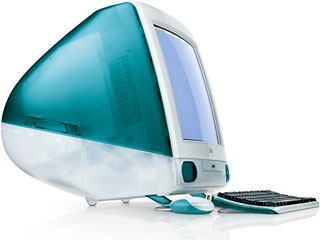
Overclocking a Tray-loading iMac G3

Dan Knight - 2009.02.10 - Tip Jar

Popularity: LEMLEMLEMLEM

The 'iMac ClockUp' page was originally posted at <http://www.bekkoame.ne.jp/~t-imai/imace1.html> and is no longer available there. We have adapted that information for the benefit of those who wish to overclock tray-loading iMacs. The original author is not known to us.
This infomation does not confirm stable operation. Please note that any modifications you make to your iMac are made at your own risk.

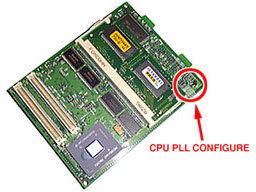
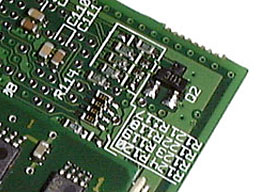
I analyzed how to increase the clock speed of an iMac. If you adjust the set of resistors labeled "R117" to "R124", which are on the underside of the system module, you can configure the processor clock PLL.
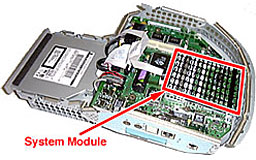
First, you need to take out the logic board assembly and remove the system module from the I/O board.

Next, configure the set of resistors labeled "R117" to "R124" that are on the underside of the system module.

Resistor Settings

CPU Clock
PLL Config
R117
R118
R119
R120
R121
R122
R123
R124
Note
233 MHz
x3.5
x
S
S
S
S
x
x
x
Rev. A & B
266 MHz
x4
x
S
x
S
S
x
S
x
Rev. C
300 MHz
x4.5
S
S
S
x
x
x
x
S
333 MHz
x5
S
S
x
S
x
x
S
x
Rev. D
366 MHz
x5.5
S
x
x
S
x
S
S
x
DANGER!
400 MHz
x6
S
x
S
S
x
S
x
x
DANGER!
433 MHz
x6.5
S
x
S
x
x
S
x
S
DANGER!
466 MHz
x7
x
S
x
x
S
x
S
S
DANGER!
500 MHz
x7.5
S
x
x
x
x
S
S
S
DANGER!
533 MHz
x8
x
x
S
S
S
S
x
x
DANGER!
  • S - mount resistor
  • x - remove resistor

Not sure if you should upgrade your old Mac or replace it? Check the Mac Daniel index to see if we've already addressed your problem.

Recent Mac Daniel columns

Links for the Day

Recent Content on Low End Mac

Recent Deals

About LEM | Support | Usage | Privacy | Contacts

Custom Search

Amazon.com

Navigation

Used Mac Dealers
Apple History
Video Cards
Email Lists

Favorite Sites

MacSurfer
MacMinute
MacInTouch
MyAppleMenu
InfoMac
Macs Only!
The Mac Observer
Accelerate Your Mac
RetroMacCast
PB Central
MacWindows
The Vintage Mac
   Museum

DealMac
DealsOnTheWeb
Mac2Sell
ramseeker
Mac Driver Museum
JAG's House
System 6 Heaven
System 7 Today
the pickle's Low-End
   Mac FAQ

Abandonware
   Petition

Mac vs. PC Info

Affiliates

The Apple Store
Mac Connection
B&H
MacMall
TechRestore
ExperCom
Crucial Memory
batteries.com

Advertise

Open Link