Low End Mac Reader Specials
TypeStyler For Mac OS X is Now Shipping! Download The Free Fully Functional 60 Day Tryout at www.typestyler.com
OWC: Mercury On-The-Go FW800+USB2 up to 1.0TB. Bus Powered, no external power supply needed. Macworld Editors Choice, CNET Very Good Starting from $99.97, 500GB $159.99. Click here
Don't install Parallels to play poker online! Poker Mac will show you how
to download and install a native Mac poker application such as Full
Tilt Poker Mac.
Laptop Hardware Provided by TechRestore - Overnight Mac & iPod Repairs.
Compare products like desktop computers, apple laptops, apple macs, and LCD Monitors side by side! All the information and reviews to make the best purchasing decision for new mobile phones, sat nav systems, or MP3 players. The Ciao online shopping community makes searching products easy for you.
Mac Daniel's Advice
The Best Used PowerBook,
PowerBook Upgrade Options
Dan Knight - 1998.12.30
- Upgrade or Replace My PowerBook 520c?
- Upgrade my PB 190, Performa 6200, or ...?
- What's the Best Used PowerBook?
Upgrade or Replace My PowerBook 520c?
CW writes: I have a PowerBook 520c that won't start up. Should I bother having it fixed? Is there anything I can do to fix it, I suspect it's a PRAM battery problem. Once it starts up what should I do about the 12 MB of RAM, 160 MB HD, and lack of OS 8? Should I try to get a 603 processor for it?
Mac Daniel responds: Your 520c is worth around $500 in working condition (maybe more - those PowerBooks really hold value). At least get an estimate on the repair. Better to fix and sell it than take a complete loss on it.
At this point, I'd recommend against a 603 upgrade, especially with the limited RAM and hard drive. Total cost of making it a workhorse is prohibitive.
I'd look into selling the 520c and then getting a close-out PB 1400/133. With a 133 MHz 603 processor, 128 KB cache, 800 x 600 color screen, and large hard drive, it's a lot more computer than you'd get by upgrading your 520c. With the 1400/133 selling in the $1,100 range (when you can find them), it looks like a much better long term solution than upgrading your older PowerBook.
Upgrade my PB 190, Performa 6200, or ...?
AR writes: I have a PowerBook 190 8/500 with the 68040 chip and a Performa 6200 CD. They are both slow and out date. I am considering upgrading one of them.
I really don't need to get a G3 because I am a college student. I found out that I can bump up my Performa from 66 MHz to 180 MHz for around $300-$400. I know that my PowerBook, which I got for a mere $600 new, can be upgraded to a 120 MHz PPC and color screen. It should feel and run like 5300c. I need the computer to do some net surfing, word processing, PowerPoint, and to run Mathematica. For the long run should I instead go for a used Power Mac of some sort?
I am trying to spend over $700. Another option would be to get rid of them both, which after a few tears I could do.
Mac Daniel responds: I'd lean toward a PowerPC laptop, such as the PowerBook 1400. I really like the idea of portability. Something you can use for notes in the classroom, research in the library, and anywhere else is very attractive.
I haven't followed the used and close-out PowerBook market closely, but have heard there are deals on the PB 1400 at around $1,000-1,300. Avoid the 117 MHz model, since it has no cache. Both the 133 MHz and 166 MHz are very competent performers - and each 1400 can be upgraded with a G3 processor.
The 800 x 600 screen is a real improvement over the 640 x 480 on your PB 190. Best of all, the 1400/133 or 1400/166 would offer over twice the performance of your 6200.
Used PowerBooks hold their value quite well. You could probably sell your 190 for at least $500, keeping any PC Cards you may have for use in the 1400. If you sold both your PowerBook and your Performa, you should easily cover most of the cost of the new PowerBook.
What's the Best Used PowerBook?
JJ writes: Along the same lines as the current discussion about the best desktop Mac to have, what is the best used PowerBook when it comes to upgradability? I'm just finishing college and would love a brand new G3 but I'm still on a budget.
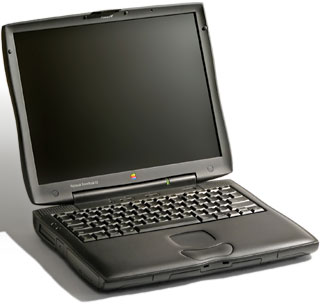
Mac Daniel responds: Now that's a question I've been waiting for. The best PowerBook ever is the PowerBook G3 Series with that amazing 1024 x 768 14.1" screen - and I can hardly wait to see what Apple does for an encore.
I have heard a lot of good things about the PowerBook 3400, but have no experience with it. With a 603e processor running at 180-240 MHz, it was plenty fast. It had large hard drives, an 800 x 600 active matrix screen, and plenty of expansion options.
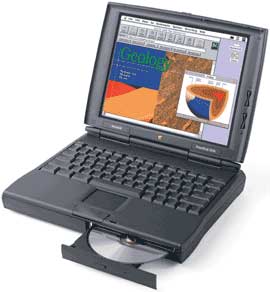
The only discontinued PowerPC PowerBook I've worked with is the 1400, which I immediately fell for. I'd pass on the 117 MHz version, since it lacks a level 2 cache. Both the 133 MHz and 166 MHz models are excellent all around computers. Best of all, they're currently selling in the $1,000-1,500 range, just a bit more than we paid for my wife's PowerBook 150 4/120 some years back.
Below that price range, I'd look at a PowerBook 540c (33 MHz 68LC040) or Duo 280c (also 33 MHz 68LC040).
But if I had $2,500, there's no question that I'd go for the PowerBook G3 Series. To see that screen is to love it.
Reader Feedback
VB writes: The best used PowerBooks? Let's not forget the PowerBook 2400c. If you want the portability it's a really fast machine at 180 megahertz 603e. And it only weighs 4.4 lbs., yet is has all the peripheral ports in the back, including support for virtually any external monitor.
Not sure if you should upgrade your old Mac or replace it? Check the Mac Daniel index to see if we've already addressed your problem.
Recent Mac Daniel columns
- WiFi Hardware Compatible with Desktop Macs Running OS X, MetaPhyzx, 03.11. USB, ethernet, PCI, and other wireless hardware compatible with Mac OS X.
- WiFi CardBus Adapters Compatible with PowerBooks, MetaPhyzx, 03.11. CardBus hardware and drivers compatible with PowerBooks running Mac OS X.
- WiFi PC Cards Compatible with PowerBooks Running OS X, MetaPhyzx, 03.11. PCMCIA/PC Card hardware and drivers compatible with PowerBooks running Mac OS X.
- WiFi PC Cards for PowerBooks Running Mac OS 9, MetaPhyzx, 03.10. PCMCIA cards and drivers reported to be compatible with PowerBook running the Classic Mac OS.
- More in the Mac Daniel index.
Links for the Day
- Mac of the Day: iMac Core Duo, Jan. 2006 - The first Intel-based iMacs ran at 1.83-2.0 GHz, came with 17" and 20" displays.
- Group of the Day: Mac Pro List is for those using a Mac Pro.
- November 23 in LEM history: 99: Should I buy a USB card? - 01: Can a low-end Mac be an only Mac? - Palm Desktop without a PDA - CyberDog saves the day - 05: How Consumer Reports could compare Macs fairly - Speakers for your Mac - Living with the hi-res 15" PowerBook - Birth of the PowerBook - Daystar 1.9 GHz iMac G4 upgrade - 1.92 GHz PowerBook upgrade
- Support Low End Mac
Recent Content on Low End Mac
- Apple's Tablet an End Run Beyond Netbooks, Frank Fox, Stop the Noiz, 11.20. Whatever Apple has planned will leverage existing technologies while going beyond what its competitors can offer.
- i5 iMac Benchmarked, Mac mini 'Shouldn't Be Overlooked', Twitter Client for Classic Mac OS, and More, Mac News Review, 11.20. Also why Apple leaves the low end to others, 10.6.2 fixes video playback problem in 27" iMac, 3D Leopard and Snow Leopard performance, and more.
- Apple #4 in Reliability, Apple Tablet a Gadget for All?, HP's i7 Notebook Outdoes Mac Rivals, and More, The 'Book Review, 11.20. Also Flash 10.1 improves video on Hackintosh netbooks, thin-and-light notebooks impress, Windows XP finally on the way out, and more.
- NASA Chemical Sensor for iPhone, Smartphone Death Match, iPhone Earrings, and More, Ian R Campbell, 11.20. Also mobile phone dangers, new apps, GPS solution for iPod touch, new iPod and iPhone cases, and more.
- Replacing the Hard Drive in a Clamshell iBook, John Hatchett, Recycled Computing, 11.19. Yes, it is one of the most difficult Apple notebooks to disassemble and reassemble, but a 10 GB hard drive just will not do.
- IBM Model F: A Great Old Keyboard with an Outdated Layout, Tommy Thomas, Welcome to Macintosh, 11.19. Although it used a different technology than the revered IBM Model M keyboard, the Model F was a great keyboard in its own right.
- Soft Touch Keyboards, Wireless Mouse Options, Loving SeaMonkey 2, and More, Charles W. Moore, Miscellaneous Ramblings, 11.18. Also the future of browsing with PowerPC Macs and the multiple mouse input bug introduced with OS X 10.5.8.
- More links in our archive.
Recent Deals
- Best eMac Deals, 11.18. Used 1 GHz Combo, $100; SuperDrive, $269; 1.25 GHz Combo, $119; SD, $319; 1.42 GHz Combo, $289; SD, $498.
- Best Mac OS X 10.6 and Mac Box Set Deals, 11.18. "Snow Leopard", single user, $25; 5 users, $45; Mac Box Set, single user, $139; 5 users, $180; Server, $414. Shipping included.
- Best Xserve Deals, 11.18. Used 1 GHz dual G4, $649; 2.3 dual G5, $795; 3.0 4-core Xeon, $1,899; refurb 2.26 4-core, $2,499; new, $2,888; refurb 8-core, $2,999; new, $3,449; more.
- Best 15" MacBook Pro Deals, 11.17. Used 1.83 GHz, $750; 2.16, $800; 2.33, $900; refurb 2.4, $1,299; 2.53, $1,449; 2.66, $1,699; 2.8, $1,899; new 2.53, $1,579; 2.66, $1,799; more.
- Best Power Mac G4 and AGP Video Card Deals, 11.17. Used 400 MHz, $50; 933 MHz, $80; 500 dual, $60; 867 dual, $90; 1 GHz dual, $150; 1.25 GHz dual, $225; 1.42 GHz, $499.
- Best Mac OS X 10.5 Deals, 11.17. "Leopard" upgrade, $80; single user license, $135; 5 users, $173; Mac Box Set, 5 users, $230; Server, 10 users, $340; unlimited, $850. Shipping included.
- Best Mac mini Deals, 11.16. Used 1.42 GHz G4 mini, $379; 1.66 GHz Core Solo, $419; 2.0 Core 2, $450; new 2.26 GHz nVidia, $580; 2.53 GHz, $769; Server, $990.
- Best iBook G4 Deals, 11.16. Used 12" 1.07 GHz Combo, $210; 1.33 GHz, $298; 14" 1.33 GHz, $398; 1.42 GHz, $479; SuperDrive, $498.
- Best iPod shuffle Deals, 11.16. Used 1 GB, $35; 4 GB, $65; refurb 1 GB, $39; 2 GB, $59; new 2 GB, $55, 4 GB, $75. New and refurb prices include shipping.
- More deals in our archive.
About LEM | Support | Usage | Privacy | Contacts
Navigation
Used Mac Dealers
Apple History
Video Cards
Email Lists
Favorite Sites
MacSurfer
MacMinute
MacInTouch
MyAppleMenu
InfoMac
Macs Only!
The Mac Observer
Accelerate Your Mac
RetroMacCast
PB Central
MacWindows
The Vintage Mac
Museum
DealMac
DealsOnTheWeb
Mac2Sell
ramseeker
Mac Driver Museum
JAG's House
System
6 Heaven
System 7 Today
the pickle's Low-End
Mac FAQ
Abandonware
Petition
Mac vs. PC Info
Affiliates
The Apple
Store
Mac
Connection
B&H
MacMall
TechRestore
ExperCom
Crucial
Memory
batteries.com
Advertise
MacMinute
MacInTouch
MyAppleMenu
InfoMac
Macs Only!
The Mac Observer
Accelerate Your Mac
RetroMacCast
PB Central
MacWindows
The Vintage Mac
Museum
DealMac
DealsOnTheWeb
Mac2Sell
ramseeker
Mac Driver Museum
JAG's House
System 6 Heaven
System 7 Today
the pickle's Low-End
Mac FAQ
Abandonware
Petition
Mac vs. PC Info
Mac Connection
B&H
MacMall
TechRestore
ExperCom
Crucial Memory
batteries.com