
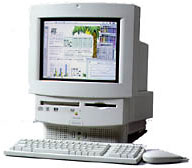
1998 – DS writes: At our (the Atlanta Mac Users’ Group) annual swap-fest, I was unable to not purchase for a small amount an extremely clean and (I think) handsome LC 550 that had been used by a school administrator. [Readers, you may want to read that again. It’s a masterful use of the double-negative.]
 I have a good friend who has so far hesitated to make that jump into the often perplexing world of computing – many of us who are around 60 still consider it perplexing – and I thought it would be a good machine for a beginner. She would probably not want to do more than the basics plus the Internet, which may also be counted as basic by now, but you never know.
I began the same way just two years ago, and the Mac has become a necessary part of my daily life. The RAM can be increased from its minimum, and apparently an upgrade to a 68040 is possible. Notwithstanding your general advice about not rushing to upgrade, would this upgrade be worthwhile? Is there anything else I should do?
I thank you for time and admire your courage and patience in inviting inquiries.
Mac Daniel writes: It takes little courage to do this, but a lot of time and patience (especially for my kids, who always want to play Nintendo emulator on my computer). On the other hand, I’ve been living in the Mac world for over a decade now, so I have a lot to give back to the Macintosh community.
For those unfamiliar with the 550, it’s an all-in-one model with a built-in 14″ Trinitron monitor, 33 MHz 68030 CPU, and the ability to accept up to 36 MB of memory. Via motherboard upgrade, it can be turned into a 575 (25 MHz 68LC040) or 580 (33 MHz 68LC040).
Used 500-series Macs are relatively rare, since they were sold primarily to the education market. Logic board upgrades are also hard to come by. The only one I see listed in the current Macworld sells for $400 – which I would strongly recommend against.
To make the 550 into a nice productivity and Web machine, I recommend running System 7.5.5, ClarisWorks, a friendly email program (I lean toward Claris Emailer, but taste in emailers is a personal thing), and a good browser such as Netscape 3 or that one from Microsoft (which I don’t care for – again, personal taste).
You do not want to use Open Transport networking on a 68030-based Mac. It’s inefficient on anything less than a 68040 and consumes about 500 KB of additional system resources compared to Classic Networking. (This rules out Mac OS 7.6 and 7.6.1, since they don’t support Classic Networking.)
To adequately run Netscape, you want at least 16 MB of real memory. The 550 already has 4 MB on the motherboard. Adding a 16 MB SIMM can cost under $30, but with 32 MB currently available for under $50, that might be the better bet.
Then add an inexpensive 56k fax-modem so your friend will be ready to roll. The 550 is a nice starter system, but one that will be outgrown in a year or two.
Keywords: #lc550 #performa550
Short link: http://goo.gl/AkrqRX
