
1998 – AH writes: G’day. I have a Performa 6220 CD, 32 MB RAM, 1 GB hard drive, 14.4 faxmodem, 603 processor (75 MHz), 17″ Sony screen, and System 7.5.5. I use it currently for Net surfing (exceedingly slow) and for various home projects (adequate). Is there anything to do to speed up Net travel?
I’ve read this is essentially a fish weight, since the 603 is the funnel hole. Appreciate any advice, comments, suggestions, prayers.
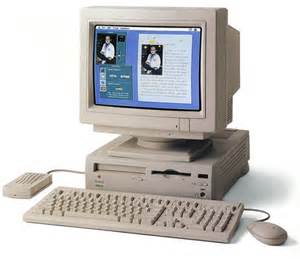 Mac Daniel writes: The Performa 6220 CD (a.k.a. Power Mac 6200) was the first Macintosh designed around the PowerPC 603 processor. Although the 603 itself provides the same level of performance as the older 601 (and at lower cost), design compromises in the 62xx series gave the 603 an undeserved reputation as a dog of a microprocessor.
Instead, as documented in Performa and Power Mac x200 Issues, a good CPU was hobbled by a poorly designed motherboard. (This applies to the 52xx models and 6200-6320, not just the 6200.)
If brief, Apple tried to save money by recycling parts from the Quadra 605 and Performa 630, both 68040-based machines with a 32-bit bus. Apple could do this because, although the 603 processor was designed for a 64-bit bus, it has a mode that allows it to work on a 32-bit bus.
Alas, this is quite inefficient, since it takes two memory accesses to obtain the 64 bits of data the CPU needs, because it can only grab 32 bits per cycle. Add to that the overhead of putting the two pieces of data together into a single 64-bit unit, and you’ve seriously hobbled an otherwise efficient processor.
That’s the easy part to understand. Beyond that, the motherboard was designed in such a way that any data from serial ports (including the internal modem) has to go through the 603 CPU to reach memory – and vice versa. This means that any time you are printing or using the modem, the CPU is very busy handling data and may not have enough resources to keep up with typing, mouse movement, screen redraws, etc.
In fact, the x200 series was the first family of Mac to be awarded the unwanted title of Road Apple.
Beyond that, there is no way to have adequate Net performance with a 14.4 modem. If your Internet service provider supports 56k modems, your only option seems to be a special Global Village modem that provides hardware handshaking. Even at the 28.8 and 33.6 levels, Global Village was the only one to make modems designed specifically for the x200 hardware.
Unfortunately, Global Village is out of the modem business, so finding these modems could be very difficult.
I have heard from several users that upgrading to Mac OS 8.1 greatly improves the stability and helps performance on this series. If you intend to keep it, upgrading your OS would be a step in the right direction.
The other upgrade option is to obtain a 6360, 6400, or 6500 motherboard, any of which will work in the 6220 case. These models were designed to avoid the problems that plagued earlier x200 models. [The power supply is different in the 6360 and later. Because of this, their logic boards will not work in earlier x200 models.]
On the other hand, it may be less costly to buy a good used Power Mac 6360, 6400, or 6500 – replacement motherboards can be expensive.
SA writes: I read Scott Barber’s article on 5200 issues (Performa and Power Mac x200 Issues) and am wondering, as I have a British Performa 6200, would it improve performance to upgrade to a 56K modem.
I’d also appreciate some info on maximizing performance of Netscape/Explorer: my banking requires 4.0 browsers for security.
Would Mac OS 8.5 v. 7.5.5 make a difference to Netscape performance?
Mac Daniel writes: I seem to get a lot of letters about that article and the x200 series.
The short answer on modems: Unless you can find a modem that provides hardware handshaking, such as the discontinued Global Village Teleport model designed especially for the x200 series, there is no point in upgrading your modem.
The short answer on the Mac OS: Yes, Mac OS 8.1 or later makes the x200 models much more stable. The improved Open Transport also helps with networking, including using a modem to reach the Internet.
That said, unless you can find the modem you need, you may want to look for either a 5500 logic board upgrade or a different Mac.
Reader Feedback
DK writes: Global Village out of business? Not that I have heard! They were bought by Boca but, as far as I knew they are still in business. <http://www.globalvillage.com/> [Update: Global Village was acquired by Zoom Telephonics.]
BP writes: I’m a little confused about the 6200/6300 modem issue. I have a 6300 with 48 MB of RAM and Mac OS 8.5.1. My machine originally came with a built-in Global Village 28.8 modem. A few months ago I removed the internal modem and began using a Global Village V90/K56Flex external modem. I now get fairly consistent connection speeds of between 40,000 and 43,000 with AOL. Even during busy hours I always get at least 34,000.
Granted, the CPU bottleneck still makes this setup slower than other 56K-connected Macs, but its still a vast improvement over the original modem. I’ve never had any problems with hardware handshaking. Am I missing something?
I would also highly recommend System 8.1 or higher to any 6200/6300 user – the improvements are dramatic.
Lastly, it’s important to note that while the 6200 and 6300 are closely related, the 6300 is considerably faster. Not only is it 100 MHz versus 75 MHz, but the 6300 uses the 603e chip, which is a lot faster than the 603 due to the improvements to the Level 1 cache.
- Mac Daniel replies: The 5200-5300 and 6200-6300 are all covered by the “Repair Extension Program for the Apple Power Macintosh and Performa 5200, 5300, 6200, and 6300.” (Thank to Macworld Macintosh Secrets, 5th ed., for that impressive sounding title for what was essentially a recall program.)
If your 6300 has ever been in for service, it has undoubtedly been updated under this program.
I wholeheartedly agree about Mac OS 8.0 and higher – they make a world of difference on any Power Mac. Likewise, the 603e used in the 6300 is far faster running old Mac programs, since the internal (Level 1) cache is large enough to handle emulation within the cache.
BD writes: I take issue with your recommendations for upgrading modem speed for the 52xx/62xx series. I have recommend and done the following myself many times for clients in this situation. Pull the 14.4 kbps or 28.8 kbps Comm Slot modem, toss the software that came with it, and put a piece of masking tape over the hole. Pull the plastic cap off the modem port and plug in a very speedy external US Robotics/3Com 56K (Sportster) modem which supports, of course, hardware handshaking. I suggest not using the pathetic MacComCenter software for the fax side, but using FaxSTF 3.2.5 or Pro 5.0.2.
The modem holds on to poor quality phone lines, and on a good line it can get better than 53,333 bps, as reported in the OT/PPP PPP Control Panel, now replaced by the Remote Access control panel in Mac OS 8.5.x. The modem connects to x2 and v.90 POP sites very nicely, and the US Robotic High Speed modem script drives it nicely. It even has a volume control on the side.
Forget having to compromise on digging up a Comm Slot modem; go external.
DG writes: I use to own a 6200, and I use to be the Apple on-site, in-warranty tech in Jacksonville, FL (you know, the guy who made house calls). Obviously being an Apple tech had some benefits and “connections.” My 6200 over time became a 6300, then a 6320. One day I fooled around and put a 6360 logic board in it (an exact fit size-wise) – it didn’t work. I tried a 6400, too – no go. I didn’t spend any real time trying to figure out why and just forgot about it.
One day I had a call to a guy’s house with a 6360. His machine had no power, which indicates a bad power supply (obvious you might say) or a bad logic board (which actually turns out to be the more common cause, because power is controlled through it). In such a case I would order and take both items on site with me. The power supply was back ordered, but the 6200/6300 one wasn’t (which made me think “what’s different?”). Okay, at the guy’s house, the logic board didn’t fix it and the power supply didn’t fit!
The 6360 power supply is configured and shaped just slightly different. The only one like it! The case and chassis are unchanged from the Quadra 630 (which also has the same power supply as 6200).
Why is this? The 6360 is the only Mac in that case which is PCI based. It has different voltage requirements. Hey, you can upgrade your 6360 all the way up to a 6500/300!
- Mac Daniel replies: Thanks for pointing this out. I’ve made the mistake of claiming the 62xx and 6300 could be upgraded to a 6360 many times. No more.
- Update:Low End Mac’s Comm Slot FAQ, Tommy Yune, 2018.03.20
Keywords: #performa6200 #performa5200
Short link: http://goo.gl/5jklMj
