
1998 – VZ writes: Thanks for your intelligent musings on all things Mac. My Mac obsession is flaring at the moment, and I wondered if you’d given some thought to my current dilemma. I just bought an iMac to replace a beloved Performa 638CD that I’d maxed out on RAM, processor upgrade, etc. The iMac flies, and I love it.
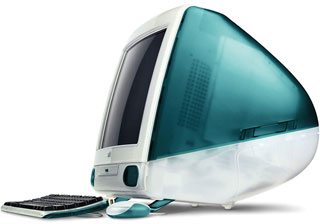 But what to do with all my peripherals? To wit: a StyleWriter 2400, a SCSI Zip drive, a SCSI hard drive, and a SCSI scanner. Those expensive adapters seem silly, and the SuperDrive “floppy solution” is overkill, so I came up with the brilliant idea of building a network, that is, networking the iMac with an old Mac. Such a solution, I figured, would allow me to hook the peripherals to the old Mac, the old Mac to the iMac, and, viola, my obsolete peripherals gain new life.
Or do they?
Is this a feasible scheme? If so, having sold off the 638 CD, which old Mac do I buy?
I’m leaning toward an SE/30, because they are cool looking and seem powerful enough to do what I want to do (I think). Looks like I can pick up a reasonably equipped one for $100 to $150 – the price of the SuperDrive!
Would a Color Classic work? (Even cooler, though I wonder whether the 16-bit thing would screw me up…)
Or should I go for an ‘040 Mac?
As for networking: I suppose ethernet 10T, Mac-to-Mac crossover cable, is the way to go. Or is it?
Questions, questions.
Anyway, as you can see, I’ve given a good deal of thought to this, and could use some expert guidance.
Mac Daniel writes: Iomega is now shipping its Zip drive in a USB version, so that’s one way to migrate data to your iMac. There are also a couple iMac SCSI cards for the mezzanine slot that should be available soon. And the Griffin iPort will let you connect your StyleWriter to the iMac.
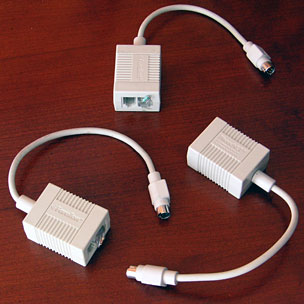 But you’ve brought up an important topic: the home network. It used to be easy: Buy one PhoneNet connector per Mac or LocalTalk device (like my old DeskWriter or current StyleWriter 4100), chain them together with phone line, and you have an instant network, albeit a slow one (230.4 kbps speed limit).
Ethernet changes all that. As you note, you can connect two ethernet-equipped Macs with a crossover cable, which will allow you to share your Zip drive and SCSI drive via the file sharing built into the Mac OS. There is even software to enable sharing a scanner, such as ScanShare.
And even a serial StyleWriter can be shared with the printer sharing software that Apple bundles with the Mac OS.
But you went and sold your Performa – and now you may need a Mac so you can use your old hardware.
I’ve worked with a lot of Macs over the years, done a lot of experimenting, and learned a lot of things. One thing I’ve learned is that 68030-based Macs are only adequate as servers. They crawl under Open Transport, so you’re better off using Classic Networking. That also frees about 0.5 MB of memory.
But Open Transport really takes off with a 68040. Moving data between your iMac and another Mac will be much faster with a 68040 and Open Transport.
Another factor is SCSI speed. 68030-based Macs top out at a SCSI throughput of 2.1 MBps (and that’s only the IIci and IIsi – other models are 1.3-1.5 MBps). The Quadra series is rated at 3.4 MBps – 60% faster. Also keep in mind that most of today’s hard drives have sustained transfer rates at least double that.
Despite the fact that the SE/30 and Color Classic are cool, your best server will be a 68040-based Mac, such as a Quadra 650 (used prices start at $150). That’s a computer that has the horsepower to make a decent server – and ethernet is a standard feature, although you’ll need an AAUI adapter to use it.
There are apparently tricks to getting point-to-point ethernet working. I haven’t done it myself, but others tell me that you should start the older Mac with LocalTalk enabled, then power up the iMac, then switch the old Mac to ethernet. If you don’t do that, there won’t be any signal on the ethernet line, so it won’t let you select it.
Short link:
