
Mac Daniel's Advice
What about 7500 Upgrades?
Dan Knight - 1998.12.01
CF sent this letter: I've got a few decisions to make in the next several months, and I'd like your two cents. Right now, my girlfriend and I have two Mac OS machines.
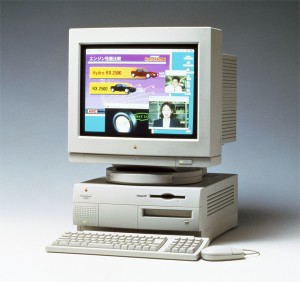
- I've got a Power Mac 7500 (older, somewhat fickle motherboard) upgraded with a Power Computing 604e 225 MHz daughtercard (stable 45 MHz bus) and 512k L2 Cache (which only seems to work well with Mac OS 8.5). I also have 112 MB RAM, a 1.2 GB Quantum Fireball and a 2.1 GB Quantum Fireball, internal 4x CD-ROM, external Zip, and 2x CD burner. I also have upgraded the VRAM to 4 MB and installed a Techworks Power3D card.
- My girlfriend's system is a Power Computing PowerTower with a 150 MHz 604, 128 MB RAM, 2.1 GB hard drive (unknown manufacturer), 6x CD-ROM, plus external Zip and EZFlyer. She's still running Mac OS 8.0 because of problems with ATM and 8.5.
Needless to say, I'm the "power-user" of the two of us. She is a designer and is happy if she can work quickly enough in Photoshop and Quark. I, on the other hand, am always looking for a few extra frames per second in Unreal or a few seconds shorter rendering time in Bryce 3D.
Here is the dilemma. I desperately want to upgrade to G3. I have a few alternatives: either upgrade my 7500's daughtercard once again and donate my 604e/225 to my girlfriend, or look at getting a new machine altogether and combine the best of the two older systems for her to use. Cost is an issue, because we will be making a major move shortly and have to save some pennies for a house, etc. Long-term cost is a consideration as well. What do you think?
Mac Daniel writes: Two Mac users - the basis of a good relationship. ;-)
Although you could drop $2,000 into a really hot 400 MHz G3 card, you can get 60% of that speed for 20% the money - there are a handful of 220 MHz to 233 MHz G3 cards under $400 today. (See our Guide to G3 Daughter Cards for an up-to-date listing.)
That said, I think the sweet spot for upgrades today is in the 250-300 MHz range. Under that, the performance jump between a 225 MHz 604e and a G3 at about the same clock speed is maybe 50%. Beyond that speed, you come closer to doubling performance at very reasonable ($500-800) prices.
And remember that you're getting two upgrades for the cost of one: a G3 for your Mac and a 225 MHz 604e for her PowerTower.
HK sent this letter: I've got a 7500 with a 604/146, 144 MB RAM, and a 1 MB L2 cache. I'm wondering about the value of upgrading. I've got minimal money. I was thinking of the 220 cards and cranking it up.
In addition, my father has a SuperMac 604e/180 and a 6100. What do you think about them? Is it even worth it for the 6100?
Mac Daniel writes: I'm a huge fan of the 7500 because it can be upgraded so far. You can get some great bargains on 200-233 MHz 604e cards - and some of the G3 cards are under US$400. Since you already have a 1 MB L2 cache, your best value may be a fast 604e card, especially if you can find one for US$150-200.
Your father's SuperMac is a fine machine. I have a SuperMac J700/180 at home and love it. It has all the upgrade options of the 7500 -- but more drive bays and more memory capacity.
As for the 6100, I recently learned that a 1 MB L2 cache can nearly double performance. This is mostly because the 6100 uses system memory for video, which is slow. By using a cache larger than the 640 KB the system sets aside for video, the whole system can run faster.
There are also some nice G3 upgrades for the 6100, although I would find it difficult to justify that much expense on such a limited design.
Join us on Facebook. Follow us on Twitter.
Not sure if you should upgrade your old Mac or replace it? Check the Mac Daniel index to see if we've already addressed your problem.
Recent Mac Daniel columns
- OWC Legacy SSD Tested in Mystic Power Mac G4, Dan Knight, 2011.07.15. G4 Power Macs don't have built-in SATA support, and most SSDs are SATA devices. OWC's legacy SSDs work on the older Mac's IDE bus.
- OWC Mercury Extreme Pro SSD Legacy Edition Tested in Blue & White Power Mac G3, Dan Knight, 2011.06.24. The Blue & White G3 has a slow ATA/33 data bus. Will OWC's Legacy SSD outperform a fast hard drive with that bottleneck?
- OWC's Legacy SSD Tested in Mirrored Drive Door Power Mac G4, Dan Knight, 2011.05.18. G4 Power Macs don't have built-in SATA support, and most SSDs are SATA devices. OWC's legacy SSDs work on the older Mac's IDE bus.
- More in the Mac Daniel index.
Links for the Day
- Mac of the Day: Mac IIci, introduced 1989.09.20. The fastest Mac to date, the 25 MHz IIci was a real workhorse and a big hit.
- February 11 in LEM history: 98: Disposable modems - 00: Setting up a Mac web server - Small network backup solutions - 02: Flea market Mac Plus - I love this Quadra! - 03: Jaguar revisited - Beige G3 upgrades - 05: The key to Apple's success - Which iPod is best for you? - 08: Could a wireless dock be in the MacBook Air's future? - 2 of Apple's best notebooks ever
- Support Low End Mac
Recent Content on Low End Mac
- Fix Home Button Delay, Tablet the Ultimate Mobile PC, iPad Notebook a Possibility, and More, iOS News Review, 2012.02.10. Also using your iPad at work, two photo editors, a new iPad text editor, Macally's magnetic iPad 2 stand, and more.
- White MacBook Goes End-of-Life, Logitech Touch Mouse Supports Gestures, Firmware Updates, and More, The 'Book Review, 2012.02.10. Also MacBook Air better than any Ultrabook, docks for MacBook Pro models, Intel offers improved SSDs, and more.
- Mac and iOS Browsers: Options Galore, Freeware Forum, 2012.02.10. Safari is adequate on Mac and great on iOS, but the range of good alternatives is stunning. LEM writers share their favorites.
- Apple's Support Lead Shipping, Smartphones Outsell PCs, OS X Ported to ARM by Intern, and More, Mac News Review, 2012.02.10. Also the power of Tex-Edit Plus, Google and Twitter are already censoring the Web, Snow Leopard Security Update, and more.
- LogMeIn: Remote Screen Sharing for the Rest of Us, Alan Zisman, Zis Mac, 2012.02.09. Configuring the Mac's built-in screen sharing to work over the Internet can be difficult or impossible. LogMeIn makes it easy.
- 15 Years Ago Motorola Unveiled the PowerPC G3, Low End Mac Round Table, 2012.02.06. The G3 processor was optimized for real world Mac software and made a big leap forward in efficiency.
- Don't Kill Caps Lock, Learning to Love the iOS Keyboard, and an Adaptive iPad Keyboard, Charles W. Moore, Miscellaneous Ramblings, 2012.02.06. The Caps Lock key has a useful function, the iPad's keyboard really is useful, and checking out an adaptive keyboard for the iPad.
- More links in our archive.
Recent Deals
- Best MacBook Air Deals
- Best iBook G4 Deals
- Best iPad Deals
- Best Classic Mac OS Deals
- Best Apple TV Deals
- Best 15" MacBook Pro Deals
- Best Power Mac G4 Deals
- Best Mac OS X 10.6 Deals
- More deals in our archive.
About LEM Support Usage Privacy Contact
Follow
Low End Mac on Twitter
Join Low End Mac
on Facebook
Low End Mac Reader Specials
TypeStyler 11 is now in the Mac App Store!! -- Special Introductory Price of $59.95!! -- To Buy From The Mac App Store Click Here Now!! Or buy direct
from Strider Software.
Don't install Parallels to play poker online! Poker Mac will show you how to download and install a native Mac poker and Mac Casino applications in minutes.
Favorite Sites
MacSurfer
Cult of Mac
Shrine of Apple
MacInTouch
MyAppleMenu
InfoMac
The Mac Observer
Accelerate Your Mac
RetroMacCast
PB Central
MacWindows
The Vintage Mac Museum
DealMac
Deal Brothers
Mac2Sell
Mac Driver Museum
JAG's House
System 6 Heaven
System 7 Today
the pickle's Low-End Mac FAQ
Affiliates
Amazon.com
The Apple Store
The iTunes Store
PC Connection Express
GainSaver
Parallels Desktop for Mac
eBay

