
1998 – The following is from a dialogue on Macintosh TV. After letting ET know that there’s no way for Mac TV to handle more than 8 MB of memory and that upgrading the motherboard would lose the TV part of the computer, she sent the following.
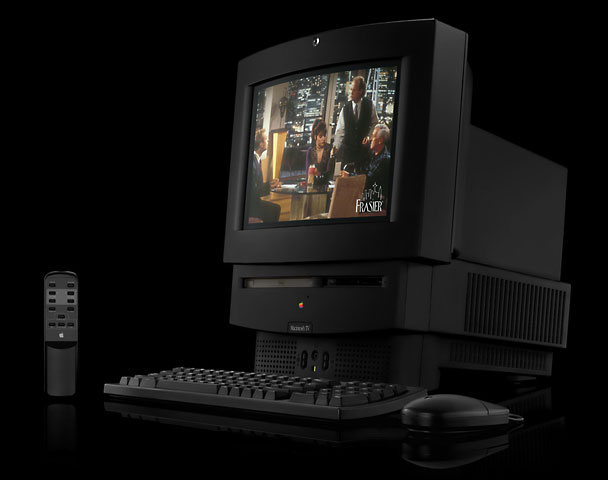
ET writes: Okay, so I can’t add more RAM (I have 8 MB). I have RAM Doubler. Do you think RAM Charger will help? Also, is there any stuff on there I can dump off (like AppleTalk and such)? Is there any way to add an external hard drive or get a new hard drive altogether and just use the monitor/speakers included? I have a printer, modem and everything! Any advice you have would be greatly appreciated!
Mac Daniel writes: RAM Charger will let you use what you have more efficiently. It can work in conjunction with RAM Doubler. And you can download a demo copy from Jump Development.
Still, 8 MB isn’t a whole lot these days. Most of the Macs I set up at work have 7.5 MB systems, which wouldn’t leave room have a lot less stuff in the system with only 8 MB of RAM.)
Yes, you can turn off any control panels and extensions you don’t need. Use Extensions Manager to move them out of the way – and move them back, if you discover you do need them.
You could replace the hard drive or add an external one.
Frankly, you might be better off looking into a second computer to make up for all the limitations Mac TV has. An LC 575 or 580 would give you a 68040 processor and the ability to add lots more memory. They’re not easy to find in the used market, but they have the same design as Mac TV – but they don’t come in black.
ET writes: First off, thank you for your polite, thorough answer! Most of the people I asked were like HA! nothing you can do.
One more question though. My main problem is accessing the Web. It is very slow going loading pages. I have a 19.2 modem. Some people say if I get a faster modem, it will help; others say it’s the memory restricting me; still others say it’s the processor. What is your opinion? Will the RAM Charger help this?
Also, do you know of any good books that explains all this Mac stuff?
Mac Daniel writes: Mac Daniel is nothing if not polite – even when delivering bad news.
I’ve been doing some experimenting with my Mac IIfx on a 56k Internet connection. It’s a real slug at downloading and displaying pages. It’s even slow when redisplaying information from the browser’s cache. The bottleneck is the computer, not the connection. The 7600 I normally use at work connects to the Internet on the same line, but it displays things a lot faster.
I discovered that Open Transport is excruciatingly slow on 68030-based Macs, such as my IIfx and your Mac TV. Switching back to classic networking (I run System 7.5.5 – System 7.6 and later no longer allow use of classic networking) makes things more sprightly, but still far from fast.
If you want to work on the Internet, want a modern browser, and want decent performance, the least Mac you want is something with a 68040. The 68030 just doesn’t cut it (especially without a math chip, which Mac TV doesn’t have and can’t accept), and the 68LC040 really suffers from its missing math processor. You’ll also want a 56k modem if your Internet service provider supports it; a 28.8 modem is an absolute minimum for anything except email.
But the sad news is that while a 56k modem will move data a bit faster, your wonderful old Mac TV simply isn’t up to providing smooth Internet performance. The one thing that can help is to browse with graphics turned off – but so many sites are strongly graphical that this may be impractical.
As for books, here are a few I’ve found helpful:
- Introductory Books
- The Little Mac Book, (the other) Robin Williams, best introduction to the Mac
- Macs for Dummies, second best introduction to the Mac — and it has great cartoons
- The Mac Is Not a Typewriter, Robin Williams, best book on writing on a Mac
- Technical Books
That said, don’t forget to read Macworld, the Mac magazine that seems to have the best technical grasp of things.
Reader Feedback
DD writes: After reading your discussion on the Mac TV, I just wanted to let you know that I have one, my brother has one, and my best friend has one! Currently, all three are being used as, well, TVs.
But, unlike normal TVs, you can still do screen captures, play CDs, and Myst runs very well on them!
LKO’D writes: Should you or your readers retain a hankering for watching TV on their Macs, the 5000 desktop series (Performa 5200 CD to Power Mac 5500/250) is real great. I have a Performa 5200 and a Power Mac 5500/225. The former has an Apple TV/Video Card, the latter an Apple TV/FM Radio Card, and both work great as TVs.
I also really like the look of these Macs – even more than the iMac, they represent the traditional Macintosh design and look that sets them apart from all other desktop PCs.
Their only big flaws (since I am a big gamer) are their inability to accommodate 3dfx Voodoo cards or upgrades to G3. Or am I wrong about that?
- Mac Daniel writes: The 5500 does have a single PCI slot. If yours is free, you may could put in a Voodoo card – although I’m not sure if or how you’d connect it to the internal monitor.
MC writes: For the person with the Mac TV, a good choice would be to dump it for a first generation Power Mac AV and a VCR with S-video output.
When I had my 6100AV, I fed the VCR output into it and could use its tuner to watch my favorite programs while I worked. It even had an option for transparent video, where the Video Player window would show through any windows on top of it.
My current StarMax 3000/200 doesn’t have that capability unless I add a TV Tuner card.
JS writes: I read your article concerning the Mac TV, and I have to disagree with the following:
“If you want to work on the Internet, want a modern browser, and want decent performance, the least Mac you want is something with a 68040. The 68030 just doesn’t cut it.”
Hey, I’m writing this on a PowerBook 180 (33 MHz 68030), and I have no problems using it on the Internet. I’m running system 7.1 with 14 MB of RAM, using a GV 28.8 external modem and Netscape Navigator 4.05. It’s quite speedy, and unless I am viewing a graphics-intensive site there seems to be little difference between the PowerBook and my iMac.
- Mac Daniel writes: That’s just the opposite of my experience using a Mac IIfx (40 MHz 68030, 32 MB RAM). Connected to the same 56k shared line as my 7600 at work, it absolutely crawled on the Web, even when running the same browser on both machines. (I tested with Netscape 2 and 3, plus Internet Explorer 3 and 4. Netscape 4 wouldn’t install without Mac OS 7.6.1, which I didn’t have on the IIfx. I have heard Netscape 4 is faster than 3 on a 68k machine.)
Keywords: #mactv #macintoshtv
Short link: http://goo.gl/6Xag5e
